
ASRock B550M-HDV
4.5Editor score
Four DDR4 memory slots
Four SATA 3.0 ports
Three legacy display outputs
Our low power motherboard guide compares 10 efficient boards for NAS, home server, office, firewall, and compact builds, with compatibility and expansion
A low power motherboard can form the foundation of an efficient NAS, quiet home server, compact office computer, or network-security appliance. The strongest choices balance a modest processor draw with useful networking, storage expansion, memory support, and a form factor suited to the intended enclosure.
This guide compares ten motherboards based on their documented processor configurations, power-oriented designs, network controllers, storage options, memory support, display outputs, expansion slots, and case compatibility. It covers both processor-equipped industrial boards and conventional AM4 micro-ATX models that can accommodate efficient desktop processors.
The selections reveal which products stand out for multi-gigabit networking, abundant SATA connectivity, compact installation, integrated wireless networking, and flexible CPU support. Ratings and product availability can change, and current prices fluctuate, so confirm the latest listing, processor support, and accessory requirements before ordering.
4.5Editor score

4.5Editor score
This side-by-side comparison highlights each board's processor approach, form factor, networking, and storage capacity so buyers can quickly identify the option that best matches their server or compact-system plans.





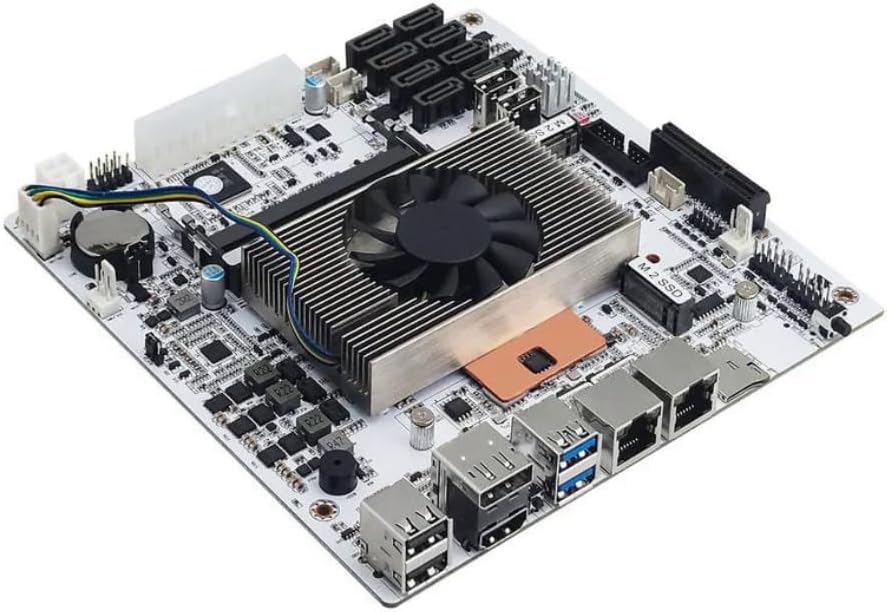
This board stands out as the most purpose-built option in the group for a compact, network-heavy low power system. It integrates an Intel Celeron N5105 processor with four cores, four threads, a 4 MB cache, boost capability up to 2.90 GHz, and Intel UHD Graphics. Its 4.5 rating reflects a strong balance of specialized connectivity and practical NAS features.
We may earn a commission when you buy through this link, at no additional cost to you.
The standout feature is its four Intel i226 2.5GbE ports, which provide a substantial upgrade over a single Gigabit Ethernet connection. That makes the board particularly attractive for NAS storage, firewall, network-security, and multimedia appliances where several wired services may be required. Storage support is also generous: six SATA 3.0 connectors, two DDR4 slots accepting up to 32 GB, and two M.2 NVMe 2280 positions running at PCIe 3.0 x1.
Its 17 by 17 cm Mini-ITX layout fits compact server cases, while twelve USB 3.0 ports, two USB 2.0 ports, two internal boot-capable USB connections, HDMI 2.1, and DisplayPort 1.4b provide plenty of peripheral flexibility. There are trade-offs. The board requires both 24-pin and 4-pin power connections, and its memory ceiling is lower than several AM4 alternatives. A first boot can also take several minutes while memory information is read.
This is the strongest choice for someone who values integrated multi-gigabit networking and abundant storage connectivity more than processor upgradeability. It is less appropriate for a general-purpose gaming build or a system expected to run unusually memory-intensive virtual machines. For a dedicated low power NAS, firewall, or compact network appliance, however, its combination of ports, storage options, and physical efficiency is difficult to overlook.
Four Intel i226 2.5GbE ports allow the system to serve several network functions without depending on add-in cards. They are especially useful for NAS applications, virtualized network services, link-aggregation plans, or separating management and storage traffic.
Six SATA 3.0 connectors and two M.2 NVMe slots allow fast scratch or cache storage alongside conventional hard drives. That combination is well suited to a small home server where adding a PCIe network card would otherwise be desirable.
We may earn a commission when you buy through this link, at no additional cost to you.
The ASRock D1800M is a straightforward micro-ATX board built around an included Intel J1800 dual-core processor operating at 2.41 GHz. Its 4.0 rating reflects a functional platform for lightweight services, basic office work, and simple always-on systems where modern high-speed storage is not essential.
We may earn a commission when you buy through this link, at no additional cost to you.
Two DDR3L slots support 1333 and 1066 speeds in dual-channel, non-ECC, buffered configurations up to 16 GB total. Expansion includes a PCI Express 2.0 x16 slot operating at x1, two PCI Express 2.0 x1 slots, and two SATA 2.0 ports. An RTL8111GR controller provides Gigabit Ethernet, while the rear panel includes USB 3.0, six USB 2.0, PS/2 keyboard and mouse, VGA, DVI-D, HDMI, RJ45, and audio jacks.
The older platform is its main limitation. SATA 2.0 bandwidth, DDR3 memory, and modest expansion options make it less appropriate for heavily populated NAS builds or modern high-throughput workloads. Its single 24-pin ATX power connector is nevertheless simpler than the dual-input power requirements found on several newer industrial boards in this roundup.
Choose the D1800M when you want a processor-equipped, straightforward board for a lightly loaded service, a compact office terminal, or a simple home-server experiment. Prospective buyers should confirm that the case supports micro-ATX and that available DDR3L memory is compatible with the board. It is a functional low-power option, but it lacks the storage and network flexibility of newer alternatives.
Because the Intel J1800 is already fitted, builders do not need to select a separate processor. That simplifies assembly for basic appliances, although the integrated platform limits the obvious paths for future CPU upgrades.
VGA, DVI-D, and HDMI provide broad monitor compatibility for an office or kiosk-style installation. The selection is more useful than having only a modern digital output, although display performance is not the focus of this board.
We may earn a commission when you buy through this link, at no additional cost to you.
The GIGABYTE B550M K is a conventional micro-ATX motherboard for builders who want more processor and memory choice than a fixed industrial system offers. It supports AMD Ryzen 5000, 4000, and 3000 series processors through socket AM4 and carries a 4.4 rating, making it a flexible base for an efficient office, home-server, or lightly equipped desktop system.
We may earn a commission when you buy through this link, at no additional cost to you.
Its digital 3+3 VRM, premium chokes, capacitors, and chipset heatsinks form the foundation for stable power delivery. Four DDR4 DIMM slots support memory configurations and Extreme Memory Profile options. Storage and expansion include one PCIe 4.0 x16 slot, one PCIe 4.0 M.2 slot, one PCIe 3.0 M.2 slot, and four USB 3.2 Gen 1 ports.
The trade-off is that the processor is not included, and actual energy consumption depends heavily on the selected Ryzen model and installed graphics hardware. Although the platform can accommodate a low-power processor, it does not guarantee the same tightly integrated efficiency as the N5105, J4125, or 8265U-based boards. Its single Gigabit Ethernet connection also lacks the multi-port networking found on several NAS-specific choices.
This motherboard is best for a buyer who wants the freedom to choose an efficient AM4 processor, add several memory modules, and retain conventional micro-ATX expansion. It is a sensible platform for a quiet office machine or modest home server, but buyers focused on dedicated NAS networking should compare its single LAN port with the multi-gigabit options in this guide. Q-Flash also provides a convenient route for BIOS management.
The board supports three broad generations of Ryzen processors, allowing the builder to balance performance, integrated graphics, and power requirements. Check the manufacturer's CPU support list and current BIOS version before finalizing the processor choice.
Four DDR4 slots make this more flexible than many two-slot compact boards, while two M.2 positions allow a mix of NVMe and SATA-oriented storage. The PCIe 4.0 x16 slot also supports a modern graphics card when an APU does not provide the required outputs.
We may earn a commission when you buy through this link, at no additional cost to you.
The MSI PRO B550M-P targets efficient, compact builds that still need conventional motherboard features. It supports a wide range of AMD Ryzen desktop processors on AM4, including 3000, 4000, and 5000 families and the listed G-series variants. Its 4.4 rating reflects a well-rounded platform for office work, light content creation, and small servers.
We may earn a commission when you buy through this link, at no additional cost to you.
MSI Core Boost supports stable power delivery, while passive chipset heatsinks and Frozr AI cooling adjust system fans according to processor and graphics-card temperatures. Four DDR4 DIMM slots can reach advertised overclocking speeds of 4400+ MT/s in supported one-DIMM, one-rank configurations. Storage and expansion consist of a Steel Armor PCIe 4.0 x16 slot, an M.2 Gen4 x4 slot, and an M.2 Gen3 x4 slot.
Networking is limited to a Gigabit LAN controller, making the board less compelling for a high-speed NAS where multi-gigabit transport is a priority. It also requires a separate processor, so buyers must avoid assuming that its power use will automatically be low. Memory stability still depends on the chosen modules, processor, and firmware settings.
The PRO B550M-P is a good fit for a small, quiet workstation that benefits from a full-size graphics slot, multiple memory modules, and fast NVMe storage. It also works as a general-purpose home-server base when a single Gigabit connection is enough. For multi-gigabit networking or an all-in-one appliance with an integrated processor, choose one of the dedicated NAS boards instead.
Frozr AI cooling adjusts fan behavior according to CPU and GPU temperatures. This is useful in a small case where constant high-speed fans could undermine the goal of a quiet, efficient system.
The full-length PCIe 4.0 x16 slot offers room for a discrete graphics card, while the two M.2 positions provide fast solid-state storage options. This makes the board useful for compact workstations that need more than basic integrated graphics.
We may earn a commission when you buy through this link, at no additional cost to you.
The ASRock J4125M combines an Intel J4125 quad-core processor, capable of operating up to 2.7 GHz, with a compact motherboard platform. Its 3.4 rating is the lowest among the ten products, so buyers should investigate the current customer feedback and documentation carefully, especially when considering this board for a critical always-on role.
We may earn a commission when you buy through this link, at no additional cost to you.
The board supports DDR4 memory at 2133 and 2400 speeds through Long DIMM slots. Expansion is modest, with a PCIe 2.0 x16 slot operating in x1 mode and two PCIe 2.0 x1 slots. An M.2 Key E slot is reserved for an Intel CNVi-compatible wireless module. ASRock Super Alloy is also listed as a construction feature intended to support board durability.
The J4125's four cores can be more useful than a dual-core platform for lightweight virtualization, NAS management, and background services, while its embedded orientation keeps the overall system focused and efficient. However, the limited storage and expansion information in the supplied listing means buyers should verify the complete board specification before buying. A connected CPU also removes normal socket-upgrade flexibility.
This board is most appropriate for a compact home server, lightweight network appliance, or embedded-style project where low processor power and an integrated design matter more than modern expansion. Its lower rating prevents it from being a leading recommendation, but that rating alone does not reveal whether the concerns are compatibility, documentation, or a specific hardware limitation. Verify the CPU's supported OS, storage configuration, wireless module requirements, and enclosure fit before committing.
The J4125 provides four processing cores without requiring a separate processor installation. That combination can be useful for lightweight server tasks where two cores would create a noticeable limitation, particularly during concurrent storage or network activity.
The M.2 Key E position supports Intel CNVi-compatible wireless hardware, but it does not mean every generic WiFi module will work. Confirm the required interface, antenna arrangement, and operating-system support before purchasing an internal wireless card.
We may earn a commission when you buy through this link, at no additional cost to you.
The ASRock B550M-HDV combines a 4.5 rating with broad AM4 processor support, making it an economical foundation for an efficient office or home-server build. It accepts Ryzen 5000, 4000, and 3000 series processors, as well as supported APUs, while using a conventional 24-pin ATX power connection.
We may earn a commission when you buy through this link, at no additional cost to you.
Two DDR4 DIMM slots support dual-channel configurations and advertised overclocked speeds up to 4733+ MT/s. Storage includes a Hyper M.2 position compatible with PCIe Gen4 x4 and SATA3 plus four SATA3 ports. The primary PCIe 4.0 x16 slot can operate at PCIe 4.0 speeds with compatible third-generation Ryzen processors and newer.
Three outputs—HDMI supporting 4K at 60 Hz, DVI-D, and D-Sub VGA—give it unusually broad display compatibility. Connectivity includes six USB 3.2 Gen1 ports, Gigabit LAN, and Realtek 7.1-channel audio. A six-phase power design with 50A chokes and Full Spike Protection for USB, audio, and LAN adds reassurance for everyday use.
The main compromises are two memory slots and a single Gigabit Ethernet port. The micro-ATX form factor may also require a case that accepts both micro-ATX and full-size ATX boards. Overall, this is our best budget selection because it leaves the processor open to choice, provides a modern PCIe and M.2 path, and includes useful legacy display outputs. Choose an efficient supported Ryzen or APU to complete the low-power objective.
Unlike the fixed-processor industrial boards, this model lets the buyer select an efficient Ryzen or APU from a broad compatibility range. That makes it a flexible option when processor performance, integrated graphics, or memory needs differ from a fixed NAS appliance.
HDMI, DVI-D, and VGA allow the board to drive different monitor and projector arrangements. This is especially handy for office reuse, where an older display without HDMI may still be available.
We may earn a commission when you buy through this link, at no additional cost to you.
The Gigabyte A520I AC is a compact Mini-ITX board centered on a straightforward third-generation Ryzen platform. It carries a 4.4 rating and is particularly attractive for small builds that need integrated wireless connectivity without adding a separate card or stretching a USB port to a dongle.
We may earn a commission when you buy through this link, at no additional cost to you.
Its Mini-ITX format fits appropriately small enclosures, while a direct six-phase digital PWM using 55A DrMOS and an optimized VRM heatsink supports stable power delivery. Two DDR4 DIMM slots operate in dual-channel mode, and storage includes an NVMe PCIe 3.0 x4 M.2 slot. The board also includes Gigabit Ethernet, ALC887 audio, and an Intel dual-band AC WiFi and Bluetooth module with an Ultra Durable antenna.
Display flexibility is another strength. The rear panel includes DisplayPort and two HDMI connections, which is useful with compatible Ryzen processors that provide integrated graphics. A potential limitation is the listed focus on third-generation Ryzen processors, so buyers should verify exact model support and any later BIOS updates if they intend to use a different AM4 processor.
Choose the A520I AC for a small desktop, media appliance, or wireless-enabled home server where a full-size ATX board would be unnecessary. Its integrated networking simplifies setup, and Mini-ITX makes efficient enclosure planning easier. It is less suited to high-end graphics or heavily upgraded storage systems, but for the right processor and modest workloads, it is a capable and tidy low-power foundation.
Integrated Intel dual-band AC WiFi and Bluetooth reduce cable clutter and avoid occupying a scarce expansion slot. An external antenna also makes it easier to position radio reception away from a densely packed metal case.
The Mini-ITX footprint significantly reduces the space required compared with micro-ATX models. It is well suited to a compact enclosure, provided the case supports Mini-ITX boards and the selected processor's cooler.
We may earn a commission when you buy through this link, at no additional cost to you.
The ASRock B550M WiFi earns the highest numerical rating in the guide at 5.0, reflecting a particularly complete feature set for a micro-ATX system. It supports Ryzen 3000 through 5000 series processors on AM4, uses an eight-phase power design, and offers enough connectivity for a modern efficient workstation or compact server.
We may earn a commission when you buy through this link, at no additional cost to you.
Four DDR4 slots support dual-channel operation, advertised speeds up to 4733+ MT/s with overclocking, and capacity up to 128 GB. Expansion includes one PCIe 4.0 x16 slot, a PCIe 3.0 x16 slot running at x4, and a PCIe 3.0 x1 position. A Hyper M.2 interface supports PCIe Gen4 x4 storage, while four SATA3 connectors provide room for conventional drives.
Wireless capabilities are particularly notable. WiFi 6E supports the 6 GHz band, while Bluetooth provides short-range peripheral connectivity. Realtek ALC1220 7.1-channel audio with Nahimic, HDMI 2.1, DisplayPort 1.4, eight USB 3.2 Gen1 ports, and six USB 2.0 ports make the board well equipped for multimedia and general-purpose desktop use.
This is not a dedicated low-power NAS board: it requires a separate processor and has no listed multi-gigabit Ethernet. It is most compelling when an efficient Ryzen desktop processor can be paired with a strong general-purpose feature set. Buyers should verify case support for the 9.6 by 9.6-inch micro-ATX board and confirm that their chosen processor supports the desired display outputs.
WiFi 6E expands the board's appeal beyond wired network use and offers access to the less crowded 6 GHz band where supported. Bluetooth can handle compatible keyboards, headsets, controllers, and other nearby accessories.
Up to 128 GB across four DDR4 slots provides useful capacity for virtual machines, large file shares, and memory-heavy office tasks. The additional PCIe slots create room for a capture card, WiFi module, or other specialized expansion.
We may earn a commission when you buy through this link, at no additional cost to you.
This compact server board uses an eighth-generation U-series quad-core, eight-thread processor with up to 3.9 GHz turbo frequency and a 15W thermal design power. It has a 4.1 rating and is engineered specifically for home servers, NAS storage, firewalls, and virtualization rather than gaming or general desktop expansion.
We may earn a commission when you buy through this link, at no additional cost to you.
Two Intel i226-compatible 2.5GbE RJ45 ports provide fast wired networking for storage traffic, virtual machines, and other services. Storage support includes eight SATA 3.0 ports, two M.2 NVMe 2280 positions using PCIe 3.0 x2 lanes, and one PCIe x4 Gen3 slot. Two DDR4 SO-DIMM slots accept 2133 through 3200 MHz modules with up to 32 GB per slot.
The processor supports VT-x and VT-d virtualization, a meaningful advantage for users running virtual machines. A dual ball-bearing fan cooler with dual copper heat pipes handles cooling, while a six-layer, moisture-resistant PCB and 6.69-inch Mini-ITX size suit industrial-style enclosures. HDMI and DisplayPort can drive two 4K displays at 60 Hz.
There are two important caveats. The listing identifies a known sleep-mode bug, so the board may not suit applications that depend on suspend and resume. It also requires both 24-pin and 4-pin power connections, and the first boot may take several minutes while the system reads memory information. For a continuously running NAS, firewall, or virtualization host where power management is not a priority, it offers a notably capable combination of CPU threads, networking, and storage.
The quad-core, eight-thread processor gives virtual machines and containerized services more scheduling room than a basic dual-core embedded chip. VT-x and VT-d support also improve its usefulness as a compact Proxmox or Linux virtualization host.
Eight SATA ports support a substantial drive complement, while dual 2.5GbE ports can serve separate storage and management duties. Two M.2 slots provide high-speed cache, metadata, or application storage without occupying the drive bays.
We may earn a commission when you buy through this link, at no additional cost to you.
The Core i5 8265U NAS motherboard is the most feature-dense eight-bay option in the guide. It integrates an ES-version Intel processor with four cores, eight threads, a 1.6 GHz base frequency, up to 3.4 GHz boost, 6 MB cache, and a 15W thermal design power. The supplied listing does not provide a numerical customer rating, so the specification sheet is the main basis for comparison.
We may earn a commission when you buy through this link, at no additional cost to you.
Its storage design supports eight SATA 3.0 ports, with two native and six added through an ASM1166 PCIe 3.0 x2 expansion, plus two M.2 NVMe 2280 slots. Two DDR4 SO-DIMM positions support 2133, 2400, 2666, and 3200 MHz modules, with up to 32 GB each. A PCIe x4 slot with a PCIe 3.0 x2 signal provides room for a network card or other expansion.
Dual Intel i226-V 2.5GbE controllers are central to its NAS positioning. They can support link aggregation and are listed as compatible with TrueNAS, Unraid, Windows, Linux, and Proxmox-style virtualization systems. The board also includes a TF card slot, a Clear CMOS button, internal USB headers for encryption or boot devices, an included I/O shield, and both HDMI and DisplayPort outputs.
Its Mini-ITX size and dual power inputs suit specialized compact server cases, but sleep mode is explicitly unsupported, making it best suited to systems designed to remain running. The included manual and broad OS support reduce some planning uncertainty, while the premium Core i5 processor offers more headroom than the Celeron and J4125 alternatives. This is the strongest choice for a dedicated multi-bay NAS requiring substantial storage, virtualization, and dual multi-gigabit networking.
Eight SATA connectors and two NVMe positions create a clear separation between bulk storage and fast cache or application drives. This is more specialized than a general desktop board and more practical for a purpose-built NAS than a handful of loose storage adapters.
Two Intel 2.5GbE controllers can be used for separate services or combined in a link-aggregation configuration. This provides a practical foundation for high-speed NAS traffic while remaining compatible with widely used open-source storage systems.
We may earn a commission when you buy through this link, at no additional cost to you.
The right low power motherboard depends on the processor strategy, workload, case size, network speed, and number of storage devices. Reviewing those requirements before comparing specifications prevents a technically capable board from becoming an awkward or incompatible choice.
Prioritize the processor architecture that matches the build's longevity and service role. A fixed embedded platform may suit a stable appliance, while a socketed board offers broader upgrade choices.
Choose the smallest form factor your case and expansion plan can support. A smaller board is not automatically better if it prevents access to needed ports or interferes with cooling.
Match network hardware to workload, not merely to the headline processor. More useful Ethernet ports can be more valuable than extra general-purpose expansion.
Count planned bays, cache drives, and any M.2 devices before choosing. Future storage expansion is easier when the board already provides both adequate SATA and M.2 connectivity.
Size memory around the workload rather than the slot count. A server running several virtual machines benefits from more capacity, while a simple appliance may not need to fill every DIMM.
Match the cooler and power supply to the board's processor and connection requirements. Good ventilation matters even when the processor itself consumes relatively little power.
Confirm the exact I/O arrangement needed for boot media, monitors, peripherals, and recovery. A management feature that seems minor can be essential in an unattended appliance.
Choose the board whose operating-system and power-state behavior matches the intended service. Continuous operation and desktop convenience are not identical requirements.
Before installation, read the board's manual and verify the processor, memory modules, storage devices, and cooler are supported. Check the case for the correct form factor and mounting pattern, inspect the rear-panel openings against the supplied I/O shield, and confirm that the power supply has every required connector. Install the processor and cooler according to the manufacturer's instructions, paying particular attention to socket alignment and the even application of thermal compound.
Connect the 24-pin power lead and any additional CPU or board power connector required by the model. Route cables away from fans and storage drives, attach the front-panel switches and USB headers, and install memory in the slots recommended by the manual for dual-channel operation. Connect SATA data cables individually rather than relying on an unverified cable bundle, and fit the operating system to a connected drive through the appropriate boot method.
For boards that report memory information slowly on the first boot, allow the documented startup period before repeatedly pressing the power button. Enter the BIOS when needed to confirm CPU and memory recognition, storage mode, boot order, and network settings. After installing the operating system, enable appropriate security updates, configure shared storage and backup services, test the network interface at its intended speed, and arrange reliable backups. For a continuously running NAS, use a UPS and plan for clean shutdowns, firmware updates, and periodic verification of drive health.
The most important feature depends on the build's role. A NAS prioritizes SATA connectors and network speed, a home server benefits from memory capacity and virtualization support, and a compact office computer may value display outputs and integrated wireless networking. The processor also matters because the board's energy use is closely tied to the CPU and workload.
It can be, particularly when the integrated processor is designed for embedded or efficient desktop use. Fixed-processor boards also simplify compatibility planning because the CPU is already installed. However, actual energy consumption depends on the processor, operating system, storage activity, cooling, and how aggressively the system is used.
Not always. Gigabit Ethernet may be sufficient for light file sharing, backups, and administration, especially with modest hard-drive performance. Multi-gigabit networking becomes more valuable with fast SSDs, multiple disks, large transfers, virtualization, or a local network with compatible switches and clients.
Count the hard drives you expect to install, plus space for cache, scratch, or backup devices. Two M.2 slots can hold fast system and application drives, while eight SATA connectors support larger drive complements. Also verify the case can provide the necessary drive power, cooling, and data connections for every storage device.
Several are explicitly designed for NAS, firewall, or continuous-operation use, and the Core i5 8265U board is listed for 24/7 operation. Continuous use still requires a suitable power supply, effective cooling, dependable storage, a UPS, and regular backups. Review any known sleep-mode limitations if you also need energy-saving suspend behavior.
Not always. A case that accepts full-size ATX and micro-ATX boards generally accepts Mini-ITX as well, but some compact cases support only Mini-ITX. Micro-ATX cannot necessarily fit a Mini-ITX-only enclosure. Check the supported form factors, mounting holes, expansion clearance, and rear-panel layout for every candidate case.
They can, but wired Ethernet is usually preferable for storage traffic and remote administration because it is easier to troubleshoot and may offer more consistent performance. Wireless remains useful for management, setup, or locations without cabling. Confirm the operating system recognizes the included controller and that the required antennas are properly positioned.
Check the motherboard manufacturer's CPU support list, the board's BIOS version, and whether the processor requires a later update. Also confirm supported memory type, cooler compatibility, and the intended chipset features. A board that physically accepts an AM4 processor should not automatically be assumed to support every model or every advertised feature.
The Celeron N5105 Industrial NAS Board is the leading choice for a purpose-built compact network appliance because four Intel 2.5GbE ports, six SATA connectors, and two M.2 slots create an unusually capable all-in-one platform. The ASRock B550M-HDV is the best budget route when a separate efficient Ryzen processor is acceptable, while the Core i5 8265U board is the premium eight-bay selection for demanding NAS and virtualization use.
Prioritize the workload before comparing boards. Count storage drives, confirm memory requirements, match the form factor to the case, and decide whether networking must exceed Gigabit Ethernet. Processor-equipped industrial models simplify appliance builds, while AM4 boards offer greater choice. Also review sleep support, operating-system compatibility, cooler requirements, and unusual power connections before purchasing.
Ratings, product availability, and current prices can change, so read the latest listing and manufacturer documentation at the time of purchase. Confirm that the processor, memory, storage, wireless modules, operating system, power supply, and enclosure are all compatible. A carefully matched system will deliver a quieter, more efficient result than choosing a board only on processor wattage or one headline port.