
Redragon K512 RGB
4.5Editor score
Six onboard macro keys
No software required for basics
Detachable magnetic wrist rest
Explore the best keyboards with macro keys, comparing programmability, switch type, connectivity, comfort, lighting, and gaming features.
Keyboards with macro keys give gamers, streamers, and productivity users a faster way to launch commands, automate repetitive tasks, and control common functions without leaving the keyboard. A strong macro setup should feel convenient, dependable, and easy to customize, whether recording directly on the board or using companion software.
We compared ten full-size and wireless gaming keyboards based on macro capacity, onboard programming, switch technology, connectivity, anti-ghosting, comfort, lighting, media controls, and practical extra features. The comparison includes membrane, mechanical, low-profile, streaming-oriented, wired, and tri-mode designs, with a mix of direct hardware controls and software-based configuration.
Each review explains who the keyboard suits, what makes its macro system useful, and which compromises deserve attention before purchase. Ratings reflect the supplied customer feedback, while feature availability can depend on the connected operating system, installed software, and firmware. Prices and configurations change over time, so verify the current listing before ordering.
4.5Editor score

4.1Editor score
4.3Editor score
The table below compares all ten keyboards by macro capacity, core construction, connection method, and standout controls, making it easier to identify the model that matches your preferred workflow.


The VSD K1 Pro stands out because it combines an 87-key mechanical keyboard, a programmable TFT display, rotary controls, and an integrated streaming deck in one housing. It carries a 4.1 rating, but its strongest feature is flexibility: every key can be assigned through the web interface or VSD Craf software, while shortcut and multi-step macro recording is supported. That combination makes it far more ambitious than a basic gaming keyboard with a small row of programmable keys.
We may earn a commission when you buy through this link, at no additional cost to you.
Its most compelling feature is the stream-controller function. Software can create switchable pages, each with six LCD keys and three knobs, allowing actions to be assigned to buttons, combinations, applications, or media controls. Individual LCD keys can even display JPG, PNG, or GIF images, which helps users recognize commands quickly. The built-in screen and knobs also provide access to status information, volume, date and time, lighting, and connection settings without requiring separate hardware.
Mechanical construction adds another layer of appeal. The PCB accepts three-pin and five-pin switches through a hot-swappable layout, and the package includes a puller for changing switches and keycaps without soldering. Pre-lubed stabilizers, a five-layer dampening structure, extended silicone pads, and single-key PCB slots create a softer, more controlled feel. The trade-off is that some display functions and image calibration need VSD Craf, Windows or macOS, and a wired connection.
This is the recommendation for a gamer, streamer, or advanced productivity user who wants one device to replace several desk controllers. It is less suitable for someone seeking a simple wireless keyboard or a plug-and-play membrane board. Even so, the combination of full-key programming, dedicated streaming controls, switch customization, and an 87-key layout makes the VSD K1 Pro the most versatile option in this guide.
The switchable LCD pages turn the keyboard into a multifunction control surface. Users can place frequently used actions, app launches, media controls, and game sequences behind physical buttons instead of navigating software menus during a session.
Hot-swappable sockets, supplied switch and keycap tools, pre-lubed stabilizers, and layered sound control create a flexible platform. Switch changes are approachable, although the three-pin and five-pin compatibility does not cover every switch style.
We may earn a commission when you buy through this link, at no additional cost to you.
The Redragon K512 RGB delivers the core macro-key experience without making configuration feel like a project. Its six onboard G1 through G6 keys can record and reassign combinations directly, so essential shortcuts are available without installing drivers. The keyboard holds a 4.5 rating, making it one of the strongest customer-rated options here, and its dedicated media wheel adds practical control alongside the macro row.
We may earn a commission when you buy through this link, at no additional cost to you.
Basic operation is pleasantly straightforward. The anti-ghosting section supports up to 26 simultaneous keys, helping reduce missed inputs during multi-button actions. RGB lighting includes seven presets and six customizable slots, with adjustable brightness, while the double-shot molded keycaps are designed to resist fading. A magnetic wrist rest supports longer sessions and can be removed when desk space is limited.
The main compromise is the membrane construction. It will feel less crisp and less customizable than a hot-swappable mechanical board, and it does not offer the deeper switch and sound character of mechanical alternatives. Companion software is available for more advanced lighting and macro configuration, but it is not necessary for the primary onboard features, which is a major convenience for users who dislike background utilities.
Choose the K512 when you want reliable, immediately accessible macro keys at a budget-conscious level. It is well suited to gaming, school, office, and general productivity use, particularly for anyone who values a simple learning curve. If a tactile mechanical feel and extensive switch customization matter more than simplicity, the Redragon K580 is the more natural next step.
Recording combinations directly on the G1 through G6 keys removes the main obstacle for beginners. The keyboard can begin serving as a macro tool without driver installation, while optional software remains available for deeper customization.
The removable magnetic wrist rest improves ergonomics without permanently enlarging the footprint. Thirteen lighting modes and adjustable brightness provide enough visual variety for most gaming setups.
We may earn a commission when you buy through this link, at no additional cost to you.
The Corsair K55 RGB PRO is a conventional full-size gaming keyboard with six dedicated macro keys, a wired connection, and a strong 4.4 rating. Its distinguishing strength is software integration rather than raw feature volume. CORSAIR iCUE handles macro assignments, lighting zones, and personalized effects, while the macro keys can also trigger streaming commands through Elgato Stream Deck software.
We may earn a commission when you buy through this link, at no additional cost to you.
The RGB system divides the board into five zones, each of which can be assigned a color or coordinated through iCUE. This is less granular than true per-key lighting, but it produces a coherent setup without becoming visually busy. Dedicated media and volume keys are placed conveniently near the top-right, allowing playback control to remain separate from ordinary typing and macro functions.
For everyday reliability, the membrane layout should appeal to users who prefer a familiar gaming feel and straightforward key response. Its IP42 rating adds protection against dust and spills, while the textured, detachable rubber palm rest helps reduce hand slippage. The downside is that it offers no hot-swappable sockets, and users who want onboard macro recording without software may find K55 less convenient than the Redragon models.
This keyboard is a strong recommendation for an established Corsair user who already values iCUE or uses Elgato streaming tools. It suits gamers, streamers, and desk setups that value polished organization and media control. Buyers wanting a more mechanical or wireless experience should look elsewhere, but within conventional membrane gaming boards with software-managed macros, the K55 is among the most complete options.
Compatibility with Elgato Stream Deck software gives the six macro keys a practical role in streaming workflows. The keyboard can act as an additional command surface for actions that are already managed in a compatible streaming setup.
Zone-based lighting is less granular than individual key illumination, but it makes coordinated desk effects easier to maintain. iCUE also expands the options beyond the keyboard's six onboard lighting effects.
We may earn a commission when you buy through this link, at no additional cost to you.
The Redragon K580 combines five dedicated macro keys with the mechanical feel and switch flexibility that the budget-oriented K512 does not offer. It has a 4.5 rating, full-size 104-key layout, and hot-swappable sockets that accept almost any mechanical switch. The result is an approachable mechanical option for gamers who want direct macro control without making software a requirement.
We may earn a commission when you buy through this link, at no additional cost to you.
The included Brown switches provide a noticeable tactile bump and relatively restrained noise, making them suitable for shared spaces as well as gaming sessions. Swapping them without soldering allows users to move toward linear, clicky, silent, or other switch preferences later. The keyboard is also rated for 50 million keystrokes, and its double-shot keycaps are designed to retain their legends under regular use.
On the functional side, all 104 keys use full anti-ghosting, which is useful during fast multi-key sequences. Dedicated media controls cover play, pause, and skipping, while a wheel handles volume. Five G keys can record complex combinations or shortcuts directly on the board. Optional companion software remains available for advanced RGB effects and more detailed macro profiles, but it is not mandatory for basic operation.
The main limitation is the modest number of dedicated macro keys compared with the K550, K618 PRO, and Razer V4 Pro. There is also no wireless mode, and mechanical construction inherently uses more desk space than a low-profile model. Even with those caveats, the K580 is a versatile recommendation for a gamer who wants mechanical responsiveness, hot-swap flexibility, and simple onboard macros in a full-size board.
Hot-swappable sockets let users alter the feel without soldering or replacing the entire keyboard. The stock Brown switches offer a moderate tactile bump, while compatibility with nearly any switch creates room for future experimentation.
Five G keys can store essential sequences on the board, and the complete 104-key layout retains a numeric keypad. That balance works well for users who game and also handle spreadsheets, shortcuts, or media-heavy productivity tasks.
We may earn a commission when you buy through this link, at no additional cost to you.
The Redragon K550 RGB is built around macro capacity, providing twelve onboard G keys across its full-size layout. That is substantially more dedicated programmable space than most competing gaming keyboards, and the keys can be edited on the fly without additional software. Its 4.1 rating reflects a mixed set of strengths, but the sheer number of macros makes this one of the clearest choices for users who want extensive command storage.
We may earn a commission when you buy through this link, at no additional cost to you.
The mechanical build uses customized Purple switches with a 55g actuation force and 1.1mm pretravel. They are designed to provide a clear, strong tactile event and a pronounced clicky sound. Gamers who prefer a mechanical feel may appreciate that definition, although the acoustic profile is likely to be less suitable for shared offices or late-night use than quieter Brown or linear switch options.
Physical construction feels upscale for a gaming keyboard, with a brushed aluminum top plate that adds rigidity and visual refinement. A USB pass-through port provides a convenient connection point for a mouse, wireless receiver, or another peripheral, reducing cable clutter around the main USB port. Dedicated media buttons and a volume wheel complement the macro bank, while optional Redragon software supports additional modes, effects, bindings, and shortcuts.
The K550 is best for competitive gamers, MMO players, streamers, or productivity power users who can use a large number of independent commands. Its trade-offs are a larger footprint, a wired design, and louder switches. For someone needing only a few shortcuts, the extra keys may be unnecessary, but for a dense command center, this model offers exceptional onboard programmability.
Twelve G keys can be assigned to separate sequences, shortcuts, or actions and edited directly. This reduces dependence on mouse-driven software and makes frequently used commands easier to trigger during play.
The brushed aluminum top plate adds rigidity and visual interest. A built-in USB pass-through keeps another peripheral connected to the keyboard, while the media controls and volume wheel provide useful everyday functions.
We may earn a commission when you buy through this link, at no additional cost to you.
The Razer BlackWidow V4 X provides six dedicated macro keys in a conventional full-size mechanical gaming design. With a 4.5 rating, it combines Razer Chroma customization, per-key lighting, and a multifunction roller in a package that is more streamlined than the V4 Pro. It is a strong fit for gamers who want recognizable Razer software and lighting without paying for every premium feature of the flagship model.
We may earn a commission when you buy through this link, at no additional cost to you.
Its Yellow linear switches have a 1.2mm actuation and reset distance and require 45g of force. Zero tactile resistance supports rapid, repeated inputs, while integrated sound dampeners help control the noise produced during gaming. A layer of foam beneath the circuit board and lubricated stabilizers further improve the overall acoustic character, creating a more refined feel than a basic mechanical board.
Chroma RGB illuminates individual keys with more than 16.8 million colors and a broad set of effects, including dynamic game-linked lighting. The multifunction roller and secondary media keys handle volume, brightness, playback, and skipping. Six programmable macro keys expand the command set, while double-shot ABS keycaps use thick walls and molded legends for durability. The keyboard does not include a wrist rest, so users who want one must plan for an additional accessory or another model.
The V4 X is recommended for a gamer who prioritizes fast linear switches, per-key lighting, and a familiar Razer ecosystem. It may be less compelling for someone seeking a bundled palm rest, a command dial, or wireless flexibility. Compared with the BlackWidow V4, it delivers many of the same core gaming features in a more modest configuration.
The 45g Yellow linear switches enable short, smooth activation for fast gameplay. Sound dampeners, circuit-board foam, and lubricated stabilizers make the board easier to use in long or shared sessions.
Per-key Chroma RGB provides more visual precision than zone-based alternatives. A multifunction roller and media keys cover common adjustments, while six macro keys provide a useful programmable layer.
We may earn a commission when you buy through this link, at no additional cost to you.
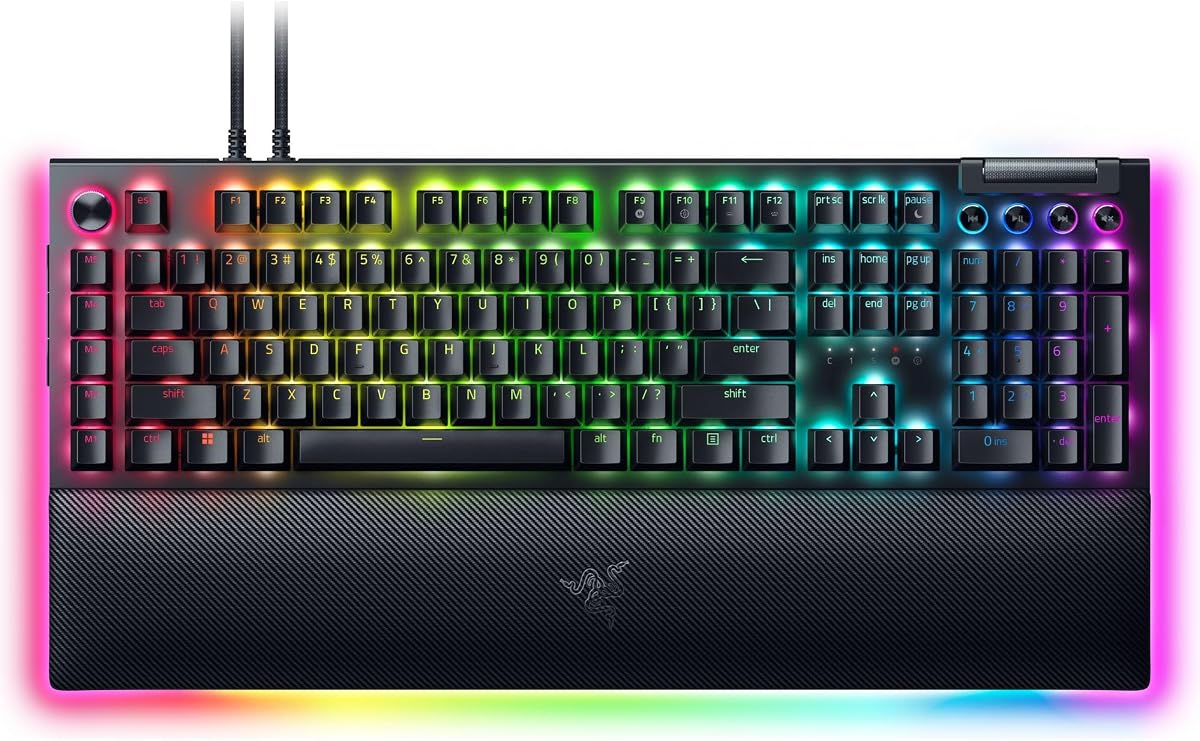
The Razer BlackWidow V4 Pro is the most premium-oriented keyboard in this collection, combining eight dedicated macro keys with a programmable command dial and an illuminated magnetic wrist rest. Its 4.3 rating is accompanied by a feature set aimed at enthusiasts who want a polished command surface rather than a basic macro row. The wrist rest, underglow, and mechanical construction also distinguish it clearly from the other Razer models here.
We may earn a commission when you buy through this link, at no additional cost to you.
The command dial can be assigned a custom function, adding another layer of control beyond the eight macro keys. This makes it useful for functions that benefit from continuous adjustment, such as volume, scrolling, or application-specific commands. The macro keys can be assigned to essential game bindings, and the board's per-key lighting and three-side underglow support an immersive desk setup, particularly when paired with the included rest's Chroma illumination.
Green tactile switches are the defining input choice. Their tactile feedback is intended to provide precise execution, giving users a noticeable event without the stronger click profile of a clicky switch. Double-shot ABS keycaps use thick walls to withstand frequent use and molded labels designed to resist wearing away. The magnetic plush leatherette wrist rest supplies support and stays physically connected during use.
This is the premium recommendation for a gamer, streamer, or productivity user who wants substantial macro capacity, a high-end control dial, and a cohesive lighting setup. The wired connection and premium positioning may not suit buyers with limited desk space or a strict preference for wireless use. Those constraints aside, it is the most complete luxury-oriented option in the guide and the strongest choice when the command dial is important.
The programmable command dial expands control beyond simple key presses. It can suit functions that benefit from rotation, while eight dedicated macro keys handle discrete commands and game bindings.
The magnetic wrist rest combines soft cushioning with dedicated underglow. Per-key lighting and three-side illumination create a more finished appearance than a standard gaming keyboard with a single RGB strip.
We may earn a commission when you buy through this link, at no additional cost to you.
The Redragon K618 PRO is unusual in this guide because it combines a low-profile design, tri-mode wireless connectivity, and twenty dedicated macro keys. Its 4.1 rating reflects a specialized balance, but the sheer macro count gives it a distinct place for travelers, streamers, and productivity users who want many direct commands in a compact footprint. The dedicated four-by-five macro zone is positioned alongside media controls.
We may earn a commission when you buy through this link, at no additional cost to you.
Connectivity is a major strength. USB-C, Bluetooth, and 2.4GHz wireless modes let the keyboard move between a desktop PC, laptop, or tablet. The supplied description emphasizes switching devices without re-pairing and avoiding lag through 2.4GHz operation. A one-touch control also changes between Windows and Mac layouts, reducing the friction of using the same keyboard across different operating systems.
Its slim switches and keycaps shorten travel to create a lighter, faster-typing profile. Stock Red mechanical switches provide linear feedback, while the reduced height may appeal to users who prefer a laptop-like feel without giving up mechanical construction. Onboard macro recording works without installation, and optional software supports deeper remapping, extensive keybinding combinations, and custom 16.8-million-color lighting effects.
The K618 PRO is best for someone who needs portable flexibility and a large macro bank. It is less suitable for users who require a numeric keypad or prefer a deep, high-profile typing feel. The 20-key macro grid also takes up meaningful space, so buyers should be sure they will use it. For wireless productivity with direct command access, it is one of the most distinctive choices in this roundup.
USB-C, Bluetooth, and 2.4GHz modes support different desk and travel situations. The Windows and Mac switch helps maintain familiar layout behavior when moving between systems.
Slim switches reduce travel and keep the overall board visually compact. Twenty dedicated macro keys create a large command surface without requiring a separate stream deck.
We may earn a commission when you buy through this link, at no additional cost to you.
The Logitech G213 Prodigy is a full-size membrane gaming keyboard with a 4.2 rating, designed for users who want an established software ecosystem and a practical mix of gaming and productivity features. Unlike several dedicated macro boards in this list, it does not advertise a visible bank of programmable macro keys. Instead, macro programming is handled through Logitech G HUB alongside lighting, game mode, and other settings.
We may earn a commission when you buy through this link, at no additional cost to you.
The full-size layout includes a numeric keypad and dedicated media controls for play, pause, mute, volume, and track skipping. An integrated palm rest and adjustable keyboard feet improve comfort and positioning, while the slim body keeps the board relatively restrained. The construction is designed to resist liquids, crumbs, and dirt, making routine cleaning straightforward for shared or high-traffic environments.
Lighting uses five customizable zones and more than 16.8 million colors. It can be synchronized with other compatible Logitech G devices through G HUB, which is a particular advantage for an established Logitech setup. The anti-ghosting gaming matrix supports responsive multi-key input, and each key is tuned for quick tactile feedback despite the use of membrane switches.
The G213 is a sensible recommendation for a gamer who also uses the keyboard for work and prefers one familiar device for both roles. Its primary limitation is the lack of dedicated macro keys, making it less convenient for users who want one-touch access to recorded sequences. It is best when G HUB integration, familiar media controls, and a full-size layout matter more than instant onboard programming.
G HUB centralizes macro assignments, game mode, lighting, and device synchronization. This provides a consistent experience for Logitech G users, although the macros are not assigned through dedicated onboard keys.
The full-size layout preserves a numeric keypad, while the integrated palm rest and adjustable feet support longer sessions. Durable, easy-clean construction is particularly useful for offices, classrooms, and shared desks.
We may earn a commission when you buy through this link, at no additional cost to you.
The Razer BlackWidow V4 combines six dedicated macro keys with fast linear switches, per-key Chroma lighting, and a magnetic plush leatherette wrist rest. Its 4.2 rating places it in the middle of this group, but the feature balance makes it appealing to gamers who want a full-featured mechanical board with more comfort than the streamlined V4 X.
We may earn a commission when you buy through this link, at no additional cost to you.
The Yellow switches provide 45g of force, 1.2mm actuation and reset points, and integrated sound dampening. Their linear operation supports quick repeated inputs, and the board also benefits from a foam layer under the circuit board and lubricated stabilizers. The result is designed to balance fast response with a more controlled sound profile during extended gaming sessions.
Six macro keys can be programmed for the user's preferred playstyle, while a multifunction roller and four media keys handle playback, volume, and brightness. Per-key Chroma RGB supports more than 16.8 million colors and game-linked effects, and two-side underglow highlights the board's profile. The magnetic wrist rest supplies soft support and stays attached during use, addressing one of the omissions in the V4 X.
The BlackWidow V4 is recommended for a gamer who prioritizes linear response, a comfortable bundled rest, and per-key lighting but does not need the V4 Pro's programmable command dial or additional macro keys. It remains a wired model, and the software-assisted macro system may be less appealing than a board with extensive direct recording. Even so, its balanced feature set makes it a strong general-purpose Razer mechanical keyboard.
The low-force linear switches react quickly and avoid a tactile bump during rapid play. A multifunction roller and four media keys make common adjustments available without navigating application menus.
The magnetic leatherette wrist rest supports long sessions and snaps securely to the keyboard. Per-key RGB and two-side underglow provide a more dimensional lighting effect than a single accent strip.
We may earn a commission when you buy through this link, at no additional cost to you.
The right macro keyboard depends on how you will store and trigger commands, the type of feedback you prefer, and how much desk space and setup complexity you can accept.
Onboard macro recording stores commands directly on the keyboard, making it fast to configure and dependable during play. The Redragon K512, K580, and K550 emphasize this approach, while the VSD K1 Pro extends it across the full key set. Software-based systems, such as those used by the Corsair K55 and Logitech G213, can provide deeper profiles and synchronization but require an installed utility and compatible computer.
Choose onboard programming for quick setup and fewer background applications. Choose software when lighting, device integration, profile management, or application-specific commands matter more.
Macro capacity ranges from six dedicated keys on the Redragon K512 and Corsair K55 to twenty on the Redragon K618 PRO. The VSD K1 Pro offers full-key assignment and a separate six-button streaming deck, creating more flexibility than a simple fixed macro row. More keys are not automatically better, but they help when several games, streaming actions, and productivity commands must remain accessible.
Match the number of keys to your routine. A handful suits a common game bind, while a dense bank benefits from advanced stream and productivity workflows.
Membrane keyboards such as the Redragon K512, Corsair K55, and Logitech G213 generally feel consistent and require less maintenance. Mechanical boards provide more tactile or acoustic character, and hot-swappable models such as the Redragon K580 allow the switch feel to be changed without soldering. The Razer models use linear or tactile mechanical switches, while the Redragon K550 emphasizes its custom clicky Purple switches.
For quiet use, favor membrane, Brown, or linear switch options depending on your sound preference. For customization, prioritize hot-swappable sockets and broad switch compatibility.
Most models are wired, which offers a simple and consistent connection for a stationary gaming desk. The Redragon K618 PRO stands apart with USB-C, Bluetooth, and 2.4GHz wireless modes, making it the clearest choice for moving between devices. A wired keyboard may also be preferable when avoiding battery management is a priority, but it can limit desk flexibility compared with a wireless model.
Choose tri-mode connectivity for travel or multi-device work. Choose wired operation for a fixed setup, uninterrupted charging, and fewer wireless-related considerations.
Macro keys can perform complete sequences, but a streaming-oriented control surface makes frequently used actions easier to identify and operate. The VSD K1 Pro adds an integrated deck with switchable pages, LCD keys, knobs, and customizable images. Other models prioritize simpler tools such as a media wheel, playback buttons, volume controls, or a multifunction roller.
Choose a dedicated deck or command dial when visual identification and live control are priorities. Choose standard media controls when a small set of playback and volume commands is sufficient.
A full-size keyboard provides a number pad and familiar navigation cluster, but it takes more space than a compact or low-profile model. The Redragon K618 PRO and VSD K1 Pro reduce the footprint, while the K512, K550, and several Razer boards include a wrist rest or palm support. Adjustable feet, angled stands, and wrist-rest design can influence comfort more than macro count alone.
Check desk dimensions and preferred typing posture before choosing. Use a separate wrist rest if a model's included support does not match your hand position.
RGB lighting ranges from five or six broad zones to true per-key illumination. Zone-based systems are easier to maintain, while per-key effects create more detailed desk synchronization. Keycap durability is also relevant: double-shot molded ABS keycaps are used across several Redragon and Razer options, with the stated goal of resisting fading and surviving repeated use.
Choose zone lighting for a coordinated look or per-key lighting for detailed effects. Check keycap construction and expected switch life when durability is a priority.
Begin by identifying the programs or game scenes where macros will save the most effort. Record a small sequence first, such as a text shortcut or a simple game action, and confirm that it works as intended before assigning longer workflows. For software-based boards, install the official utility before moving the keyboard between computers, since some profiles and lighting effects may depend on the active system.
Keep macro recordings short, clearly named, and easy to undo. Test each key in the target application, pay attention to whether a sequence uses a different timing or a modifier that remains active, and avoid assigning the same function to several keys unless that redundancy is intentional. For the VSD K1 Pro, connect it by cable when configuring display images, GIFs, date and time settings, or switching streaming-deck pages.
For care, disconnect the keyboard before removing switches or keycaps. Use the supplied puller where applicable, work on a clean surface, and keep dust away from the sockets and controls. Clean the case and keycaps with a soft, lightly dampened cloth, avoid spraying liquid directly onto the keyboard, and allow the palm or wrist rest to dry fully before reconnecting it. Check the current product instructions for compatible switch types and cleaning restrictions.
Macro keys are programmable buttons that can trigger a saved sequence of keystrokes, shortcuts, or commands with one press. They are useful for complex game bindings, repetitive office tasks, media control, and streamer commands. Some keyboards record macros directly on the board, while others require official software to assign and store them.
No. The Redragon K512, K580, and K550 support direct onboard macro editing, and the K618 PRO also provides an onboard macro zone. Software-managed options such as the Corsair K55 and Logitech G213 are more dependent on their companion utilities. The VSD K1 Pro supports both onboard assignment and more advanced software configuration.
It depends on your preferences. Membrane boards often feel consistent, quiet, and simple to maintain, while mechanical boards provide a wider range of tactile and acoustic responses. Hot-swappable mechanical models add the ability to replace switches later. Sound preference, maintenance habits, and budget usually matter more than the presence of macros alone.
They can make common actions easier to perform and reduce the need for complicated key combinations. They do not automatically improve reaction time or competitive skill, and games may restrict or prohibit certain automation features. Check each title's rules and use macros only for permitted actions.
The Redragon K618 PRO has twenty dedicated onboard macro keys, the largest fixed macro bank listed here. The Redragon K550 has twelve, the Razer BlackWidow V4 Pro has eight, and several other models provide six. The VSD K1 Pro takes a different approach by allowing full-key assignment and adding six LCD deck keys on each switchable page.
A wireless model can be reliable when using a stable 2.4GHz connection, but a wired link removes wireless interference and charging concerns entirely. The Redragon K618 PRO supports USB-C, Bluetooth, and 2.4GHz modes. The other models listed are wired, making them straightforward options for a fixed gaming station.
Look for easily identified command buttons, a media wheel or multifunction roller, and software that supports the actions you use while broadcasting. The VSD K1 Pro offers a dedicated LCD streaming deck, while the Corsair K55 supports Elgato Stream Deck software. The right choice depends on whether you need visual command labels, simple controls, or deep software integration.
For an onboard system, select a macro key, begin recording, perform the desired sequence, and save it. Software-based keyboards generally use a macro editor in the official utility, where you can assign keys, set delays, and organize profiles. Test every sequence in the intended application because modifiers, timing, and game-specific behavior can change the result.
The VSD K1 Pro is the most versatile overall recommendation because it combines full-key macro assignment, a switchable streaming deck, an TFT display, knobs, and hot-swappable mechanical switches. The Redragon K512 RGB is the best budget choice for anyone who wants six reliable macro keys and direct recording without setup complexity. For premium features, the Razer BlackWidow V4 Pro pairs eight macro keys with a programmable command dial and an illuminated wrist rest.
Prioritize the parts of the experience you will use every day. Choose onboard recording for immediate control, software integration for deeper profiles, a membrane layout for low-maintenance comfort, or mechanical construction for a more expressive feel. Wireless connectivity matters if you move between devices, while extra macro keys matter only when you have enough distinct commands to fill them.
Before purchasing, verify the current listing, operating-system support, included cable, switch compatibility, and software requirements. Ratings and configurations can change as customer feedback and product updates develop, and prices fluctuate over time. Checking those details helps ensure that the selected macro keyboard fits both your workflow and your desk.