
Ducky Origin Mechanical Gaming Keyboard, Cherry MX Red, Black
4.8Editor score
Slim narrow-bezel design
Cherry MX Red switches
Hot-swappable stabilizer sockets
Discover the best Ducky keyboards for gaming, typing, and everyday use, with comparisons of layout, switches, connectivity, sound, build quality, and features.
Ducky keyboards appeal to gamers, typists, and productivity-focused users who value distinctive industrial design, flexible configuration, and an unusually broad selection of layouts and switch options. A strong keyboard should feel comfortable during extended sessions, communicate clearly, fit your desk, and suit the way you work or play.
This guide compares ten Ducky mechanical keyboards across size, switch feel, mounting, damping, keycap material, wireless connectivity, lighting, programmability, and everyday practicality. The list includes full-size, 80%, 65%, and compact models, giving readers options whether they value a numpad, extra desk space, or a portable setup.
Each pick has a distinct reason to appear: the Origin models emphasize a slim profile, the One 3 range highlights refined construction, the OK-M prioritizes versatile wireless use, and the One X introduces rapid-trigger technology. Product ratings and availability can change over time, so always confirm current specifications, seller details, and prices before purchasing.
4.8Editor score

5.0Editor score

3.8Editor score
The table below summarizes the most important differences among all ten models, including their physical layouts, switch platforms, connection options, and signature design features.


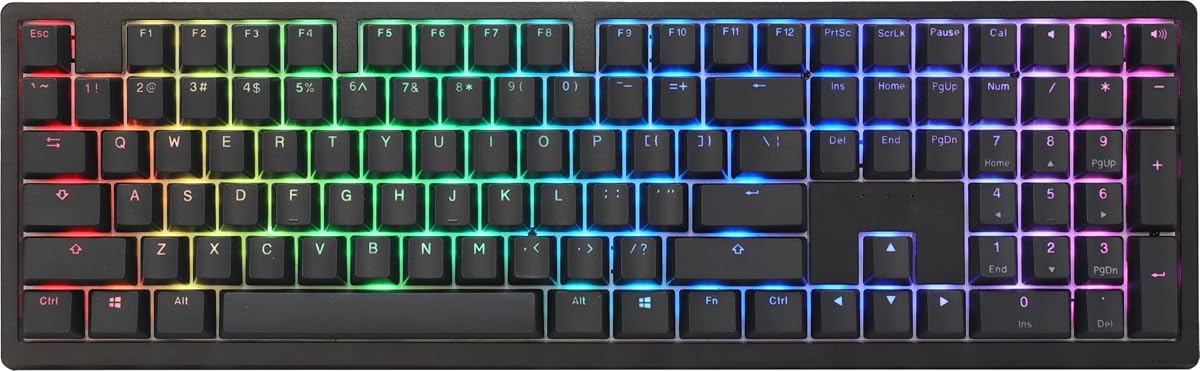


The Ducky Origin Mechanical Gaming Keyboard with Cherry MX Red switches combines a full-size layout, a slim visual profile, and a 4.8 customer rating. It is particularly appealing to gamers who want responsive linear switches without moving to a wireless or premium analog platform. The black color scheme, narrow bezel, and detachable braided USB-C cable give it a restrained, practical appearance.
We may earn a commission when you buy through this link, at no additional cost to you.
Its most important gaming-oriented feature is the use of Cherry MX Red switches, which provide smooth, linear travel. Kailh yellow hot-swap sockets are fitted to stabilizer keys, including the Escape key, Backspace, Enter, both Shift keys, Spacebar, and several numeric keys. That arrangement makes the board more flexible for users who want to modify larger keys while retaining the supplied switch platform elsewhere.
The keycaps use an OEM-profile, double-shot PBT construction, and the switches face south. Those details should appeal to users who prefer a conventional typing angle and textured keycap surfaces. The trade-off is that this is primarily a wired design, and the full-size body retains a separate navigation cluster and number pad. Those may be drawbacks on a compact desk, but they are useful for spreadsheet work, shortcuts, and number entry.
This Origin model is a strong recommendation for a gamer who wants a complete keyboard with linear switches, a slim profile, and useful hot-swap points without moving to a higher-complexity design. It is also a sensible choice for typists who prefer Red over tactile or clicky switches. The larger footprint and wired cable are the main compromises, but neither changes the board's value-focused appeal.
Cherry MX Red switches offer a smooth, linear action without the tactile bump of Brown switches or the audible click of Blue switches. Their straightforward feel is well suited to quick repeated inputs and users who want minimal resistance while typing or gaming.
The Origin's exceptionally slim and narrow-bezel design reduces visual bulk while preserving a full-size layout. That balance makes it useful for desks that can accommodate a number pad but do not need the deeper visual profile associated with many traditional full-size gaming keyboards.
We may earn a commission when you buy through this link, at no additional cost to you.
The Ducky OK-M stands out as the most balanced model in this guide, combining a 65% layout with gasket-mount construction, hot-swappable switches, five-layer acoustic dampening, RGB lighting, and three connection modes. Its 5.0 customer rating makes it an especially attractive recommendation for buyers who want wireless versatility in a compact, modern mechanical keyboard.
We may earn a commission when you buy through this link, at no additional cost to you.
The gasket-mount design and five-layer dampening system work together to reduce pinging, echoes, and harsh acoustic peaks. That construction is especially relevant for shared workspaces, late-night use, or anyone who prefers a quieter, more controlled typing experience. Side RGB adds visual personality without turning the board into a brightly illuminated centerpiece, while the 65% footprint preserves the essential gaming key cluster and navigation keys in a compact form.
Connectivity is one of the OK-M's defining advantages. It supports wired USB-C, 2.4GHz wireless, and Bluetooth, allowing it to move among a gaming computer, laptop, and other compatible devices. VIA support adds web-based key and macro customization, so the board can serve both productivity and gaming setups. The main compromises are the absence of a dedicated number pad and the deliberately understated nature of the side lighting.
Choose the OK-M if your priority is a flexible keyboard that can connect in several ways, remain visually tidy, and deliver a refined mechanical feel. It suits gamers, students, and office users who need occasional number-row access but value desk space more highly. Among this list, it offers one of the most convincing combinations of layout, acoustics, programmability, and connectivity.
USB-C, Bluetooth, and 2.4GHz support make the OK-M practical for setups that involve more than one computer. Wireless operation is especially useful when you want to reposition the keyboard or clear desk space without reducing the number of physical keys.
The five-layer dampening system, paired with the gasket mount, is designed to reduce unwanted echo and pinging. It does not promise silence, but the construction targets a fuller and more comfortable sound than an undamped mechanical board.
We may earn a commission when you buy through this link, at no additional cost to you.
The vintage Ducky Origin with Cherry MX Brown switches combines a classic full-size format with a tactile mechanical feel. Its 4.6 rating reflects a favorable reception among buyers looking for a keyboard that can handle both daily typing and gaming. Brown switches provide a middle ground between the smooth action of Red and the pronounced feedback of Blue.
We may earn a commission when you buy through this link, at no additional cost to you.
The board retains the Origin family's defining design traits: an exceptionally slim, narrow bezel, OEM-profile double-shot PBT keycaps, and south-facing switches. Kailh yellow hot-swap sockets support the larger stabilizer keys, giving owners a degree of customization without requiring a new full PCB. A detachable braided USB-C cable supports a tidy, replaceable wired connection.
The vintage finish is the model's defining aesthetic. It gives the keyboard a more expressive personality than a conventional all-black gaming board, although buyers who want an understated office accessory may prefer the black Origin variant. As a full-size wired model, it also does not solve requests for Bluetooth, 2.4GHz wireless, or a smaller footprint. The number pad may be invaluable for one user and unnecessary desk clutter for another.
This Origin is a good recommendation for someone who likes tactile feedback but does not want a loud clicky switch. It works well for programming, office productivity, and mixed gaming sessions, while the full-size layout supports frequent number entry. Choose the black Red model for smoother gaming input or the OK-M for wireless versatility; this Brown version is the more balanced option.
Cherry MX Brown switches add a noticeable tactile event without the sharper click associated with Blue switches. This makes them a familiar middle ground for typists and gamers who want more input feedback than a purely linear switch provides.
The vintage treatment pairs with practical features such as PBT keycaps, south-facing switches, hot-swappable stabilizer sockets, and a detachable cable. It delivers a distinctive look without abandoning the customization and maintenance options valued by mechanical keyboard users.
We may earn a commission when you buy through this link, at no additional cost to you.
The Ducky Zero 6108 is a full-size wireless mechanical keyboard designed around smooth linear gaming switches, RGB lighting, and flexible connectivity. Its 4.1 rating places it behind several higher-rated models, but the feature set remains compelling for buyers who specifically want a number pad and the ability to connect by USB, 2.4GHz wireless, or Bluetooth.
We may earn a commission when you buy through this link, at no additional cost to you.
Its Cherry MX2A Red switches have a stated 45-gram actuation force and a smooth, linear action. The design targets rapid input during gaming, while the 45-gram force can help reduce finger fatigue over extended sessions. Full N-key rollover is a particularly useful specification for fast typing and games that register multiple simultaneous commands. Double-shot PBT keycaps add durability and a more substantial feel compared with many lower-tier plastic keycap sets.
The Zero 6108's classic black enclosure and RGB backlighting make it straightforward to integrate with an existing gaming setup. Users can customize the lighting to match their preferences. The trade-offs are its 4.1 rating, which is lower than the other products in the list, and the substantial footprint of a full-size board with a number pad. Wired operation is available, but the presence of wireless options does not make the model compact.
This is a sensible choice for a gamer who insists on a number pad, prefers Red-style linear switches, and wants to alternate between desktop and laptop use. Buyers sensitive to product ratings should examine recent customer feedback carefully. Even so, the combination of tri-mode connectivity, 45-gram linear switches, N-key rollover, and PBT keycaps makes the Zero 6108 a capable feature-focused option.
The 45-gram Cherry MX2A Red switches provide a smooth path with relatively low actuation force. That lighter feel can support quick inputs and reduce the effort required during lengthy gaming sessions, although personal preference remains important.
USB N-key rollover is designed to register more than one key at a time, reducing missed inputs during complex commands or fast typing. It is a meaningful gaming feature for users who regularly press several controls simultaneously.
We may earn a commission when you buy through this link, at no additional cost to you.
The Ducky One X is the most technically advanced model in this guide, introducing inductive switches, rapid-trigger behavior, gasket-mount construction, seven-layer acoustic dampening, and tri-mode wireless connectivity. Its 3.8 rating is the lowest among the ten products, so it should be considered a specialized premium option rather than the default recommendation for every buyer.
We may earn a commission when you buy through this link, at no additional cost to you.
Rapid trigger allows the keyboard to detect how far a key has traveled and register an input sooner when that movement is light. For supported games, this can make movement and aiming feel more responsive. The inductive switch system is described as offering greater accuracy, consistency, and power efficiency than traditional analog switches, while the linear inductive switches suit users seeking a smooth action without tactile or click elements.
Ducky's Quack Mechanics+ design combines the gasket mount with seven layers of dampening to refine both touch and acoustics. The high-density PBT double-shot keycaps use what the product information describes as 85% high-purity PBT, with a strong emphasis on resistance to shine. Tri-mode connection covers USB wired, 2.4GHz RF wireless, and Bluetooth, while web-based settings allow configuration without occupying local software space or resources.
The One X is best suited to competitive gamers who understand the value of rapid triggering and can use games that support the relevant functions. Its specialized technology and higher position in the lineup also make it less compelling for ordinary office users seeking a straightforward mechanical keyboard. The lower rating reinforces the need to check recent feedback, but for a buyer specifically seeking this class of gaming response, the feature set is unusually advanced.
Rapid trigger responds to the distance a key travels, allowing the keyboard to register a press before the key reaches its full bottom position. The potential benefit is especially relevant in fast competitive games, provided the title and configuration support the function.
A gasket mount, seven-layer dampening system, and high-density PBT keycaps work together to create a more refined mechanical feel. The layered construction is designed to soften unwanted acoustic artifacts while preserving clear key feedback.
We may earn a commission when you buy through this link, at no additional cost to you.
The vintage Ducky Origin with Cherry MX Blue switches delivers the unmistakable click and tactile bump associated with one of the most familiar mechanical switch types. Its 4.5 rating indicates solid customer reception, while the slim bezel, double-shot PBT keycaps, and full-size arrangement make it especially relevant to users who actively prefer audible key feedback.
We may earn a commission when you buy through this link, at no additional cost to you.
Blue switches provide a tactile event and a sharp click during travel. That feedback can make it easier to confirm keystrokes without looking at the keyboard, which some typists appreciate. The south-facing switch orientation, OEM-profile keycaps, and detachable braided USB-C cable create a conventional setup that should be immediately understandable to mechanical keyboard users.
Kailh yellow hot-swap sockets on stabilizer keys add some flexibility for modifying larger keys. As with the other Origin models, the sockets are specifically listed for keys such as Escape, Backspace, Enter, Shift, Spacebar, and selected numeric positions. The board remains wired, and the full-size layout takes up meaningful desk space. Its audible switches may also be undesirable in shared offices, video calls, or late-night environments.
Buy this Origin if you deliberately want clicky Cherry MX Blue feedback rather than merely accepting clicks as a side effect. It is well suited to enthusiastic typists who want a traditional mechanical experience, distinctive vintage styling, and a complete number pad. Those who need a quieter office keyboard should favor Brown or Red switches, while wireless seekers will find the OK-M more accommodating.
The click produced by Cherry MX Blue switches provides immediate confirmation that a key has actuated. This is useful for typists who rely on consistent tactile and audible feedback, though it can be distracting in quieter surroundings.
OEM-profile double-shot PBT keycaps are designed for repeated use while retaining their surface characteristics. Their durable construction is a useful match for buyers who want a board that can handle daily typing and gaming without relying on easily worn glossy keycaps.
We may earn a commission when you buy through this link, at no additional cost to you.
The Ducky One 2 Pro Mini White Edition is a compact mechanical keyboard with a clean appearance, Cherry Brown switches, RGB LED lighting, and a 4.6 customer rating. Its main appeal is straightforward: it provides tactile typing feedback and a smaller desk footprint for users who do not need the separate navigation and number-pad sections found on a full-size board.
We may earn a commission when you buy through this link, at no additional cost to you.
Cherry Brown switches offer a moderate tactile bump without the sharper acoustic click of Blue switches. That makes them a versatile middle choice for typing, general productivity, and light gaming. The RGB LED backlighting provides adjustable visual illumination, while the stated use of true PBT keycaps reflects Ducky's QUACK Mechanics emphasis on materials and the overall typing experience.
The compact form is also the main limitation. A Mini layout leaves out some of the keys found on 65%, 80%, and full-size designs, and buyers who rely on dedicated function or navigation keys may feel the tradeoff. The supplied product information is also comparatively concise, so it does not establish detailed wireless support, mounting design, or rollover specifications for this particular model.
This One 2 Pro Mini is a good fit for a compact workspace where tactile feedback and RGB lighting matter more than maximum key availability. It is also a natural option for users moving from a larger keyboard who want to free desk space. Confirm the exact key arrangement and current product details before ordering, especially if your workflow depends on a numpad or a separate arrow-key cluster.
The Mini format removes the space occupied by larger secondary sections, leaving more room for mouse movement, writing, or a second display. It can encourage a more centered posture and is useful for desks where every centimeter matters.
Brown switches deliver noticeable feedback with a feel that is generally less forceful than a clicky switch. RGB LED backlighting adds illumination and visual customization, making the white edition particularly suitable for a bright, clean desk setup.
We may earn a commission when you buy through this link, at no additional cost to you.
The Ducky One 3 Matcha pairs a distinctive colorway and low-profile case with a full-size layout, Cherry MX Blue switches, and a 4.7 customer rating. It delivers a strong combination of gaming features and visual character, making it a particularly appealing option for users who want a complete keyboard without giving up Ducky's refined QUACK Mechanics design philosophy.
We may earn a commission when you buy through this link, at no additional cost to you.
A dual-layer PCB with Kailh yellow hot-swap sockets provides two layers of hot-swap support, while dual-layer high-grade silicone and EVA foam help manage sound. Thick, seamless PBT double-shot keycaps offer a clean surface and durable construction. N-key rollover is useful for fast typing and simultaneous gaming commands, and improved V2 stabilizers support more consistent larger-key behavior.
Cherry MX Blue switches supply tactile feedback and a pronounced click, which helps some users verify inputs and gives the keyboard a more energetic acoustic profile. The three-level adjustable feet allow the typing angle to be tailored, and the detachable USB-C cable makes the wired connection easier to route or replace. The low-profile full-size enclosure still needs substantial desk space, and the Matcha finish is intentionally more expressive than a neutral black design.
The One 3 is a good recommendation for gamers who prefer Blue switches, want N-key rollover, and appreciate a color scheme that stands apart from standard black boards. It is also a viable productivity keyboard because of its full-size layout, stabilizers, and adjustable feet. Choose the One 3 TKL instead if saving desk space matters more than retaining a number pad.
Silicone and EVA foam are positioned within the keyboard's construction to reduce unwanted noise. The result complements the already clicky Blue switches, making the board better suited to users who want feedback but prefer a more controlled overall sound.
The low-profile case, three-level feet, V2 stabilizers, and detachable USB-C cable make the full-size board feel carefully considered. A remapped macro layout adds another layer of customization for users who rely on programmable commands.
We may earn a commission when you buy through this link, at no additional cost to you.
The Ducky One 3 TKL Matcha brings the One 3 design language to an 80% layout, retaining a number row and compact arrow-key arrangement while removing the separate number pad. With Cherry MX Brown switches, a 4.3 rating, and a detachable braided USB-C cable, it targets gamers and typists who want a complete everyday keyboard with less desk space than the full-size One 3.
We may earn a commission when you buy through this link, at no additional cost to you.
The dual-layer PCB and Kailh yellow hot-swap sockets provide a strong customization foundation. Thick PBT double-shot seamless keycaps create a durable surface, while dual-layer high-grade silicone and EVA foam reduce unwanted sound. Cherry MX Brown switches add a tactile bump that is useful for general typing and provides clear feedback without the sharper click of Blue switches.
Three levels of adjustable feet let users select a comfortable typing angle, and the improved PCB and V2 stabilizers support consistent key behavior. Its main disadvantage is the removal of a number pad, which can slow down frequent spreadsheet, accounting, or data-entry tasks. The 4.3 rating is also less impressive than the ratings of the Origin Red, OK-M, and full-size One 3 models.
Choose the One 3 TKL when desk space is important but a full compact-style key set remains preferable to a 65% layout. The tactile Brown switches, dampening, PBT keycaps, and hot-swap support make it a well-rounded mechanical keyboard. Users who need constant number entry should look to a full-size model, while wireless flexibility points toward the OK-M.
The 80% format preserves the number row and offers a compact alternative to a traditional full-size board. It creates more mouse room without reducing the keyboard to the smaller 65% or 60% arrangements.
Brown switches add tactile feedback, while silicone and EVA foam help manage acoustic harshness. The combination is a practical middle ground for users who want clearer input confirmation than linear switches without the pronounced click of a Blue switch.
We may earn a commission when you buy through this link, at no additional cost to you.
The Ducky One 2 80% is a straightforward RGB mechanical gaming keyboard with Cherry MX Red switches, an 80% layout, and a 4.3 customer rating. It remains relevant for buyers who want a familiar linear-switch feel, adjustable feet, a detachable USB-C connection, and a more compact footprint than a traditional full-size board.
We may earn a commission when you buy through this link, at no additional cost to you.
Cherry MX Red switches provide a smooth, linear action suited to gaming and everyday typing. The dual-layer PCB provides a solid platform for the board's mechanical construction, while Ducky RGB software support lets users personalize the lighting. A detachable 1.5-meter USB-C cable makes the wired setup easier to position, and three adjustable feet provide options for the typing angle.
The package also includes ten additional PBT double-shot colorful keycaps in random colors. That makes it easy to add personality without replacing the entire set, although the random selection means buyers cannot choose a specific combination in advance. As an older One 2 design, it lacks the more advanced acoustics, wireless options, and specialized gaming features found in newer Ducky models.
This keyboard is a reasonable choice for an established desktop setup that needs an 80% layout, RGB lighting, and conventional Red switches. It may appeal to gamers who already recognize the feel of Cherry MX Red and do not need wireless connectivity. Buyers seeking the newest construction techniques should consider the One 3, while those wanting three-mode connectivity should look at the OK-M or One X.
Cherry MX Red switches are a widely recognized standard for smooth linear gaming input. Their simple, consistent feel suits players who prefer minimal tactile interruption and light actuation.
Ten additional PBT double-shot keycaps in random colors allow users to personalize prominent positions such as Escape and Enter. The PBT construction and double-shot process support long-term durability, while the random selection adds variety.
We may earn a commission when you buy through this link, at no additional cost to you.
Choosing the right Ducky keyboard means balancing layout, switch preference, connection method, sound, and build features against the space available on your desk. The right model is the one that fits your working style rather than simply offering the longest specification list.
Layout is often the first practical decision because it determines both desk footprint and available keys. Full-size models, including the Origin, Zero 6108, and full-size One 3, include a number pad and are useful for accounting, spreadsheets, and games that benefit from dedicated numeric entry. The 80% One 2 and One 3 TKL retain a number row while removing the separate numpad, creating a useful middle ground for general productivity. The 65% OK-M takes that reduction further, prioritizing a compact footprint, while the Mini One 2 Pro is aimed at users comfortable with a smaller key set.
Red switches offer a smooth, linear action that many gamers and fast typists prefer. Brown switches add a moderate tactile bump, making them a versatile middle ground for mixed work. Blue switches provide distinct tactile feedback and a sharper click, which some typists appreciate but others find loud. The OK-M uses Baby switches, while the One X uses linear inductive switches designed for its rapid-trigger system. Switch choice should reflect your sensitivity to feedback, sound, and activation pressure rather than popularity alone.
Wired keyboards deliver a simple, dependable connection and eliminate the need to manage a battery. That makes the Origin, One 3, One 2 80%, and One 2 Pro Mini straightforward options for a permanent desk. The OK-M, Zero 6108, and One X support wireless operation, with the OK-M and One X offering USB-C, 2.4GHz, and Bluetooth. The Zero 6108 also provides wired USB, 2.4GHz, and Bluetooth. Consider charging habits, Bluetooth device compatibility, and whether wireless switching is important enough to justify added complexity.
Mechanical keyboard sound is shaped by the switches, case, PCB, mounting system, keycaps, and internal damping. The OK-M uses a gasket mount with five layers of acoustic dampening, while the One X combines a gasket mount with seven-layer Quack Mechanics+ construction. The full-size and TKL One 3 models use silicone and EVA foam. The Origin models have a slim, narrow-bezel design but their supplied details do not state the same layered damping system. Consider whether you want a bright, clicky signature or a lower, more controlled sound.
The Origin models use OEM-profile, double-shot PBT keycaps, the One 3 family uses thick seamless PBT caps, and the One 2 80% includes additional double-shot PBT caps. PBT is commonly chosen for its textured surface and resistance to developing a shiny appearance over time. The One 2 Pro Mini also emphasizes true PBT construction. Keycap profile affects the feel and angle of the board, while the included color accents and extra keycaps let you personalize the layout without replacing the entire set.
Gaming-specific features vary considerably. The One X offers rapid trigger and linear inductive switches, making it the most specialized model for supported competitive games. The Zero 6108 highlights full USB N-key rollover and 45-gram linear switches. The full-size One 3 also includes N-key rollover, while the Origin and One 3 TKL emphasize hot-swap sockets for switch or stabilizer customization. VIA support on the OK-M allows key and macro customization. Identify the inputs and commands you actually use before paying for a feature that your favorite game or software does not support.
Ducky's range includes different levels of software support. The OK-M uses web-based VIA software for key and macro customization. The One X provides web-based settings that are accessible across platforms and do not take up local space or resources. The One 2 80% supports Ducky's RGB software for lighting control. Other models emphasize hardware features such as remapped macros, south-facing switches, and hot-swap sockets. Consider whether you want browser-based control, dedicated lighting software, or simply a keyboard that works without extensive configuration.
A higher-priced board does not automatically provide a better experience for every user. The OK-M combines a 5.0 rating with gasket mounting, dampening, and tri-mode connectivity, while the Origin Red model delivers a 4.8 rating and a strong core feature set. The One X has advanced rapid-trigger hardware but a lower 3.8 rating, making it a more specialized purchase. Compare the features you will use, the customer feedback, and the product's likely longevity rather than treating cost as the only measure of value.
Before putting a new keyboard into regular service, read the included instructions and identify its connection method, lighting controls, and any required configuration software. For a wired model, route the detachable USB-C cable so it does not interfere with mouse movement. For a wireless keyboard, charge the keyboard fully and pair Bluetooth or 2.4GHz devices according to the product instructions. Test the connection from the applications and games you use most before configuring every key.
For switch-sensitive or hot-swap-capable models, power down and disconnect the keyboard before changing components. The supplied information specifically notes hot-swap sockets for stabilizer keys on the Origin models and dual-layer hot-swap sockets on the One 3 family. Work in a clean area, keep small screws organized, and confirm that replacement components are compatible with the board's layout and switch system. If a key feels uneven, inspect the stabilizer and socket rather than applying unnecessary force.
Care for the keyboard by cleaning with soft, dry methods and avoiding liquids around the switches, USB-C port, and wireless controls. Compressed air can remove dust from between keycaps, while a microfiber cloth is suitable for the case. Do not use harsh cleaners that may damage the finish or PBT keycaps. Periodically check the feet, cable, stabilizers, and wireless connection, and update settings or firmware through the applicable software when instructed by Ducky.
The best choice depends on the kind of gaming experience you want. The One X leads for supported rapid-trigger games, the Origin with Red switches is a strong conventional gaming option, and the Zero 6108 offers full N-key rollover alongside low-force linear switches. Consider your game, preferred feedback, and need for wireless connectivity before choosing.
Typists who prefer tactile feedback may favor the One 2 Pro Mini with Cherry Brown switches or the One 3 TKL with the same general switch style. The vintage Origin with Brown switches is another balanced choice. Blue switches provide the most pronounced click, while Red switches minimize tactile interruption. Your office environment and sensitivity to sound should guide the decision.
A 65% keyboard can suit gaming because it retains the main letter, number, and modifier keys while reducing desk footprint. The Ducky OK-M adds gaming-friendly features such as hot-swappable switches and RGB, alongside Bluetooth, 2.4GHz, and USB-C connectivity. It does not include a number pad, so verify that your games and workflows do not require dedicated numeric keys.
Red switches are smooth and linear, with a light feel and no tactile bump. Brown switches add moderate tactile feedback without a sharp click. Blue switches combine tactile feedback with a pronounced audible click. The OK-M uses Baby switches and the One X uses linear inductive switches, so their behavior should not be assumed to be identical to standard Cherry MX options.
The supplied product details specify Kailh yellow hot-swap sockets for stabilizer keys on the Origin models. That means the listed larger keys can have their switches changed more easily, but it should not be interpreted as a full hot-swap socket for every key. Review the exact board layout and instructions before replacing components.
The OK-M, Zero 6108, and One X provide wireless options. The OK-M supports USB-C, 2.4GHz, and Bluetooth, while the Zero 6108 supports wired USB, 2.4GHz, and Bluetooth. The One X offers USB wired, 2.4GHz RF, and Bluetooth connection. Check device compatibility and charging needs before making a purchase.
A gasket mount positions the PCB within flexible material rather than securing it rigidly to the case. This can reduce harsh resonance and allow the keyboard to flex slightly during use. The OK-M and One X use gasket-mount designs, but switch feel and sound also depend on the case, keycaps, switches, and internal damping layers.
Support varies by model. The OK-M offers VIA-based key and macro customization, the One 3 family includes a remapped macro layout, and the One X provides web-based configuration settings. The One 2 80% focuses on RGB software support. Review the model-specific instructions to determine which keys can be programmed and how those settings are stored.
The Ducky OK-M is the most well-rounded recommendation, combining a 5.0 rating, a compact 65% layout, gasket mounting, five-layer damping, three-mode connectivity, and VIA customization. The Origin with Cherry MX Red stands out as a value-focused gaming choice, while the One X is the premium selection for gamers who specifically want rapid-trigger technology and inductive switches.
For most buyers, the right priorities are layout first, switch feel second, and connectivity third. Full-size Ducky models serve number-heavy workflows, 80% boards balance function and space, and 65% or Mini formats suit compact desks. Build features such as PBT keycaps, hot-swap sockets, dampening, and adjustable feet can then be matched to gaming, travel, and typing preferences.
Ratings, product configurations, and prices can change, so confirm the current listing and seller information before ordering. Compare recent customer feedback, check the exact layout, and make sure required gaming features are supported by your chosen game. With those checks in place, you can select a Ducky keyboard that fits your desk and priorities without paying for capabilities you will never use.