
Marspark 2 Pcs Heated Mouse Pad
3.6Editor score
Two mouse pads included
Plush wrist support
Simple USB heating
Discover the best hand warmer mouse pad options for cold offices, gaming desks, and home setups, compared for warmth, safety, comfort, power, and portability.
A hand warmer mouse pad combines everyday mouse control with targeted heat for cold fingers, stiff wrists, and uncomfortable winter workspaces. The best models deliver steady warmth without interfering with tracking, while offering useful temperature controls, safe automatic shutoff, and a surface that remains practical for work or gaming.
We compared all ten products by examining their heating methods, temperature ranges, power requirements, safety features, size, mouse compatibility, noise levels, cleaning considerations, and portability. The list covers enclosed hand warmers, flat heated pads, large desk mats, plush USB models, and compact 100-watt designs suited to different desk setups.
Each review highlights the strongest use case, practical trade-offs, and important compatibility details. Ratings reflect the supplied customer feedback and should be considered alongside personal comfort needs. Product availability, features, and prices can change, so readers should verify the latest listing and electrical requirements before purchasing.
3.6Editor score

4.2Editor score
4.5Editor score
This side-by-side overview compares heating style, heat control, safety provisions, power, and practical desk coverage. It shows that the most suitable hand warmer mouse pad depends on whether the priority is full-hand enclosure, low-cost dual-pad convenience, compact mouse freedom, broad desk coverage, or simple USB-powered comfort.


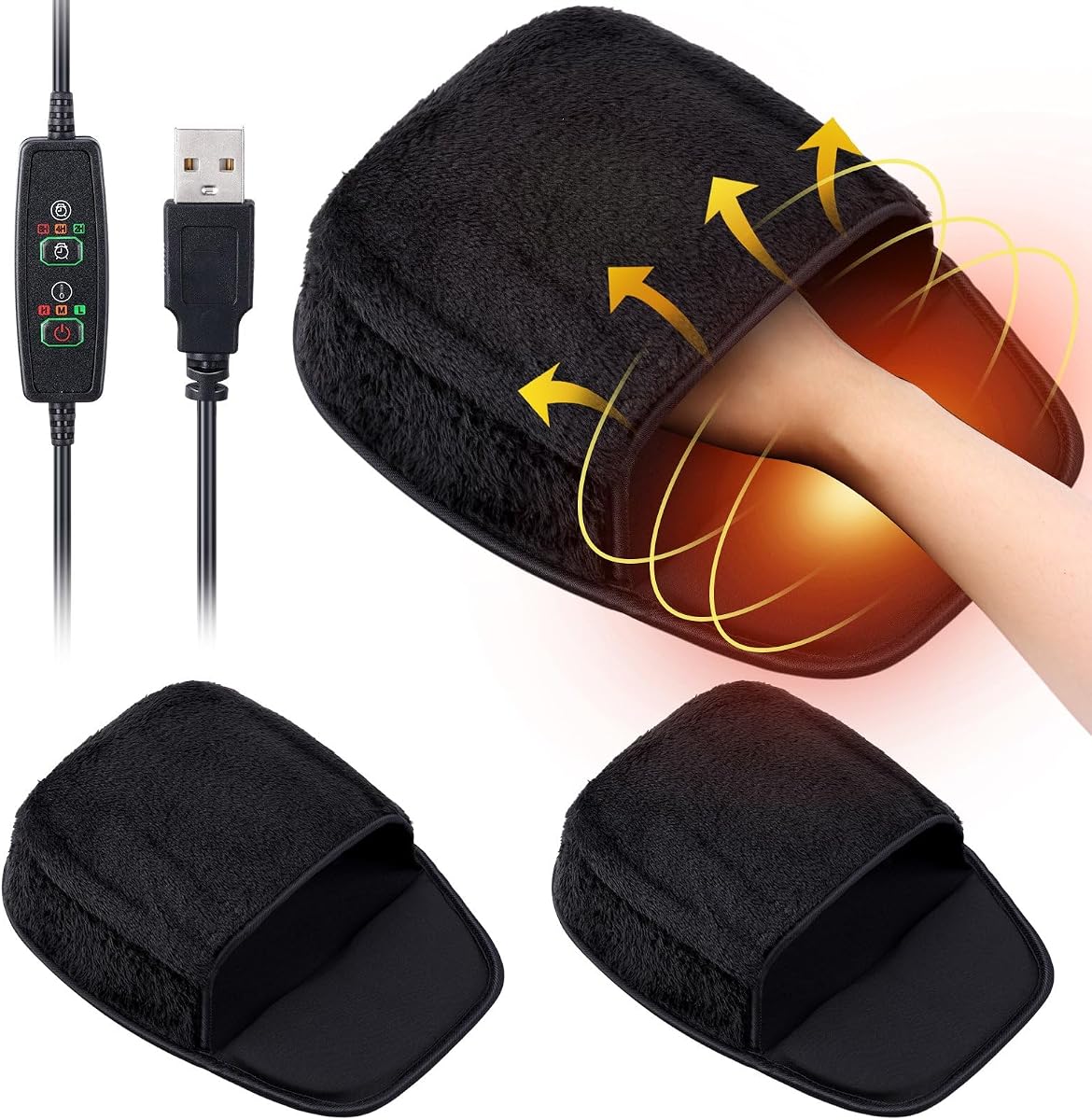

The USB Heated Mouse Pad Hand Warmer is one of the most complete options in this guide and earns a 4.2 customer rating. Its distinguishing feature is an enclosed neoprene cocoon that covers the hand rather than placing a flat warming surface beneath the wrist. That design targets the fingers, knuckles, and palm simultaneously, making it a strong choice for anyone who regularly feels cold while using a computer.
We may earn a commission when you buy through this link, at no additional cost to you.
Heat is distributed by a PTC element and controlled through three settings: low at 110°F, medium at 130°F, and high at 145°F. A separate controller provides access to those levels, while 2-, 4-, and 8-hour timers help prevent continuous operation. The 5V USB power requirement is modest, allowing connection to a computer, monitor, power bank, or suitable USB mains adapter without the need for a dedicated outlet.
The built-in wrist rest is one of the design's most useful details. It helps maintain a more neutral wrist position and reduces the static support offered by a conventional flat mouse pad. The product also accommodates left- or right-handed users, and the stated compatibility covers USB, wireless, and Bluetooth mice. A removable heating element, 1.5-meter lead, and non-slip base improve portability, maintenance, and stability.
The main compromise is the enclosed shape. Users who move their hand widely, alternate between resting and active mouse positions, or prefer a completely flat surface may find the cocoon less adaptable than a conventional pad. Nevertheless, for a cold home office, winter gaming station, or shared remote-work space, the combination of full-hand coverage, adjustable heat, wrist support, timers, and simple USB power makes this the strongest all-around recommendation in the list.
The neoprene shell surrounds the hand and helps retain heat around areas that a conventional heated mat may leave exposed. The result is particularly useful when cold fingers make precise mouse movement difficult or uncomfortable.
Three heat levels and selectable timers make operation more deliberate than a basic always-on pad. The removable heater can be taken out for cleaning, while the non-slip underside helps maintain a stable position during active mouse use.
We may earn a commission when you buy through this link, at no additional cost to you.
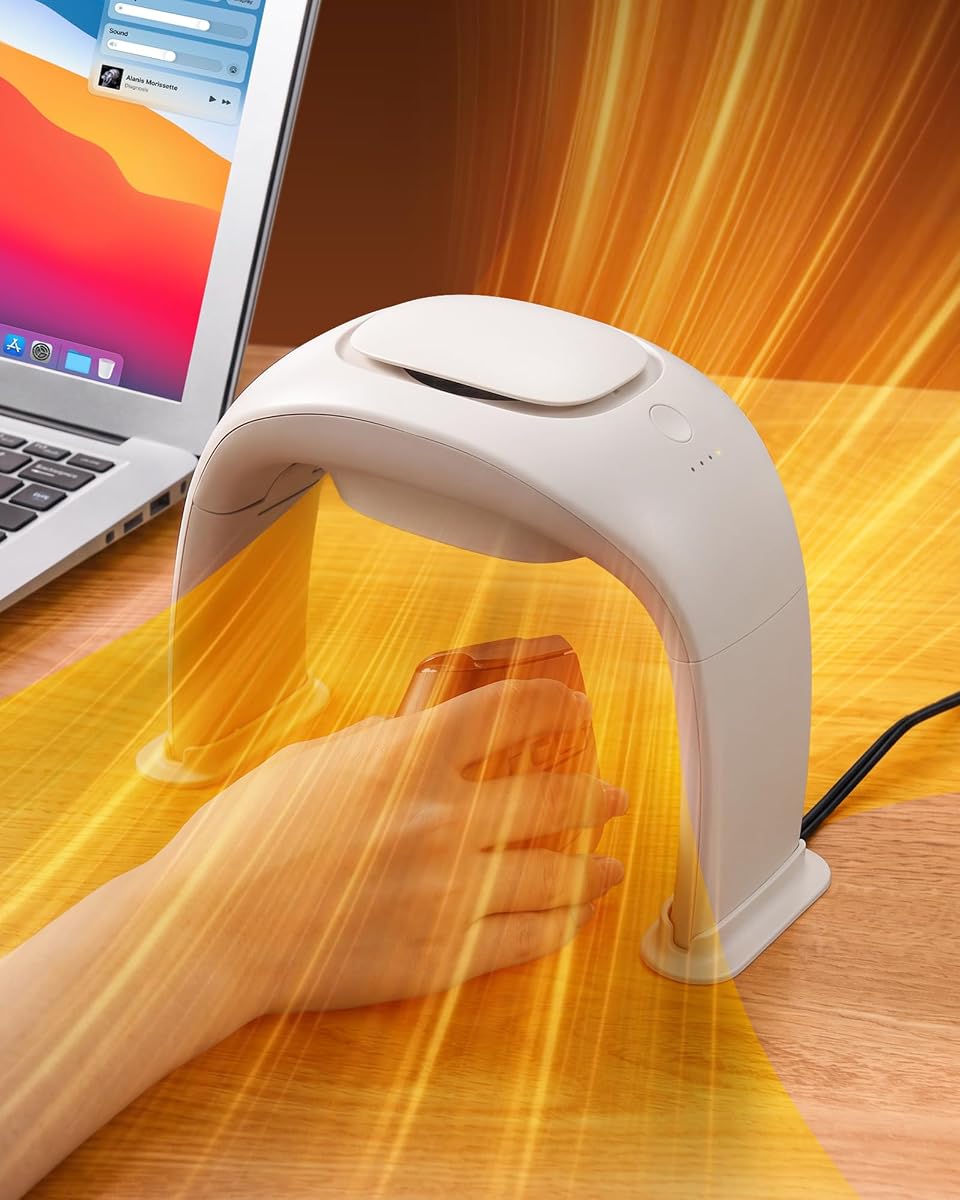
The Desk Hand Warmer Over Mouse is a substantial enclosed heater with a 4.5 rating, making it a compelling premium option for a dedicated desk. Unlike a flat pad, the hand enters through the top, allowing heat to circulate around the full hand while the mouse remains accessible underneath. Its 360-degree approach is designed to address both cold palms and exposed backs of the hand.
We may earn a commission when you buy through this link, at no additional cost to you.
Three modes offer noticeably different heating behavior. Low mode cycles on for one second and off for two seconds to produce a gentle 95–104°F range at 30W. Medium mode cycles on for three seconds and off for two seconds, reaching 113–122°F at 60W. High mode provides continuous heat from 131–140°F and draws up to 100W. A thermostat and energy-saving control system help maintain the selected temperature rather than heating without regulation.
Construction combines PTC ceramic heating, an aviation-turbine-style air guide, and flame-retardant PP plastic. The wide angle of the guide increases the heat-transfer area, while double-level safety protection includes automatic tip-over shutoff and over-temperature protection. The listed operating noise is below 20dB, making it suitable for offices, bedrooms, and quiet gaming environments. Stabilizing pieces are included for setup.
This is not a lightweight travel product. It needs a 110V connection, and its 100W maximum output is substantially greater than that of USB-powered alternatives. The 8.1-inch diameter and 6.3-inch height also occupy a noticeable amount of desk space. Even so, the product stands out for full-hand heat, unrestricted mouse use, quiet operation, and robust protection, making it best for users who want a dedicated hand-warming station rather than a conventional mouse pad.
The over-mouse chamber allows warmth to wrap around the hand rather than press against its back like a slipper-style design. Users can continue reading, writing, or gaming while keeping a conventional mouse within reach.
Cycling low and medium modes provide gentler intermittent warmth, while continuous high mode is available for colder conditions. This flexibility also makes it easier to balance comfort against energy use throughout the day.
We may earn a commission when you buy through this link, at no additional cost to you.
The Heated Mouse Pad Hand Warmer for Desk is a quiet, foldable enclosed heater with a 4.3 rating. It combines MCH technology with PTC ceramic heating to warm the mouse hand while the user works, writes, or games. The three selectable settings cover a stated 100–150°F range, giving users a broad choice between gentle and stronger warmth through a simple one-button interface.
We may earn a commission when you buy through this link, at no additional cost to you.
A built-in smart chip is intended to maintain the selected temperature after the initial heating period, reducing unnecessary energy consumption. Safety provisions include tip-over protection, overheat protection that cuts power above 170°F, and an anti-scald grille. The flame-retardant PP construction further supports a safety-focused design. These features make the heater a solid option for a stationary desk where a consistent temperature is preferred.
Its listed noise level is only 15dB, the lowest figure in this roundup, so it is unlikely to disturb a shared office, bedroom, or recording space. The body folds after use to reduce storage requirements, while silicone on the underside helps prevent the unit from sliding. Those qualities make it easier to move than a rigid full-size desk heater, although it remains less compact than a flat USB mouse pad.
The product's limited descriptive information is the main reason it does not lead the list. The supplied details do not clearly describe the power connection, dimensions, or exact mouse clearance, so prospective buyers should examine the current listing and instructions carefully. Within the stated 100–150°F range, however, it offers a compelling combination of quiet heat, foldability, anti-skid stability, and layered safety protection.
At a stated 15dB, the unit is designed for users who are sensitive to background noise. It is particularly suitable for quiet offices, late-night study sessions, and shared workspaces where a fan-powered heater would be disruptive.
Three temperature choices and a smart temperature-maintenance system provide useful control. Tip-over, overheat, and anti-scald protections reduce common risks associated with enclosed electric heaters.
We may earn a commission when you buy through this link, at no additional cost to you.
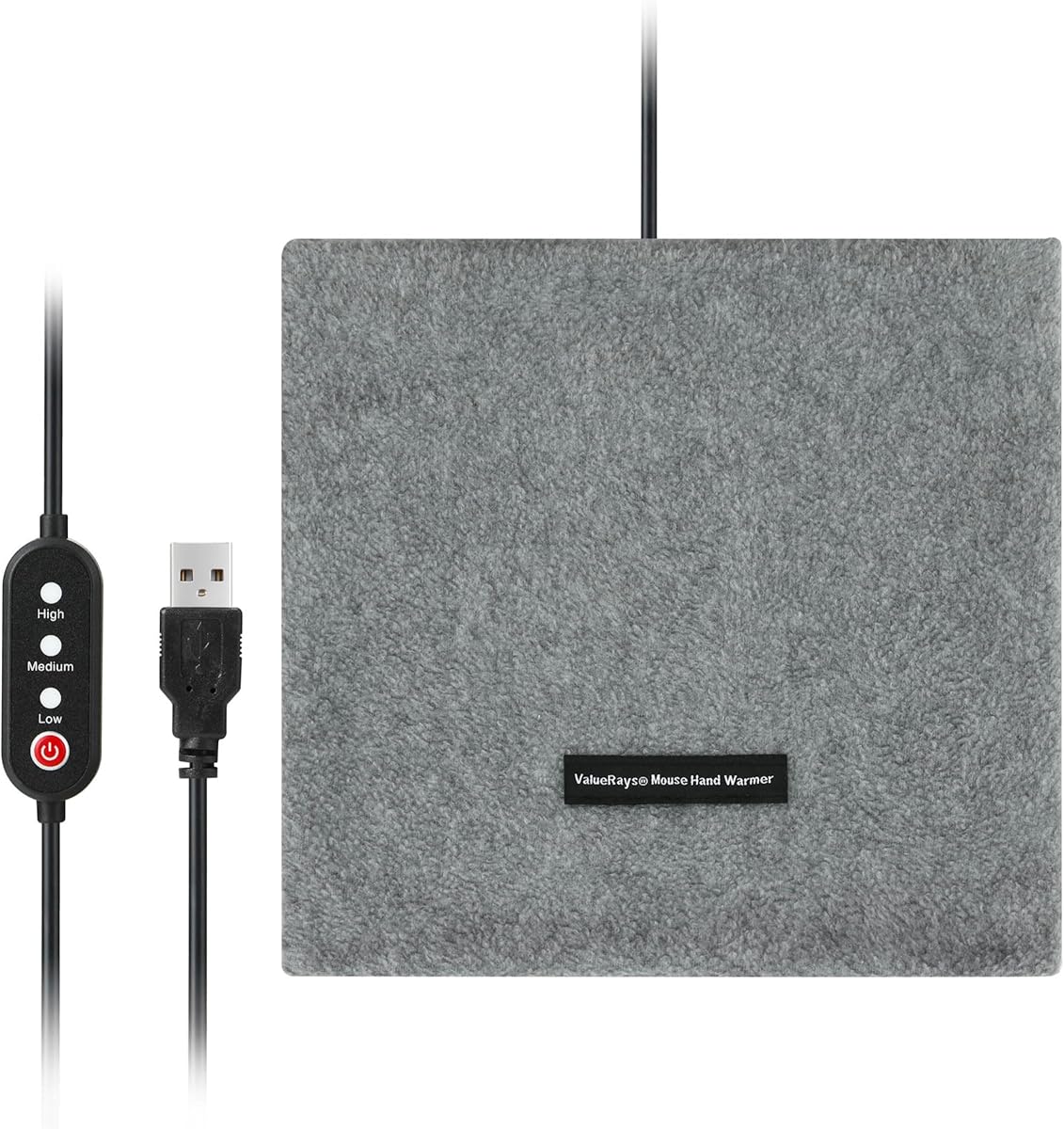
The Marspark 2 Pcs Heated Mouse Pad is the straightforward budget choice in this collection, offering two USB-powered mouse pads for separate use at home and in the office. Its 3.6 rating reflects a simple product concept rather than a highly advanced heater. Each pad measures about 11 by 9 inches and provides a conventional flat surface with room for flexible mouse movement.
We may earn a commission when you buy through this link, at no additional cost to you.
The supplied information indicates that the heater and mouse pad are separate. Users can therefore choose whether to position the heating component beneath the hand while still using the pad as a regular mouse surface. This flexibility may be helpful when the desk is warm, when the heating element needs to be removed, or when a second location requires its own pad. The plush surface adds a softer wrist contact area than a bare desk.
Power comes through a USB connection to a computer, avoiding the need for a nearby wall outlet. The listing also advises disconnecting the power after extended periods to reduce the risk of burns. That guidance is sensible, but it reveals one of the product's limitations: there is little information about a selectable temperature range, timer, or automatic shutoff, so heat control appears less developed than it is in several competing models.
The two-pack format is the key reason to consider this model despite its modest rating. It is a practical choice for a shared household, a home-and-office combination, or a user who wants a spare mouse surface. Buyers who want adjustable heat, enforced shutoff, and more comprehensive safety functions should choose a more advanced model, while those prioritizing simplicity and dual-pad value may find this one adequate.
The matching pair solves the common problem of wanting warmth at both a home desk and an office desk. Each unit has a generous surface for ordinary mouse use, and the heater can be positioned independently from the pad.
USB power keeps setup simple and removes the need for a dedicated outlet. The soft surface and detachable heating component improve everyday usability, although users should unplug the pad during prolonged unattended use.
We may earn a commission when you buy through this link, at no additional cost to you.
The Flutesan 2 Pcs Heated Mouse Pad is a plush-focused alternative for people who want a softer surface beneath the wrist and hand. It carries a 3.8 rating and includes two separate USB heated mouse pads, allowing one to remain at home while the other is used at work or in a shared study area.
We may earn a commission when you buy through this link, at no additional cost to you.
The thick plush covering is described as soft and skin friendly, offering more cushioning than a conventional hard mouse surface. Each pad measures approximately 11 by 9 inches, leaving enough room to reposition the mouse without taking up an excessive portion of the desk. A detachable internal heating pad supplies the warmth and can be removed for cleaning, which is a useful maintenance feature.
Like the Marspark dual-pad model, this product uses a simple USB connection. The listing recommends unplugging it after use to extend the life of the heating element, and it acknowledges that element durability may be limited. It also notes the risk of burns, making careful placement and avoiding extended unattended operation important. The absence of a stated temperature range, timer, or automatic shutoff means comfort must be judged by feel rather than precise controls.
This is a sensible pick for someone who prioritizes plush comfort and a two-pad package over advanced regulation. It works especially well for writing, casual browsing, and general office use where a soft resting area is valued. Gamers or users wanting stronger controls may prefer the timed three-level designs, but the Flutesan package remains a versatile, uncomplicated way to add warmth and mouse space to two locations.
The thick plush exterior provides a more forgiving surface during long typing or mouse sessions. It can be especially comfortable for users who dislike the feel of a hard desk mat or exposed mouse pad.
Removing the internal heater allows the outer pad to be cleaned more easily. The two-piece package also gives the user flexibility to keep separate supplies at home and at work.
We may earn a commission when you buy through this link, at no additional cost to you.
The Heated Desk Pad Mouse Pad is the broadest conventional desk-mat option here, with a 4.5 rating and a stated size of 31.5 by 13 inches. Rather than enclosing the hand, it spreads controlled heat across a PU leather surface large enough to hold a mouse and keyboard. It also warms the forearms and hands when positioned in front of the user.
We may earn a commission when you buy through this link, at no additional cost to you.
Three heat levels are easy to identify through red, green, and blue indicators. The range extends from 104°F at the low setting to 122°F at the highest level, making the pad more suitable for steady, moderate warmth than extreme heat. A four-hour automatic shutoff stops the heating function and can be restarted, reducing the chance of leaving it active indefinitely.
The PU leather and waterproof PVC materials are intended to resist ordinary desk wear, spills, and cleaning demands. UL and FCC certifications are also listed. Because the heating switch can be turned off, the same mat functions as a regular mouse pad, keyboard pad, blotter, or writing surface throughout warmer months. That versatility extends its usefulness beyond winter.
Electrical compatibility is the critical consideration. The product is designed for 110V with a two-pin American plug for use in the United States and Canada, so it may not suit other regions without an appropriate arrangement. Its wide dimensions may also overwhelm a compact desk. Within compatible locations, however, the combination of generous coverage, three levels, visible controls, and four-hour shutoff makes it an excellent choice for users who want one surface to support both warming and normal desk work.
The 31.5 by 13-inch footprint provides broad coverage that can warm both hands and forearms. It also gives a mouse and keyboard a consistent, clean surface, reducing visual clutter compared with several separate accessories.
With the heat switched off, the PU leather mat remains a conventional writing and mouse surface. That year-round function improves its overall utility, while the four-hour timer adds control during colder months.
We may earn a commission when you buy through this link, at no additional cost to you.
The 100W Heated Mouse Pad Hand Warmer is a refined version of the enclosed over-mouse concept, earning a 4.3 rating. It uses PTC ceramic heating, an aviation-turbine-style air guide, double ball bearings, and flame-retardant PP plastic. The result is fast heating with a stated operating noise of 20dB, low enough for offices, bedrooms, gaming rooms, and reading areas.
We may earn a commission when you buy through this link, at no additional cost to you.
The hand opening measures 8.1 inches across and stands 6.3 inches high, providing a broad space for either the left or right hand. Heat can circulate around the full hand while the mouse remains accessible, avoiding the uneven sensation associated with designs that warm only the palm or press a heating element against the back of the hand. Its 14-ounce weight and folding legs make it more portable than a rigid desk heater.
Three settings provide different operating patterns. Low runs for one second and stops for two, producing 95–104°F. Medium runs for three seconds and stops for two, producing 113–122°F. High heats continuously between 131–140°F. An intelligent energy-saving chip reduces power as the selected temperature is reached. Overheat and tip-over protection add important safeguards, while the included stabilizers help support the enclosure.
The unit requires a 110V connection, making it less convenient for international users or temporary laptop-only setups. Its 100W maximum rating also means it is not the lightweight option. Even so, quiet operation, foldable construction, broad hand coverage, three heat patterns, and multiple protections make this a strong recommendation for a permanent home or office desk where full-hand warmth is the main goal.
The stated 20dB operation allows the heater to serve in rooms where audible fan noise would be distracting. It is suited to shared offices, bedrooms, reading corners, and quieter gaming sessions.
Folding legs reduce the amount of space needed for storage, and the listed weight makes the unit easier to carry between locations. Despite that portability, it still requires access to 110V power.
We may earn a commission when you buy through this link, at no additional cost to you.
The USB Heated Mouse Pad Infrared Hand Warmer is a minimalist option with a 3.8 rating. It combines a conventional mouse-pad format with infrared heating and a manual control switch, while drawing power through USB. The straightforward design is likely to appeal to anyone who wants a basic warm surface without navigating a complicated controller or multiple modes.
We may earn a commission when you buy through this link, at no additional cost to you.
Because the product follows a familiar mouse-pad shape, it can slot into an existing workstation with little disruption. Users can continue operating the mouse while the heating element warms the surface beneath the hand and wrist. USB power also makes it convenient for laptops, desktops, and other setups that already have an accessible port, without requiring a cable to a nearby wall outlet.
The supplied product information is extremely limited, however. It does not specify a temperature range, heating area, dimensions, wattage, cable length, automatic shutoff, or cleaning method. It also provides no information about the physical materials, noise, base grip, or compatibility with different mouse types. As a result, it is difficult to compare this model objectively with the more thoroughly specified alternatives in the guide.
This uncertainty does not make the product unsuitable, but it does make careful listing review essential. Prospective buyers should look for clear operating instructions, electrical details, and safety information before ordering. The model could be a practical pick for someone seeking uncomplicated infrared warmth and USB convenience, but buyers who prioritize adjustable heat, verified shutoff, or a known wrist-support design should favor a model with more complete specifications.
A manual switch and USB connection reduce setup to a minimum. The familiar mouse-pad format also allows the product to blend into a regular computer workspace without requiring enclosure-style positioning.
Limited information about temperature, dimensions, materials, and automatic shutoff makes product-page verification especially important. Confirm the current details and care instructions before committing to this model.
We may earn a commission when you buy through this link, at no additional cost to you.
The Copkim 2 Pcs USB Heated Mouse Pad combines two portable heated surfaces with relatively sophisticated controls, although its 3.4 rating is the lowest among the reviewed products. Three temperature settings provide 110°F, 130°F, and 145°F, allowing users to move from mild warmth to stronger heat for very cold conditions.
We may earn a commission when you buy through this link, at no additional cost to you.
The most notable feature is the range of automatic timers. Users can select 2-, 4-, or 8-hour shutoff periods, making it easier to match heating duration to a work shift, study session, or gaming period. Power can come from a laptop, desktop, or power bank, and the slim construction is easier to carry than a powered enclosed heater. The included wrist cushion supports the natural curve of the wrist during extended mouse use.
A thick rubber base is intended to grip wood, glass, and plastic desktops, limiting movement during rapid mouse corrections. The two-pack allows separate placement at home and at work or in two shared spaces. The product also advertises a foldable, lightweight design for offices, schools, workshops, and travel, making it more flexible than the full-size over-mouse heaters in this guide.
The rating suggests that some buyers may have found shortcomings, although the supplied information does not identify specific customer complaints. The maximum 145°F setting may be more intense than some users want, and the product description does not clearly explain every safety mechanism beyond the timers. Still, for buyers seeking three heat levels, timed shutoff, wrist support, and two USB-powered pads, the feature combination is unusually practical.
The product separates heat intensity from operating duration, allowing a user to choose strong warmth briefly or gentler comfort over a longer period. This makes it easier to avoid leaving a warmer active longer than intended.
The paired design supports a home-and-office arrangement, and USB power enables use with a laptop or power bank. A grippy rubber base helps keep mouse tracking stable on several common desktop surfaces.
We may earn a commission when you buy through this link, at no additional cost to you.
The Multi-Function Desk Pad Heated Mouse Pad is a large-format desk accessory designed to warm hands, feet, and other areas while providing a stable work surface. It measures 31.5 by 13 inches and is 0.12 inches thick. No customer rating was supplied, so it is impossible to compare its received feedback with the rated products in this guide.
We may earn a commission when you buy through this link, at no additional cost to you.
Its main advantage is versatility. The PU leather construction is described as durable, easy to clean, and protective against scratches and stains. A non-slip underside helps hold the mat in place during mouse and keyboard activity. The same surface can serve as a desktop pad, mouse pad, keyboard area, floor mat, keyboard hand warmer, or under-desk foot warmer, expanding its usefulness well beyond a dedicated hand warmer.
The control scheme uses a single switch button. One press turns on high heat, a second activates medium, a third activates low, and a fourth turns the heater off. Separate lights indicate the current setting. An automatic shutoff function adds a safety layer, although the product information does not state its duration or explain exactly when the system activates it.
The main uncertainties are the absence of a customer rating and the lack of numerical temperature information. The supplied package includes one mouse pad, a 110V power cord, and an English instruction manual, so the mat requires a compatible wall outlet. Its size may also be excessive for a compact workstation. Even so, buyers seeking a broad, easy-to-clean mat with selectable heat and several possible uses will find this model worth investigating.
The wide PU leather area can serve a mouse, keyboard, and writing tasks while also warming the hands. Its listed floor and foot-warmer uses further extend the value beyond a standard desktop pad.
Repeated presses cycle through high, medium, low, and off, with indicator lights showing the selection. Automatic shutoff adds protection, but buyers should verify its timing in the product instructions.
We may earn a commission when you buy through this link, at no additional cost to you.
The best hand warmer mouse pad depends on how you work, how much desk space you have, and how much control you want over heat. Comparing heating style, power, safety, surface size, and portability helps narrow the field before you buy.
In short, choose an enclosure for full-hand heat and a flat pad for versatility, broad coverage, and unrestricted mouse positioning.
In short, adjustable heat is more useful than a single setting. Choose low or medium for daily comfort and save the highest level for quick warming in cold conditions.
In short, look for automatic shutoff, overheat protection, and clearly stated temperature limits. These safeguards matter more than maximum heat output.
In short, USB is best for portability and simple setup, while 110V is best for powerful stationary heating. Voltage and plug compatibility are essential checks.
In short, prioritize adequate mouse space, unrestricted movement, and a grippy base. The warmer should improve comfort without degrading control.
In short, choose a small pad for limited space, a dual pack for multiple desks, or a large mat for broad keyboard-and-mouse coverage.
In short, choose a soft or supportive surface if you use the mouse for long periods. Comfort should be balanced against smooth, predictable tracking.
In short, prioritize low noise and easy cleaning for frequent use. Choose a foldable USB model for travel or a compact 110V heater for a fixed workstation.
Place the warmer on a clean, dry, level section of the desk before connecting it to power. USB models can usually connect to a computer, monitor, or suitable power bank, while 110V models should use their supplied cord and a compatible outlet. Position the mouse where it can move naturally, then begin with the lowest heat setting and increase the level gradually according to the manufacturer's instructions.
Use the controls as intended and do not place the warmer under clothing, bedding, or another insulating layer. Do not leave it operating while unattended, and stop use if heat becomes uncomfortable. For products without an automatic timer, disconnect the power after the session. Avoid dragging the mouse across the surface if that could damage the finish, and keep liquids away from the heating element and electrical connections.
For cleaning, first unplug or switch off the unit and allow it to cool completely. Removable heating elements can be taken out and cleaned according to the supplied instructions, while PU leather surfaces can generally be wiped with a slightly damp cloth. Do not immerse electrical components, use harsh chemicals, or wash insulating shells unless the manufacturer explicitly permits it. Store the product folded or flat in a dry location, inspect the cable occasionally, and replace it if signs of damage appear.
A heated mouse pad can be suitable for regular use when it is operated according to its instructions. Look for automatic shutoff, over-temperature protection, and a low or medium setting designed for extended work. Do not cover the heater, operate it while sleeping, or leave it unattended. People with reduced circulation, nerve damage, or a medical condition affecting heat sensation should consult a qualified professional and use extra caution.
An enclosed hand warmer generally retains more heat because it surrounds the fingers, palm, knuckles, and back of the hand. A flat heated pad mainly warms the area where the hand and wrist rest, though it can cover a larger desk area. An enclosure is often better for cold fingers, while a flat mat is usually more convenient for broad keyboard use and unrestricted mouse positioning.
Most USB heated mouse pads can draw power from a laptop USB port, desktop, monitor, or compatible power bank. The included cable length and connector type should be checked before purchase. Because some laptops supply only limited current, it is wise to use the product with a stable connection and follow the manufacturer's guidance if the pad does not heat normally.
Usage varies considerably by design. Low-power USB pads generally draw less electricity than larger 100-watt enclosed heaters, while flat desk mats fall between those extremes. If energy consumption is important, compare the stated wattage and select the lowest heat level that remains comfortable. Automatic timers can also reduce unnecessary operation after the user leaves the desk.
A properly designed pad should not significantly interfere with tracking, but surface texture and movement can affect performance. Choose a smooth, stable surface and a non-slip base, then test the mouse at the settings you normally use for work or gaming. Enclosed models are best checked for sufficient clearance so the hand is not forced into an unnatural position.
Flat USB models are the most travel-friendly because they are light, compact, and can run from a laptop or power bank. Foldable enclosed heaters are more portable than rigid designs but still require access to compatible mains power. Always unplug the unit during transport, avoid folding it against the heating element, and confirm electrical compatibility before using it away from home.
Low or medium is generally the most practical setting for sustained office work because it provides warmth with less risk of discomfort. High is better for quick warming in a very cold room, then can be reduced once the hand is comfortable. Listed ranges vary among products, so begin at the lowest level and increase gradually rather than starting with maximum heat.
Do not wash the electrical heating element unless the manufacturer explicitly instructs you to do so. Products with removable heaters often allow the outer pad to be cleaned separately, while PU leather surfaces can usually be gently wiped. Switch off and unplug the device, let it cool, avoid immersing powered components, and follow the included care instructions.
The USB Heated Mouse Pad Hand Warmer is the leading choice for most buyers because its enclosed neoprene design warms the entire hand, includes an ergonomic wrist rest, offers three heat levels, and provides selectable timers. The Desk Hand Warmer Over Mouse stands out for stronger full-hand heating, quiet operation, and a premium 100-watt design, while the Marspark two-pack delivers the most approachable dual-pad package.
Before choosing, prioritize the type of heat you need. Pick an enclosure when cold fingers and knuckles are the main concern, a flat mat when you want broad keyboard-and-mouse coverage, and a dual pack when separate home and office setups matter. Automatic shutoff, over-temperature protection, verified electrical compatibility, adequate mouse clearance, and easy cleaning should carry more weight than maximum heat output.
Finally, verify the current product listing before ordering, especially for voltage, plug type, dimensions, temperature values, and timer behavior. Customer ratings and prices can change, and a product that feels ideal during a brief demonstration may behave differently over a full workday. Choose the model whose controls, power, and physical design best match your desk and routine.