
Eyoyo 3.5-inch Portable Digital Video Magnifier
4.6Editor score
3.5-inch portable display
2X to 25X magnification
Eight color modes
Snapshot and screen lock
AV output included
A digital magnifier for low vision can make small print, labels, menus, maps, and everyday objects easier to inspect by placing material beneath a camera and viewing it on an enlarged screen. The most useful models combine adjustable magnification, clear imaging, simple controls, and comfortable positioning. Screen size, color enhancement, external-display support, and battery life also influence which device suits a particular reader.
This guide compares ten digital magnifiers using the supplied specifications, including magnification ranges, LCD resolution, color modes, camera capabilities, memory functions, external connections, handles, and stands. The list includes compact units for occasional reading, larger handheld models for extended use, and a feature-rich 12-inch magnifier designed for accessibility-focused workflows. It also highlights practical differences among products with similar headline specifications.
Each review explains the strongest reasons to consider a particular model while noting relevant limitations. The top picks identify a budget-friendly option, an editorial choice, and a premium product with advanced text-reading features. Magnification alone does not determine usability, so comfort, contrast controls, focus, and viewing setup deserve attention. As with all electronics, current prices, availability, and feature details may change over time.
4.6Editor score

4.3Editor score
4.0Editor score
As an Amazon Associate we earn from qualifying purchases.
The comparison below highlights the core differences among these ten magnifiers: display size, magnification range, color controls, and standout functions. It is a practical overview, but hands-on comfort and accessibility needs should guide the final choice.


The Eyoyo 3.5-inch Portable Digital Video Magnifier combines a compact body with the highest customer rating in this comparison, at 4.6 out of 5. It supports 2X, 8X, 16X, and 25X magnification, making it a practical all-around option for reading labels, short passages, menus, maps, and other material that benefits from visual enlargement.
We may earn a commission when you buy through this link, at no additional cost to you.
Its eight adjustable color modes include full color, black on white, white on black, blue on white, white on blue, yellow on blue, and blue on yellow. These choices can improve contrast or reduce glare depending on the user's vision and the printed material. The snapshot function can capture important images, while screen lock freezes a view for steadier reading. TF card support extends the same capability, although a card is not included.
The main compromise is screen size. At 3.5 inches, it is smaller than the 5-inch and 12-inch options in the guide, so readers may need more movement across a page. Its maximum 25X magnification is also lower than the 32X and 48X models. Nevertheless, the foldable bracket, comfortable handheld format, and AV output make this a well-rounded choice for quick assistance and travel.
This is the strongest budget-oriented recommendation for someone who needs a portable magnifier for occasional reading rather than prolonged book sessions. Its favorable rating, color controls, freeze function, and ability to connect to a television give it more flexibility than a simple fixed-magnification glass. Users with substantial reading demands should still compare it with the larger 5-inch alternatives.
Eight modes make it possible to move from conventional full color to high-contrast combinations. Readers can experiment with inverted text and blue or yellow palettes to find a display that appears easier to read under different lighting conditions.
The lightweight body and foldable bracket support quick readings at home or while traveling. AV output provides a route to a larger television or monitor when the built-in screen feels too small.
We may earn a commission when you buy through this link, at no additional cost to you.
This 5-inch digital video magnifier provides 2X to 32X magnification and an 800 by 480 color LCD. Its 3.9 rating places it below several similarly sized competitors, but the supplied specifications show a broad feature set for low-vision reading, including 26 color modes, simplified controls, automatic focusing, and a memory function for preferred settings.
We may earn a commission when you buy through this link, at no additional cost to you.
The control design is especially relevant for elderly users and people with amblyopia. Rather than requiring repeated adjustments, the device can retain habits selected before shutdown. Its integrated handle and foldable bracket can rest at an angle over a page, reducing the need to hunch over the material. The handle may also be positioned to suit left- or right-handed use.
Connection to a television or computer is supported through an included cable, offering a larger image and potentially greater visual comfort. The screen is more suitable than the 3.5-inch Eyoyo for sustained reading, although the 800 by 480 resolution is common across many 5-inch options rather than exceptional. The supplied information does not identify battery capacity or an estimated operating duration, which may matter for travel.
This model makes sense for readers who prioritize simple buttons, a larger display, and a broad color palette over the highest rating in the category. It is also a credible option for shopping, restaurant menus, magazines, and books. Those who want a longer stated battery life or a wider maximum magnification may prefer one of the other five-inch models.
Large, uncomplicated operations and retained preferences can reduce repeated setup. This is particularly useful when a user wants to read quickly or has limited fine-motor control.
The folding bracket positions the screen above the page at a comfortable angle. A reversible handle adds flexibility for different hands and preferred viewing positions.
We may earn a commission when you buy through this link, at no additional cost to you.
The Portable Digital Video Magnifier for Visually Impaired has a 4.3 rating and combines a 5-inch HD LCD with adjustable 2X to 32X magnification. Its 26 customizable color modes and ability to remember preferred settings make it one of the more adaptable products in this roundup, particularly for readers whose visual needs change with lighting, contrast, or the type of material being viewed.
We may earn a commission when you buy through this link, at no additional cost to you.
The display uses 800 by 480 resolution and image-processing technology intended to restore color and detail while limiting distortion at higher magnification levels. Its integrated handle, foldable bracket, and left- or right-handed positioning provide a more comfortable setup than a simple fixed magnifier. The screen can also connect to a television for a larger image when needed.
The primary limitation is that 32X is not the highest maximum magnification available. Models in the list reach 48X, and the Snow 12 adds optical character recognition and text-to-speech functionality. This product also lacks the explicitly documented photo-storage and memory-card features found elsewhere. Its 4.3 rating, broad color selection, and ergonomic positioning nevertheless create a strong overall balance.
It is a good recommendation for someone who wants more screen area than a compact unit without moving to a large desktop-style magnifier. The combination of adjustable zoom, remembered settings, a foldable handle, and television connectivity suits reading, shopping, office tasks, and travel. Users who rely heavily on text-to-speech may want to examine the Snow 12 instead.
Twenty-six modes give users more opportunities to improve text contrast than the eight-mode Eyoyo model. Remembering the selected mode also reduces the need to repeat setup during later sessions.
The foldable bracket supports a relaxed viewing angle, while the 5-inch LCD provides a larger text area than the smallest option. These features are useful for magazines, forms, and ordinary reading.
We may earn a commission when you buy through this link, at no additional cost to you.
The 5-inch Low Vision Aids digital video magnifier is designed around automatic focus, simplified buttons, and a readable 800 by 480 color display. It offers 2X to 32X magnification, multiple color modes, and memory for user habits. The result is a straightforward reading aid aimed at older adults, people with low vision, and users who may find complicated interfaces difficult to navigate.
We may earn a commission when you buy through this link, at no additional cost to you.
Its integrated handle and foldable bracket make it possible to rest the unit over a document at an angle rather than holding it directly above the page. The handle can be mounted according to left- or right-handed preferences. An included cable also enables connection to a television or computer for a larger display, which can make fine print more approachable.
This product overlaps heavily with the 5-inch 32X model listed second, including the same screen resolution, magnification range, simplified controls, remembered settings, and connection options. Its 3.9 rating does not give it a clear advantage over that model. The supplied information also does not state battery capacity, screen lock, photo capture, or exact color-mode count beyond describing multiple choices.
Readers who prioritize uncomplicated operation and a rest-on-page bracket may still find this model appropriate. It offers the key features expected from a modern digital reading aid without requiring a larger display setup. Comparing it side by side with the second and third products is worthwhile because their headline specifications are closely aligned.
Automatic focus is useful when moving between different pages or objects. It reduces the need to make fine mechanical adjustments every time the target changes.
Simplified controls and retained preferences lower the learning curve. This makes the device approachable for elderly users and people who need a predictable, repeatable setup.
We may earn a commission when you buy through this link, at no additional cost to you.
The VEVOR Portable Digital Magnifier stands out with 2X to 48X magnification, the highest maximum zoom in this guide, and a 13MP system containing separate near and far lenses. The near lens is intended for books, newspapers, and documents, while the far lens is designed for signs, boards, and other distant subjects. Its 5-inch 800 by 480 LCD provides a familiar viewing format.
We may earn a commission when you buy through this link, at no additional cost to you.
Comfort-related controls are unusually comprehensive for this category. The magnifier provides 26 color modes, five brightness levels, adjustable LED lighting, and horizontal and vertical curtain modes that can narrow the visible area for focused reading. Large buttons support straightforward operation, and AV and HDMI outputs allow connection to a larger television or compatible display.
The built-in 2500mAh rechargeable battery is designed for extended reading and viewing, while the foldable stand improves portability. A TF card slot permits saved images, although the card is not included. The notable drawback is the 3.4 customer rating, the lowest among the ten products. The supplied information does not establish whether that rating reflects the hardware, controls, focusing, image quality, or another aspect of ownership.
This model is worth considering when maximum zoom and separate viewing distances matter more than the highest rating. It may help with small labels and distant details, while lighting and curtain controls offer more ways to improve visibility. Buyers should weigh the wide specification set carefully and read current customer feedback before committing.
Separate lenses make it easier to move between a document and a distant sign without treating both tasks as identical. This broadens the magnifier's potential uses beyond close-up reading.
Adjustable LED lighting, five brightness levels, and curtain modes allow the viewer to tailor the visible area and reduce distractions. These controls are valuable when glare or surrounding content makes text harder to isolate.
We may earn a commission when you buy through this link, at no additional cost to you.
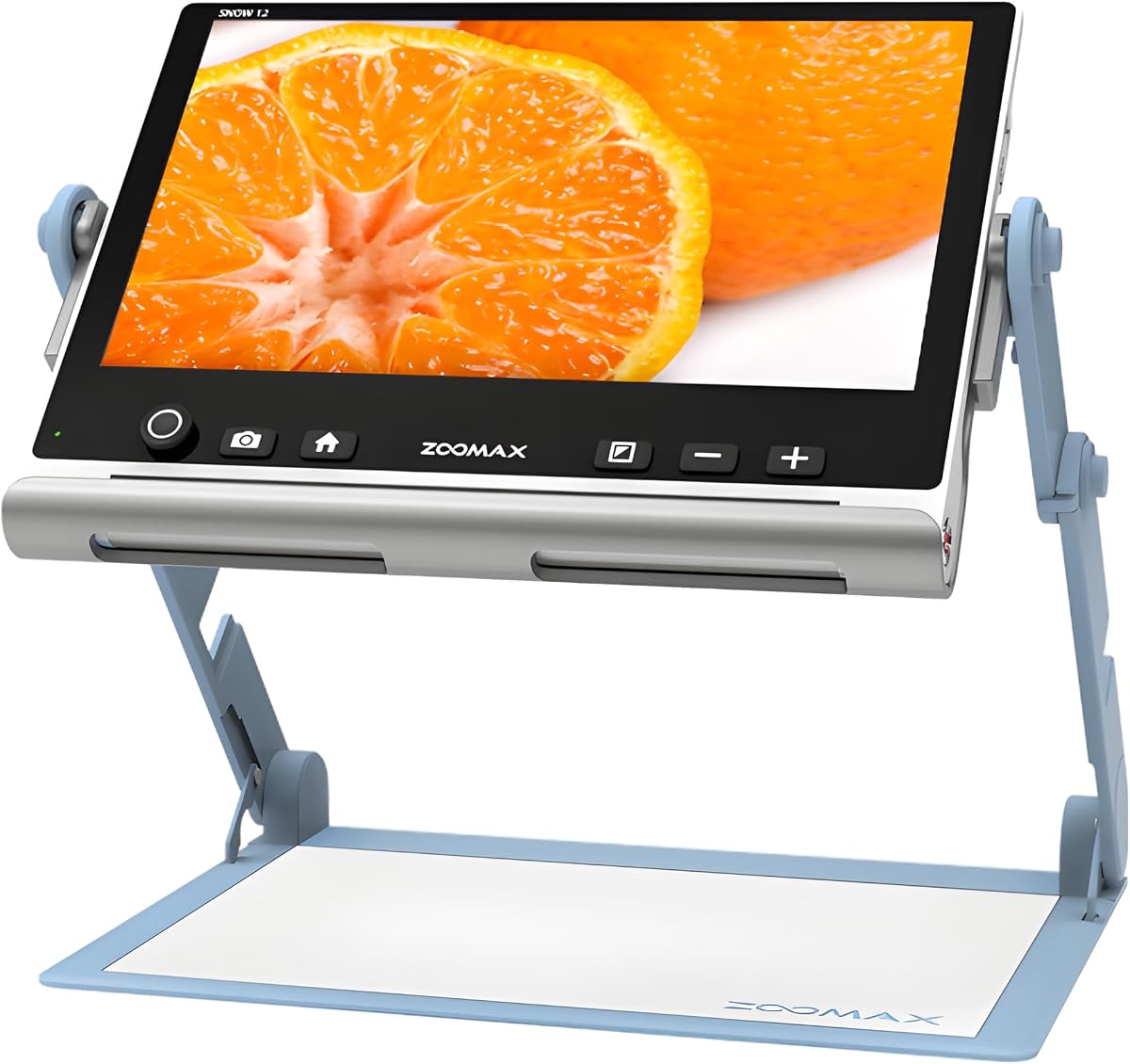
The Snow 12 Inch Foldable Portable Video Magnifier by Zoomax is the most specialized model in this guide. Its large HD display, foldable stand, and 19X magnification are designed for sustained reading and viewing, while OCR and text-to-speech support add a different kind of accessibility from simple visual enlargement.
We may earn a commission when you buy through this link, at no additional cost to you.
Optical character recognition converts recognized text into spoken words, and the supplied information states support for more than 20 languages. That can reduce the strain of reading small print continuously and make documents more accessible in multiple language contexts. The HD camera supplies the visual input, while the 12-inch display offers a substantially larger viewing area than the 3.5-inch and 5-inch products.
The 19X maximum is considerably lower than the 32X and 48X alternatives, making this less compelling for inspecting extremely small characters through magnification alone. It is also a larger, less pocketable product, although the folding stand supports different angles and compact storage. The 4.0 rating reflects a capable package, but the advanced functions are the principal reason to choose it over conventional handheld magnifiers.
This is the premium recommendation for a reader who values text-to-speech, OCR, multilingual support, and a large screen more than extreme optical zoom. It may suit document review, study, office tasks, and extended reading sessions where hearing an extracted passage is useful. Users whose priority is tiny label text should instead prioritize one of the high-zoom 5-inch devices.
OCR and text-to-speech can transform printed material into an audio output, reducing the need to keep every passage visually enlarged. The function is especially relevant for lengthy documents and multi-language reading.
The 12-inch display creates a generous viewing area, while the folding stand permits different reading angles. This supports a more stationary setup than a compact handheld device.
We may earn a commission when you buy through this link, at no additional cost to you.
The Eyoyo 5-inch Portable Digital Video Magnifier combines 4X to 32X zoom with a 4500mAh rechargeable battery and a stated operating time of more than four hours. Its 5-inch LCD offers more room for text than the compact 3.5-inch Eyoyo, making it a better fit for books, newspapers, writing, and extended reading sessions.
We may earn a commission when you buy through this link, at no additional cost to you.
Seventeen color modes and five brightness levels provide meaningful contrast and illumination choices. The device remembers preferred settings, which is useful for regular users. Photo capture and playback are included, and a TF card up to 32GB can store images, although the card itself is not supplied. AV output allows the magnified image to be shown on a television or another larger screen.
Compared with most 5-inch rivals, this model provides the largest stated battery capacity and a clear four-hour runtime claim. The trade-off is its 4X minimum magnification, which is higher than the 2X or 3X starting points offered by several competitors. A lower starting magnification can be helpful for fitting more context on the screen. Its 4.0 rating is solid but not exceptional within the category.
This is a particularly sensible option for readers who want extended portable use and do not need an ultra-low starting magnification. The foldable handle supports comfortable positioning, while the battery specification makes it easier to plan longer sessions. It is also more restrained in color choices than models offering 26 modes, so users who prioritize very broad customization may look elsewhere.
The 4500mAh battery and stated runtime of more than four hours offer useful endurance for books, forms, and documents. That makes the model less dependent on frequent charging than smaller alternatives.
Seventeen color modes, five brightness levels, and automatic preference memory make it easier to establish a repeatable viewing setup. Photo capture provides a way to preserve temporarily visible information.
We may earn a commission when you buy through this link, at no additional cost to you.
This Portable Digital Video Magnifier stands out for free switching between near and far cameras, giving users two viewing distances in one 5-inch device. It supports 2X to 32X magnification, 26 color modes, and an 800 by 480 HD color LCD with digital signal processing intended to restore detail without noticeably deforming enlarged fonts.
We may earn a commission when you buy through this link, at no additional cost to you.
Large, prominent buttons and remembered settings make the interface approachable for elderly users and anyone who values simplicity. The integrated handle and foldable bracket allow the magnifier to rest at an angle over a page. They also support left- or right-handed positioning, which can reduce wrist and neck strain during longer readings.
The television connection is useful for enlarging the image on a larger screen, though this model does not list HDMI output. The supplied information also does not identify battery capacity, photo capture, or card support. Its 4.0 rating is respectable, though it does not separate this model from the Eyoyo 5-inch and other 32X alternatives. The near-and-far camera system is its clearest distinguishing feature.
Choose this product when the ability to examine both nearby text and more distant details is important. It is well suited to home, office, shopping, and general low-vision support. A buyer who prioritizes rechargeable battery specifications, extreme zoom, or text-to-speech should compare one of the devices that documents those features explicitly.
Dedicated near and far cameras allow the user to move from close documents to other subjects without relying on a single focal setup. This adds flexibility for tasks that extend beyond the page.
Prominent buttons reduce the effort required to locate commands. Remembering settings also helps users return to a familiar color and magnification combination without rebuilding it each time.
We may earn a commission when you buy through this link, at no additional cost to you.
The Eschenbach SmartLux is a lightweight, portable HD video magnifier with a 4.4 customer rating. Its magnification choices are more restrained than those of the high-zoom models, offering 5X, 7X, 9X, and 12X, while five viewing modes give users several ways to present printed or visual information.
We may earn a commission when you buy through this link, at no additional cost to you.
Image capture is another useful feature for preserving information that is only temporarily visible. The handheld design and included Liberty cleaning cloth emphasize convenience and maintenance. This makes the product potentially approachable for people who need magnification but do not need to transport a larger stand-based system.
The major limitation is its maximum 12X magnification. That may be sufficient for moderate print, labels, and short passages, but it is not well suited to very small text compared with devices reaching 32X or 48X. The supplied information also does not state screen size, resolution, battery details, external-output support, or whether the viewing modes adjust color and contrast. Those omissions make careful comparison important.
This model is most attractive to buyers who value a simple, lightweight handheld design and discrete magnification steps rather than extreme zoom. Its 4.4 rating is the second highest in the guide. Users who need to read tiny medicine labels, dense fine print, or distant signage should prioritize the documented magnification range of a higher-zoom alternative.
The lightweight body supports use across a home, office, or travel setting without the bulk of a larger screen. It also offers a direct way to preserve selected images for later reference.
Four magnification levels and five viewing modes provide a manageable set of adjustments. This can be useful for readers who prefer a limited menu over a large number of technical controls.
We may earn a commission when you buy through this link, at no additional cost to you.
The 5-inch Digital Magnifier provides 3X to 48X zoom on an 800 by 480 HD color LCD, combining a moderately wide starting range with one of the highest maximum magnifications in the guide. Its 4.0 rating and simplified controls make it a practical option for short, detail-focused readings such as prescription labels, instructions, maps, recipes, menus, and tags.
We may earn a commission when you buy through this link, at no additional cost to you.
The foldable handle keeps the unit lightweight and portable for dining out, shopping, or pharmacy visits. An external battery is stated to last more than four hours. Memory retains user habits, while photo capture and playback allow important portions of a page to be saved and revisited. TF cards up to 32GB are supported, although no card is included.
The product information explicitly says that it is not recommended for long books or novels. That is an important limitation because scanning a sustained page with a handheld camera can be tiring, and 48X may create a narrow or less comfortable view. Its 3X minimum also means that less context appears at the lowest setting than on a 2X model. AV output is supported for a larger screen.
This is a strong pick for occasional inspection of very small items rather than continuous whole-page reading. The wide zoom range, portability, and capture functions offer good flexibility for short tasks. Someone planning to read novels for hours should instead emphasize a larger screen, stable bracket, comfortable battery life, and text-to-speech or reading-focused features.
The 48X maximum is well suited to tiny labels, printed ingredients, serial details, and other compact text. The 3X starting point offers more context than models that begin at 4X.
Photo capture and playback can preserve an item that may be difficult to keep under the lens. This is useful for sharing, reference, or reviewing a detail that appeared only briefly.
We may earn a commission when you buy through this link, at no additional cost to you.
The most useful digital magnifier is the one that makes the intended material easier to see while remaining comfortable to operate. Screen size, zoom, focus, color controls, power, and portability should be matched to the reader's daily tasks rather than selected from magnification numbers alone.
Choose a small screen for portability, or a 5-inch or larger display when sustained reading is the main goal.
Match the low setting to the amount of context needed and the high setting to the smallest expected text.
Favor dependable focus and stable enlargement over a headline zoom level that is difficult to keep clear.
Look for several contrast modes and brightness controls, then use the option that makes text easiest to distinguish in your usual lighting.
Choose simple buttons and saved settings when repeat use matters most.
For long sessions or travel, verify runtime, charging method, and whether a spare battery is practical to carry.
Use a stable foldable stand for lengthy reading and a handheld setup for quick, on-the-go tasks.
Prioritize extras that solve a recurring task, such as larger-screen viewing, saved images, distant viewing, or spoken text.
Begin by charging the device according to its instructions and confirming that the camera lens is clean. Place the printed material on a flat, well-lit surface, then unfold the stand or handle into a comfortable position. Turn the magnifier on, begin with a low magnification setting, and adjust the focus before moving closer to the text. Keeping the camera stable and moving the device slowly across the page usually produces a clearer result than changing several controls at once.
After focusing, test full color and a high-contrast mode to determine which display is easiest to read. Adjust brightness and, where available, the LED lighting to reduce glare. Save the preferred settings when the device includes a memory function. For longer material, use the foldable bracket to keep the screen at a consistent angle rather than holding the camera by hand. When external output is needed, connect the television or monitor as described in the product instructions and select the appropriate input.
Care for the lens with a soft, dry cloth, avoiding harsh chemicals and excess moisture. Store the magnifier with the stand folded and protect the screen from impact or pressure. Remove or protect a TF card when transporting a device that supports image storage. Periodically review saved images, recharge the battery before long outings, and keep the original guide accessible so a user or caregiver can quickly restore the preferred magnification, color, and lighting configuration.
The appropriate level depends on the size of the print, the viewing distance, and the screen size. A 5-inch model with 32X or 48X maximum magnification offers more range for tiny labels, while 2X or 3X starting points can show more context on a page. It is best to begin at a lower setting, focus carefully, and increase magnification only as needed.
No. A larger screen can reduce the need to scan across text, but focus, contrast, brightness, and viewing comfort are equally important. A smaller model may be more convenient for travel, while a larger screen with a stable stand is generally more suitable for extended reading. The best choice depends on the user's vision and typical tasks.
Digital magnification and display customization can make many forms of small print easier to see for people with macular degeneration, cataracts, glaucoma, diabetic retinopathy, color-vision differences, or amblyopia. Results vary by person, and a device should complement rather than replace professional eye care or prescribed assistive technology. A clinician or low-vision specialist can help determine whether this type of aid fits a specific need.
Color modes alter the contrast and color of the displayed image to make text easier to distinguish. Black on white and white on black reduce visual complexity, while blue and yellow combinations may improve perception for some users. The most effective setting depends on the reader's eyesight, the page background, and the surrounding light, so several modes should be tested.
A handheld model is convenient for short tasks, labels, menus, and travel, but it requires more active movement and can become tiring. A foldable stand places the camera and screen at a consistent angle and is generally more comfortable for newspapers, magazines, and extended reading. The product listing for the 5-inch 48X Reading Aid specifically advises against using that model for long books or novels.
Many models support external viewing. The compact Eyoyo, the 5-inch 32X models, the Eyoyo 5-inch, and the 5-inch 48X Reading Aid list AV output, while the VEVOR offers both AV and HDMI. Connecting a larger compatible display can provide a more comfortable image, although the included cables and supported connections should be checked before purchase.
A magnifying glass provides optical enlargement through a lens and has no display, lighting controls, color modes, or memory. A digital magnifier captures an image with a camera and presents it on an LCD, allowing users to adjust magnification, contrast, brightness, focus, and sometimes output or save images. Digital models are more versatile but require power and may be larger or more expensive.
A standard digital video magnifier primarily enlarges visual information and may be most useful for people with some remaining usable vision. People with little or no functional vision may need different assistive technology, such as a screen reader, refreshable braille display, or OCR device with reliable text-to-speech. The Snow 12 stands apart in this list because it explicitly includes OCR and spoken-text functions.
The best overall choice in this guide is the portable 5-inch model with 2X to 32X magnification, 26 color modes, remembered settings, and a foldable handle. Its 4.3 rating and balanced feature set make it versatile for ordinary reading and a wide range of everyday tasks. The compact Eyoyo is the leading budget option for quick, portable assistance, while the Snow 12 is the premium pick for large-screen viewing, OCR, and multilingual text-to-speech.
Prioritize the features that match your routine rather than maximum magnification alone. A stable bracket, clear focus, comfortable contrast, accessible buttons, sufficient battery life, and a screen size suited to the material can matter more than an extra zoom step. High-zoom models are useful for labels and tiny print, whereas stand-supported and text-to-speech options may be better for documents and longer reading.
Finally, check the current listing, availability, included accessories, and specifications before ordering. Product designs, included cables, battery details, and marketplace listings can change, and the same is true of prices. The comparison provides a practical starting point, but the best digital magnifier for low vision is ultimately the one that is comfortable, understandable, and effective for the user's particular vision needs.