
USB Monitor Clip on Fan Deepsea Blue
4.3Editor score
Dual adjustable fan heads
Integrated eye-care light
Independent lighting controls
Extended USB power cable
A clip on desktop monitor fan can add personal cooling without occupying valuable desk space. The best models attach securely to compatible displays, laptops, or other suitable edges while directing airflow toward the user. Useful features include adjustable fan heads, multiple speeds, quiet motors, flexible placement, and convenient USB power.
The products in this guide are compared using their stated specifications and customer ratings. We look closely at mounting compatibility, airflow direction, control options, noise characteristics, power requirements, lighting, battery support, and suitability for offices, gaming areas, study spaces, travel, and other compact environments.
Each review identifies the most useful qualities and the practical compromises of its featured model. The top picks represent strong options for different priorities, including flexible airflow, adjustable cooling, and a versatile clip-and-stand format. Product availability and prices can change, so compare current listings and verified customer feedback before purchasing.
4.3Editor score

5.0Editor score
4.6Editor score
As an Amazon Associate we earn from qualifying purchases.
This side-by-side comparison evaluates ten clip on desktop monitor fan options across airflow, adjustability, mounting, power, and useful extras, helping you find the right balance of cooling, convenience, and desk-friendly design.


The THRRLY Desktop Fan is a versatile monitor-mounted cooler with a 4.0 customer rating. Its defining feature is the pair of fan heads, each of which can be turned vertically and horizontally through 360 degrees. This gives users more control over whether the air reaches their face, upper body, desk, or the back of a nearby computer. The fan is also designed to remain out of the way while preserving open desk space.
We may earn a commission when you buy through this link, at no additional cost to you.
Installation is based around an adjustable silicone clamp that accommodates monitor thicknesses from 0.2 to 1 inch, or 5mm to 25mm. A soft rubber layer inside the clamp helps protect the contact surface from scratches. Once attached, the fan is positioned high enough to direct air across the user. The two heads can also point in different directions, making the product suitable for shared workspaces, gaming setups, and situations where one person needs cooling while another area of the desk needs airflow.
Three speed settings provide soft, natural, and strong wind options, and the third setting offers variable-speed control within that level. The included 6.5-foot USB cable can connect to a laptop, desktop computer, power bank, or another USB power source. The tradeoff is that this is a wired design, so it cannot be repositioned around the room without also considering the cable's reach. Its two-headed format may also feel more substantial than a single-fan alternative.
This fan is a strong choice for buyers who value adjustability and broad airflow coverage over cordless convenience. It works particularly well for users who want to cool both themselves and the area around a computer, or who share a desk with someone else. Those seeking a rechargeable model, integrated lighting, or an especially subtle single-head design may prefer another option, but the THRRLY offers one of the most flexible configurations in this roundup.
The dual-head arrangement is more than a visual feature: each head can be aimed independently. This is useful when direct facial airflow is too concentrated, when the computer itself needs additional air, or when the fan is shared across a wide workstation.
The adjustable silicone grip accommodates a broad range of display thicknesses, while the internal soft-rubber layer helps reduce the chance of scratching the monitor or another suitable clipped surface.
We may earn a commission when you buy through this link, at no additional cost to you.
The Bladeless Monitor Clip On Fan is built around portability, with a 2.9 customer rating and a rechargeable 4000mAh battery. Its most useful feature is the ability to operate cordlessly for up to seven hours, depending on the selected speed. That makes it more flexible than a permanently wired monitor fan when the user wants to move the fan between a workstation, bedside table, or other compact location.
We may earn a commission when you buy through this link, at no additional cost to you.
The adjustable silicone clamp is designed for displays between 0.2 and 0.8 inches thick and is described as suitable for flat monitors, curved monitors, and laptops. A detachable pedestal turns the device into a small tower fan for narrow spaces. Its bladeless outlet uses a long, air-conditioner-style design intended to widen wind coverage, while the outlet angle can be adjusted. Three wind speeds give the user several levels of personal cooling.
The principal concern is the 2.9 customer rating, which is lower than that of most products in this guide. Buyers should therefore examine recent customer feedback carefully, particularly around airflow consistency, battery charging, mounting stability, and real-world noise. It is also important to remember that the stated seven-hour runtime depends on speed, so maximum-runtime claims may not reflect use at the strongest setting.
Despite that caveat, this is a compelling choice for anyone who prioritizes cordless use. It is particularly suited to people who alternate between clipping the fan to a laptop and placing it on a nearby surface. If dependable battery operation and a bladeless outlet matter more to you than the stronger customer rating enjoyed by several wired competitors, this model deserves close consideration.
A built-in rechargeable battery separates this fan from models that must remain connected to a USB source. That freedom is especially convenient in shared rooms, temporary workspaces, and locations where power outlets are inconvenient.
The clip can be removed and replaced with the detachable pedestal, allowing the same fan to serve as a monitor accessory or a small freestanding tower in a narrow area.
We may earn a commission when you buy through this link, at no additional cost to you.
The HomeBeyond Clip on Fan leads this group with a 5.0 customer rating. It combines a gravity-assisted rotatable clip with a freestanding desktop position, giving it more versatility than a conventional monitor-only fan. The design is particularly well suited to offices, gaming areas, and study spaces where users may alternate between a clipped and upright setup.
We may earn a commission when you buy through this link, at no additional cost to you.
Its standout control feature is stepless speed regulation. Rather than moving through only a few preset levels, the button control allows airflow intensity to be fine-tuned according to personal comfort. The fan head also adjusts through 60 degrees vertically, and the product is described as using a wide-area airflow pattern to circulate air around the desk. Its muted motor is intended to keep noise unobtrusive during calls, concentration-heavy work, or gaming.
Unlike dual-head and flexible-neck competitors, the HomeBeyond concentrates on a cleaner, more compact form with one adjustable head. This may be an advantage on busy monitors or in visually minimal workspaces. The trade-off is less directional versatility: users who need to direct one head toward a person and another toward equipment will find the more elaborate fan designs better suited to that task.
This is our preferred pick for buyers who want simple controls, strong customer feedback, and flexible placement without a rechargeable battery. The combination of continuous speed adjustment, a useful 60-degree tilt, and a sturdy clip-and-stand design makes it an adaptable desk companion. It is especially attractive for users who want one product to handle both a monitor-mounted and freestanding setup.
Stepless adjustment is a meaningful improvement for users who find discrete speed levels either too weak or too strong. Fine control can also make the fan easier to keep running during focused work without creating an uncomfortable draft.
The gravity-assisted clip and freestanding option allow the fan to follow the user from a monitor to a desk. This dual-purpose format is useful when equipment changes or when different cooling positions are needed throughout the day.
We may earn a commission when you buy through this link, at no additional cost to you.
The USB Monitor Clip on Fan Deepsea Blue has a 4.3 customer rating and combines personal cooling with an adjustable monitor light. Its dual fan heads sit on flexible arms, allowing airflow to be directed toward the front, side, or back of the display. This makes it useful for directing air around the user while also helping move air near the computer.
We may earn a commission when you buy through this link, at no additional cost to you.
The lighting feature is designed for screen-based work, with adjustable angles, three lighting modes, and an anti-glare design intended to reduce reflections and screen glare. Separate controls allow the light and fans to be operated independently. This is a meaningful benefit at night, during gaming, or in a home office where the main overhead light creates shadows. The user can use the cooling without activating the lamp or create a focused pool of light with the fans switched off.
Its clamp is advertised for curved, thin, and thick monitors, as well as laptops, and the product description also mentions edges up to 3 centimeters wide. Those broad mounting claims increase its usefulness beyond traditional displays, although buyers should always check the dimensions and shape of the intended attachment surface. A 200-centimeter USB cord supports continuous use with a computer, power bank, wall charger, or another USB source.
This model is a good match for users who want a monitor light and fan in one compact accessory. Its main compromise is that the integrated lighting is unnecessary for people who already have satisfactory task illumination. It is also fully wired, so it cannot offer the placement freedom of a battery-powered model. Even so, the combination of two movable fan heads, independent controls, and flexible lighting makes it a well-rounded option for extended desktop use.
Independent buttons let users operate the fan and lamp separately. That flexibility is helpful when the light is only needed for a short task or when cooling is desired without adding more illumination to the desk.
The versatile clamp can also grip suitable edges such as table edges, bed frames, picture frames, mirrors, and music stands, provided the dimensions and surface shape meet the stated limits.
We may earn a commission when you buy through this link, at no additional cost to you.
The Rechargeable Flexible-Neck Clip Fan has a 4.3 customer rating and emphasizes portability across offices, dorms, vehicles, camps, travel, and home spaces. It combines a built-in rechargeable battery with USB charging, so it can provide cooling beyond the reach of a wall outlet. The integrated power-bank output is another distinguishing feature for emergencies, although it should be treated as a convenience rather than a substitute for a dedicated power source.
We may earn a commission when you buy through this link, at no additional cost to you.
Its most flexible component is the 360-degree durable gooseneck. The neck can be bent to direct the breeze toward the user, toward a sleeping area, or toward a nearby object that needs air movement. A five-blade motor is described as producing strong airflow while remaining under 40dB, and three speed settings let users balance cooling against noise. The quiet motor is particularly useful for bedrooms and study sessions.
The rechargeable battery is not replaceable, which is worth considering for buyers who expect several years of regular use. Long-term battery aging can also affect the usefulness of a compact fan whose primary advantage is cordless operation. The flexible neck is another practical compromise: it provides excellent direction control, yet its position may shift as the device is handled or moved.
This fan is a strong option for travelers, students, campers, and anyone who needs personal cooling in locations without convenient power. It may be less appropriate for a permanent workstation where a long USB cord would not be bothersome and where a more rigid, more stable clamp is preferable. For flexible placement and emergency utility, however, this model stands apart from conventional wired monitor fans.
The bendable neck makes it easy to place the fan above, beside, or below the user. It can also be repositioned toward a car interior, bedside area, or other location where a rigid monitor clamp would be inconvenient.
USB charging and rechargeable operation make the fan suitable for travel and outdoor use. Its power-bank output adds a limited emergency charging function, although users should still carry a separate battery for critical electronics.
We may earn a commission when you buy through this link, at no additional cost to you.
The Monitor Fan with Eye-Care LED has a 3.9 customer rating and brings together three functions in one monitor-mounted device: cooling, task lighting, and aromatherapy. The fan provides three airflow levels, while the lamp offers three brightness settings and a vertically adjustable angle. A dedicated slot accepts reusable aroma pads and essential oil, although the oil itself is not included.
We may earn a commission when you buy through this link, at no additional cost to you.
The 360-degree adjustable fan head is designed to direct cooling where it is needed, making the device appropriate for offices, dorm rooms, reading areas, and content-creation setups. The LED light is described as soft and flicker-free, with a non-glare treatment intended to make prolonged screen use more comfortable. Independent controls allow the fan and lamp to run separately, and the lamp can fold away when it is not required.
The product is also portable. Its stated height is 6.9 inches, and the included 6.6-foot USB-C cable supports use with compatible computers, power banks, and wall chargers. The clamp fits displays up to one inch thick and is described as suitable for curved or flat screens without scratching. Its stated power draw ranges from 1.4 to 6W, and the ABS and polycarbonate construction is intended to resist yellowing.
This is a good choice for buyers who want a compact productivity accessory rather than a basic fan. The combination can reduce desk clutter by replacing separate task lighting and fragrance accessories. The trade-offs are the lower customer rating, the need to add essential oil separately, and the possibility that some users will not use the aromatherapy feature. It is nevertheless a versatile pick for students, remote workers, gamers, and readers.
Combining a fan, task light, and aroma pad reduces the number of separate accessories around a monitor. This makes the device especially appealing to users who value an organized desk and frequently work after normal room lighting has been switched off.
The ability to switch the fan and lamp independently prevents the lighting from remaining on when only cooling is required. The foldable light design also helps the device sit more neatly against a display when the lamp is not in use.
We may earn a commission when you buy through this link, at no additional cost to you.
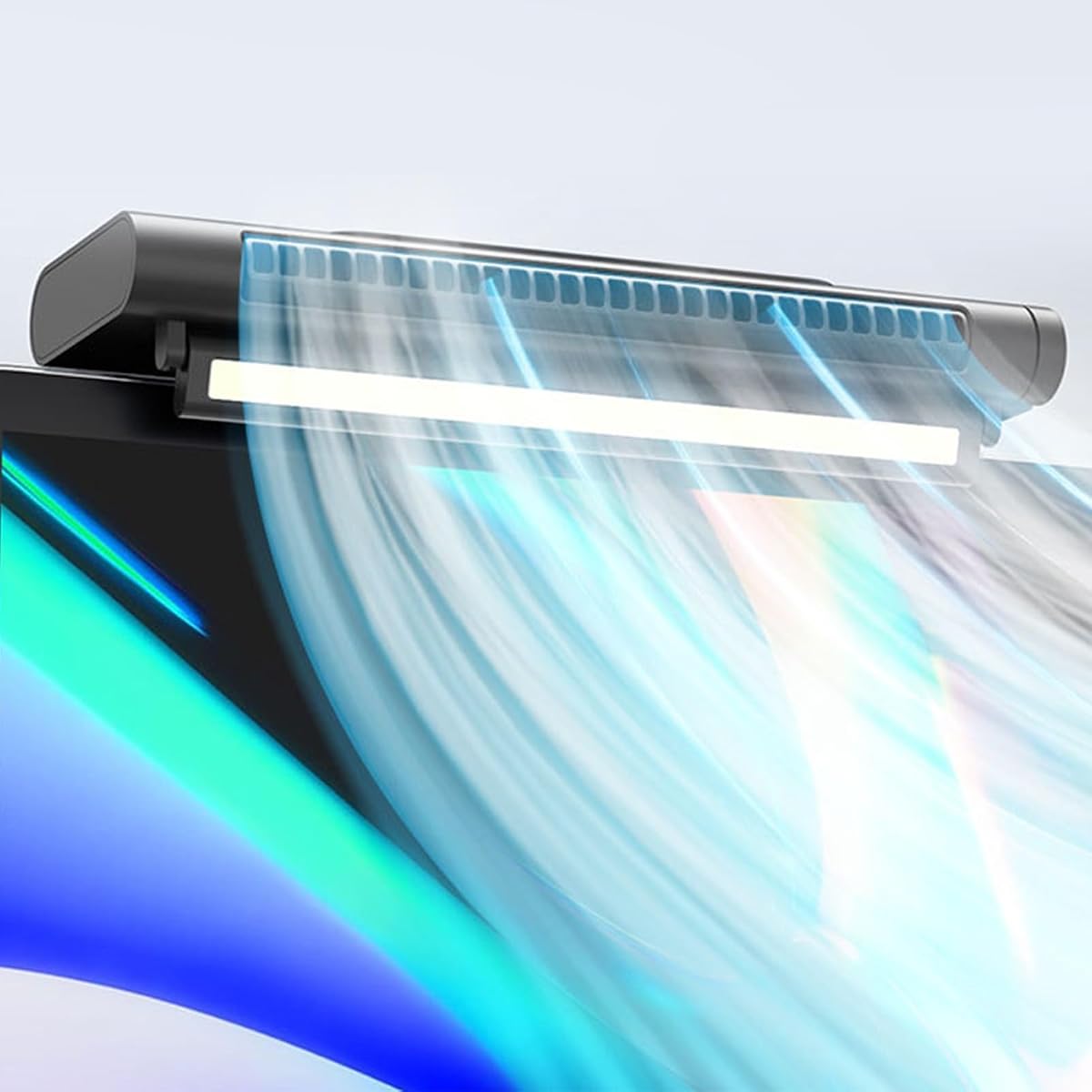
The 11.8-Inch Clip-On Monitor Fan has a 1.0 customer rating, the lowest among the listed products, so prospective buyers should approach it cautiously. Its central attraction is the unusually wide, 11.8-inch air outlet. The product description compares this outlet with an air-conditioner-style design and states that it is intended to triple wind speed and produce broad, even airflow across the desk.
We may earn a commission when you buy through this link, at no additional cost to you.
The fan can clip to the top of a PC or laptop screen, function as a desktop fan, or be wall-mounted. Its desktop outlet tilts up and down through 45 degrees, allowing airflow to be aligned with a seated user's position. Three wind speeds are provided, while stated noise is below 36dB at the lower level and below 45dB at the higher level. The stated figures suggest an emphasis on quiet operation during work and study.
Its long format is the most important trade-off. A wide bar can distribute air over a broader area, but it may cover more of a monitor or be less convenient on compact laptops than a smaller clamp-on unit. The low customer rating may also reflect issues not fully explained in the supplied product information, so checking recent reviews for mounting stability, vibration, and actual sound would be sensible before ordering.
Despite the rating, the design is worth considering for a wide desk, a large monitor, or a setup where even airflow is more important than a minimal profile. It may be especially useful as a wall-mounted or desktop fan rather than a conventional clip-on accessory. For buyers, the deciding question is whether the wide outlet and mounting flexibility justify the uncertain customer feedback.
The extended outlet is designed to cover more of the user's upper body than a compact circular fan. That makes it interesting for wide workstations where a concentrated stream of air could feel overly direct.
Wall mounting and a tiltable desktop position broaden the fan's uses. These options can help users place cooling closer to their seated height or in a room where the monitor edge is not the most convenient location.
We may earn a commission when you buy through this link, at no additional cost to you.
The OVARIA Monitor Clip On Fan has a 2.0 customer rating and combines a bladeless personal fan with an eye-protective light. It uses USB power and stepless speed control, allowing the user to adjust the airflow continuously rather than moving only through a limited set of presets. Installation is based on a simple clip that is presented as compatible with flat monitors and laptops.
We may earn a commission when you buy through this link, at no additional cost to you.
The integrated light is intended to reduce screen glare and visual fatigue while adding a softer illuminated area near the display. From a workspace perspective, the product addresses two needs at once: directional personal cooling and focused task illumination. The bladeless format also avoids exposed rotating blades, which can appeal to users who place the device close to their hands or work materials.
The main concern is the 2.0 customer rating. The product description makes a claim that the fan can cool the user within seconds, but the supplied information does not independently verify that outcome. It would be prudent to evaluate recent customer comments for airflow strength, sound, mounting durability, and light quality. The integrated design may also be less attractive if one component is useful while the other is not.
This model is best suited to buyers who want one refined desk accessory to handle cooling and lighting. It is more specialized than a simple fan, and the rating makes careful review essential. If the bladeless appearance, continuous speed control, and integrated light align with your workspace priorities, it can be a practical choice; if you only need reliable airflow, a simpler model may offer a more straightforward alternative.
Stepless control lets the user settle on a subtle background breeze or increase the airflow without navigating several preset levels. It is particularly useful for changing comfort needs during a long work session.
Combining the light and fan can simplify a compact workspace where separate accessories would consume more surface area. The product also supports use beyond a monitor, including office partitions and dormitory bed boards.
We may earn a commission when you buy through this link, at no additional cost to you.
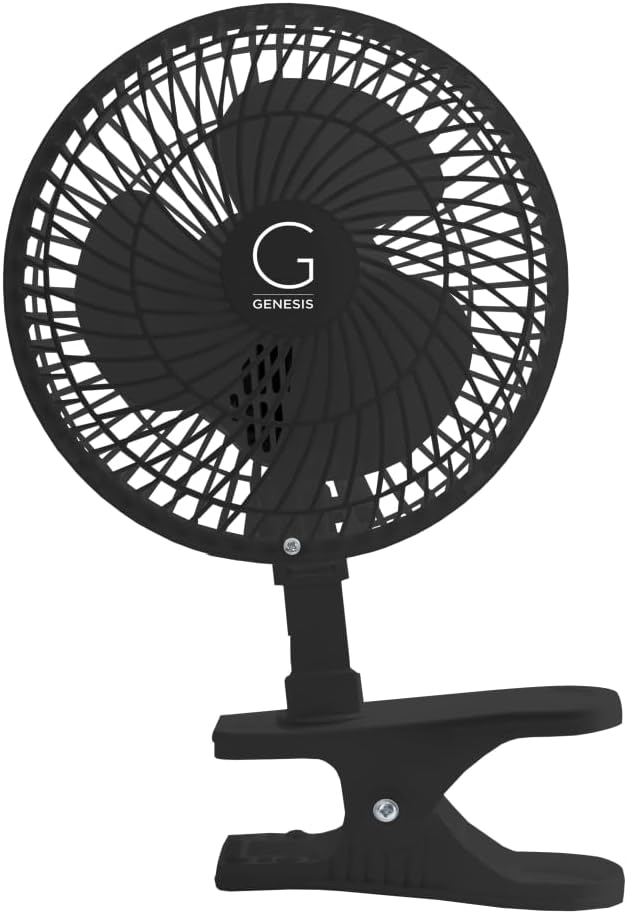
The Genesis 6-Inch Clip Fan has a 4.6 customer rating and offers a deliberately simple alternative to feature-heavy monitor fans. It converts between a clip-on fan and a tabletop fan by loosening a butterfly screw on the head and attaching the base appropriate to the desired position. That mechanical approach is direct and easy to understand, even for users who dislike complicated controls.
We may earn a commission when you buy through this link, at no additional cost to you.
The sturdy clamp is intended to keep the fan fixed and direct airflow where needed. The head is adjustable, allowing the user to aim the breeze toward a seated person or reposition it to serve more than one area. Two quiet speeds provide straightforward cooling options for the home, office, or dormitory. The six-inch format also gives it a familiar, conventional fan shape that can feel less visually technical than a light bar or bladeless model.
The primary limitation is its lower level of customization. There are only two speeds rather than continuous or multi-level controls, and the conversion process requires physically changing the base. There is also no integrated lighting, battery, or stated digital display. Users seeking those features should look to one of the newer multi-function models, but buyers who prioritize simplicity may find those extras unnecessary.
This is an excellent choice for someone who wants a dependable, uncluttered fan that can move between the edge of a desk, a monitor, or a tabletop. The strong 4.6 rating and adjustable head make it a well-regarded pick in this category. It is particularly suitable for dorm rooms, home offices, and shared workspaces where a simple mechanical product is easier to use and maintain.
The butterfly-screw connection makes it easy to understand how the fan changes between a clipped and freestanding arrangement. That simplicity can be a meaningful advantage in a shared or frequently rearranged workspace.
A strong grip helps the fan remain in position while its adjustable head changes the direction of the breeze. The two quiet speeds are enough for routine personal cooling without a complicated control interface.
We may earn a commission when you buy through this link, at no additional cost to you.
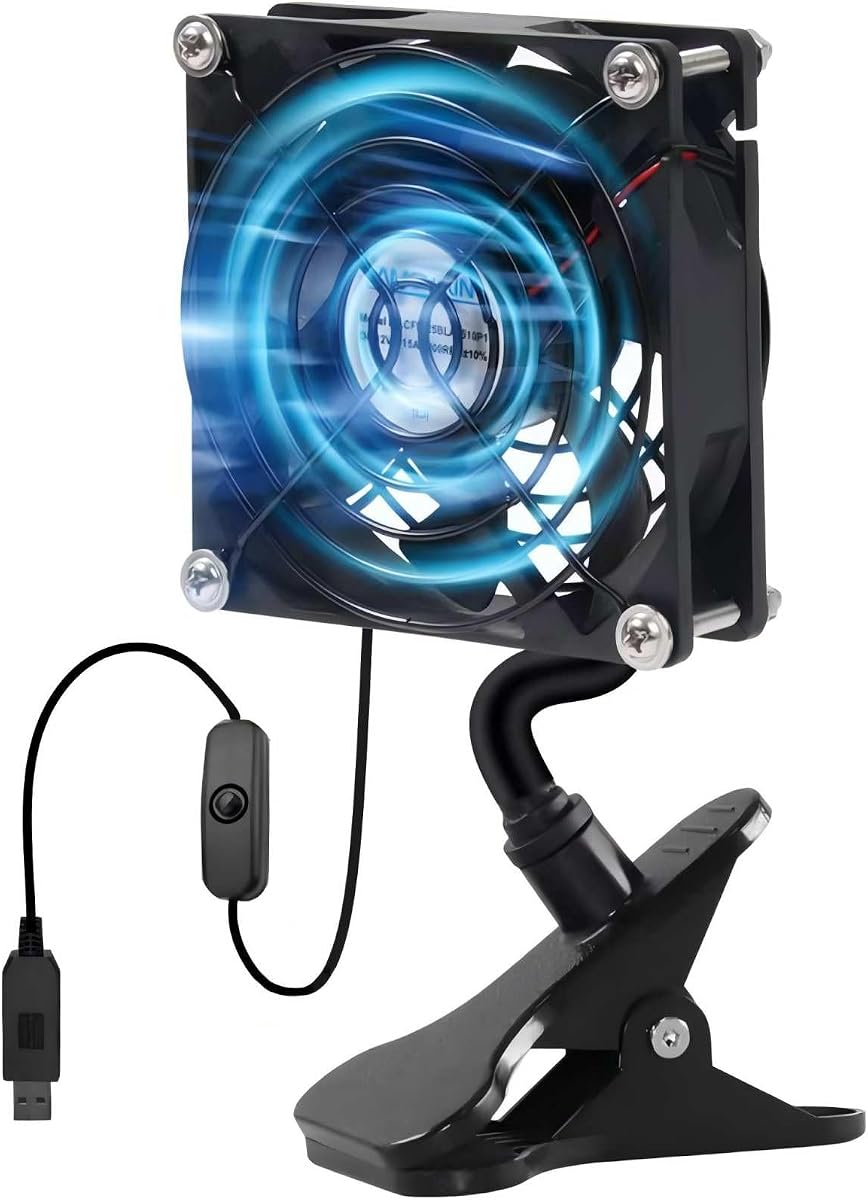
The 92mm USB Clip on Fan has a 3.6 customer rating and focuses on a compact, multipurpose format. Its 3.62-inch fan size makes it small enough for tight spaces, while the strong clamp can grip surfaces up to 1.38 inches thick. That grip capability is broader than many monitor-fan clamps, allowing the fan to secure itself to suitable computer, equipment, vent, router, and other edges.
We may earn a commission when you buy through this link, at no additional cost to you.
The fan converts between clipped operation and a stable freestanding position on a flat surface. Its cooling direction is adjustable and designed to remain directed without gradually loosening or vibrating out of position. The inline on-and-off switch provides a convenient way to stop the fan without disconnecting it from the USB source, which can reduce unnecessary port wear and make daily operation easier.
Stated noise is below 33dB, placing this model among the quietest options described. It can be used in bedrooms, offices, vehicles, gaming areas, and other compact locations, with the product information also mentioning plant cooling, tent ventilation, and electronics projects. Its limitations include a modest customer rating and only an on/off control, so users seeking multiple speeds or continuous regulation should look elsewhere.
This is a compelling pick for small workspaces, travel, and unconventional mounting locations where a larger monitor bar would be cumbersome. The strong clamp and freestanding option make it more versatile than its small size might initially suggest. It is also a practical choice for users who specifically value quiet operation and a simple inline switch over sophisticated lighting or digital controls.
The compact ninety-two millimeter format fits where larger bars or dual-head units may feel intrusive. It is easy to reposition among a desk, a computer setup, a vehicle, or other compact environment.
A clamp rated for relatively thick edges provides mounting flexibility beyond the standard monitor. The inline switch offers a straightforward way to turn the fan off without unplugging the cable.
We may earn a commission when you buy through this link, at no additional cost to you.
The right clip on desktop monitor fan depends on your display, power setup, preferred airflow, and tolerance for extra functions. Review mounting limits, controls, noise, and portability before choosing a model.
Clamp compatibility is the most important mechanical consideration because a fan cannot provide stable airflow if it cannot safely attach to the intended surface. The listed products support different ranges, including 5mm to 25mm, 5mm to 20mm, monitors up to one inch thick, and edges up to 1.38 inches. Measure the display bezel or edge rather than assuming that a monitor's overall dimensions determine the fit. Also consider the shape of the edge, because a curved or unusually narrow bezel may not match a clamp even when the thickness is within range.
Check the stated range before buying, and confirm that the attachment area is firm enough to hold the fan. Some models use silicone or soft internal padding to reduce scratching, while others simply claim a stable grip. A protective liner is preferable on a display or finished surface.
Good personal cooling depends on where the air goes, not just how quickly the fan spins. Dual-head models can direct one fan toward the user and another toward equipment, while single-head designs generally need more careful positioning. Look for vertical tilt, horizontal rotation, a flexible neck, or an adjustable outlet. A broad outlet may distribute air more evenly across a wide desk, whereas a compact circular fan often creates a more concentrated stream.
Choose the articulation that matches your setup. Adjustable positioning is especially useful in shared workspaces, gaming setups, and rooms where the user frequently changes posture.
Preset speed buttons offer quick operation, while stepless regulation gives finer control over a continuous breeze. Fans with two speeds are adequate for many users, but three levels or continuous adjustment can make it easier to avoid either an uncomfortable draft or insufficient airflow. Consider whether a quiet low setting is important for calls, reading, study, or sleep. The relationship between motor speed and noise is central to comfort, so look for stated decibel figures when available.
More control is useful only if the interface is convenient. Choose a simple button layout for frequent adjustments or a straightforward inline switch when basic on-and-off operation is enough.
USB-powered fans are convenient because they can draw power from computers, power banks, wall chargers, and other compatible USB sources. Wired models are dependable for permanent desks, but cable length and routing matter. Long cords provide more positioning freedom, while short cords can keep a workstation tidy. Rechargeable models are better for travel and temporary use, though runtime varies with speed and battery aging can affect long-term performance.
For a fixed workstation, a wired design is usually straightforward. For travel, camping, or shared spaces, a rechargeable battery is more valuable. Always verify connector type and include an appropriate charging source if needed.
A monitor fan is often used close to the user, so low noise can matter more than maximum airflow. The products in this guide cite figures ranging from below 33dB to below 45dB, although real-world noise can vary with mounting quality, surface vibration, speed, and the user's hearing distance. A fan that resonates against a desk or monitor may sound louder than its motor rating suggests. Stable clamps and balanced mounting help reduce transferred vibration.
For bedrooms, libraries, and video calls, favor models explicitly designed for quiet operation. In a garage, workshop, or noisy gaming area, stronger airflow and a robust clamp may matter more.
Some monitor fans include an adjustable task light, while others add an aroma slot, emergency charging, or a detachable stand. These features can make a single device more versatile, but they also add complexity and may duplicate accessories you already own. A light with anti-glare construction may be useful in dark rooms, yet it will not replace properly positioned desk lighting for every task. An aromatherapy feature is an optional wellness touch rather than a core cooling benefit.
Treat extra functions as secondary to airflow and mounting. A simpler fan that meets your core needs may be easier to use and maintain than a multi-function model.
The main reason to clip a fan to a monitor is to preserve usable surface area. Compare the product's bar length, head size, clamp footprint, and whether it blocks any part of the display. A long model may provide wider airflow but occupy more bezel space, while a small circular fan may fit compact laptops better. Portability also depends on weight, cable length, and whether a battery is included.
Choose the smallest format that delivers the airflow and mounting flexibility you need. If the device will move frequently, favor a light, rechargeable, or easy clip-and-stand design.
Customer ratings offer a useful snapshot of the market, but they should be interpreted alongside the number of reviews, recent comments, and the product's maturity. The guide includes ratings ranging from 5.0 to 1.0, illustrating that a high visual rating does not guarantee that every installation will be equally successful. For lower-rated options, look for repeated complaints about stability, noise, charging, airflow, or lighting rather than relying on a single isolated issue.
Read current customer feedback for the exact model and installation scenario. Confirm that the product's stated features match the experiences buyers describe in their own homes, offices, and travel setups.
Before mounting the fan, measure the thickness and shape of the intended edge. Confirm that the surface is clean, dry, and stable, then position the silicone-lined or protected clamp over the upper edge of the display. Avoid forcing the clamp onto a bezel that appears thin, flexible, or uneven. Connect the USB cable before adjusting the fan's final position so the power source does not pull it out of alignment.
Aim the fan toward the user's face or upper body at a comfortable distance. A direct stream can feel stronger than expected, so begin with a low or moderate setting and increase the speed gradually. If the fan vibrates, reposition it, tighten the clamp, or move it to a sturdier edge. Use independent light and fan controls where available to avoid unnecessary illumination, and unplug the device when it will not be used for an extended period.
Clean the fan with a soft, dry or lightly damp cloth and disconnect the power before maintenance. Keep the air outlet and any vents free of dust, hair, and debris, and do not immerse the product. Follow the manufacturer's charging and battery guidance, especially for models with a built-in rechargeable cell. Inspect the clamp and silicone contact layer periodically, and discontinue use if the cable, connector, housing, or mounting point shows damage.
It can improve air movement around the computer, but it is not a substitute for proper computer ventilation. Keep intake and exhaust vents unobstructed, maintain the clearance recommended by the computer manufacturer, and use a clip-on fan to move room air rather than forcing it directly into a sealed case. Some dual-head products can aim one fan toward the back of a display while the other reaches the user.
A properly fitted clamp with a soft or silicone contact layer is less likely to cause damage, but the risk depends on the surface and the fit. Measure the edge before installation and avoid clamping onto a fragile, flexible, or sharply curved bezel. Do not drag the fan along the display while adjusting it, and inspect the contact area for grit that could cause abrasion.
Rechargeable fans are usually more convenient for travel, shared spaces, and temporary setups because they can operate away from a wall outlet or computer. Wired models are often simpler and remain available continuously while USB power is connected. Battery runtime depends on the selected speed, and built-in batteries eventually lose capacity, so consider how frequently and for how long you plan to use the fan cordlessly.
Several models in this guide advertise low noise, with stated levels ranging from below 33dB to below 45dB depending on the product and speed. Actual sound varies with motor quality, mounting vibration, airflow resistance, and distance from the user. A stable, non-rigid mount and a lower speed setting generally produce the quietest experience, particularly during calls, reading, or sleep.
Many models are designed for both, but you must check the stated thickness range and the shape of the available edge. A laptop lid may be thinner than a desktop monitor bezel, while a curved display may require a more flexible or carefully positioned clamp. Also consider whether the laptop can support the weight without leaning forward or pressing against a potentially hot exhaust area.
Two independently adjustable heads can create broader airflow coverage and serve different areas at once. One head may point toward the user while the other aims behind the display, or each may be adjusted for different seating positions. The additional size may make a dual-head model less suitable for very small laptops, so monitor dimensions and available bezel space should be checked.
No. Most USB-powered models can also connect to a compatible wall charger or power bank, and rechargeable models may run without any cable after charging. Connecting the fan directly to a computer is convenient because power and airflow are managed in one setup, but it is not required if another suitable USB power source is available.
Disconnect the power first, then use a soft brush or microfiber cloth to remove visible dust from the outlet, blades, and vent openings. A lightly damp cloth can be used on the exterior if the manufacturer allows it, but liquid should not enter the housing or USB connection. Do not use harsh cleaners, immerse the fan, or operate it while any part is wet.
The HomeBeyond Clip on Fan is the most flexible all-around choice because it combines stepless control, a 60-degree tilt, quiet operation, and both clipped and standing placement. The USB Monitor Clip on Fan Deepsea Blue stands out for integrated task lighting and two movable fan heads, while the Genesis Convertible Clip Fan offers a highly rated, simple clip-and-tabletop format for buyers who prefer uncomplicated controls.
Prioritize the features that affect your daily use: measure clamp compatibility before anything else, choose the airflow direction you need, and decide between wired and rechargeable power based on where the fan will live. Noise matters in bedrooms and study spaces, while integrated lighting or emergency charging may be worthwhile in a compact workstation. Avoid paying for extras that duplicate equipment you already own.
Before making a final purchase, compare the current listing, recent customer feedback, and the manufacturer's stated dimensions with your monitor and desk. Product designs, availability, and prices can change, so current information is essential. Whichever model you select, test the mounting gently, start with a lower airflow setting, and adjust the fan only when the power cable is safely routed.