
USB to Dual 3.5mm Audio Cable
5.0Editor score
Built-in high-resolution DAC
USB to dual 3.5mm
Driver-free plug-and-play use
A mic and speaker splitter can solve several common audio connection problems, especially when a headset uses separate microphone and headphone plugs but the computer has only one combined socket. The right adapter must match connector genders, follow the correct CTIA wiring standard, and preserve stereo sound without introducing unnecessary interference.
This guide compares ten adapters based on their stated connector configurations, supported equipment, construction, portability, and intended uses. It covers PC headset adapters, dual-headphone sharing cables, and USB-to-audio solutions, with special attention to compatibility because superficially similar 3.5mm splitters can serve very different purposes.
Each entry explains the most suitable buyer and the main trade-offs, helping distinguish a headset mic splitter from a music-sharing Y cable. Ratings and availability can change over time, and current prices should be checked before purchasing because promotional offers and retailer inventory fluctuate.
5.0Editor score

4.7Editor score

4.6Editor score
As an Amazon Associate we earn from qualifying purchases.
The table below compares connector direction, audio function, compatibility considerations, and physical design so shoppers can quickly identify the correct adapter for their equipment.




The D & K Exclusives Headphone Splitter is a 3.5mm female-to-dual-male adapter designed to connect a combined headset to a computer with separate headphone and microphone sockets. Its 4.3 rating reflects a generally useful approach, while the straightforward two-male layout makes the correct connection relatively easy to understand.
We may earn a commission when you buy through this link, at no additional cost to you.
Gold-plated contacts and oxygen-free copper are the main construction highlights. The adapter is intended for stereo playback and microphone input, making it suitable for internet calls, chat software, and multiplayer games. Its compact form is especially convenient for users who alternate between a laptop, desktop, and other equipment with legacy 3.5mm audio jacks.
The main limitation is compatibility uncertainty. The product details say it works with standard 3.5mm auxiliary equipment and PC or laptop connections, but the microphone path still depends on the headset using the expected CTIA-style wiring. It is not a general-purpose two-person audio-sharing cable, despite the additional description mentioning two headset connections.
This is a sensible choice for a separate-plug gaming headset that needs to use a computer with one combined headset port. Buyers should verify the plug orientation and CTIA standard before buying. Those who need a USB connection, longer reach, or guaranteed support for Apple earbuds should consider a more specialized option.
The short, portable format is practical for a laptop bag, shared office, or gaming setup that moves between locations. It avoids adding another permanently installed box to the computer.
Separate male plugs allow the headphone and microphone leads to reach the appropriate ports, reducing the need to hunt for a converter when a computer still offers legacy dual-jack audio.
We may earn a commission when you buy through this link, at no additional cost to you.
The UGREEN Headphone Splitter for Computer has a 4.5 rating and combines a 3.5mm female headset socket with two male outputs for microphone and audio. Its design targets computers and laptops with separate legacy 3.5mm jacks, which makes it a direct solution for dual-plug gaming headsets.
We may earn a commission when you buy through this link, at no additional cost to you.
The adapter uses polished 24K gold-plated connectors, oxygen-free copper wire, and an aluminum alloy housing. Its nylon braid reportedly passes more than 10,000 bending tests, giving it a reassuring construction profile for a cable that will be connected, disconnected, and carried regularly. A 20-centimeter length balances portability with enough room to route around a computer.
Compatibility is the decisive trade-off. Functional microphone output requires a CTIA-compliant TRRS cable, and the product is not suitable for OMTP headsets or CTIA Apple earbuds and Beats headphones. It also must be used in the correct direction: a headset plugs into the female side, while the two male plugs enter the computer's audio and microphone jacks.
This is a strong all-around choice for PC gamers using compatible Turtle Beach, HyperX, Razer, Bose, or Sennheiser equipment. It provides a more rugged feel than a basic molded adapter, although users of Apple-specific headphones should select the dual-headset alternative or a USB solution instead.
The braided jacket and aluminum connector housings are useful details for a small adapter that may be removed frequently. Strain relief is especially helpful at the points where movement can stress internal wires.
The stated support for popular dual-plug gaming headsets makes this useful for streamers, online players, and students using voice-chat applications, provided their headset follows CTIA wiring.
We may earn a commission when you buy through this link, at no additional cost to you.
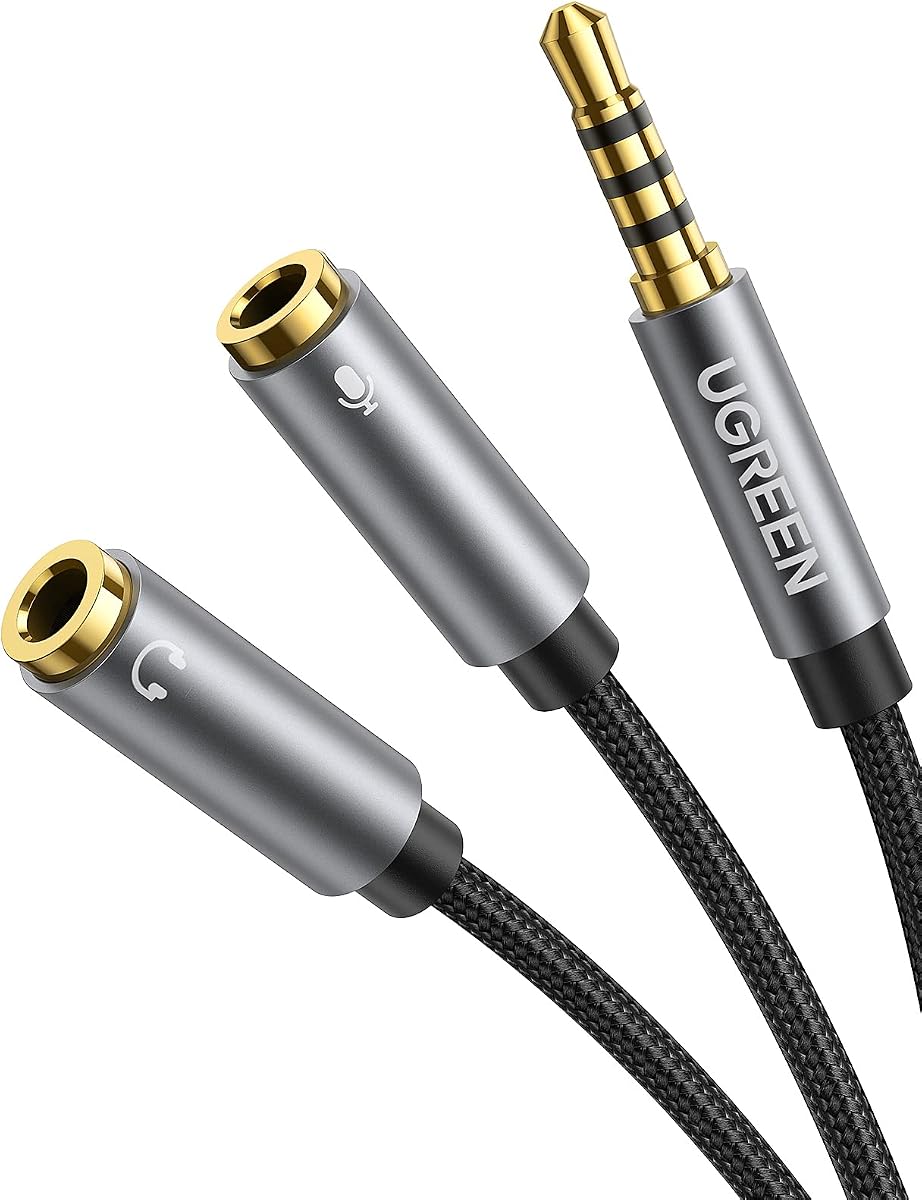
The UGREEN Headphone Splitter 3.5mm 2 Female to 1 Male connects a device's combined 3.5mm headset port to separate headphone and microphone plugs. It receives a 4.5 rating and targets legacy PCs, laptops, tablets, and similar devices that use CTIA headset wiring.
We may earn a commission when you buy through this link, at no additional cost to you.
Soft TPE material is used around the short cable, allowing it to flex and adjust more easily than a rigid adapter. A nylon braid protects the cable from scratches, while copper and gold-plated connectors support conductivity and resist corrosion. The seven-inch length keeps the solution small enough to carry in a pocket or laptop sleeve.
The adapter's microphone function depends on following the correct setup sequence. The separate headphone and microphone plugs should be connected to the splitter before the TRRS male end is inserted into the computer. Otherwise, the product may not detect the microphone. The listing also explicitly excludes iPhone and other OMTP headsets.
This option is best for a compatible CTIA headset user whose computer has separate audio and microphone sockets but whose phone or tablet has one combined port. It is less appropriate for Apple-centric setups, OMTP devices, or users who need a USB adapter for a computer without legacy analog audio.
The soft cable body reduces the awkward stiffness often found in short Y adapters. It is easier to position around a laptop or monitor while remaining small enough for a carry pouch.
Rather than simply duplicating music, the two female ends accept the headset's separate audio and microphone leads. That makes it more useful for calls and games than a conventional one-to-two music splitter.
We may earn a commission when you buy through this link, at no additional cost to you.
The Bordsek Headphone Mic Splitter for PC is the strongest general-purpose choice in this comparison, combining a 4.7 rating with a clearly defined CTIA headset connection. It divides a combined TRRS headset plug into separate male connections for a computer's headphone and microphone inputs.
We may earn a commission when you buy through this link, at no additional cost to you.
Its 24K gold-plated contacts, aluminum housings, and braided cable support both signal quality and physical durability. The stated resistance to more than 40,000 bending tests is a notable construction claim, while the 20-centimeter cable remains compact. Black and red male connectors make the headphone and microphone roles easier to distinguish during setup.
The most important limitation is that Apple original earbuds and Beats headphones are not expected to provide working microphone output. Compatibility otherwise includes many familiar gaming headsets, speakers, legacy laptops, and other CTIA equipment. It is designed for a PC with separate audio and microphone jacks, not a modern computer with only USB.
This is the recommended pick for a PC gamer or remote worker whose dual-plug headset uses CTIA wiring. Its combination of strong rating, clear labeling, portability, and robust construction makes it easy to recommend, while the Apple exclusions should be checked before purchase.
Color-coded male ends reduce setup confusion. Even a simple feature can prevent users from repeatedly swapping the headphone and microphone connections when a computer offers similarly sized sockets.
Gold-plated contacts support reliable signal transfer, while the braided jacket and aluminum shells protect frequently used areas. These construction details suit an adapter intended to remain close to a gaming station.
We may earn a commission when you buy through this link, at no additional cost to you.
The SYNCWIRE Headphone Splitter is a one-male-to-two-female Y cable for sharing stereo audio from phones, tablets, laptops, music players, and several gaming devices. Its 4.6 rating and emphasis on stereo sharing make it a practical budget alternative to the more specialized PC headset adapters in this list.
We may earn a commission when you buy through this link, at no additional cost to you.
Polished 24K gold-plated connectors support accurate signal transmission, while double shielding is intended to reduce interference. The soft nylon jacket and metal housing add flexibility and strength. According to the product information, the cable is designed to withstand at least 15,000 90-degree bending cycles, which is appropriate for frequent travel and storage.
This is primarily an audio-sharing cable. It can feed two headphones or speakers, but it should not be confused with a TRRS headset adapter that separates microphone and headphone signals. Its slim connector may also not fit inside a particularly thick phone case, although the listing mentions a LifeProof case as a specific exception rather than guaranteeing universal case clearance.
Choose the SYNCWIRE when two people want to listen to the same music, video, or other stereo audio from one source. It is a straightforward, durable solution for travel or casual shared listening, not the right choice for connecting a dual-plug gaming headset to a PC with separate microphone and audio sockets.
The one-to-two layout provides an uncomplicated way to connect two headphones or one headphone and a speaker to a single source. It works well for music and media shared during a trip.
The braided jacket and compact form help the cable tolerate being packed, pulled from a bag, and connected to different devices. Shielding also supports a cleaner stereo signal in common environments.
We may earn a commission when you buy through this link, at no additional cost to you.
The KINGTOP Headphone Mic Splitter is a compact 3.5mm adapter designed around gaming and voice communication. It has a 4.4 rating and uses a male-to-dual-female configuration, allowing separate microphone and headphone leads from a gaming headset to connect to a device with one CTIA combo socket.
We may earn a commission when you buy through this link, at no additional cost to you.
The product supports platforms including PS4, PS5, Xbox One, and Switch controllers, as well as selected PC and mobile devices. Named compatible gaming headsets include Logitech G430, G231, and Turtle Beach X12, with broader mention of HyperX, Razer, and SteelSeries dual-plug models. Gold-plated connectors support dependable signal transfer.
Its exclusions are significant. The listing specifically says the adapter does not work with iPhone, iPad, MacBook Pro, iMac, or other Mac devices, nor with Beats or Bose headphones designed for Apple. It is also expressly not a standard two-person music-sharing splitter; its function is to recombine separate microphone and headphone connections.
This is a good choice for a console, controller, Android device, or compatible PC with one combined CTIA headset port. It is less versatile than the Bordsek model, but its gaming-specific focus and platform compatibility make it straightforward to understand for the intended setup.
Support for current and legacy gaming platforms is useful for players who move between console and desktop setups. The single combo connection can reduce cable clutter around a controller or gaming console.
The adapter is designed to preserve the microphone and headphone paths of a dual-plug gaming headset. It is therefore more appropriate for team chat than for simply duplicating a music signal.
We may earn a commission when you buy through this link, at no additional cost to you.
The Headset Headphone Splitter Adapter Cable for PC is an eight-inch CTIA Y-splitter intended to connect a four-pole gaming headset to a PC with separate 3.5mm microphone and headphone jacks. Its 4.4 rating reflects a generally well-received product with a broad stated compatibility list.
We may earn a commission when you buy through this link, at no additional cost to you.
The listing names Astro, Turtle Beach, BENGOO, HyperX, SteelSeries, Razer, Sennheiser, and Sades headsets, making it relevant to a wide range of gaming equipment. The same CTIA arrangement can also be used with compatible PlayStation 4, Xbox One, Switch, and smartphone headsets, as well as voice-over-IP applications.
The design has less emphasis on premium materials than several competing options, and it does not describe the same detailed shielding or bending-test specifications. Its 20-centimeter length is sufficient for close desktop connections but offers limited positioning flexibility when a computer sits under a desk or behind a larger monitor.
This is a useful general adapter for gamers who know their headset uses CTIA TRRS wiring and need to reach a pair of legacy PC sockets. The broad brand list is helpful, although users should still confirm their exact headset model and connector arrangement.
The same CTIA wiring can support several console and mobile devices. That versatility is valuable for gamers who do not want to maintain a separate adapter for every platform.
By providing distinct connections for headset audio and microphone input, the splitter supports multiplayer chat and other communication applications that require both functions.
We may earn a commission when you buy through this link, at no additional cost to you.
The 4FT USB to Dual 3.5mm Male Headphone/Speaker and Mic Splitter Audio Cable is the most technically advanced product here. It earns a 5.0 rating and solves two problems at once by adding a USB audio connection and exposing separate headphone and microphone jacks.
We may earn a commission when you buy through this link, at no additional cost to you.
A built-in high-resolution DAC decodes the digital audio signal and optimizes analog amplification. The listing specifies support for audio up to 16-bit/48kHz and includes noise reduction. A four-foot cotton-jacketed cable, thickened aluminum shells, 24K gold-plated connectors, and a pure-copper core support both signal and mechanical performance.
The major restriction is that its dual 3.5mm outputs use CTIA-standard audio and microphone wiring. It is not a universal analog adapter for every legacy headset arrangement. The four-foot cable is also longer than the compact splitters in this list, which may be helpful for a desktop but inconvenient for travel.
This is the top choice for a modern laptop or desktop that lacks analog audio jacks, provided the user has a USB port and a CTIA headset. It works without drivers across numerous versions of Windows, Mac OS X, Linux, ChromeOS, and other listed systems, making it a flexible premium solution.
The USB connection bypasses the need for legacy 3.5mm sockets and converts digital audio within the cable. This makes it a practical way to add headset support to newer hardware that no longer includes analog audio ports.
The integrated DAC is the cable's defining feature. Combined with the stated 16-bit/48kHz support and noise reduction, it offers a more advanced signal path than a passive splitter.
We may earn a commission when you buy through this link, at no additional cost to you.
The 3.5mm TRRS Splitter for 2 Headphones is a two-pack designed to let two users share audio and microphone functions from one source. It has a 4.5 rating and uses a male TRRS input with two female TRRS outputs, making it more specialized than a conventional stereo Y cable.
We may earn a commission when you buy through this link, at no additional cost to you.
Both TRRS headsets can carry sound and microphone signals simultaneously, allowing shared music, movies, or calls. The gold-plated plug is intended to reduce signal loss, while the aluminum housing protects the connection and resists scratches and corrosion. A 30-centimeter braided nylon cable resists tangling and is practical for daily use or travel.
The requirement for two TRRS headsets is essential. Ordinary TRS headphones or speakers can receive sound through the female outputs, but their microphone functions will not work. The adapter is therefore best for two people with combo headset plugs, not for two people using completely separate wired headphones.
This is a compelling choice for a shared gaming session, watch party, or remote call where both participants need microphones. The two-pack makes it convenient to keep one splitter at home and another in a travel kit, although the product cannot substitute for a dedicated mic-to-speaker mixer.
The two TRRS female outputs support both output and input functions, creating a convenient way for two headset users to participate in the same audio session. Standard TRS outputs remain useful for listening only.
Including two adapters allows one to remain at a primary computer while the other travels. The short braided cables are easy to coil and carry without taking up much room.
We may earn a commission when you buy through this link, at no additional cost to you.
The Maeline Headphone Splitter Adapter is a compact PC-oriented solution for separating a combined headset connection into microphone and stereo audio ports. It carries a 4.4 rating and is positioned for voice applications such as Skype, chat software, Messenger, and Google Voice.
We may earn a commission when you buy through this link, at no additional cost to you.
Construction details include a polished 24K gold-plated connector, aluminum shell, oxygen-free copper wire, shielding, and a nylon-braided cable. Strain-relief rings are intended to improve stability around the connection points. Its 20-centimeter length is compact enough for travel while offering enough slack to reach ports on a laptop or nearby desktop.
Compatibility is limited to CTIA-standard Android headphones according to the product details. Apple Earbuds are explicitly excluded because their microphone wiring does not match the expected standard. The adapter also requires a computer with separate 3.5mm microphone and headphone inputs, so it will not replace a USB audio solution for a modern port-light computer.
This is a good lightweight pick for a compatible Android gaming headset, remote-work call, or streaming setup using a PC with legacy analog audio. Buyers should check the headset wiring and computer jack arrangement first, as those two factors determine whether the adapter will work as intended.
Shielded copper wiring, gold-plated contacts, and a braided jacket provide useful signal and durability characteristics without adding a large inline box. The result suits a portable setup.
The product's emphasis on microphone and audio separation makes it most relevant to online meetings, chat software, and gaming rather than ordinary music-sharing scenarios.
We may earn a commission when you buy through this link, at no additional cost to you.
Choosing correctly starts with the ports on both ends, followed by the wiring standard, intended audio function, device support, and physical design. Checking these details prevents the most common problem: buying a visually similar cable that cannot carry the microphone signal.
Connector direction is the first thing to verify. A female TRRS end that divides into two male TRS plugs is commonly used to connect a headset to a computer with separate microphone and audio sockets. The reverse arrangement, one male TRRS plug splitting into two female sockets, serves a combined headset connected to a device with one combo port. Ordinary TRS adapters are for stereo audio and generally do not separate a microphone.
A 3.5mm plug may carry headphone audio, microphone audio, or both. CTIA places audio and microphone on particular contacts, while OMTP uses a different arrangement. Most PC gaming headsets and Android phones use CTIA, but Apple earbuds often use OMTP. A splitter designed for CTIA may play sound without delivering a working microphone when connected to OMTP equipment, so the headset and adapter must use the same standard.
A mic and speaker splitter is not always a two-person sharing cable. Headset adapters divide or combine microphone and headphone signals, whereas stereo Y cables send the same music output to two headphones. Some dual-headset splitters support two TRRS headsets, including both microphones, but ordinary TRS headphones can usually receive only the playback channel. Choosing by the actual task prevents a feature mismatch.
Analog splitters require a device with an appropriate 3.5mm socket. Many current laptops and desktops omit legacy audio jacks, making a USB audio adapter necessary. A USB-to-dual-3.5mm cable includes digital conversion, while a passive 3.5mm Y cable cannot create an audio connection where no analog port exists. Check the computer before considering the headset or adapter.
Gold-plated contacts, oxygen-free copper, shielding, and braided jackets are common quality-oriented features. They support conductivity, resist corrosion, and protect against wear and interference. Signal claims should still be considered alongside the correct wiring, because a polished connector cannot compensate for an incompatible standard. A short braid is often enough for a desktop, while a longer cable offers more placement flexibility.
Published compatibility lists can save time, but they are not substitutes for checking the exact headset and device. Gaming adapters often list popular models, while other products focus on Android phones, tablets, media players, or legacy computers. Apple exclusions, console support, operating-system support, and the presence of separate or combined jacks should all be reviewed before purchasing.
Compact adapters are easy to carry in a laptop bag and usually sit close to the device, reducing cable clutter. A longer cable can reach ports on a desktop placed beneath a desk, while a USB solution may need enough length to reach the computer from a comfortable position. Braided jackets and reinforced housings are especially useful for products that travel regularly.
Confirm whether the splitter only duplicates playback or actually carries microphone input. Gaming headset adapters usually separate the headphone and microphone leads, while two TRRS outputs can preserve both functions for two users. Ordinary TRS headphones and speakers can still play sound through many of these products, but they cannot supply a microphone signal.
Begin by identifying the source device and headset. Check whether the headset ends in one combined TRRS plug or separate TRS headphone and microphone plugs. Then inspect the computer or console to determine whether it has a combined analog socket, separate 3.5mm sockets, or only USB. This simple inventory prevents a reversed connection and clarifies which adapter direction is needed.
For a headset-to-PC adapter, connect the separate headset microphone and headphone plugs into the appropriate female sockets first. Some manufacturers recommend completing these connections before attaching the splitter to the computer. Plug the TRRS male end into the combined headset port, or connect the two male outputs to the computer's separate microphone and audio jacks. Select the microphone in the operating system's sound settings and test a short recording.
For a USB solution, plug the USB connector into the computer and connect the headset to the color-coded or labeled analog outputs. Install no extra software when the product is designed for plug-and-play use. When finished, hold the connector housing rather than pulling the cable, coil the adapter without sharp bends, and keep the ports free of dust and moisture.
A mic splitter separates or combines microphone and headphone signals so a headset can work with mismatched ports. A standard headphone splitter usually duplicates stereo music to two headphones and does not handle a microphone. Some dual TRRS headset splitters support both functions for two users, so the connector and wiring specifications are essential.
No. The headset and adapter must use compatible CTIA or OMTP wiring, and the connector genders must also align. Many PC gaming headsets use CTIA, while some Apple earbuds use OMTP. A connection may produce playback audio without a working microphone when the standards do not match.
Only if the laptop can provide audio through another supported connection. A passive 3.5mm splitter has no way to create an analog signal by itself. A USB-to-dual-3.5mm audio adapter is usually the appropriate solution because it converts the computer's USB audio signal into analog headphone and microphone connections.
It means the single female socket accepts a male-ended device or headset connection, while the two male plugs enter two separate sockets elsewhere. In a headset adapter, one male plug normally carries headphone output and the other carries microphone input. The direction must match the source and destination ports exactly.
Yes, but the splitter must specifically support two TRRS headsets and preserve both audio and microphone signals on each output. A conventional one-male-to-two-female stereo adapter may duplicate music while blocking microphone input. The dual TRRS headset splitter in this guide is designed for two combo-headset users.
A passive splitter usually preserves the source signal rather than improving it, although shielding, clean contacts, and a solid connection can help avoid interference or loss. A USB adapter with a built-in DAC performs digital-to-analog conversion and can provide a different signal path for a modern computer, but compatibility remains more important than marketing claims.
The likely causes are a wiring-standard mismatch, an incorrect connection order, or a product that duplicates only audio. Check that the headset uses CTIA when the adapter requires CTIA, connect the separate microphone and headphone leads before the source, and confirm the correct microphone input in the computer's sound settings.
Length is mainly a placement consideration rather than a sound-quality upgrade. A short adapter is convenient beside a laptop, while a longer cable can reach a desktop or console positioned farther away. For USB audio, a four-foot cable may provide comfortable routing, but a passive 3.5mm headset adapter is usually most useful at close range.
The Bordsek Headphone Mic Splitter is the most balanced recommendation for PC users because it combines a strong rating with a clearly labeled TRRS-to-dual-male design, robust materials, and broad CTIA gaming-headset compatibility. The USB to Dual 3.5mm Audio Cable stands out for modern computers because it adds digital conversion, a high-resolution DAC, and separate analog outputs without requiring drivers.
For basic shared music, the SYNCWIRE Headphone Splitter is the practical budget choice. For a dual-plug gaming headset and a legacy computer, the D & K, UGREEN, KINGTOP, and Maeline options all serve the same core purpose but differ in materials, connector direction, and stated platform support. Always prioritize exact connector and CTIA compatibility over brand recognition.
Before purchasing, compare the source port, headset plug, microphone requirement, and intended audio function. Availability and current prices can change, so shoppers should review the latest listing details and retailer offer before making a final decision.