
SABRENT 4-Port Powered USB 3.0 Hub
4.5Editor score
Four 5Gbps data ports
Individual illuminated switches
Compact travel-friendly design
Our Powered USB Hub guide compares ten models for port count, charging, data speed, compatibility, controls, and reliable device expansion at home or in the
A powered USB hub solves a familiar workspace problem: one computer port becomes several, while an external adapter supplies enough electricity for demanding peripherals. A good model combines ample data ports, useful charging options, stable power delivery, broad compatibility, and controls that make connected equipment easier to manage.
The ten hubs in this guide were compared using the specifications and customer ratings supplied for each product. The list covers compact four-port options, high-capacity desktop models, USB-A and USB-C designs, 5Gbps and 10Gbps data connections, dedicated charging ports, and individual on/off controls.
Each review explains the strongest reasons to consider the hub, along with its limitations and ideal audience. Rankings reflect the balance of capacity, performance, convenience, and rating rather than price alone. Product prices and availability can change, so confirm current details before purchasing.
4.5Editor score

4.5Editor score

4.6Editor score
The comparison below highlights port capacity, maximum data speed, charging provisions, and the most important physical or functional feature of each powered hub.


The TP-Link UH720 is an accomplished general-purpose powered hub with a 4.5 customer rating. It expands one USB 3.0 connection into seven 5Gbps data ports and adds two dedicated smart charging ports. That combination makes it especially useful for desks where keyboards, mice, storage devices, printers, and phones all need convenient access without occupying every built-in port.
We may earn a commission when you buy through this link, at no additional cost to you.
Its primary strength is the balance between capacity and power management. The supplied 12V/4A adapter is intended to provide dependable power across a crowded setup, while the smart charging system identifies connected devices and adjusts its output. The seven data ports support transfer speeds up to 5Gbps and remain backward compatible with USB 2.0 and USB 1.1 equipment.
TP-Link also gives the UH720 an unusually thorough safety-oriented design. Multiple protections cover overheating, overload, overvoltage, and short circuits, and a built-in surge protector is intended to help protect both equipment and data. Hot swapping lets users connect or remove supported devices while the host computer is operating, while plug-and-play support spans major desktop operating systems.
This is the most balanced choice for a shared office desk, creative workstation, or home setup with several USB peripherals. It does not offer USB-C data ports, video output, or the newest 10Gbps interface, but its nine-port layout, dedicated charging, and protective circuitry outweigh those limitations for most users. Choose it when reliable everyday expansion matters more than cutting-edge connector variety.
The 12V/4A adapter is designed to support a broad collection of connected peripherals. The two smart charging ports are valuable because they separate device charging from data transfer, reducing competition for the data connections.
Overheating, overload, overvoltage, short-circuit, and surge protections add reassurance when several devices are active. Hot-swapping and broad operating-system support also reduce setup friction for offices, classrooms, and mixed computer environments.
We may earn a commission when you buy through this link, at no additional cost to you.
The atolla 8-Port Hub carries a 4.6 rating and offers a useful combination of seven 5Gbps data ports, one dedicated smart charging port, and individual on/off switches. The product name refers to its total port count, while the data-focused portion expands a single USB 3.0 host connection into seven external data ports.
We may earn a commission when you buy through this link, at no additional cost to you.
Per-port switches are the feature that distinguishes this model from simpler hubs. Instead of reaching under a desk to disconnect an idle keyboard, scanner, or drive, the user can turn off the relevant port directly. This is particularly valuable in fixed installations, repair shops, studios, and offices where the same collection of peripherals is used throughout the day.
The included 5V/4A power adapter supports the hub and its dedicated charging output, which can deliver up to 2.4A. Data connections operate at up to 5Gbps, and compatibility is listed across current and older Windows versions, Mac OS X, and Linux. Plug-and-play operation, hot swapping, and the supplied quick guide keep installation straightforward.
The atolla is a strong fit for users who value direct port control and need a moderate number of data connections. Its one charging port is less generous than the TP-Link's two, and the upstream connection remains USB-A rather than USB-C. Nevertheless, the 4.6 rating, flexible switches, and generous cabling make it a persuasive desk organizer.
Individual switches let users isolate connected peripherals without repeatedly removing cables. This can reduce wear, simplify troubleshooting, and make it easier to keep a workstation organized.
Support for Windows, Mac OS X, and Linux makes the hub suitable for mixed-device environments. Hot swapping and driver-free installation also help it fit quickly into an active workspace.
We may earn a commission when you buy through this link, at no additional cost to you.
The SABRENT HB-UMP3 is a compact powered hub designed to turn one compatible USB connection into four USB 3.0 data ports. It has a 4.5 rating, supports transfer speeds up to 5Gbps, and remains compatible with slower USB 2.0 and USB 1.1 devices. For a modest collection of accessories, that is often the most practical capacity.
We may earn a commission when you buy through this link, at no additional cost to you.
Every data port has its own power switch and LED indicator. The controls make it easy to see which devices are active and to power down a port that is not being used. Hot-swappable operation and plug-and-play installation further simplify daily use, while the 2.5A adapter provides dedicated power rather than relying entirely on the host computer.
Its thin, lightweight construction is a major advantage over bulkier desktop hubs. That makes it easier to carry between a home office and a meeting room or to keep in a laptop bag. The trade-off is limited expansion: four ports cannot accommodate a large collection of drives, controllers, and charging devices at once.
The SABRENT is an excellent first powered hub for a student, traveler, or home user who regularly connects a keyboard, mouse, flash drive, and one other peripheral. It lacks dedicated phone charging and modern USB-C data support, but it covers the core requirements with straightforward controls and a compact form.
The slim enclosure takes up little desk space and is easier to carry than a full-size multi-device hub. Its four-port capacity is well suited to common travel accessories and compact home-office setups.
Each port combines an individual switch with an LED indicator. Users can identify active connections and disable unused accessories without removing a working cable.
We may earn a commission when you buy through this link, at no additional cost to you.
The SABRENT HB-BU10 is built for users who need many data connections rather than a small number of mixed charging and data ports. It expands one USB 3.0 port into ten data ports, each capable of speeds up to 5Gbps when the host and connected devices support that rate. Its customer rating is 4.5.
We may earn a commission when you buy through this link, at no additional cost to you.
The 60W, 12V/5A power adapter is the defining feature for high-density setups. It provides a substantial dedicated power budget for numerous peripherals, helping reduce the likelihood that the computer's own USB connection will become the limiting factor. Individual switches and blue LED indicators add control and make the status of every port easy to check.
Installation is straightforward because the hub is plug-and-play and requires no drivers. It is listed for Windows, Mac OS, and Linux, while backward compatibility allows older USB 2.0 and USB 1.1 devices to be used when appropriate. The package includes the power adapter, a USB 3.0 cable, and a user manual.
This model is well suited to technical workstations, edit desks, laboratory benches, and other places where numerous peripherals share one computer. Its ten-port footprint and lack of a dedicated charging connector make it less appealing for a simple laptop setup, but for pure expansion, it offers exceptional capacity and a generous power adapter.
Ten ports can consolidate keyboards, mice, card readers, phones used for synchronization, and multiple storage devices. This reduces reliance on the computer's built-in connections and simplifies cable routing.
The included 60W adapter provides more capacity than many similarly sized hubs. It is particularly relevant when several high-draw USB devices are connected at the same time.
We may earn a commission when you buy through this link, at no additional cost to you.
The atolla 4-Port Hub combines four 5Gbps data ports with one dedicated charging port and a 4.6 customer rating. It is a compact option for expanding a computer that needs connections for a keyboard, mouse, storage drive, and another peripheral while also providing a convenient place to charge a phone or tablet.
We may earn a commission when you buy through this link, at no additional cost to you.
The dedicated charging output can supply up to 2.4A, while the 5V/3A adapter powers the hub. Four illuminated on/off switches provide direct control of each data connection. That makes it easy to isolate an unused peripheral and also gives the hub a more deliberate, organized appearance on a small desk.
Compatibility extends across Windows 10 and earlier listed versions, Mac OS X, and Linux. It requires no drivers, supports hot swapping, and includes a 65-centimeter host cable plus a quick setup guide. The product is also backed by an 18-month warranty, which adds some reassurance for a compact accessory intended for regular use.
This atolla is a strong candidate for a laptop user who wants a small, versatile desktop accessory. It does not offer 10Gbps transfer rates or USB-C data connectivity, but its charging port, per-port controls, and relatively compact design create a more complete package than a simple four-port adapter.
The separate charging output leaves all four data ports available for peripherals. This separation is useful on desks where a phone or tablet needs regular charging alongside an active mouse and keyboard.
The small enclosure keeps the footprint manageable, while illuminated individual switches make each connection easy to identify and control. It suits workspaces where every inch of desk space matters.
We may earn a commission when you buy through this link, at no additional cost to you.
The UGREEN 7-in-1 Powered USB 3.0 Hub is unusual within this roundup because it provides five USB-A data ports and two USB-C data ports. Each of the seven connections has an individual on/off switch, and a 24W power adapter is included to support a collection of connected peripherals. Its customer rating is 4.1.
We may earn a commission when you buy through this link, at no additional cost to you.
The mixed connector layout is especially practical for modern desks that still rely on USB-A accessories but increasingly use USB-C flash drives or other compact devices. A one-meter host cable adds placement flexibility around desktop towers, raised laptops, and equipment positioned under a desk. It connects to USB-A hosts and is listed for compatibility with systems such as iMac, Surface, and XPS computers.
Data speeds reach up to 5Gbps on the shared upstream channel. The specifications are clear that simultaneous transfers divide that bandwidth, so individual drive performance may be lower when several devices are active. The hub also does not charge the host laptop, and the 24W adapter distributes power among connected accessories rather than functioning as a computer charger.
UGREEN's hub is appealing to users who prioritize connector variety and physical controls over having a dedicated charging socket. Its 4.1 rating is the lowest among the listed models, and it lacks USB-C charging, so buyers should compare the hub with their exact peripheral mix before choosing it. For modern mixed-device workspaces, however, its seven individually controlled ports are highly functional.
Two USB-C data ports reduce the need for a separate adapter when using newer accessories. Because the product is designed around a USB-A host, it can also fit many legacy desktop setups without requiring a host-side USB-C dongle.
A single active transfer can reach up to 5Gbps, but concurrent activity reduces per-port results. Users moving large files between several drives should account for that shared limit.
We may earn a commission when you buy through this link, at no additional cost to you.
The Wenter 11-Port Hub is designed to deliver maximum physical expansion. It contains ten USB 3.0 data ports and one dedicated smart charging port, all while drawing from a supplied 12V/3A adapter. Data connections are advertised at up to 5Gbps, and the hub has a 4.4 customer rating.
We may earn a commission when you buy through this link, at no additional cost to you.
Every data port receives an individual on/off switch and LED indicator. That level of control is useful in installations with a stable but large collection of devices, such as a recording studio, photo workflow, or office with legacy peripherals. The dedicated charging port can deliver up to 2.4A for compatible phones, tablets, and cameras without using a data port.
The hub supports USB 3.0, USB 2.0, USB 1.1, and USB 1.0 peripherals, with no driver required and hot-swapping available. Listed operating-system support includes Windows, Mac OS, and Linux. Long host and power cables give users freedom to place the hub where connections are easiest to reach, and a 24-month warranty is stated.
The Wenter is a practical choice when count matters more than the newest interface generation. Its ten data ports dwarf the four-port options, but all share one upstream connection, and the physical hub will require meaningful desk space. Users with newer USB-C-only hosts or a need for 10Gbps should consider more specialized alternatives.
Ten data ports and one charging port allow a substantial peripheral collection to be consolidated. The hub is useful where numerous specialized accessories would otherwise compete for limited computer ports.
Individual switches and LEDs reduce the need to trace cables or disconnect equipment manually. This supports faster troubleshooting and more orderly cable management.
We may earn a commission when you buy through this link, at no additional cost to you.
The SABRENT HB-B7C3 offers a notably balanced layout of seven USB 3.0 data ports and three dedicated charging ports. It carries a 4.6 customer rating and includes a 60W, 12V/5A power adapter. That makes it a compelling option for offices that need both a meaningful number of data connections and several devices that require charging.
We may earn a commission when you buy through this link, at no additional cost to you.
Data transfers can reach up to 5Gbps, while the charging ports are designed to auto-detect connected devices and deliver up to 2.4A per port. Phones, tablets, and other USB-powered accessories therefore have dedicated connections rather than sharing bandwidth and power with data accessories. Each port also includes a power switch and LED indicator.
The hub is designed for straightforward operation across Windows, macOS, and Linux, with no driver installation required. A mirrored enclosure gives it a symmetrical appearance, and the product's stated 60W supply is intended to maintain stable performance even when the full collection of ports is in use.
This SABRENT is ideal for shared desks, conference rooms, and mixed office equipment where charging is nearly as important as data expansion. It is not the best choice for a modern USB-C-only workstation, nor does it offer as many pure data ports as the 10-port SABRENT model. Even so, the three charging ports make it especially versatile.
Three charging outputs let several phones or tablets recharge without occupying the data ports. Up to 2.4A per port makes the hub convenient for an office where multiple mobile devices are handled during the day.
The included 60W adapter is intended to provide consistent power when multiple data and charging devices are connected. Individual port controls help users avoid unnecessary consumption from idle equipment.
We may earn a commission when you buy through this link, at no additional cost to you.
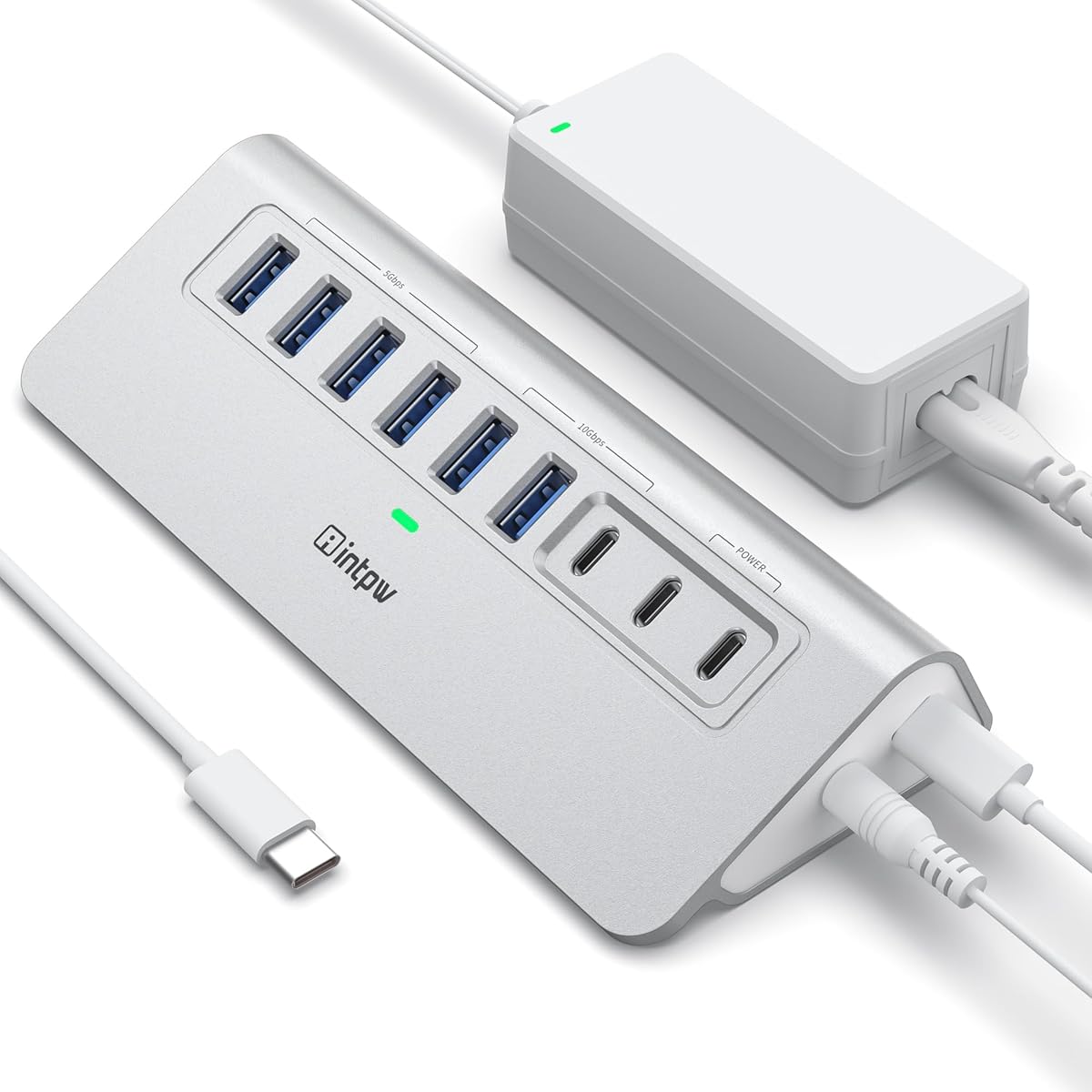
The intpw 9-Port Hub brings a modern connector mix to the powered-hub category. It includes one USB-C 3.2 port rated at 10Gbps, two USB-A 3.2 ports rated at 10Gbps, four USB-A 3.0 ports rated at 5Gbps, and two USB-C Power Delivery charging ports. Its customer rating is 4.3.
We may earn a commission when you buy through this link, at no additional cost to you.
The dedicated charging outputs are each listed at 45W and use the supplied 65W adapter. They are intended for compatible USB-C phones and tablets, but the product information clearly states that these PD ports do not carry data. The hub also does not support video output and is not recommended for charging computers or other high-power devices.
Data performance depends on the selected port. USB 3.2 connections can reach 10Gbps, while USB 3.0 connections reach 5Gbps. The enclosure uses a 28-degree ergonomic design and includes feet for stability. A USB-C-to-USB-C host cable is included, making the hub well suited to contemporary USB-C laptops, desktops, and other compatible computers.
The intpw model is worth considering for users who need fast transfer from newer storage but also want convenient high-wattage charging for mobile devices. Its limitations are meaningful: charging and data occupy different ports, video is unsupported, and the guidance discourages using multiple SSD or removable drives at once. It is a specialized modern hub rather than a universal desktop expansion solution.
The fastest data ports can reach 10Gbps, which is useful for reducing transfer delays with compatible external storage. The inclusion of both USB-C and USB-A data options supports newer and older accessories.
Each USB-C PD output is listed at 45W, offering a dedicated alternative to data connections for compatible mobile devices. Because these ports do not transfer data, they should be treated as charging-only additions.
We may earn a commission when you buy through this link, at no additional cost to you.
The atolla 7-Port USB 3.2 Hub is the premium selection in this guide. It has a 4.6 customer rating and, most importantly, places 10Gbps-capable USB 3.2 Gen 2 data connections across all seven data ports. This avoids the mixture of slower and faster ports found in some larger hubs.
We may earn a commission when you buy through this link, at no additional cost to you.
A separate smart charging port provides a convenient place to replenish a phone or tablet, and the included 20W, 5V/4A adapter powers the full hub and charging function. Surge and overcurrent protection are included to help safeguard external drives, digital audio equipment, and other connected gear when several devices are in use.
Individual on/off switches and LED indicators allow users to disable idle accessories and identify their status. The built-in 3.3-foot cable combines USB-C and USB-A connector options, making it easier to connect to newer laptops and older desktops without a separate host adapter. A 4.9-foot power cord adds placement flexibility.
This atolla is the strongest option for users who need multiple full-speed USB 3.2 connections rather than a mixture of generations. It suits demanding creative desks and workstation setups involving several external drives or other high-bandwidth accessories. The original charger will still charge compatible devices faster, and the 20W supply should be considered carefully if multiple power-hungry peripherals are attached.
Every data port is capable of 10Gbps, so users do not need to carefully identify which ports offer the faster interface. This consistency makes the hub attractive for multi-drive or high-bandwidth workflows.
The integrated two-in-one USB-C and USB-A connector broadens host compatibility without requiring a separate dongle. It is a convenient solution for desks that alternate between modern laptops and older desktop systems.
We may earn a commission when you buy through this link, at no additional cost to you.
The right powered USB hub depends on your device count, connector types, transfer demands, charging habits, and available desk space. Comparing these factors before shopping prevents a mismatched hub from becoming another cable-management problem.
A headline port count often combines data connections with charging-only sockets, so shoppers should examine the port breakdown rather than relying on the total. The SABRENT HB-BU10 provides ten data ports, while the HB-B7C3 provides seven data ports and three charging ports. The atolla and Wenter models also separate these functions, whereas the UGREEN's seven USB-C and USB-A connections are all data ports.
Most powered hubs in this guide support up to 5Gbps, which is suitable for keyboards, mice, card readers, and many external drives. Faster 10Gbps options, such as the intpw and the seven-port atolla USB 3.2 hub, make more sense for demanding storage workflows. The host computer, hub port, cable, and attached drive must all support the intended speed for the best results.
A multiport hub typically sends all data through one connection to the computer. When one device is active, it may receive the full advertised rate, but concurrent transfers divide the available bandwidth. This is explicitly noted for the UGREEN hub and is a normal property of bus-powered and externally powered hub designs. Users planning several simultaneous drive transfers should account for the reduction in per-device speed.
The power adapter matters when several devices draw current at once. Options range from the SABRENT four-port hub's 2.5A adapter to 60W and 65W supplies in the larger models. The intpw includes a 65W adapter, while the premium atolla USB 3.2 model uses 20W. Check the adapter output and the combined needs of connected accessories rather than assuming every port can deliver maximum power simultaneously.
Dedicated charging ports are useful, but their output and connector type vary. Several models provide a smart port rated at up to 2.4A, the SABRENT HB-B7C3 provides three such ports, and the intpw includes two USB-C PD ports listed at 45W. The intpw PD ports do not support data transfer, and its hub is not intended to charge a laptop. Buyers should confirm whether charging, data, or both are the priority.
Individual on/off switches and LEDs are especially helpful in permanent installations. They allow a user to power down an idle external drive, printer, controller, or keyboard without removing its cable. The SABRENT four-port model, both atolla models with switches, the Wenter, the UGREEN, and the intpw are all oriented toward direct management. A single master power button may be sufficient for a temporary or portable setup.
Most hubs in this list terminate their upstream cable in USB-A, making them straightforward to use with legacy PCs and many current laptops. The intpw includes a USB-C-to-USB-C cable, while the atolla USB 3.2 hub features a built-in two-in-one USB-C and USB-A connector. USB-C data support does not automatically mean video support, so display users should confirm that their required output is available.
More ports are not always better if the hub crowds the workspace. The four-port SABRENT is described as thin and lightweight, the atolla four-port model emphasizes a compact case, and the atolla USB 3.2 hub offers a long host cable for flexible placement. Larger ten-port designs may be better for workstations, while a small portable hub is easier to carry. Cable length and desk layout can be as important as the port count.
Begin by positioning the hub where its ports are easy to reach and where its cables will not interfere with the computer, desk edge, or other equipment. Connect the supplied host cable to a compatible USB-A or USB-C port on the computer, then attach the correct power adapter. The specifications state that these hubs use plug-and-play operation, so additional drivers are generally not required.
Attach peripherals one at a time and allow the host computer to recognize each connection. Use the individual switches to manage devices that are not in use. When moving a hard drive, flash drive, or other removable storage, wait for file transfers to finish before disconnecting it, even though hot-swapping is supported. USB-C charging-only ports should be used according to their stated output limitations and never assumed to transfer data or video.
Keep the power adapter connected to a grounded outlet and avoid using extension cords or power strips that cannot handle its load. Inspect cables for bends, pinching, or damage, and do not expose the hub or adapter to moisture, excessive heat, or dusty areas. If a drive disconnects unexpectedly, reduce the number of connected devices, test the cable, and confirm that the host port and attached equipment support the expected data standard.
A powered hub draws electricity from an external adapter, while an unpowered hub relies on the host computer's USB port. External power is usually preferable when connecting several high-draw peripherals, storage devices, or charging equipment. It can reduce connection instability and prevents the computer's port from carrying the full load.
Most models in this guide are intended to charge mobile devices through designated charging ports, not laptops. The intpw explicitly states that its powered hub is not recommended for charging computers, and its two 45W USB-C PD ports are charging-only and do not transfer data. Always check the specific model's power-delivery and compatibility notes.
A standard data hub does not automatically add display outputs, and several models in this guide do not support video output. The intpw specifically notes that it has no video-output function. Users needing display expansion should look for a product explicitly designed as a USB-C docking station and verify support for the computer's display standards and resolution.
Most hubs share one upstream data connection with the computer. When only one device transfers data, it may receive the full advertised rate, but simultaneous transfers divide the available bandwidth. Faster 10Gbps hubs can reduce this constraint, although the hard drive, host connection, and other bottlenecks can still limit real-world results.
Individual switches are most useful in permanent or shared setups with several regularly connected devices. They allow an unused peripheral to be powered down without removing its cable and make troubleshooting easier. For occasional travel use with only two or three accessories, a simpler hub may be sufficient.
Yes. Most products listed are backward compatible with USB 2.0, and many also support USB 1.1 or USB 1.0 devices. The actual transfer speed will be limited by the slowest connected device and the capabilities of the host computer's connection.
Most of these hubs support hot swapping, allowing compatible devices to be connected or disconnected while the computer is running. Safe practice still includes finishing active file transfers before removing storage and confirming that every device supports hot swapping.
The correct amount depends on the number and type of connected accessories. A 20W adapter may suit a handful of ordinary peripherals, while 60W and 65W models provide more headroom for demanding storage or many active devices. Check the adapter rating, the hub's requirements, and the combined power needs of connected equipment.
The TP-Link UH720 stands out as the most complete general-purpose option because it combines seven 5Gbps data ports, two smart charging ports, a 12V/4A adapter, hot swapping, and extensive electrical protections. The SABRENT four-port model is a compact, economical choice for a smaller collection of accessories, while the atolla 7-Port USB 3.2 hub delivers a premium mix of 10Gbps data connections, a charging port, per-port controls, and broad host compatibility.
Prioritize the features your setup actually needs. Four-port models are easier to carry, ten-port models consolidate more equipment, USB-C data ports modernize a mixed-device desk, and 10Gbps connections suit demanding storage workflows. Check the upstream connector, operating-system support, adapter capacity, and whether charging ports also support data before making a final decision.
Ratings and product configurations offer a useful starting point, but they do not replace checking the current listing and manufacturer details. Prices, availability, included accessories, and product revisions can change, so review the latest information and confirm that the hub is compatible with your computer and peripherals before purchasing.