
VEVOR 45W CO2 Laser Engraver
5.0Editor score
45W desktop laser power
12 by 8-inch bed
Rotary axis included
A CO2 laser engraver turns digital artwork into clean marks, precise cuts, and repeatable products using a focused beam and a rotating gantry. The right machine depends on material thickness, engraving speed, work area, software, ventilation, and safety—not wattage alone. This guide highlights practical distinctions that can affect every project.
We compared the ten featured engravers using the supplied specifications, focusing on laser power, usable work areas, bed design, autofocus or focusing aids, supported software, material capabilities, exhaust and cooling systems, and protective features. The list covers compact desktop units as well as larger machines intended for more demanding production work.
Each review explains the strongest reasons to consider a particular model, along with limitations visible in its specifications. The top picks highlight leading options for value, versatile production, and premium automation. Product configurations and prices can change, so readers should confirm current bundle contents, specifications, and availability before buying.
5.0Editor score

4.7Editor score

4.5Editor score
As an Amazon Associate we earn from qualifying purchases.
The table below compares the featured CO2 laser engravers by power, working area, core automation, and included production features, making it easier to narrow the field before investigating materials, safety, and workflow requirements.



The VEVOR 45W CO2 Laser Engraver combines a 45W laser tube with a compact 12 by 8-inch work area, earning a 5.0 rating and making it a compelling entry for hobbyists and small product businesses. Its supported materials include wood, acrylic, glass, leather, and other non-metals, while the supplied specifications also explain that it is not intended for metal engraving.
We may earn a commission when you buy through this link, at no additional cost to you.
Several details improve its value. A rotary axis expands the range of cylindrical projects, air assist helps clear smoke and dust, and a pull-out waste tray simplifies cleanup. Manual focusing is supported by a precision knob, red-dot positioning, and a focusing scale. Compatibility with LightBurn, CorelDRAW, GRBL, and AutoCAD also makes it approachable for users arriving from different design environments.
The principal limitation is scale. A 12 by 8-inch bed is appropriate for coasters, keychains, phone cases, tags, and nameplates, but it is less convenient for oversized signs or multiple large blanks. The listed cutting recommendations of up to 5 mm acrylic and 3 mm wood are also more modest than the depth claims of several higher-powered models in this guide.
This is an attractive choice for creators who want useful power, rotary capability, and broad software options without moving to a large commercial machine. It is especially compelling for personalized small products, prototypes, and engraving batches that fit within the bed. For those needs, it delivers the most balanced feature set among the compact options.
The included rotary axis allows the machine to move beyond flat sheets, making it practical for cups, cylinders, and similar items. Buyers should confirm their preferred accessory arrangement and verify that the rotary hardware is included in the exact listing they choose.
Support for LightBurn, GRBL, CorelDRAW, and AutoCAD gives users several ways to prepare artwork. Operating-system compatibility across Windows, macOS, and Linux is another practical advantage, although a smooth workflow still depends on correct driver and software setup.
We may earn a commission when you buy through this link, at no additional cost to you.
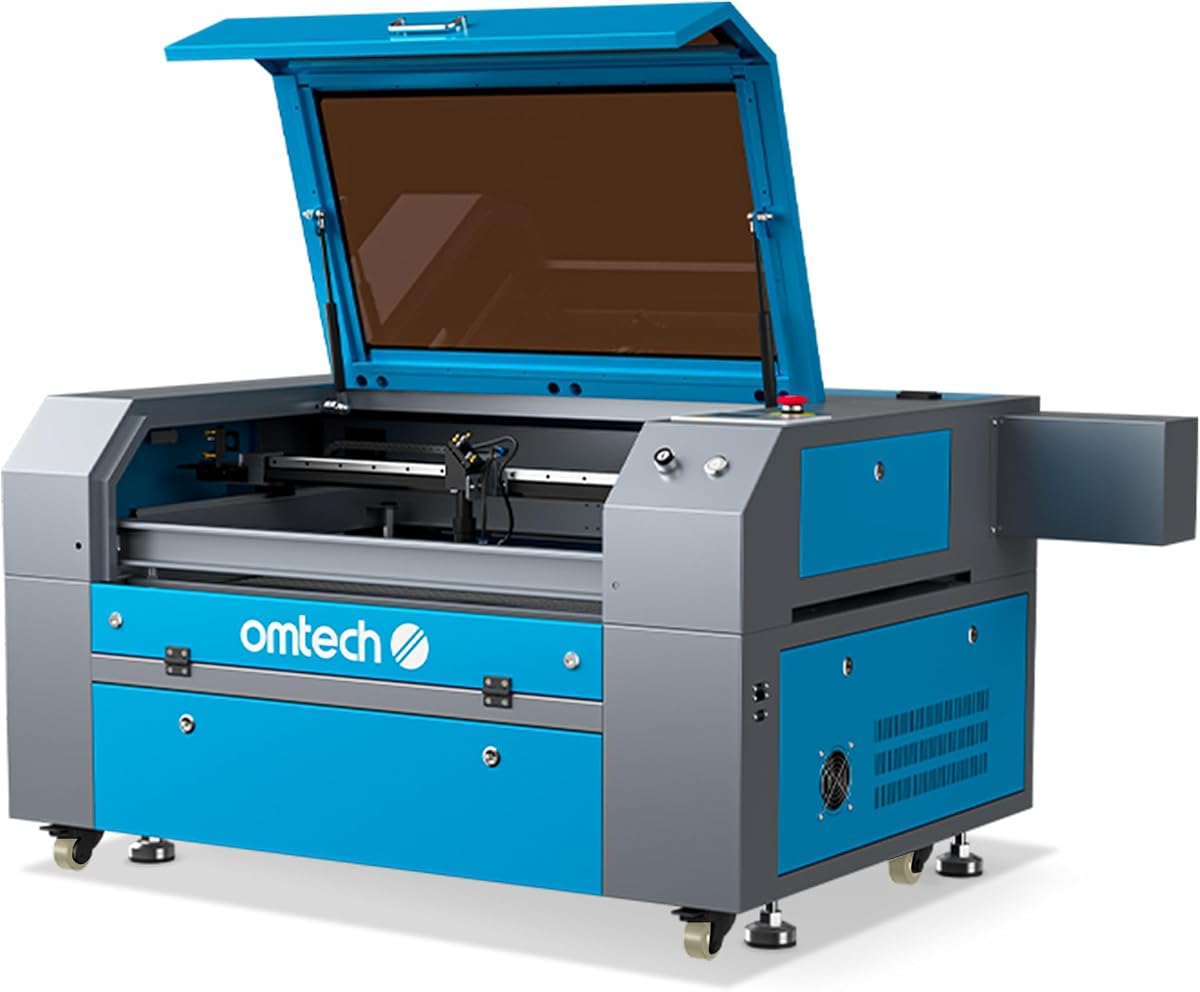
The OMTech K40+ 45W Desktop CO2 Laser Engraver & Cutter has a 4.4 rating and offers a strong mix of cutting capability, compact construction, and support resources. Its upgraded 45W tube is listed as capable of slicing through 10 mm acrylic and 8 mm wood, with engraving speeds reaching 300 mm/s.
We may earn a commission when you buy through this link, at no additional cost to you.
The 12 by 8-inch workspace uses a honeycomb bed for flat work, while a detachable base and optional rotary axis provide flexibility for taller or cylindrical objects. Integrated 45-degree air assist automatically adjusts airflow according to laser power, helping remove debris, protect optics, and reduce wood carbonization. LightBurn and LaserGRBL support cover the main workflows commonly used with this type of desktop machine.
Safety and service deserve attention. The machine includes door and water protection, an emergency stop, a flame-retardant acrylic panel, and a high-powered exhaust fan. These features do not replace safe operating practices, but they add useful layers of protection. The principal drawback is that rotary support is optional rather than clearly included, and the bed remains limited for large panels.
The K40+ fits makers who want a capable desktop cutter and frequently work with acrylic, wood, or leather. It is also suitable for users who value global support and a two-year service offering. Choose it when speed, compactness, and productive cutting matter more than a large work surface.
The stated 10 mm acrylic and 8 mm wood capabilities give this model more cutting headroom than many compact competitors. Results will still depend on the specific material, machine condition, lens quality, assist configuration, and the settings chosen for each pass.
OMTech highlights 24/7 global support, technical guidance, and local demonstrations by appointment, along with two years of comprehensive service. LightBurn and LaserGRBL compatibility gives new users options while leaving room to move between simpler and more advanced control environments.
We may earn a commission when you buy through this link, at no additional cost to you.
The OMTech Maker 60W CO2 Laser Engraver with LightBurn & Water Chiller combines a 60W tube, a spacious 20 by 28-inch area, and automatic focusing. Its 4.7 rating reflects a balanced package for users who have outgrown a small desktop engraver but do not need the largest production system in the list.
We may earn a commission when you buy through this link, at no additional cost to you.
Honeycomb and aluminum blade beds give users two ways to support workpieces, while four-way pass-through doors make it easier to accommodate longer materials. The workbeds adjust vertically, and the preinstalled autofocus finds the focal distance with a button press. LightBurn and a water chiller are included, reducing the need to plan those functions around later purchases.
Clean operation and visibility are supported by integrated air assist and a widened viewing window made from flame-retardant material. The machine is listed as Laser Class 2 with 0.827 mW output power. As with any CO2 engraver, ventilation, material knowledge, and safe operating procedures remain essential even when protective features are present.
This is the strongest middle-ground recommendation for small businesses, educators, and serious makers handling mixed production. The bed can accommodate substantially more than a 12 by 8-inch model, while autofocus reduces setup effort. Pick it when balanced capacity, clean cutting, and a complete bundle matter more than a premium automation platform.
Automatically locating the focal plane reduces the need for repeated manual height adjustments. This is particularly useful when switching between materials or bed surfaces, although operators should still verify the setup before beginning a production run.
The 20 by 28-inch area is a major step above compact desktop dimensions. Four-way pass-through doors further improve handling of long pieces, and the dual bed surfaces offer flexibility for fragile or awkwardly shaped materials.
We may earn a commission when you buy through this link, at no additional cost to you.
The OMTech Maker 90W CO2 Laser Engraver with LightBurn & Water Chiller is built for users who want more cutting power and a larger working area than the 60W model. It offers a 28 by 20-inch workspace, four-way pass-through doors, engraving speeds up to 600 mm/s, and cutting depth up to 0.4 inches in wood.
We may earn a commission when you buy through this link, at no additional cost to you.
Its 90W DC tube is rated for up to 12,000 hours of operation, with potentially longer service when used efficiently at lower settings. The product includes LightBurn and a water chiller, and the honeycomb and aluminum blade beds provide different workpiece support options. An automatic cover interlock shuts off the beam when the lid opens.
A widened flame-retardant viewing window and integrated air assist support safer, cleaner operation. The air system helps remove smoke and dust, protecting lenses and mirrors while improving visibility. The tradeoff is that this is a substantial machine with greater power, footprint, and operating considerations than a compact desktop engraver.
Choose this model for heavier wood projects, larger panels, or a growing operation that regularly uses production materials. It is also compelling for users who value a large bed and high speed without moving to the more automated xTool platform. Review the full bundle and operating requirements before making a final selection.
A 600 mm/s maximum engraving speed can improve throughput on suitable jobs, while the larger bed reduces the need to tile or reposition oversized work. Real output still varies with detail, material, fill density, and the number of cutting passes.
The lid interlock is a meaningful safety feature for a high-power machine, while integrated air assist supports clearer viewing and cleaner results. Operators should still follow all manufacturer instructions and use appropriate workshop ventilation.
We may earn a commission when you buy through this link, at no additional cost to you.
The xTool P3 80W Flagship CO2 Laser Cutter is the premium choice in this guide, pairing an 80W laser with an extensive automation system. Its 4.5 rating reflects strong performance, while its specifications distinguish it through LiDAR ranging, dual HD cameras, automatic bed positioning, smart nesting, and an enclosed Class 1 safety-rated design.
We may earn a commission when you buy through this link, at no additional cost to you.
The 36 by 18-inch workspace is the largest stated bed in this roundup. The ACS system uses LiDAR for autofocus, two cameras for positioning, and an AutoLift Base that can reach 8.7 inches in height. The Evolved Dual HD Camera system provides a 16-megapixel overview and a close-range detail camera, with stated alignment accuracy of 0.0079 inch.
Production tools include AI-powered smart nesting, variable batch fill, and spreadsheet import. The machine can cut 20 mm wood and 25 mm acrylic, reaches a maximum speed of 1200 mm/s, and supports an optional conveyor feeder and rotary attachment for expanded workflows. These accessories are sold separately unless expressly included in a selected bundle.
This is the choice for professional operations that value automation, setup speed, visual positioning, and material utilization. It may be excessive for occasional hobby use, and buyers should account for the cost of optional production accessories. Even so, the P3 offers the most developed automation concept among the machines compared.
LiDAR autofocus, camera positioning, and automatic bed height work together to simplify repeatable setup. This can make short production runs more consistent and reduce manual intervention when operators are handling varied materials or frequent changeovers.
Smart nesting, spreadsheet imports, variable batch fill, and optional conveyor and rotary systems address needs that usually arise as customization businesses grow. Buyers should evaluate the exact bundle carefully because several expansion accessories are sold separately.
We may earn a commission when you buy through this link, at no additional cost to you.
This OMTech K40+ 45W Desktop CO2 Laser Engraver & Cutter listing has a 4.5 rating and covers the same core 45W platform as the second-ranked product. It combines a 12 by 8-inch work area, speeds up to 300 mm/s, and stated cutting depths of 10 mm acrylic and 8 mm wood.
We may earn a commission when you buy through this link, at no additional cost to you.
Its honeycomb bed handles flat work, while a detachable base and optional rotary axis support cylindrical or taller pieces. The integrated 45-degree air assist automatically adjusts airflow based on power, reducing smoke, debris, and wood carbonization. LightBurn and LaserGRBL compatibility make it suitable for both entry-level and more advanced design workflows.
OMTech emphasizes 24/7 global support, technical guidance, local demonstrations by appointment, and two years of comprehensive service. Door and water protection, an emergency stop, a flame-retardant panel, and an exhaust system form a useful safety and air-management package. It is also a Laser Class 2 model with 0.827 mW output power.
This listing is worth considering for buyers who put support and service access high on their decision list. Its limitations are the familiar desktop tradeoffs: a small bed and an optional rotary axis. For personalized goods, prototypes, and small batches, it remains a capable and approachable choice.
The power-responsive 45-degree air assist helps move smoke and debris away from the work area and optics. This is especially helpful when cutting wood, where residue and carbonization can otherwise obscure the cut or affect repeatability.
Global technical support and two years of service coverage can add confidence to a substantial equipment purchase. Prospective buyers should confirm the precise service terms and local support arrangements for their location before ordering.
We may earn a commission when you buy through this link, at no additional cost to you.
The OMTech Pronto 100W CO2 Laser Engraver & Cutter is the most powerful model in the roundup, offering a 100W tube, a 40 by 24-inch work area, and engraving speeds up to 1000 mm/s. No customer rating was supplied, so its inclusion here rests on its specifications and feature set rather than a rating comparison.
We may earn a commission when you buy through this link, at no additional cost to you.
The large honeycomb and aluminum blade beds provide room for broad workpieces, and two-way pass-through doors help accommodate longer materials. Advanced autofocus simplifies focal adjustment across different setups. The 100W tube is listed for up to 12,000 hours of use, with the possibility of longer service when operated efficiently at lower settings.
Air management is unusually robust, with a 4.4 cfm air pump and a 318 cfm fan intended to improve cut cleanliness and reduce material burn. Water protection, air assist, temperature alarms, cover protection, and an emergency stop add multiple safety controls. The machine is also listed as Laser Class 2 with 0.827 mW output power.
This Pronto is aimed at operators who regularly cut thick material or need high output from a large work area. It is the most technically powerful model here, but also demands more space, power, ventilation, and operational discipline. It is better suited to committed production than occasional decorative engraving.
The 100W tube and 1000 mm/s speed are designed for high-volume work and materials that challenge lower-power systems. Actual completion times vary, but the combination gives experienced operators a higher ceiling for cutting and engraving throughput.
A 40 by 24-inch bed is the largest area listed in the guide. Honeycomb and blade bed options offer different support strategies, while two-way pass-through doors simplify the placement of long stock.
We may earn a commission when you buy through this link, at no additional cost to you.
The OMTech Maker 90W CO2 Laser Engraver with LightBurn & Water Chiller has a 5.0 rating and a distinct bundle that includes both software and cooling. Its 90W laser and 20 by 28-inch area position it as a capable middle-to-large production machine without moving to the Pronto's maximum dimensions.
We may earn a commission when you buy through this link, at no additional cost to you.
Honeycomb and aluminum blade beds support flat and irregular work, while four-way pass-through doors allow long pieces to extend through the machine. LightBurn provides the control environment, and the water chiller supports consistent cooling. The listed Yongli H2 tube delivers 90W and is rated for up to 8,000 hours, potentially lasting longer when used efficiently at lower settings.
A widened viewing window is made from flame-retardant material, and the cover interlock stops the laser beam when the window is opened. The machine is listed as Laser Class 2 with 0.827 mW output power. Compared with some similarly powerful models, the supplied description does not state an autofocus feature, making manual setup a likely consideration.
Choose this model for users who want a 90W tube, a generous bed, and a ready-made software-and-cooling bundle. The 5.0 rating is encouraging, although review volume is not supplied and should be checked. It is best suited to established makers and small production operations that value a complete configuration.
Including LightBurn and a water chiller simplifies initial setup compared with purchasing a basic machine and adding core workflow components separately. The inclusion of these items should be verified in the current listing because bundle contents can change.
The Yongli H2 tube is listed for up to 8,000 hours and for longer life when used efficiently at lower settings. Its 90W output offers strong material capacity, while the 20 by 28-inch bed provides a practical balance for larger panels and production batches.
We may earn a commission when you buy through this link, at no additional cost to you.
The OMTech 100W CO2 Laser Engraver with Water Chiller offers a 100W tube, a 28 by 20-inch bed, and engraving speeds up to 1000 mm/s. No customer rating was supplied, but the stated cutting capabilities and feature set position it as a high-output option for wood, acrylic, glass, and other non-metallic materials.
We may earn a commission when you buy through this link, at no additional cost to you.
Its smart autofocus fine-tunes the focal point with a single button press, simplifying setup across varied materials. X- and Y-axis stepping motors work with V-wheel guide rails to support controlled movement and reduce misalignment or shaking. The water chiller, built-in air assist, and two-way pass-through doors make it suitable for sustained and elongated workflows.
Advanced sensors monitor air pressure and temperature and can pause operation when needed. A powerful air pump and 318 cfm turbo exhaust fan help control dust and debris. Software compatibility includes RDWorks, CorelLaser, and LightBurn, giving operators several familiar ways to prepare and send designs.
This is a good fit for operators who want maximum laser power, high speed, and straightforward autofocus within a moderately large enclosure. It is less expansive than the Pronto but offers comparable headline power and speed. Confirm the current package, cooling details, and available software configuration before ordering.
A single-button autofocus reduces the number of manual setup steps, which can improve consistency across repeated jobs. Operators should still confirm material settings and focus before committing a full production run.
Air-pressure and temperature monitoring can interrupt work when conditions are unsuitable, while the air pump and turbo fan support debris control. These features complement rather than replace routine lens care, filtration, and safe material handling.
We may earn a commission when you buy through this link, at no additional cost to you.
The OMTech Maker 90W CO2 Laser Engraver & Cutter with Water Chiller combines a 90W laser with a 28 by 20-inch workspace, four-way pass-through doors, and a water chiller. No rating was supplied for this listing, so it should be evaluated on its specifications, current bundle, and the availability of customer feedback.
We may earn a commission when you buy through this link, at no additional cost to you.
The 90W DC tube is rated for up to 12,000 hours and may last longer when used efficiently at lower settings. The machine engraves materials such as glass, acrylic, and leather, cuts wood up to 0.4 inches deep, and reaches 600 mm/s. These figures make it suitable for demanding medium- and large-format production.
An automatic cover interlock shuts off the laser when the lid opens, and the widened flame-retardant viewing window supports visibility and durability. Integrated air assist removes smoke and dust, helping protect the lens and mirrors while producing cleaner marks. The product is listed as Laser Class 2 with 0.874 mW output power and model SH-G570.
This configuration is worth shortlisting for buyers who want the larger 28 by 20-inch bed and water cooling without moving to the xTool P3's advanced automation. It is a practical high-power choice, provided the current listing confirms the software, autofocus, and other bundle details that a particular workflow requires.
Four-way pass-through doors are especially useful when material enters and exits through opposing sides, and the 28 by 20-inch bed accommodates larger sheets than the 20 by 28-inch configuration is positioned to emphasize in either direction.
The stated 12,000-hour tube rating and advice to use lower settings efficiently support long-term ownership planning. Actual life varies with material, duty cycle, maintenance, and operating conditions, so proper cooling and optics care remain essential.
We may earn a commission when you buy through this link, at no additional cost to you.
Choosing a CO2 laser engraver requires balancing material capabilities, usable bed size, workflow software, thermal management, and safe operation. The following factors are more informative than wattage alone when determining which machine fits a particular maker or business.
Choose power according to the thickest material you expect to cut regularly. If your work is mostly engraved wood, paper, leather, or thin acrylic, a 45W model may provide ample capacity. Repeatedly cutting thicker acrylic, wood, or other dense non-metals favors a higher-powered system. Always test settings on the exact material and use appropriate focus, assist, passes, and ventilation.
Measure the largest finished item you plan to make, then compare it with the entire working area rather than only the stated dimensions. Honeycomb beds support many flat items, while aluminum blade beds can accommodate different shapes and workpiece arrangements. In short, prioritize a bed that comfortably holds the work with room for fixtures and material movement.
Look for software that matches both your design software and your experience level. Confirm the operating-system requirements, included license terms, driver needs, and whether tutorials or community support are available. A broad compatibility list is useful, but a familiar and dependable workflow is more valuable than having many options you will never use.
Automatic focus is particularly valuable for mixed production, where operators change materials or bed surfaces throughout a session. Cameras can further help position artwork and identify the correct starting point. Even with automation, a quick visual and test-pattern check before a long job remains sensible because mechanical movement, material thickness, and setup conditions can change the ideal focus.
Good airflow improves visibility, reduces residue around cuts, and helps protect optical components from contamination. It can also limit carbonization on wood. Do not treat built-in air assist as a substitute for safe ventilation. Consider the materials you will process, the volume of smoke produced, whether other people share the space, and the availability of suitable filtration.
Match the cooling system to the machine's power and duty cycle. Water-cooled bundles can be especially useful for sustained production, provided the fluid, lines, and chiller are maintained correctly. Treat published tube-life figures as maximum or nominal values rather than guarantees; material choice, operating power, maintenance, and service practices all influence actual longevity.
Choose a machine appropriate to your training and environment, but never rely on built-in safeguards as permission to skip safe procedures. Keep the lid closed during operation, maintain the air path, keep combustible materials away from the beam area, and use suitable eye protection where required. New operators should learn the emergency-stop procedure and keep a fire-response plan accessible.
Identify the repetitive task that consumes the most time before paying for automation. Batch customization may justify spreadsheet import or variable fill, while cylinder products may make rotary mapping more valuable. Conversely, a maker producing occasional signs and gifts may gain more from a simpler machine, a larger bed, and money reserved for quality materials and proper ventilation.
Begin by reading the manual for the exact model, installing the appropriate cooling and exhaust arrangements, and checking that the work area is clear. Confirm material compatibility before placing anything on the bed, especially because the CO2 lasers discussed here are intended primarily for non-metallic materials. Load the artwork in the supported control software, verify the scale and placement, then use a small test cut to establish focus, power, speed, and pass settings.
During operation, keep the lid or cover closed, avoid touching the moving gantry or beam path, and never leave the machine unattended while it is firing. Use air assist and suitable ventilation, watch for unusual smoke or odor, and keep the air assist and exhaust unobstructed. For rotary work, secure the item correctly and use the matching attachment settings rather than trying to improvise around an unsupported fixture.
After each job, allow the machine to cool as directed and clean the bed, tray, lens window, and external filters according to the manufacturer's instructions. Remove residue gently with suitable cleaning methods, inspect the lens and mirrors for contamination or damage, and keep the water system in the specified condition. Back up design files and preserve proven settings for each material, but always retest when a material or configuration changes.
CO2 laser engravers are generally best suited to non-metallic materials such as wood, acrylic, leather, paper, cardstock, rubber, and some plastics. The featured machines advertise combinations of wood, acrylic, glass, and leather, but each material responds differently to power and focus. Some acrylic colors and coatings can also change the result. Always run a test using the exact material and thickness before starting a production batch.
A 45W machine can be suitable for small-business engraving and light cutting when the work generally fits a 12 by 8-inch bed. It is a credible option for personalized products, labels, tags, and thinner acrylic or wood. If the business regularly cuts thicker stock or processes large panels, a 60W to 100W model with a larger bed may offer more practical throughput.
Engraving uses a focused beam to mark the surface of a material, while cutting uses enough concentrated energy to pass through it. CO2 machines can perform both tasks with different power, speed, focus, and pass settings. A machine described as a laser engraver and cutter should support both, but actual cutting depth depends on the material, optics, machine condition, and chosen settings.
Cooling is important because the laser source and surrounding components generate heat. Several machines in this guide include a water chiller or integrated water pump, while others may rely on a separately configured cooling arrangement. Follow the specifications for the exact model, maintain the recommended fluid level, and avoid operating without the required cooling system.
Autofocus is not strictly necessary, but it reduces setup time and helps maintain consistency when working with different thicknesses. Manual focusing can work well for a dedicated material and bed configuration, particularly on smaller desktop machines. Automated systems are especially useful for mixed production, frequent material changes, and operators who want fewer manual height adjustments.
Use the machine on a stable, nonflammable surface, maintain suitable ventilation, keep the lid closed while the laser fires, and follow all manufacturer instructions. Depending on the machine and operating environment, appropriate eye protection and fire-response preparation may be necessary. Built-in interlocks, emergency stops, flame-retardant panels, and air assist add protection, but they do not eliminate the need for careful operating practices.
Choose the larger bed when your finished pieces or stock are physically too large for a smaller machine or when you want to batch more items at once. Choose more power when your priority is cutting thicker materials or increasing the ceiling for cutting speed. The best choice supports both your largest workpiece and your toughest common material without requiring an unnecessarily large machine.
Verify the exact laser power, work area, included accessories, software, cooling equipment, safety features, and warranty coverage in the current listing. Bundle contents can change even when the machine model remains the same. Check the current rating and customer feedback as well, but do not assume that a high rating guarantees a particular cut depth or workflow performance.
The VEVOR 45W stands out as the best overall value in this guide because it combines useful power, a rotary axis, air assist, and broad software compatibility in a compact desktop format. The OMTech Maker 60W is the editor's choice for users who want a larger 20 by 28-inch bed, autofocus, LightBurn, and a water chiller, while the xTool P3 represents the premium choice for advanced automation and production features.
For most buyers, the right comparison begins with the largest material and most demanding task. Match the work area to the projects, select enough power for realistic cutting, and confirm that the software and focusing system fit the operator's experience. Pay equal attention to cooling, air assist, interlocks, and ventilation, since these factors influence both output quality and safe operation.
Finally, review the current product listing before purchasing. Ratings, bundle contents, available accessories, and prices can change, and no buying guide can guarantee identical results across every material or operating environment. Use the detailed specifications here to build a shortlist, then confirm the latest configuration and support terms with the seller.