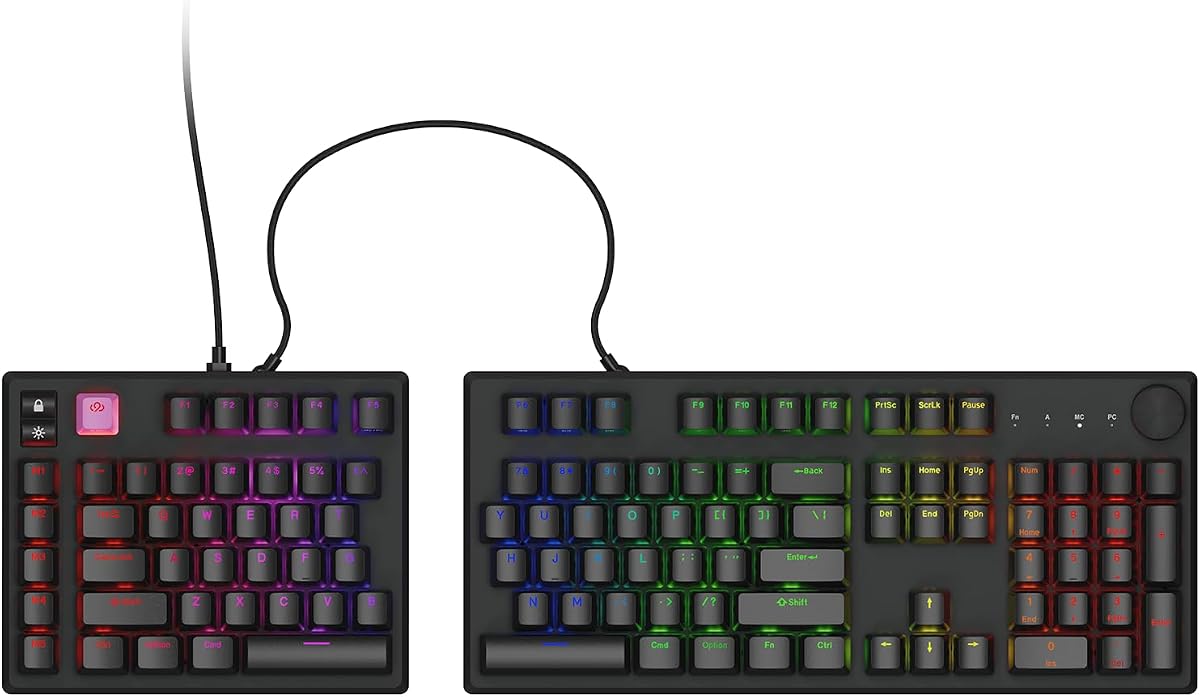
Cloud Nine ErgoPRO Full-Size Mechanical Split Ergonomic Keyboard for Mac
4.8Editor score
Full-size split mechanical layout
QMK and VIA customization
Hot-swappable mechanical switches
RGB backlighting with presets
A split keyboard can encourage a more natural typing posture by separating the left and right key zones, reducing inward wrist bending during extended work. For Mac users, the best models also need familiar shortcuts, dependable connectivity, appropriate system compatibility, and a layout that works across laptops, desktops, and tablets.
The keyboards in this guide were compared using their supplied specifications, ratings, connection options, key layouts, backlighting, adjustability, and Mac-related features. The list covers wired, wireless, mechanical, membrane, and scissor-switch designs, with attention to comfort, portability, programming support, and ease of adaptation.
Each review identifies the features that distinguish its keyboard and explains who may benefit from its particular design. Ratings reflect the information available when this guide was prepared, while prices and availability can change, so shoppers should confirm current product details before buying.
4.8Editor score

4.4Editor score

4.1Editor score
As an Amazon Associate we earn from qualifying purchases.
This side-by-side comparison highlights each keyboard's layout, connection method, adjustability, lighting, and Mac-oriented features to help narrow the field before buying.


The Macally Wired Ergonomic Keyboard for Mac is a full-size, sloped split keyboard designed for users who want a familiar Mac layout without giving up the more open hand position of an ergonomic design. Its 4.1 rating reflects a practical balance of comfort-focused construction, useful shortcuts, and straightforward connectivity. The curved frame separates the main typing zones while preserving a 100-key arrangement that should feel more approachable than a compact custom keyboard.
We may earn a commission when you buy through this link, at no additional cost to you.
Its standout qualities are the padded wrist support, four adjustable kickstands, and three brightness levels for the LED backlit keys. The design gives users several ways to tune the typing angle without requiring advanced configuration. A five-foot USB-A cable provides a dependable plug-and-play connection, eliminating battery management and wireless pairing. Sixteen shortcuts offer quick access to common Mac functions, while the scissor switches are intended to provide a familiar laptop-like feel.
The main trade-off is that this is a wired design, so its cable may constrain desk positioning or travel. Users switching from a conventional keyboard may also need several days to adapt to the split shape and curved arrangement. It lacks the deeper programmability of mechanical models and does not offer the flexible separation and tenting seen in dedicated ergonomic keyboards. Nevertheless, those omissions are reasonable for a straightforward Mac-oriented option.
This keyboard is best for office users, students, and home workers who spend substantial time typing, want visible keys in changing light, and prefer not to manage wireless connections. It is also a sensible choice for anyone wanting a full-size Mac layout with a numeric keypad. For users who prioritize wire-free flexibility or extensive key customization, a more specialized model may be preferable.
The sloped split layout, padded wrist support, and four adjustable kickstands let users alter the angle of the keyboard rather than relying on a single fixed posture. These adjustments can help users find a more comfortable position during long typing sessions.
The 100-key Mac-style layout and 16 shortcuts preserve familiar navigation, while the USB-A cable removes charging and pairing concerns. It is a practical option for users who want an ergonomic upgrade at a stationary desk.
We may earn a commission when you buy through this link, at no additional cost to you.
The KINESIS Freestyle2 is a budget-friendly split keyboard with an emphasis on physical adjustment. Rather than fixing the two key modules at one position, it allows users to separate them by as much as nine inches and rotate them into different positions. Its 4.1 rating makes it a notable option for typists who need more precise ergonomic tuning than a standard curved keyboard offers.
We may earn a commission when you buy through this link, at no additional cost to you.
The included VIP3 lifters support tenting angles of 5, 10, or 15 degrees, and the integrated cushioned palm supports are designed to keep the forearms in a more neutral position. Low-activation-force membrane switches provide tactile feedback while reducing the force required for each press. The Mac version includes familiar Cut, Copy, Paste, multimedia hotkeys, and a convenient two-port USB hub.
The principal drawback is that it does not offer modern conveniences such as wireless connectivity, rechargeable power, or broad key remapping. The membrane switches also feel fundamentally different from modern mechanical or scissor-switch options. Its substantial, curved footprint may also occupy more desk space than a compact split model. Still, the degree of tenting and separation control is exceptional for the budget category.
The Freestyle2 suits users who want a proven ergonomic layout, have a constrained budget, and work primarily from a desk. It is particularly attractive for programmers, writers, and data-entry users who understand that split keyboards need time to become familiar. Buyers who need Bluetooth, Mac multi-device switching, RGB lighting, or extensive customization should look at more advanced alternatives.
Independent module rotation and separation up to nine inches give the Freestyle2 more fitting flexibility than keyboards with a fixed split. The included lifters and palm supports reinforce the neutral-hand-positioning concept.
Low-activation-force membrane switches reduce finger effort while preserving tactile feedback. Standard Mac hotkeys and an integrated USB hub add everyday usefulness without requiring software or special drivers.
We may earn a commission when you buy through this link, at no additional cost to you.
The Macally Wired Ergonomic Keyboard with USB Hub combines a split, curved layout with a full-size 100-key design and a practical collection of connection ports. Its 4.1 rating reflects the appeal of a keyboard that is explicitly tailored for macOS while remaining usable with iPads and iPhones. The cushioned wrist support and curved slope are intended to reduce strain during lengthy work sessions.
We may earn a commission when you buy through this link, at no additional cost to you.
Its most useful distinction is the integrated hub, which provides two USB-A ports and one USB-C port for accessories such as a mouse, flash drive, or other peripherals. The included dual plug supports either USB-A or USB-C hosts, making the keyboard broadly practical across contemporary Mac setups. White LED backlighting includes three brightness levels, and 16 shortcuts cover brightness, media, and everyday functions.
As with the first Macally wired model, the cable constrains positioning and there is no wireless or battery option. The added hub is valuable only if the Mac has limited USB ports, and some users may prefer to keep their desk uncluttered with a separate dock. This model also provides less physical tuning than the KINESIS because its split shape and slope are fixed.
It is a good fit for MacBook users, office workstations, and shared desks where USB-C is already in use. The built-in hub makes it especially convenient for people who want one keyboard to handle input and basic peripheral connections. It remains less appealing for users who need multi-device wireless switching or extensive keyboard programming.
Two USB-A ports and one USB-C port add convenient attachment points without requiring a separate desk hub. This can simplify a MacBook setup that otherwise has very few ports available.
The dual USB-C and USB-A plug allows use with Mac computers, iPads, and iPhones. Backlighting and Mac-specific shortcuts make the keyboard especially convenient in low-light conditions.
We may earn a commission when you buy through this link, at no additional cost to you.
The Cloud Nine ErgoPRO is a full-size mechanical split keyboard developed with macOS users in mind, and its 4.8 rating is the highest in this guide. It combines a natural split layout with extensive customization, allowing it to serve programmers, designers, gamers, and productivity-focused professionals. The product also supports Windows, making it a flexible choice for mixed-device workspaces.
We may earn a commission when you buy through this link, at no additional cost to you.
Its standout feature is QMK support, which permits custom keymaps, macros, shortcuts, and layers. VIA support adds browser-based lighting control without requiring a separate installation, while 43 pre-programmed RGB presets provide convenient starting points. The hot-swappable PCB allows compatible mechanical switches to be replaced without soldering, and the aluminum keyframe contributes rigidity. PBT keycaps are also designed to resist shine, fading, and wear.
The learning curve is the clearest trade-off. A new split layout can feel awkward initially, and mechanical switches produce a louder, more tactile experience that may not suit shared offices, quiet libraries, or users who prefer a laptop-like feel. QMK and VIA features also go unused by shoppers who only want a basic keyboard. Nevertheless, the customization potential makes this model distinctive among the Mac-focused options.
The ErgoPRO is best for experienced keyboard enthusiasts who want a split layout without giving up modern mechanical construction and software control. It is also a compelling choice for programmers who can benefit from layers and macros. New users should expect to spend time learning the layout, while buyers seeking simple plug-and-play operation may find a membrane or scissor-switch keyboard more approachable.
QMK support allows layers, macros, shortcuts, and custom keymaps to be tailored to demanding workflows. VIA support for lighting is browser based, reducing the effort required to make visual adjustments.
Hot-swappable sockets make compatible three-pin and five-pin switches easy to replace without soldering. The aluminum frame and PBT keycaps emphasize durability and long-term customization.
We may earn a commission when you buy through this link, at no additional cost to you.
The SABLUTE Ergonomic Wireless Keyboard and Mouse is a broad workstation package rather than a keyboard-only product. Its 4.8 rating reflects a complete set of features for users who want to coordinate the keyboard and pointing device around a split, ergonomic layout. It is built for extended sessions, with a full-size key arrangement, number pad, curved wrist rest, and matching ergonomic mouse.
We may earn a commission when you buy through this link, at no additional cost to you.
The keyboard uses a curved split layout to place the hands at a more natural angle, while a soft memory-foam wrist rest and four adjustable tilt legs provide additional comfort controls. Its surface is described as water-resistant and easy to clean. A dedicated system key switches between Windows and Mac layouts, and shortcut keys cover media, calculator, screenshot, and emoji functions. The mouse adds palm and thumb support, four DPI levels, and forward and back buttons.
Both devices communicate through a 2.4GHz receiver, with a USB-C adapter included for compatible hosts. Their rechargeable batteries, automatic sleep function, and stated standby durations reduce the need for disposable batteries. The trade-off is that this is not a Bluetooth product, and the 19-by-10.45-inch keyboard needs a large desk. Users with compact workspaces may find the footprint restrictive despite the ergonomic benefits.
This bundle is best for Mac users building a complete ergonomic office setup who prefer one supplier and one receiver for both input devices. It is especially useful for users who work long hours and want wrist support alongside a mouse designed for a more relaxed grip. Those with limited desk space or a preference for Bluetooth multi-device pairing should consider a smaller or more conventional wireless model.
The included mouse mirrors the keyboard's ergonomic intent with palm and thumb rests, four DPI settings, and navigation buttons. Using both together may create a more consistent comfortable workspace than mixing unrelated input devices.
Rechargeable batteries and automatic sleep help reduce charging and battery-replacement interruptions. The included USB-C adapter allows the 2.4GHz receiver to connect through a USB-C host.
We may earn a commission when you buy through this link, at no additional cost to you.
The Macally Bluetooth Ergonomic Keyboard provides a full-size split design for Mac users who want to move between several Apple devices. Its 3.8 rating is lower than those of the leading choices, but the product addresses a clear combination of needs: a familiar 100-key layout, Bluetooth pairing for three devices, adjustable backlighting, and a rechargeable 2000mAh battery.
We may earn a commission when you buy through this link, at no additional cost to you.
Its posture-friendly shape separates the typing zones, while the padded wrist support and four adjustable kickstands offer ways to tune the angle. Three LED brightness settings provide visibility in different ambient conditions. Dedicated device switching makes it possible to use the keyboard with a MacBook, iPad, iMac, or iPhone. Thirteen shortcuts and a familiar Mac-style layout also help reduce the transition from an Apple laptop keyboard.
The lower rating may reflect the compromises associated with a large, wireless, full-size design. The keyboard still requires an adjustment period because the split shape changes familiar typing habits, and its footprint may not suit smaller desks. The included USB-C cable is used for charging rather than providing a wired data path. Users seeking deeper customization or premium mechanical construction may find alternatives more compelling.
It is best for Mac users who regularly alternate between a laptop and an iPad or iPhone and want backlit keys without carrying a separate peripheral. Its rechargeable battery and device switching support a mobile workflow. Buyers primarily typing at one fixed desk may get more value from a wired model, while those wanting programmable layers should consider the Cloud Nine ErgoPRO.
Bluetooth pairing and dedicated switching make it easy to move between a MacBook, iPad, iMac, or iPhone. The full-size layout maintains familiar placement of standard keys.
Three brightness levels cover different lighting conditions, while the large built-in battery supports extended wireless use. A USB-C charging cable is included for recharging.
We may earn a commission when you buy through this link, at no additional cost to you.
The Macally Dual-Mode Split Keyboard is a compact two-zone model designed for users who need wireless flexibility and a wired option without moving to a full-size desktop layout. Its 3.4 rating is the lowest in this guide, so buyers should weigh its useful feature set carefully against the alternatives. The design is particularly relevant for users who want to reduce desk clutter and work across Mac, iPad, and iPhone devices.
We may earn a commission when you buy through this link, at no additional cost to you.
The keyboard can connect over Bluetooth or through USB-C or USB-A. Wired mode provides a stable connection, supports charging, and allows access to a computer's login screen before a wireless connection is established. Dedicated keys switch among three paired devices. The 86-key arrangement includes 15 shortcuts, including Mission Control, Spotlight, and media controls, while scissor switches provide a quiet and familiar feel.
Its compact format means that some users will need time to locate less frequently used functions, and the split design still creates an initial learning curve. The 500mAh rechargeable battery is smaller than the battery in the full-size Macally Bluetooth model and is stated to last up to one to two months depending on use. The low rating also makes independent user feedback particularly important before committing.
This model is best for mobile-oriented users who switch among several devices and value a smaller footprint. It is also useful when a dependable wired mode is needed for startup, recovery, or charging. Users who require a number pad, extensive remapping, premium materials, or strong support for long-term heavy typing may prefer one of the higher-rated full-size options.
Bluetooth serves everyday mobile use, while USB-C and USB-A wired modes provide a stable path for login screens and simultaneous charging. This dual approach covers several common working conditions.
Mission Control, Spotlight, media controls, and other shortcuts support common macOS tasks. The 86-key layout reduces footprint but asks users to adapt to a more condensed arrangement.
We may earn a commission when you buy through this link, at no additional cost to you.
The Logitech ERGO K860 is a polished wireless split keyboard whose 4.4 rating and broad feature set make it an excellent general choice for Mac users. It combines a curved, sloping keyframe, a large pillowed wrist rest, quiet keys, and a full-size layout. Rather than focusing on extreme customization, it focuses on a refined, approachable ergonomic experience.
We may earn a commission when you buy through this link, at no additional cost to you.
Its wrist rest includes a memory-foam layer and is designed to provide more wrist support while reducing bending compared with a standard keyboard without palm support. Scooped keycaps are shaped to follow the fingertips, while tilt legs offer 0, negative 4-degree, and negative 7-degree positions for seated or standing use. Connectivity includes both Bluetooth and a USB receiver, giving users a straightforward way to work with Mac systems.
Logitech Options adds useful controls for Fn-key behavior, custom shortcuts, and battery-life notifications. However, it does not provide the extensive QMK-style layers and macros available on the Cloud Nine ErgoPRO. The separate USB receiver can also add one more item to an otherwise wireless desk, although users may not need it if they connect through Bluetooth. As with all split layouts, initial adaptation should be expected.
The K860 is best for office professionals, writers, students, and programmers who want proven comfort without building a custom mechanical system. Its full-size layout makes it easier to retain a number pad and familiar key positions. It is a particularly strong recommendation for users who value a supportive wrist rest, quiet operation, and an established brand ecosystem over deeply programmable hardware.
The sloping curved frame, scooped keys, and memory-foam wrist rest work together to support a more natural hand position. Adjustable palm-lift angles allow the keyboard to suit different working heights.
Bluetooth and a USB receiver cover different connection preferences. Logitech Options handles Fn keys, custom shortcuts, and battery notifications without requiring advanced firmware work.
We may earn a commission when you buy through this link, at no additional cost to you.
The RK ROYAL KLUDGE S70 is a compact mechanical split keyboard for users who want gaming-oriented construction, programmable controls, and a smaller footprint than a full-size ergonomic model. Its 4.3 rating makes it one of the stronger choices in the guide, particularly for programmers and gamers willing to learn a more specialized layout.
We may earn a commission when you buy through this link, at no additional cost to you.
The 75-percent layout preserves essential keys while reducing desk usage. It supports low-latency 2.4GHz wireless, Bluetooth, and USB-C. Pre-lubed linear creamy switches provide smooth keystrokes, and a hot-swappable PCB accepts both three-pin and five-pin switches. The 3150mAh battery is stated to last up to two weeks without backlighting, and five programmable macro keys can accelerate work or gaming actions.
Eight adjustable feet let users alter or tent the typing angle, and a coiled cable can link the two halves. A built-in battery in the left half preserves wireless connectivity and macro functionality for one-handed use. The trade-off is that RK software for remapping macros and customizing RGB is specified for Windows, so Mac users may not receive the same configuration experience. The 75-percent arrangement can also feel dense for users accustomed to a full-size layout.
This keyboard is best for experienced mechanical-keyboard users who need a compact split format for gaming, programming, or productivity. It is also useful for users who want one-handed operation in a specific workflow. Buyers whose main requirement is effortless Mac configuration should favor a model with native macOS software or a simpler wireless layout.
The 75-percent layout saves desk space while retaining common navigation keys. Hot-swappable sockets and pre-lubed linear switches make the keyboard adaptable to different mechanical preferences.
The left half contains its own battery, retaining wireless connectivity and macro functionality when separated. Bluetooth, 2.4GHz, and USB-C cover several connection scenarios.
We may earn a commission when you buy through this link, at no additional cost to you.
The Perixx Periboard-612B is a wireless split keyboard built around a traditional membrane-switch experience. Its 3.9 rating reflects a practical design that prioritizes familiar key travel, easy setup, and broad Windows and Mac compatibility rather than advanced programmability. It is a recognizable alternative for typists who want a split shape but are not interested in mechanical switches.
We may earn a commission when you buy through this link, at no additional cost to you.
The one-piece body divides the keys into left and right zones while using stepped, curved rows and curved keycaps to encourage natural finger placement. Its 4.2mm membrane travel offers extended movement and tactile feedback described as similar to brown mechanical switches. The keyboard supports both a 2.4GHz nano receiver and Bluetooth, and a bottom switch handles operating-system selection. No drivers or setup software are required.
The design has clear limitations. There is no backlighting, RGB lighting, hot-swapping, or extensive remapping, and the split geometry is fixed. It requires two AA alkaline batteries, which are not included, so buyers should consider replacement convenience. The full 19.1-inch width may also make it less attractive for smaller desks despite the ergonomic intent.
The Periboard-612B is best for users who want a familiar tactile feel, quiet everyday typing, and simple cross-platform wireless operation. It suits general office work, writing, and study, particularly for people transitioning from a conventional membrane keyboard. Those seeking a modern mechanical feel, extensive programmability, or polished connectivity features should compare it with more advanced choices.
Extended 4.2mm membrane travel and tactile feedback can feel familiar to users accustomed to traditional keyboards. Stepped rows and curved keycaps support a more natural finger placement.
Users can select the 2.4GHz receiver or Bluetooth and change the operating-system mode with a bottom switch. Plug-and-play operation avoids driver installation and dedicated configuration software.
We may earn a commission when you buy through this link, at no additional cost to you.
The right split keyboard depends on how you work, how much desk space you have, and how much you value adjustability, customization, wireless freedom, or familiar Mac behavior.
A split layout separates the left and right key groups so the hands can approach from a more natural angle. Some models use a fixed curved shape, while others allow each half to rotate, separate, or tent independently. Greater adjustability can help users match shoulder width, forearm position, and preferred desk height, but it may also make the initial setup more involved. Macally's wired models use a familiar fixed curve, the KINESIS Freestyle2 allows substantial separation and tenting, and the RK S70 provides eight adjustable feet.
Choose a fixed design for simplicity and a more adjustable model when fine positioning matters to you. Measure your desk and consider whether the keyboard will be used with a mouse before making a final choice.
A keyboard can split the keys while still using an unfamiliar modifier arrangement. The KINESIS Freestyle2 and Logitech K860 use standard full-size layouts, while the Macally models provide explicit Mac-oriented shortcuts. Cross-platform models such as the SABLUTE, Perixx, RK S70, and Cloud Nine ErgoPRO offer a system switch or broader compatibility, although customization software may not work equally well on macOS.
Verify that the Command and Option keys are placed where you expect. If you regularly switch between Mac and Windows, favor a visible OS switch or software that is explicitly supported on both platforms.
Membrane, scissor, and mechanical switches create different typing experiences. The KINESIS Freestyle2 uses low-force tactile membrane keys, the Macally dual-mode and wired products use familiar scissor-style switches, and the Cloud Nine ErgoPRO and RK S70 use mechanical switches. Mechanical construction generally provides deeper customization and a more pronounced feel, but it can be louder and less familiar to users accustomed to laptop keyboards.
Think about your work environment as well as your preferences. Quiet offices and shared spaces may favor scissor or tactile membrane models, while gaming and enthusiast setups often benefit from mechanical options.
Wired keyboards provide immediate, stable input and avoid charging. Wireless models offer a cleaner desk and greater freedom, but they introduce pairing, battery, and latency considerations. The Macally wired keyboards and dual-plug hub model prioritize dependable connections. Bluetooth options support multiple Apple devices, while the SABLUTE and RK S70 rely on 2.4GHz wireless and offer distinct connection advantages. The KINESIS and Perixx provide 2.4GHz, while the Logitech K860 supports both Bluetooth and a USB receiver.
Choose wired if reliability, uninterrupted power, and zero configuration matter most. Choose wireless if portability, device switching, and a cleaner workspace outweigh battery management.
Backlighting helps users identify keys in dim rooms or during evening work. The two Macally wired keyboards and the Macally Bluetooth model offer three LED brightness levels. The Cloud Nine ErgoPRO goes further with full RGB backlighting, 43 pre-programmed presets, and browser-based VIA customization. The KINESIS, SABLUTE, Macally dual-mode, Logitech K860, RK S70, and Perixx do not list backlighting in their supplied features.
Decide whether simple key visibility is enough or whether adjustable RGB effects matter to your workflow. Remember that lighting is only one part of comfort and should not outweigh switch feel or layout suitability.
Split designs generally occupy more horizontal desk space than compact conventional keyboards. The SABLUTE keyboard is especially large at 19 by 10.45 inches, while the Perixx is about 19.1 inches wide. The 86-key Macally dual-mode model and 75-percent RK S70 offer a more compact alternative, although the latter separates into two physical halves. Consider where the mouse will sit and whether the keyboard travels between a home and office.
Measure your available surface and leave room for mouse movement. If portability is essential, compare the product's full dimensions and weight with your bag and workspace.
Customization ranges from basic OS and shortcut keys to complete remapping, macros, and programmable layers. The Cloud Nine ErgoPRO offers the broadest Mac-oriented feature set through QMK and browser-based VIA. The RK S70 includes five macro keys, although its remapping software is specified for Windows. The Logitech K860 supports Fn-key and shortcut configuration through Logitech Options. Other models focus primarily on standard shortcuts and physical comfort.
Prioritize programmability if you use complex shortcuts or work in software such as an IDE. For everyday office use, physical fit and comfort may provide more value than advanced firmware options.
A split keyframe reduces inward wrist bending, while a palm rest can add support when the hands rest between typing bursts. The Logitech K860 uses a curved memory-foam wrist rest, the KINESIS includes cushioned palm supports, and several Macally and RK models include padded or fixed wrist support. A wrist rest is not automatically comfortable for everyone; its height and shape should complement the user's forearms rather than force the wrists upward.
Use a desk-height reference when evaluating the included supports. A keyboard that feels supportive on a store display may feel different after several hours at your actual workstation.
Begin by placing the two halves in front of you rather than directly beside each other. Position your forearms as naturally as possible, keep your shoulders relaxed, and adjust the keyboard until the keys sit near the height of your elbows. Models with tenting, lifters, or adjustable feet should be configured gradually, and the included palm support can be positioned so it supports the heels of the hands without lifting the wrists.
For wireless models, charge the keyboard fully before the first use, install or pair the receiver if the design uses 2.4GHz, and confirm that the selected operating-system mode matches your Mac. Bluetooth keyboards should be paired through the Mac's Bluetooth settings, while multi-device models can be tested by switching among paired devices. For a wired keyboard, connect the appropriate USB-C or USB-A plug directly and verify that the backlight and Mac shortcut keys respond.
Allow at least several days to adjust to the split arrangement. Start with short typing sessions, keep your wrists neutral, and avoid reaching sharply for keys. Clean the keyboard by unplugging it or switching it off, then use a soft lint-free cloth with a lightly dampened surface. Avoid spilling liquid directly over the keys, and follow the manufacturer's instructions for battery replacement, charging, switch replacement, or software installation.
A split keyboard can be beneficial when it encourages a straighter wrist and more neutral forearm position. The result depends on the person's body, work habits, desk setup, and adjustment period. Mac-specific shortcuts, compatible connectivity, and a familiar modifier layout are just as important as the split itself, so users should compare those features before choosing a model.
No. Mechanical switches are useful for customization, tactile preferences, and enthusiast modification, but they are not required for an ergonomic split layout. The KINESIS Freestyle2 uses tactile membrane keys, while the Macally dual-mode model uses scissor switches. Both can provide comfortable typing, and they may be quieter or more familiar than mechanical alternatives.
Most standard USB keyboards will send recognizable keystrokes to a Mac, but the Command, Option, and function-key behavior may differ. Cross-platform models provide a system switch or Mac-compatible arrangement, which is preferable for regular switching. For advanced remapping, verify that the keyboard's configuration software explicitly supports macOS.
Some models, particularly the RK S70, explicitly include gaming-oriented features such as linear switches, macro keys, and low-latency 2.4GHz wireless. Wireless suitability still depends on the specific connection method, battery state, and user preferences. For competitive play, testing latency and responsiveness in the user's preferred environment is more reliable than relying on a general connection label.
Adjustment varies by person, layout, and frequency of use. Many users find the first few days uncomfortable because the hands must adopt new angles and muscle memory must adapt. Short, frequent sessions generally help, and adjustable models allow the user to move gradually toward a more pronounced split. Starting with modest separation can make the transition feel easier.
The 75-percent RK S70 and 86-key Macally dual-mode model are the most compact options in this guide. The RK splits into two separate halves, while the Macally model uses a connected compact body. Even compact split keyboards need more width than ordinary tenkeyless models, so measuring the complete desk setup remains important.
That depends on the model. The Logitech K860 includes a curved memory-foam wrist rest, the KINESIS Freestyle2 includes cushioned palm supports, and several Macally and RK models add padding or a fixed support. Users should consider both positive and negative experiences with wrist rests, because a support that is too high or poorly aligned can create discomfort.
Confirm the Command and Option key arrangement, operating-system support, connection method, and whether any configuration software works with macOS. You should also assess key travel, noise, desk space, backlighting, battery requirements, and the degree of separation or tenting adjustment. Reading current user feedback can help identify practical concerns that may not appear in the specifications.
The Cloud Nine ErgoPRO stands out as the most feature-rich premium choice, combining a Mac-focused mechanical split layout with QMK, VIA, hot-swappable switches, and RGB lighting. The Logitech ERGO K860 offers the most balanced general experience through strong comfort features, wireless flexibility, quiet keys, and useful configuration software. The KINESIS Freestyle2 is the budget selection for users who prioritize adjustable separation, tenting, and low-force typing.
Before buying, prioritize the factors that affect your daily work most. Mac users with several devices should examine multi-device switching, while programmers may value programmable layers and macros. Fixed-desk typists should compare wrist support and key feel, and people with limited space should measure the entire layout before purchasing. Allow time to adapt and make small adjustments rather than expecting instant comfort.
Product ratings, availability, and prices can change, so confirm the current listing and specifications before making a final purchase. The best split keyboard for Mac is not necessarily the one with the most features; it is the one whose layout, connectivity, comfort, and software fit the way you actually work.