
Bambu Lab P1S Combo
4.2Editor score
Up to 16 colors
500 mm/s speed
Fully enclosed design
Our 3D Printer for Small Business guide compares 10 leading FDM models for speed, multicolor printing, automation, build volume, reliability, materials, and
A 3D printer for a small business should do more than produce attractive prototypes. It should shorten development cycles, support repeat orders, and operate reliably around employees who may not specialize in CAD, slicer settings, or material handling. The right machine balances speed, usable build volume, automation, material support, and operating simplicity.
This guide compares ten FDM printers using the supplied specifications, including multi-color systems, CoreXY motion, heated chambers, direct-drive extruders, build volumes, automatic calibration, monitoring features, and supported filaments. It covers machines for entry-level prototyping, customer-facing products, larger batches, professional materials, and workspaces where noise, safety, and operator efficiency matter.
Each pick below reveals what it is best equipped to handle, along with practical limitations to consider before buying. Ratings and marketplace availability can change, so confirm the current product details and seller information before placing an order. The final recommendations are organized by business need rather than by a single performance metric.
4.2Editor score

4.5Editor score

4.0Editor score
The table below compares the core capabilities of all ten printers, focusing on build volume, motion speed, color or material handling, and the automation features most relevant to a small commercial workspace.




The Bambu Lab P1S Combo combines an enclosed FDM printer with the AMS multi-material system, giving a small business access to as many as 16 colors without painting parts after printing. Its 4.2 rating reflects a capable general-purpose package, and the headline strengths are speed, straightforward setup, and a broad enough material list for prototypes, props, organizers, and finished decorative products.
We may earn a commission when you buy through this link, at no additional cost to you.
The machine prints at speeds of up to 500 mm/s with acceleration of 20,000 mm/s², while automatic bed leveling reduces the manual setup required for a new job. The enclosed body improves consistency when working with advanced filaments. It is listed as ideal for PLA, PETG, TPU, PVA, PET ABS, and ASA, with PA and PC described as capable, providing a sensible progression path for a growing operation.
The main trade-off is that the AMS is necessary for the advertised 16-color capability; the included package addresses that need, but the system itself adds size and maintenance compared with a single-extruder machine. Carbon- or glass-fiber-reinforced polymer is not recommended, so buyers needing heavily reinforced composite parts should choose a machine expressly designed for that application. Otherwise, the P1S Combo is refreshingly versatile for its tier.
This is a strong recommendation for a small business that wants colorful output, quick setup, and dependable everyday throughput without moving into the largest production machines. It is particularly suitable for entrepreneurs, design studios, and custom-product sellers whose workflows include both rapid prototypes and visually finished orders. Operators should still verify their most common materials and model dimensions before finalizing the purchase.
The bundled AMS changes the P1S from a straightforward prototype printer into a more versatile production tool. Multi-color models can be completed in one workflow, reducing painting labor and helping small teams deliver visually coherent products more efficiently.
A 500 mm/s speed ceiling, 20,000 mm/s² acceleration, and automatic bed leveling support a productive schedule. The enclosed design also creates a more controlled environment for materials that benefit from heat retention.
We may earn a commission when you buy through this link, at no additional cost to you.
The FLASHFORGE Creator 5 Pro is built for small businesses that treat additive manufacturing as a serious production function rather than an occasional prototyping tool. Its 4.0 rating is supported by a professional feature set: four independent toolheads, a seven-second FlashSwap mechanism, a 65°C actively heated chamber, filtration, and a motion system capable of reaching 600 mm/s.
We may earn a commission when you buy through this link, at no additional cost to you.
Independent toolheads are the defining advantage. Because the system changes nozzles without flushing filament, it can reduce purge waste while accelerating multicolor and multimaterial work. The 65°C chamber helps control warping in ABS, PC, and PA, while the rigid CoreXY architecture, precision linear rails, and high-torque belts support speed and consistency. Built-in HD chamber monitoring and remote Flash Studio control also aid oversight.
The advanced thermal and filtration systems are particularly valuable when a business prints engineering polymers regularly or operates near staff and customers. Nevertheless, the machine represents a substantial operational commitment. A professional system has more complex material routing, calibration routines, and maintenance procedures than a conventional single-tool printer, so employees need clear operating instructions and a process for managing spare nozzles and filaments.
Choose the Creator 5 Pro when reducing material waste, supervising prints remotely, and producing robust parts outweigh the need for a compact or simple machine. It suits contract manufacturers, engineering consultancies, and specialty product businesses that can justify the investment through repeated professional workloads. For occasional users, the capabilities may be more than necessary.
The four-toolhead arrangement allows each nozzle to remain loaded with its own filament. This makes rapid color and material transitions more practical while reducing the material normally discarded during conventional purging cycles.
The heated chamber, dual HEPA and activated-carbon filtration, and continuous airflow create a more controlled environment for ABS, PC, and PA. These features are especially relevant for longer production sessions involving higher-temperature materials.
We may earn a commission when you buy through this link, at no additional cost to you.
The Snapmaker U1 earns the Editor's Choice position because it blends rapid multicolor production, useful automation, and approachable operation. Its 4.5 rating is the second-highest among the listed products, and the four-toolhead SnapSwap system can exchange preloaded and preheated tools in approximately five seconds rather than spending minutes loading, unloading, and purging filaments.
We may earn a commission when you buy through this link, at no additional cost to you.
The machine supports PLA, PVA, TPU, PETG, PCTG, ABS, ASA, PA, and PC, allowing a business to combine rigid and flexible materials, soluble supports, and other engineering-oriented inputs in one job. Its 270-by-270-by-270-millimeter build volume accommodates functional prototypes, articulated models, and finished objects. A 500 mm/s CoreXY system, automatic toolhead calibration, vibration compensation, and fine-tuned extrusion reinforce its production credentials.
The main limitation is that four toolheads translate into a maximum of four colors or materials within a typical job, which is less than systems expandable to 16. A business needing deeper color libraries may prefer a CFS-based printer, while a company that prioritizes fast changes and reduced waste will find the toolhead approach more efficient. Operators should also account for the learning involved in a sophisticated multiextrusion system.
The U1 is an excellent recommendation for workshops and small manufacturers that routinely combine color, flexible rubber, and dissolvable support in a single print. Its built-in model library, Snapmaker Orca slicing software, touchscreen, app control, automatic filament management, AI-powered monitoring, and one-year warranty also make it a credible choice for teams that value guided workflows and remote oversight.
Preloaded and preheated toolheads reduce downtime when a job changes from one filament to another. The five-second swap system is particularly useful for short-run production where color transitions and support removal occur frequently.
Automatic offsets, vibration compensation, extrusion tuning, first-layer calibration, AI-assisted monitoring, and remote controls reduce the amount of intervention required during a print. These features support repeatability when more than one employee may operate the equipment.
We may earn a commission when you buy through this link, at no additional cost to you.
The Bambu Lab P1S is a strong general-purpose printer for businesses that need an enclosed machine but can handle color changes as a separate operation or add the AMS later. It carries a 4.5 rating and combines a quick setup with 500 mm/s printing, 20,000 mm/s² acceleration, automatic bed leveling, and support for several practical filament types.
We may earn a commission when you buy through this link, at no additional cost to you.
Its enclosed frame is the central advantage over open-frame entry-level machines. The body can improve print performance with advanced filaments, while the fast motion system helps reduce turnaround on small-batch prototypes. PLA, PETG, TPU, PVA, PET ABS, and ASA are listed as ideal, with PA and PC rated as capable. Automatic leveling also lowers the barrier for employees creating straightforward jobs without extensive machine setup.
The principal limitation is that the P1S itself does not include the AMS, even though its color capabilities become available when the unit is connected. Buyers who require multicolor output should account for that separate component and the space it occupies. The enclosure also does not match an actively heated production chamber, so highly demanding workflows should be evaluated carefully. It also does not offer interchangeable toolheads.
The P1S is best for small engineering teams, product designers, and makers who value speed, enclosure, and straightforward automation in a single-color or optional-color setup. It can be an efficient first machine for a new internal prototyping service. Businesses that immediately need several colors, toolhead changes, or large-format output should compare it with the P1S Combo and other multicolor platforms.
Automatic bed leveling and a stated setup process of about 15 minutes make the P1S approachable for new operators. Fast motion and broad filament support give it enough capability to move beyond a purely educational role.
The printer can connect to an AMS for as many as 16 colors. This creates a staged purchasing path for a business that wants a reliable single-color machine now and may later add multicolor customer orders.
We may earn a commission when you buy through this link, at no additional cost to you.
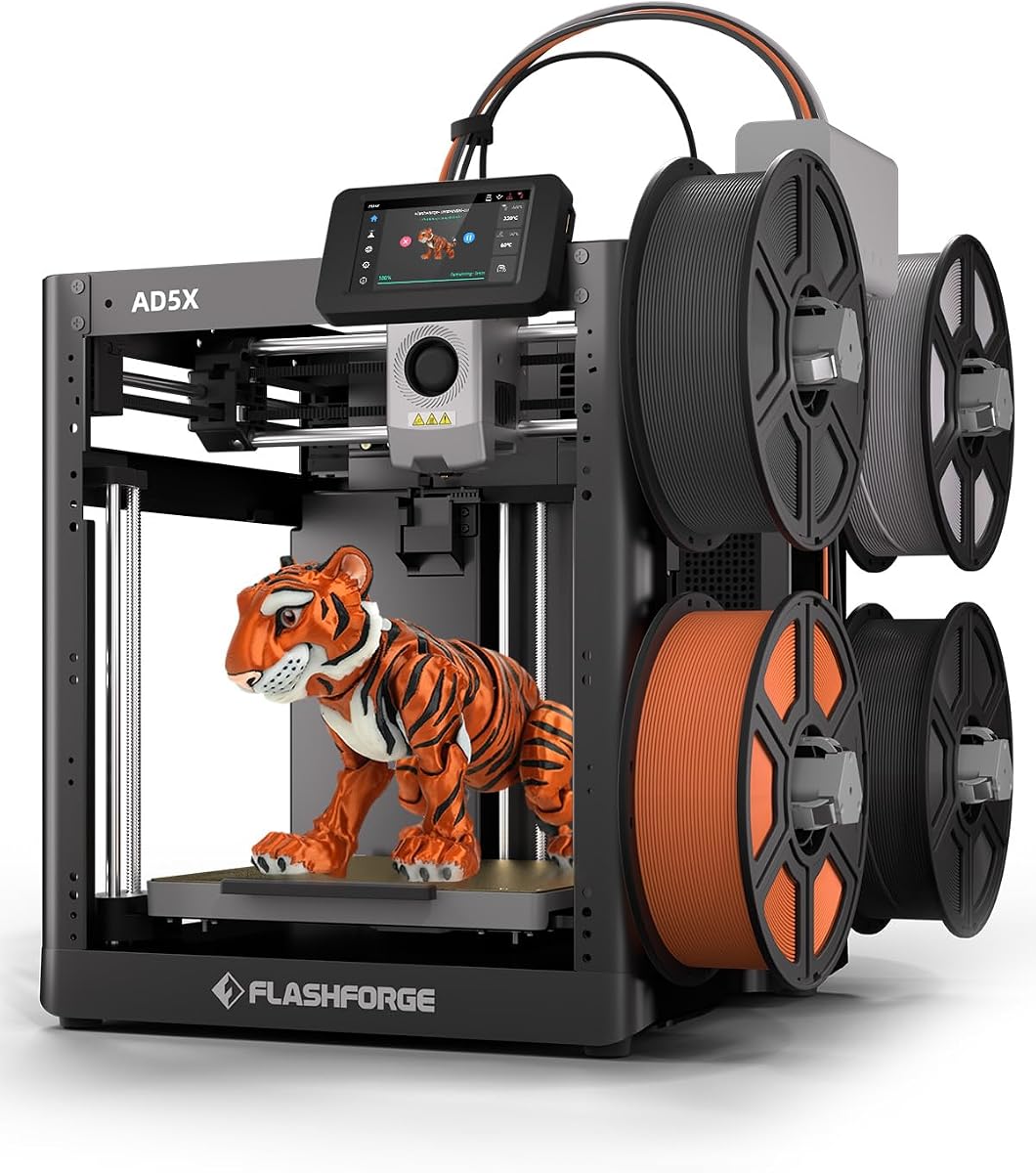
The FLASHFORGE AD5X targets small businesses that want fast production and several colors without moving to a toolhead-based or larger CFS platform. Its 3.9 rating is slightly lower than most alternatives, but the machine combines up to four simultaneous colors, 600 mm/s travel, a 300°C direct-drive extruder, and 20,000 mm/s² acceleration in a relatively focused 220 mm cubic build area.
We may earn a commission when you buy through this link, at no additional cost to you.
One-click auto leveling, a dual-channel cooling fan, and vibration compensation support consistent results. The direct-drive hotend accepts nozzle sizes from 0.25 to 0.8 millimeters, letting operators balance fine detail, standard work, and faster large-part output. A resume function helps protect an interrupted print, while automatic filament feeding, retraction, and Flash Maker app control simplify routine operation.
The 220-by-220-by-220-millimeter build volume is the most significant constraint. It is adequate for many prototypes, accessories, and small products, but larger assemblies may need to be divided into sections. Four colors also sit below the 16-color potential of CFS systems. Businesses needing deeper color libraries, large parts, or a heated chamber should look beyond this model even if its speed rating is attractive.
The AD5X is a good recommendation for sellers producing colorful accessories, organizers, display pieces, and compact custom products. It is also useful for rapid prototyping where a four-color result eliminates a separate paint and curing stage. The right buyer values speed, simple color handling, and a manageable machine more than maximum build volume or industrial material capability.
Four-color output makes the AD5X useful for decorative and branded products that would otherwise require hand finishing. It offers a middle ground between single-color FDM printing and larger multi-filament ecosystems.
The included 0.4-millimeter nozzle is versatile, while optional 0.25-, 0.6-, and 0.8-millimeter nozzles allow operators to prioritize fine detail or rapid production. A built-in resume function also adds resilience during long jobs.
We may earn a commission when you buy through this link, at no additional cost to you.
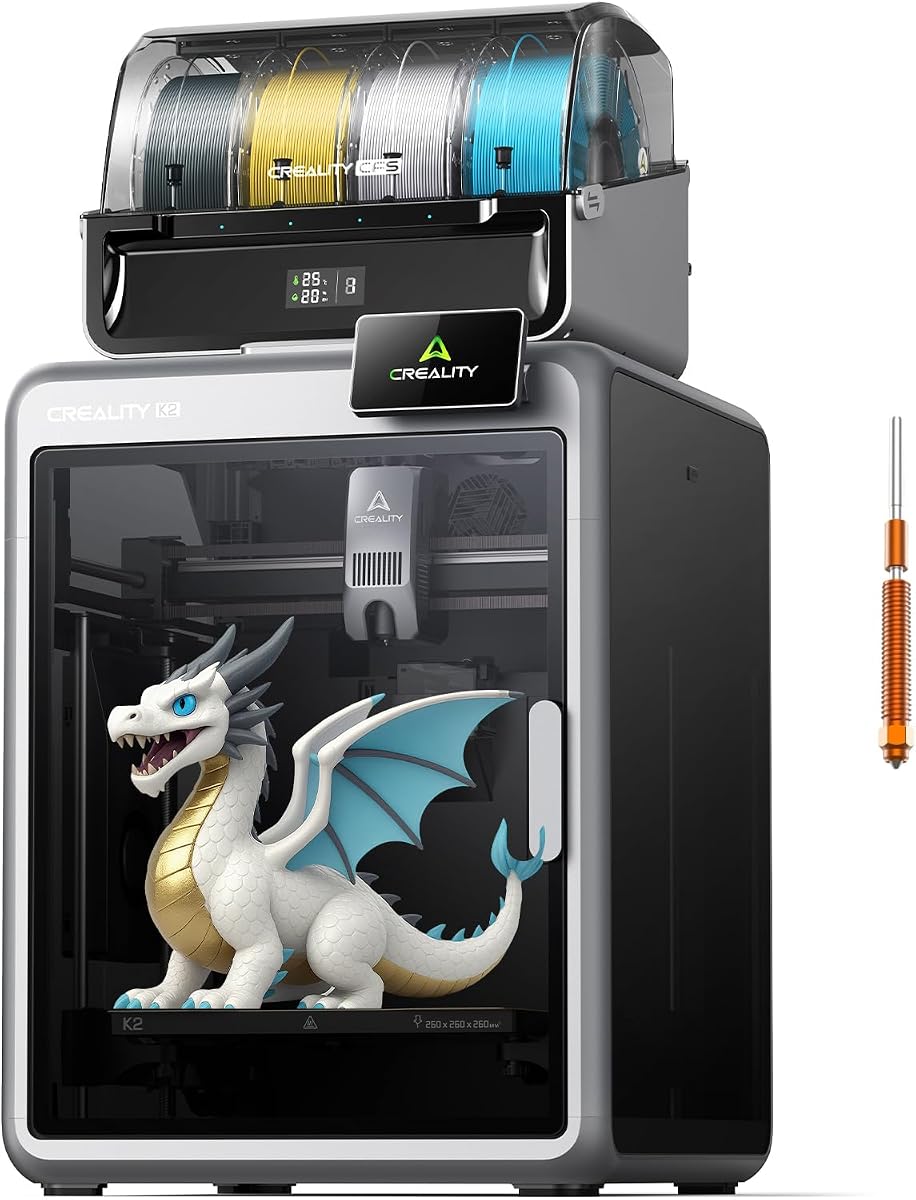
The Creality K2 Combo is designed to make an advanced multicolor production system accessible to small businesses. Its 4.0 rating reflects a strong balance of features, including one included CFS unit, expansion to four units and as many as 16 colors, a 260 mm cubic build volume, and printing speeds of up to 600 mm/s.
We may earn a commission when you buy through this link, at no additional cost to you.
The machine arrives largely preassembled, which can reduce the time and expertise needed before the first print. Smart auto-leveling probes only the relevant bed area, while an AI camera watches for issues such as spaghetti failure and idling. Step-servo motors, dynamically balanced fans, and Silent Mode are intended to make the machine quieter than a conventional printer. A next-generation direct-drive extruder supports PLA, PETG, ABS, PLA-CF, and PET.
Only one CFS is included, so reaching the full 16-color capability requires additional units and more physical space. The supplied specifications do not mention an actively heated chamber, which may matter for demanding engineering materials. The 260 mm cube remains a midrange build volume, so operators should confirm that their largest recurring jobs will fit without splitting or rotating the model.
The K2 Combo is a compelling choice for small businesses producing multicolored figurines, packaged inserts, signs, gifts, or educational models. It is especially attractive for a team that wants guided setup and quiet operation without a full four-toolhead architecture. Those with particularly demanding dimensional accuracy should examine the K2 Plus's dual Z-axis and larger frame.
The included CFS handles multiple filaments, while additional units expand the system to as many as 16 colors. Automatic wire switching reduces manual intervention during a multicolor print and can eliminate separate painting work.
Targeted leveling, AI camera monitoring, and preassembly simplify deployment. Silent Mode and dynamically balanced fans are useful in a shared office or customer-facing studio where consistent noise levels matter.
We may earn a commission when you buy through this link, at no additional cost to you.
The Creality K2 Plus Combo is the most expansive premium option in this guide, combining a 350-by-350-by-350-millimeter build volume with up to 16 colors, a 60°C actively heated chamber, and a rigid dual-Z-axis platform. Its 4.0 rating does not fully communicate the production scope, but the specification set clearly positions it for larger products, batch production, and more demanding polymers.
We may earn a commission when you buy through this link, at no additional cost to you.
The included CFS architecture can be expanded to four units, using RFID information to identify filament color and type and relay to similar material when one spool runs out. FOC step-servo motors support speeds up to 600 mm/s and acceleration of 30,000 mm/s². The frame uses die-cast aluminum alloy, while four linear rods and independently motorized Z axes help maintain bed stability during vertical movement.
Two AI cameras provide complementary oversight: one watches the chamber for failures and idling, while the toolhead camera supports flow-rate optimization. The system has 18 smart sensors, automatic bed-tilt adjustment, and a hardened steel nozzle with operating temperatures up to 350°C. The heated chamber and material claims make it more relevant to ASA and PPA workflows, although buyers should validate specific filament and geometry requirements for their own products.
Choose the K2 Plus when large build volume, color depth, thermal control, and structural rigidity justify a premium production investment. It suits established small manufacturers, studios producing oversized decor, and businesses batching smaller products within a large platform. New operators should consider training and maintenance requirements, and businesses with modest objects should confirm that the large frame offers enough operational value.
The 350 mm cube can accommodate oversized objects and allow multiple smaller models to be arranged in a batch. For a small business, this can reduce the number of separate jobs needed when the production schedule contains many similarly sized parts.
A 60°C chamber, hardened steel hotend, rigid die-cast frame, dual linear-rod Z system, and independent Z motors address stability and warping. These features are most relevant to repeat production involving engineering materials and tall or heavy parts.
We may earn a commission when you buy through this link, at no additional cost to you.
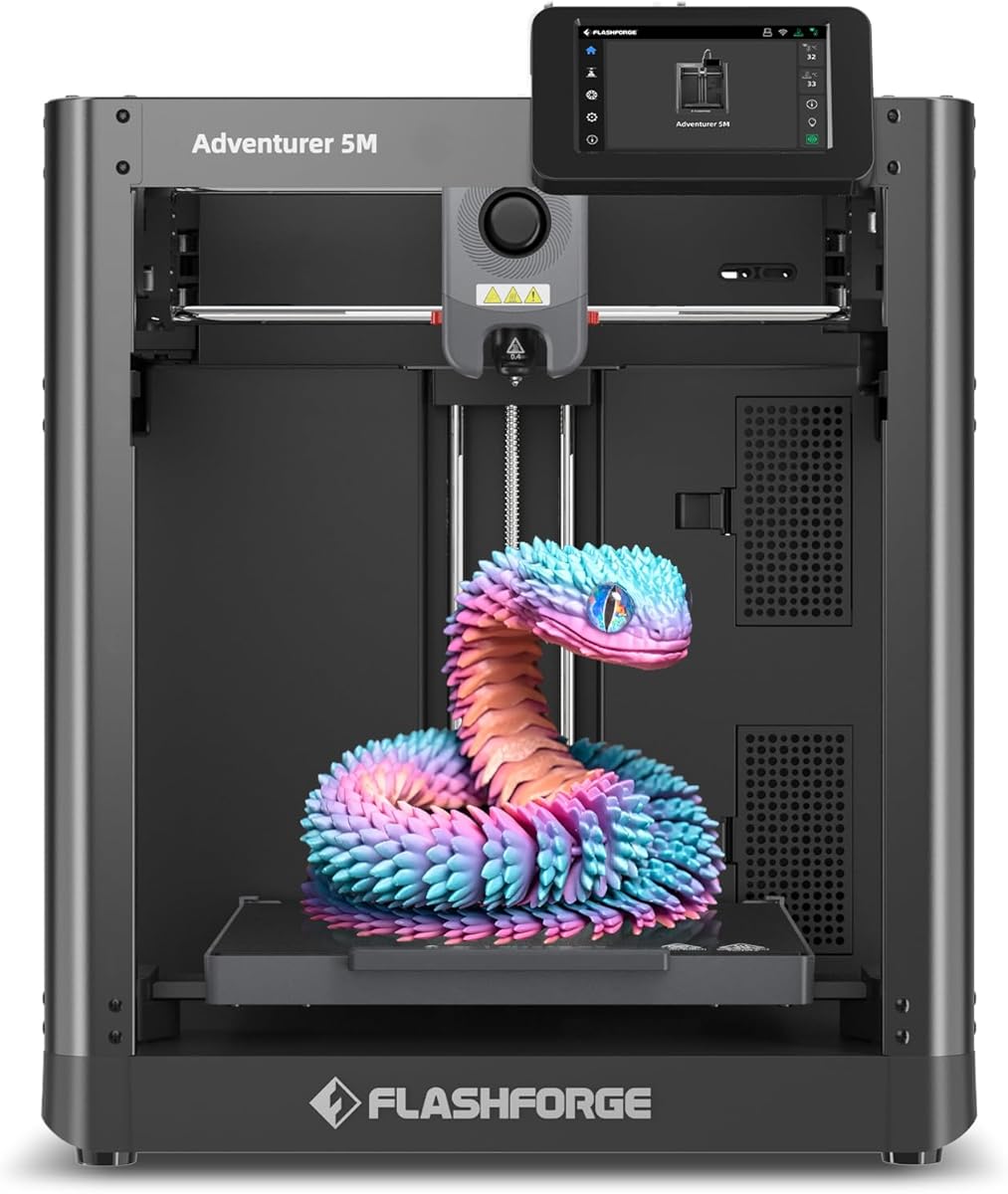
The FLASHFORGE Adventurer 5M is a fast, straightforward production printer for businesses that primarily need single-color output. It has a 3.9 rating, a 220 mm cubic build volume, and a CoreXY all-metal structure capable of 600 mm/s travel and 20,000 mm/s² acceleration, making it well suited to quick prototypes and small batches.
We may earn a commission when you buy through this link, at no additional cost to you.
The 280°C direct-drive extruder, dual-fan cooling, vibration compensation, and automatic bed leveling support dependable results. A high-flow 32 mm³/s nozzle and fast warm-up to 200°C are intended to reduce production downtime, while the detachable nozzle can be changed in about three seconds. The dual-sided PEI platform also helps with part removal, and Flash Studio provides remote monitoring and status alerts.
Its primary limitation is that it does not provide multi-color or multi-material output in the supplied configuration. The 220 mm build cube also constrains larger assemblies. Although the all-metal structure and direct drive improve thermal delivery, no actively heated chamber is specified, so buyers with a continuous need for advanced engineering polymers should evaluate another platform. A lower supplied rating also warrants careful review of customer feedback.
The Adventurer 5M is a good fit for a small business focused on rapid single-color prototyping, jigs, replacement parts, or modest batches. It also makes sense for an operator who values quick nozzle changes and a short warm-up time over color variety. It is less suitable for a polished multicolor product line or large-format production.
The 600 mm/s motion system, 20,000 mm/s² acceleration, 32 mm³/s high-flow nozzle, and 35-second warm-up target are useful for teams that print many smaller jobs. Fast access to the detachable nozzle also reduces routine maintenance delays.
Automatic leveling, vibration compensation, direct-drive extrusion, and dual-fan cooling work together to support repeatable output. Flash Studio lets managers check progress and receive alerts without remaining beside the machine.
We may earn a commission when you buy through this link, at no additional cost to you.
The Bambu Lab A1 has the highest supplied rating in the group at 4.7, making it a persuasive choice for small businesses seeking approachable equipment and dependable results. It combines 10,000 mm/s² acceleration with automatic calibration, active flow-rate compensation, a simplified touchscreen, and a quick-swap nozzle.
We may earn a commission when you buy through this link, at no additional cost to you.
Full-auto calibration handles Z-offset, bed leveling, and related adjustments, reducing the troubleshooting burden for occasional operators. Active flow compensation uses readings to adjust extrusion, which can improve consistency when material or environmental conditions vary. The motor noise-canceling design supports use in a shared workspace, and the printer can add multi-color capability through the AMS lite.
Color printing requires an AMS lite, either through a combo package or a separate purchase. The A1 is also not positioned as an advanced engineering-material machine, so businesses working with engineering polymers should compare the specifications of enclosed or heated-chamber systems. Its simple interface is an advantage for many users, but very complex enterprise workflows may eventually call for more granular control and monitoring.
The A1 is best for educational programs, microbusinesses, design teams, and training environments where ease of use is crucial. It can also serve as an approachable secondary printer for small, lightweight jobs. A commercial buyer should decide whether the convenience of automatic operation outweighs the broader material and chamber capabilities available from higher-tier models.
Automatic Z-offset, bed leveling, and related calibration routines simplify the first days of ownership. The straightforward interface and quick-swap nozzle make it easier for employees or students to move from models to finished parts.
Active flow compensation adjusts material delivery based on readings, while motor noise cancellation helps preserve a calm shared workspace. These qualities make the A1 particularly suitable for learning environments and offices.
We may earn a commission when you buy through this link, at no additional cost to you.
The Creality K2 Combo emphasizes intelligent material management as much as multicolor printing. With a 4.0 rating, it includes one CFS unit, supports expansion to four units and as many as 16 colors, and uses RFID to identify filament information automatically. Its aluminum frame, steel X-axis rail, and dual Z-axis support stable movement.
We may earn a commission when you buy through this link, at no additional cost to you.
Print speeds reach 600 mm/s with 20,000 mm/s² acceleration. The high-flow direct-drive hotend provides 40 mm³/s flow and uses a hardened steel nozzle rated up to 300°C, supporting PLA, ABS, PETG, and selected engineering-grade filaments. An AI chamber camera provides failure detection, time-lapse recording, and build-plate monitoring, while the built-in air purifier filters volatile organic compounds.
The included CFS stores filament in an airtight environment with desiccants, helping protect moisture-sensitive material. Automatic identification and relay make replenishment easier, particularly for unattended jobs. However, reaching 16 colors requires three additional CFS units, and the expanding system requires shelf and floor space. The supplied specifications also do not identify an actively heated chamber, making it less suitable for some demanding high-temperature workflows.
The K2 Combo is a strong recommendation for color-focused small businesses that value automated filament handling, stable electronics, and remote connectivity. It is particularly attractive for decorative products, personalized goods, and educational models where the printer can combine color without separate painting. Businesses should plan the physical footprint for future CFS expansion and verify compatibility with their intended materials.
RFID identification, automatic switching, and automatic relay reduce operator involvement when filament changes are needed. Airtight storage with desiccants also helps maintain material condition between jobs.
The AI chamber camera watches for common print problems and records time-lapse footage. Built-in air purification and Wi-Fi access make the system easier to supervise while remaining mindful of fumes in a shared commercial space.
We may earn a commission when you buy through this link, at no additional cost to you.
The best machine is the one that matches your products, materials, order sizes, and operating environment. Compare the following factors before choosing, because headline speed alone rarely determines total business value.
Choose a printer whose supported material list matches your current and near-term needs, then plan filament storage and drying separately.
Do not purchase for untested exotic materials before validating them on your actual workflow.
Measure your largest recurring item and add clearance for supports and accessories.
A larger platform helps only when your workflow can fill it efficiently.
Choose CFS systems for deeper color libraries and toolheads for rapid low-waste changes.
Test a representative multicolor model before committing to a production platform.
Prioritize calibration, monitoring, and recovery features that save labor.
Treat maximum speed as useful only when the machine can sustain accurate output.
Choose a system that a new employee can operate with written procedures.
Simple workflows often save more money than a modest specification gain.
Plan ventilation, filtration, noise control, and filament storage before installation.
A controlled environment protects workers, customers, materials, and the printer.
Compare weekly workload with real completed-job time, not maximum travel speed.
Buy enough capacity for current demand, while preserving a sensible growth path.
Begin by preparing a safe, stable location with adequate ventilation, clearance around the machine, and access to dry filament. Unpack the printer according to the manufacturer's instructions, install the build plate and nozzle, connect the filament path, and complete the specified calibration procedure. Before using customer files, run a standard test model and inspect the first layer, dimensions, surface finish, and any movement or noise. Save successful material, temperature, and slicer profiles as versioned presets so different employees can reproduce results without rebuilding settings from scratch.
Organize files by project, customer, material, and production status. Confirm that every model is correctly oriented, that supports will not damage the finished surface, and that required color changes are assigned before starting a long job. Use remote monitoring where available, but perform a supervised first test of new materials, geometries, and slicer profiles. A business should also log failed prints and their likely causes so recurring problems are addressed at the process level rather than dismissed as random machine faults.
Clean the nozzle and build plate regularly, inspect motion rails and belts, and replace worn nozzles according to the manufacturer's guidance. Keep filament sealed and dry, clean residue from the nozzle area, and service filtration or air-purification components on schedule. Back up printer settings and maintenance records, maintain a stock of consumable parts, and schedule a preventive check during slower periods. If a print shows a repeatable defect, diagnose the extrusion path, calibration, material condition, and model design before making permanent machine changes.
The best type depends on the products, materials, and skill level of your team. An enclosed FDM machine is a versatile starting point for prototypes and consumer goods, while multicolor systems suit decorative or personalized products. Businesses using ABS, PC, or PA may need stronger thermal controls and filtration. Choose based on recurring requirements rather than the highest speed specification.
It can be when the machine reduces prototyping costs, enables short runs, or produces items that are difficult to source conventionally. Profitability depends on material use, machine utilization, labor, failures, post-processing, and customer demand. Calculate the full cost of each job rather than treating filament as the only expense. Start with products that benefit from customization, rapid iteration, or small-batch production.
Not always. A single-color machine can support functional prototypes, jigs, replacement parts, and many monochrome products. Multicolor capability becomes valuable when color changes eliminate painting, create a stronger presentation, or permit multiple materials in one build. Before expanding, review the percentage of orders that need color and whether customers will pay for the additional workflow. A staged upgrade can be more efficient than purchasing an advanced system too early.
The amount varies with part size, infill, wall thickness, support volume, and failure rate. Track filament consumption by material and monitor leftover material after each job. Start with the materials that best match your product line, then add colors or engineering polymers as demand becomes predictable. Keep filament dry and organized because moisture can reduce print quality and increase waste.
Routine maintenance includes cleaning the nozzle and build plate, checking filament paths, removing debris, inspecting the first layer, and replacing worn nozzles. Multi-material systems also require attention to tubes, seals, CFS units, and switching mechanisms. Follow the manufacturer's cleaning intervals and record service dates. A clean machine with stable calibration usually requires less troubleshooting and produces more consistent customer work.
An enclosure is usually worthwhile for PLA, PETG, ABS, ASA, and multi-material workflows because it helps stabilize the environment around the print. It also reduces exposure to dust and contains some fumes, but enclosure alone does not replace ventilation or filtration. Businesses that only print simple PLA prototypes in a clean workshop may get adequate results from an open-frame machine, though an enclosure offers greater flexibility as products evolve.
Yes, provided each machine has reliable monitoring, clear workflows, and routine automated tasks. Remote viewing, status alerts, power-loss recovery, and automatic calibration reduce the need for constant supervision. Separate filament systems and numbered job queues help prevent mistakes when several machines run different materials. Experienced operators should still inspect new jobs and perform daily physical checks.
Reliable repeatability is usually the most important feature. Automatic leveling, flow compensation, stable frames, effective cooling, monitoring, and dependable filament handling allow employees to reproduce good results consistently. Fast motion is helpful, but speed without accuracy can create more scrap. Prioritize features that reduce failures, operator intervention, and material waste across the entire production schedule.
The Bambu Lab P1S Combo is the best balanced starting point for many small businesses because it combines an enclosed, fast printer with an included 16-color AMS. The Snapmaker U1 stands out for rapid four-tool changes, reduced purge waste, and mixed-material capability, while the Creality K2 Plus Combo is the premium selection for large builds, a 350 mm cube, 16 colors, and a heated chamber.
For a simpler operation, the Bambu Lab P1S or FLASHFORGE Adventurer 5M can provide fast single-color production, while the A1 emphasizes straightforward operation and training-friendly automation. The FLASHFORGE Creator 5 Pro and Snapmaker U1 suit businesses ready to adopt multi-tool production, and the CFS-equipped Creality models serve those who want broad color libraries and intelligent filament handling. Prioritize recurring product dimensions, materials, operator experience, monitoring, and ventilation before focusing on peak speed.
Before purchasing, verify the current listing, manufacturer details, warranty, included accessories, and availability. Marketplace conditions and promotions can change, and specifications may evolve across model revisions. A small business should also estimate filament, maintenance, electricity, training, and post-processing requirements so the printer becomes a reliable part of the operation rather than merely an impressive piece of equipment.