
XTAR X6 Swappable Battery Power Base
4.3Editor score
Hot-swappable battery design
18–25.2V DC output
Integrated foldable dish stand
Our Battery Backup for Starlink guide compares 10 options for runtime, portability, power compatibility, and outage protection to help you choose with
Keeping Starlink available during outages, travel, or off-grid work requires more than a portable charger. Useful battery backups must match the power needs of your Starlink equipment while providing enough capacity, safe connections, and a practical way to monitor remaining energy.
We compared ten battery backup options across portability, output type, outlet configuration, runtime claims, safety features, display functions, and compatibility with the Starlink Mini. The guide includes purpose-built DC systems, tool-battery adapters, and conventional UPS units for home and professional use.
Each pick below reveals what it does best, from compact camping power to protected home-office equipment. Ratings, specifications, and availability can change, so compare the latest listing details and confirm connector and power requirements before purchasing.
4.3Editor score

5.0Editor score

4.5Editor score
The table below compares every included battery backup by power architecture, capacity, portability, and monitoring features, helping you distinguish purpose-built Starlink Mini solutions from general-purpose UPS systems and battery-tool adapters.




The Pilestone/Woyum Starlink Mini UPS is a purpose-built portable power solution for people who want to keep the Mini connected away from a conventional wall outlet. It carries a 5.0 rating and is specifically described as compatible with the Mini's 22V requirement. Its 10Ah, 220Wh battery is the most substantial dedicated capacity represented in this guide.
We may earn a commission when you buy through this link, at no additional cost to you.
The strongest feature is the combination of portable weight and a stated runtime of up to 10 hours. At three pounds, the unit is easier to carry than a full-size UPS, while its dedicated Mini orientation removes much of the guesswork associated with improvised power connections. The black housing and portable design also make it a natural choice for camping, remote work, travel, and temporary backup during a household outage.
Its specialized format is also its main limitation. Buyers using another Starlink model should not assume that the 22V Mini output will suit their equipment, and the supplied information does not mention a detailed battery-level display, swappable cells, or a universal AC outlet. Actual runtime also depends on power draw, activity, signal conditions, and environmental factors, so the advertised maximum should be treated as a best-case figure rather than a promise.
This is the strongest general recommendation for someone who owns a Starlink Mini and wants a self-contained battery rather than a separate power station. It combines meaningful energy, a portable format, and direct Mini positioning. Verify the current connector, charging procedure, and current Starlink Mini power requirements before ordering, particularly if you use the dish continuously or live in a location with frequent outages.
Because this unit is designed around the Starlink Mini's 22V supply, it offers a more focused solution than a general UPS. That focus can reduce setup friction for users who already own compatible equipment.
The 220Wh battery and stated 10-hour potential make the product appealing for mobile deployments. It is particularly useful when reliable AC outlets are unavailable and the dish must remain available for calls, navigation, research, or remote work.
We may earn a commission when you buy through this link, at no additional cost to you.
The CyberPower CP1500PFCLCD is a general-purpose UPS and surge protector with a 4.5 rating. Its defining feature is PFC sine wave output, which is designed to provide cleaner and more compatible backup power for active power-factor-corrected and conventional power supplies. It is a strong option for a home office containing Starlink equipment alongside routers, computers, and networking devices.
We may earn a commission when you buy through this link, at no additional cost to you.
Its 1500VA and 1000W ratings provide meaningful headroom for a connected load, while 12 NEMA 5-15R outlets divide power between six battery-backed positions and six surge-protected positions. Two USB charging ports are useful for phones and tablets, and the tilting color LCD presents detailed information about battery and power conditions. Automatic voltage regulation addresses minor fluctuations without needlessly switching to battery operation.
The tradeoff is that this is not a dedicated Starlink system. The Mini normally uses a DC supply, so the user must confirm whether its included AC adapter can be supported during an outage and whether the UPS can accommodate the adapter's startup and operating load. Its larger size, weight, and home-oriented outlet design also make it less appealing for backpacking or compact travel.
Choose this model when continuity matters across an entire workstation rather than only the dish. It is particularly compelling for users who want clean output, extensive surge protection, network support, and a clear status display. Confirm load requirements and Starlink adapter behavior before use, and test the complete setup under simulated outage conditions.
Pure sine wave output is the central advantage for anyone pairing the UPS with a Starlink router, computer, or other active-power-supply device. It is a more conservative choice for a connected office.
Twelve NEMA outlets, USB charging, and a color LCD reduce the need for extra accessories. The display can reveal load and battery conditions before they interrupt service.
We may earn a commission when you buy through this link, at no additional cost to you.
The CyberPower CP1500AVRLCD3 is a 1500VA, 900W intelligent LCD UPS designed to protect workstations, networking devices, and home-entertainment equipment. Its 4.5 rating reflects a well-regarded general-purpose design. For a household that wants Starlink internet to remain available during short outages, it can protect several related devices from one centralized unit.
We may earn a commission when you buy through this link, at no additional cost to you.
The outlet arrangement is especially useful for an entertainment or remote-work area. Six outlets provide battery backup and surge protection, while six additional outlets provide surge protection. USB Type-A and Type-C charging ports support mobile devices. The color LCD reports immediate battery and power status, and automatic voltage regulation corrects minor fluctuations without switching to internal battery power.
Compared with the CP1500PFCLCD, this model uses simulated sine wave output rather than pure sine wave. That distinction may matter for sensitive or specialized electronics, although the CP1500AVRLCD3 remains explicitly intended for common computers, network devices, and home-entertainment equipment. It is also stationary by design and offers no dedicated Starlink Mini cable or portable battery system.
This is a good fit for a fixed home-office installation where a router, laptop, monitor, and Starlink power supply need protection from brief interruptions. It offers a helpful balance of capacity, connectivity, and monitoring without the premium focus of a pure sine wave model. Validate the total connected load and confirm that the Starlink power adapter operates normally from the UPS.
A 900W maximum output provides room for several essential devices, subject to the unit's load limits. This makes it more useful than a single-purpose inverter for a fixed office.
The color LCD gives users immediate information about power and battery conditions. That visibility is valuable when an outage is approaching and equipment needs attention.
We may earn a commission when you buy through this link, at no additional cost to you.
The XTAR X6 is a modular Starlink Mini power base built around direct DC output, swappable batteries, and a foldable stand. It has a 4.3 rating and stands apart from conventional UPS units by addressing the Mini directly rather than routing power through an AC conversion cycle. The base weighs just 0.64 pounds, keeping the physical burden low.
We may earn a commission when you buy through this link, at no additional cost to you.
Its hot-swappable design is the defining advantage. The product information says a depleted set of six cells can be replaced in under three minutes, allowing users to carry multiple battery groups for extended camping, RV travel, overlanding, or emergency use. With six compatible 4900mAh cells, the stated runtime reaches 5.3 hours for a 20W Starlink Mini load. Direct 18–25.2V output is intended to make efficient use of that stored energy.
The important limitation is that this listing is for the power base only and does not include batteries. Buyers must source six compatible cells separately and confirm the correct form, dimensions, and electrical characteristics. Although the platform is expandable, its total cost and carrying weight can exceed those of an integrated portable UPS once multiple sets are carried. It is also limited to the Starlink Mini.
This base is best for a user who values uninterrupted service and already owns suitable batteries or plans to build a modular kit. Its integrated stand, quick-swap process, and direct output make it especially attractive for organized mobile deployments. For casual users wanting one self-contained purchase, an integrated battery is the simpler choice; for serious multi-day users, the X6's flexibility is compelling.
Supplying 18–25.2V directly avoids the wasteful DC-AC-DC conversion associated with some conventional power arrangements. That architecture is central to the system's runtime potential.
The built-in foldable stand matches the Mini's original angle and reduces the need for separate mounting equipment. Three standard quarter-inch screw holes also allow alternative mounting when needed.
We may earn a commission when you buy through this link, at no additional cost to you.
The CyberPower OR2200PFCRT2U is a higher-capacity PFC sine wave UPS intended for demanding office and professional loads. Its 4.3 rating reflects a capable general-purpose backup system. The 2200VA class makes it a more logical choice than smaller units when Starlink sits within a setup containing several computers, network devices, displays, and other essential equipment.
We may earn a commission when you buy through this link, at no additional cost to you.
Eight protected outlets include two NEMA 5-20R and six NEMA 5-15R connections, while the NEMA 5-20P input uses a ten-foot cord. The rotatable multifunction LCD provides estimated runtime, battery capacity, load capacity, and other status information. Automatic voltage regulation corrects minor fluctuations without needlessly drawing down the battery, supporting longer reserve during ordinary grid instability.
Like other conventional UPS choices, it does not include a Starlink-specific cable or dedicated Mini battery. The user must check the capacity of the supplied power adapter and ensure the total load remains within the UPS rating. Its size and weight also make it unsuitable for a lightweight travel kit. The 20-amp plug may require an appropriate circuit and adds installation considerations.
Choose this model for a fixed professional workspace where downtime has a meaningful cost and the Starlink system is one part of a larger network. The detailed runtime display helps operators make better decisions about which equipment to prioritize. As with any UPS, test it before an emergency and confirm that the Starlink power adapter remains stable during the transfer to internal battery power.
The 2200VA class provides a larger safety margin for offices with several connected devices. Users can estimate the combined draw and avoid overloading the unit.
The rotatable LCD displays runtime, battery capacity, and load capacity. Those readings are more useful than a simple power light when planning an extended outage.
We may earn a commission when you buy through this link, at no additional cost to you.
The LimeCare Starlink Mini Battery Adapter turns compatible De.Walt 20V or 60V FlexVolt batteries into a portable power source for the Starlink Mini. Its 4.0 rating reflects a straightforward adapter approach with fewer built-in features than a complete UPS. The main appeal is its ability to use batteries users may already own for tools, camping, or general off-grid projects.
We may earn a commission when you buy through this link, at no additional cost to you.
Two battery slots provide greater flexibility than a single-battery adapter. The hot-swap function is especially important for continuity: a depleted battery can reportedly be replaced without interrupting the Mini, avoiding an immediate reboot or disconnection. Integrated low-voltage protection is designed to stop power before a battery is deeply discharged, while the one-touch switch provides straightforward control.
The adapter uses a heavy-duty 18AWG DC port and requires no complex wiring. It is made from high-strength, flame-retardant material and is intended to tolerate outdoor travel. On the other hand, this is only an adapter, so batteries are not included, and its usefulness depends on access to compatible De.Walt-style packs. Runtime varies with battery capacity, condition, and the load placed on the Mini.
This is a good match for a contractor, camper, or technician who already carries multiple compatible tool batteries. The dual-slot arrangement and hot-swapping make it more practical than improvised battery leads. It is less suitable for someone without a compatible battery ecosystem or for users who want an all-in-one package with a clearly stated capacity. Verify the battery fit and DC connector before use.
Changing a depleted battery without shutting down the Mini is valuable during long workdays. It reduces the disruption associated with a full power interruption.
Users can draw from batteries they already own, reducing duplicate purchases. Two slots also offer a simple way to extend available runtime.
We may earn a commission when you buy through this link, at no additional cost to you.
The CyberPower BRG1500AVRLCD2 is a 1500VA, 900W intelligent LCD UPS with a 4.7 rating, the highest among the non-top-pick products in this guide. It is built for workstations, networking devices, and home-entertainment systems, making it a strong fixed-location option for keeping Starlink and essential network equipment online through short outages.
We may earn a commission when you buy through this link, at no additional cost to you.
Its 12 NEMA 5-15R outlets include six battery-backed and surge-protected connections plus six additional surge-protected outlets. Type-A and Type-C USB ports provide convenient charging for mobile devices. A color LCD reports battery and power status, while automatic voltage regulation corrects minor fluctuations without switching to internal battery power. Remote management can be added with a compatible CyberPower card.
The strongest distinguishing detail is the five-year warranty, which includes the battery. That coverage is more generous than the three-year terms listed for several other CyberPower models in this roundup. The tradeoff is that remote management requires an optional card, and simulated sine wave output is not the same as pure sine wave. The unit also provides no dedicated Starlink connection or portable battery design.
This UPS is recommended for a fixed home office or media system where long-term support and a generous warranty matter. It balances 900W output with ample outlets and a clear monitoring panel. Buyers should verify the Starlink adapter's load and startup behavior, avoid exceeding the capacity, and leave room in the outlet layout for the equipment they intend to protect.
The included five-year warranty provides additional reassurance for a system expected to remain on standby. It also covers the internal battery according to the listed product information.
The mix of protected outlets and USB charging is useful for a network rack or entertainment center. Starlink can remain part of a broader protected equipment group.
We may earn a commission when you buy through this link, at no additional cost to you.
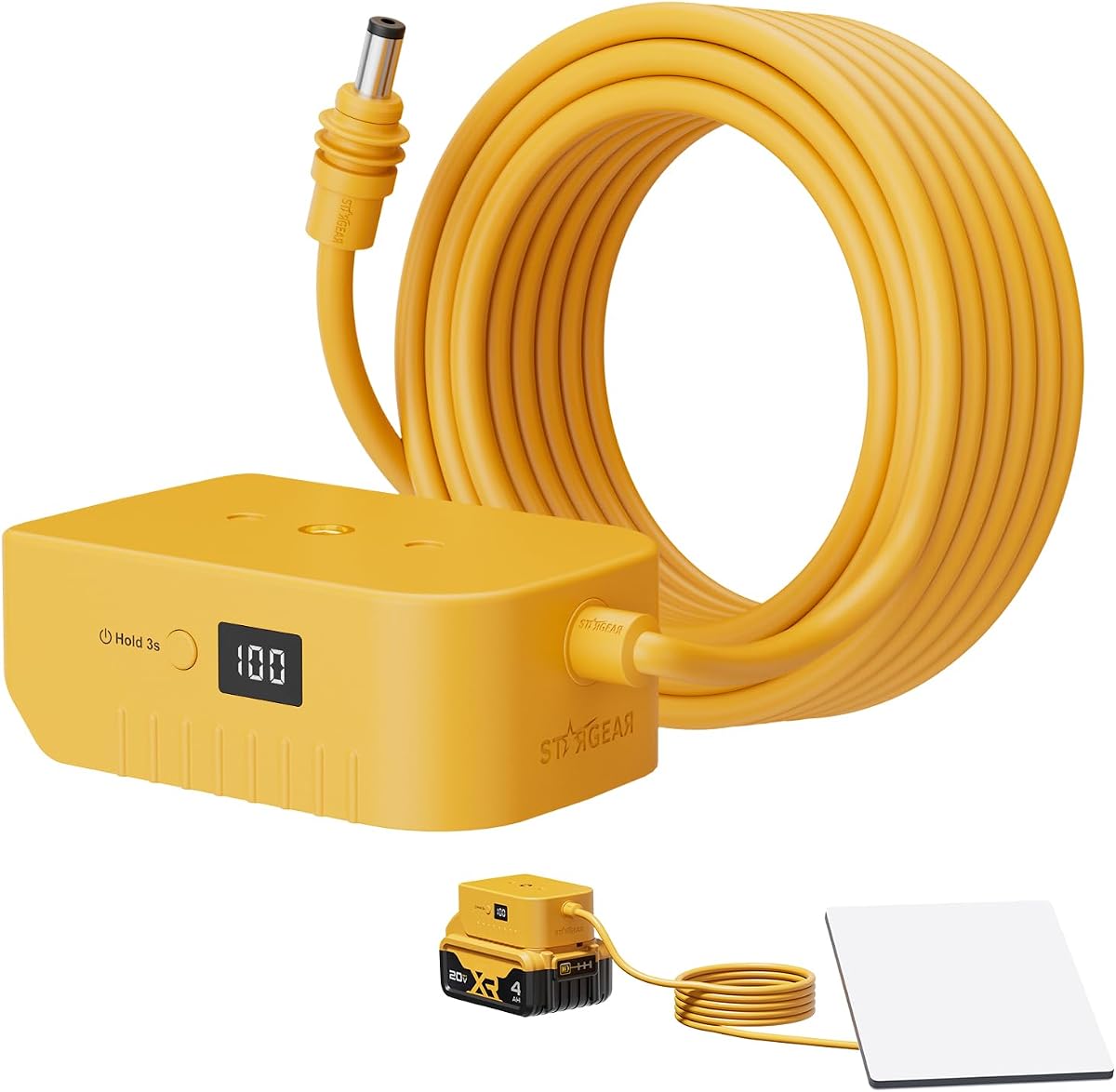
The STARGEAR Starlink Mini Battery Adapter with Over-Discharge Protection is a purpose-built solution for users who already carry compatible De.Walt tool batteries. It has a 4.6 rating and provides a long 3-meter, 9.8-foot, 18AWG pure copper cable. That length gives users more freedom to place the dish where the satellite signal requires it.
We may earn a commission when you buy through this link, at no additional cost to you.
Compatibility extends across De.Walt 20V MAX and 18V DCB-series packs, including several listed DCB models. A digital display shows the remaining battery level, while over-discharge protection helps guard the battery pack from excessive depletion. An independent on-and-off switch makes it possible to control the Mini without repeatedly unplugging the connector.
The adapter snaps directly onto the battery and connects to the dish through the supplied DC cable, requiring no tools. Copper contacts and a substantial cable length support stable delivery and flexible placement. The main limitation is ecosystem dependence: the batteries are not included, and users without compatible packs will need to buy them separately. A three-meter lead also needs deliberate routing to avoid snag points.
This is a compelling choice for RV travelers, boaters, tradespeople, and campers who value placement flexibility and a readable battery state. It performs particularly well when the Mini and battery are separated by a distance. Confirm the exact battery model and connector fit, secure the cable outdoors, and use the switch or disconnect procedure that best protects the battery during long idle periods.
The long pure-copper cable allows the battery to remain in a vehicle or sheltered area while the dish sits where it has a clear view of the sky. This is useful when placement and cable routing compete for space.
A digital level display helps prevent an unexpected shutdown, while over-discharge protection reduces the risk of taking a pack too far down. Both features support more controlled field use.
We may earn a commission when you buy through this link, at no additional cost to you.
The STARGEAR Integrated Starlink Mini Battery Adapter is a pipe-mount-based system with a 5.0 rating. It combines the Mini, battery interface, and short 0.3-meter DC cable into one more unified arrangement. The goal is not only power delivery but also cleaner installation, with fewer loose wires and less visual clutter around the dish.
We may earn a commission when you buy through this link, at no additional cost to you.
The adapter supports De.Walt 20V MAX and 18V DCB-series lithium batteries, including the listed DCB182, DCB183, DCB201, DCB203, DCB204, DCB206, DCB208, DCB230, and DCB240 models. A digital battery-level display helps users determine when to swap or recharge, while over-discharge protection supports battery longevity. The independent switch offers convenient control.
Its pipe-mount design is the main feature that distinguishes it from the other STARGEAR adapter. The information states compatibility with both new and older Starlink Mini pipe mounts, making it especially useful for owners who are unsure which mount revision they have. The short cable keeps the system compact, although it offers less placement flexibility than a long standalone cable when the battery and dish need separation.
This is a strong recommendation for a clean mobile installation where an existing De.Walt battery ecosystem is available. It minimizes clutter and presents a more integrated appearance. It is less suitable for users who need a long reach from battery to dish or who prefer a self-contained UPS. Confirm the physical mount, battery fit, and short-cable routing before installation.
The pipe mount and short cable consolidate the main components. This can simplify deployment in an RV, vehicle-mounted kit, or compact camping arrangement.
Compatibility with new and old Mini pipe mounts improves setup flexibility. The extensive listed DCB battery range also gives owners several compatible pack options.
We may earn a commission when you buy through this link, at no additional cost to you.
The Starlink Mini Battery Adapter Pack is a straightforward way to power a Starlink Mini from compatible De.Walt 20V or 18V DCB-series batteries. It carries a 4.4 rating and focuses on simple installation, portable construction, and basic power protection. It is especially relevant to people who already maintain a collection of compatible tool batteries.
We may earn a commission when you buy through this link, at no additional cost to you.
The design is described as lightweight and portable, making it convenient to move between a home workshop, vehicle, campsite, or travel bag. Installation requires inserting the Mini and battery into the adapter and ensuring the connection locks securely. Integrated circuits are intended to protect against excessive power and maintain stable transmission to the dish.
The listing emphasizes simplicity rather than advanced monitoring. Unlike some competing adapters, it does not list a digital battery-level display, independent switch, or hot-swapping mechanism. It is also a third-party accessory and explicitly not affiliated with De.Walt or Starlink. Users should confirm that the physical fit, locking mechanism, and electrical requirements align with their particular dish and battery models.
This adapter is best for a user seeking a no-fuss way to reuse existing tool batteries. Its easy installation and low weight are meaningful advantages for temporary or mobile internet access. For users who need hot-swapping, visible charge state, or more refined over-discharge management, one of the more specialized adapters may be a better fit. Always confirm compatibility before ordering.
The installation process avoids complicated wiring and is approachable for non-technical users. A secure battery lock provides the basic mechanical connection needed for travel.
Integrated circuits and a lightweight housing make the adapter convenient for mobile use. It reverts existing compatible batteries into a practical Starlink power source.
We may earn a commission when you buy through this link, at no additional cost to you.
The right battery backup depends on your Starlink model, mobility needs, available power sources, and how critical uninterrupted service is. Use the following factors to narrow the field before comparing capacity, connectors, and runtime.
Begin by identifying the exact Starlink system you own and the power requirements of its standard power supply. Several products in this guide are designed specifically for the Starlink Mini, while conventional UPS models offer general AC outlets and require verification of the supplied Starlink adapter. A 22V output, barrel connector, barrel-plug diameter, and required current are not interchangeable details. Check the product listing, the device markings, and the official Starlink power information before connecting any system.
The simplest setup usually comes from a purpose-built Mini product or a confirmed compatible adapter. General-purpose UPS units may be excellent for protecting a whole office, but they add a layer of uncertainty when it comes to powering the dish through its external adapter. Match the power architecture to the device before comparing battery size or convenience.
Runtime is one of the most important practical considerations, especially for outages, travel, and remote work. Start by estimating how long the dish and associated router must remain online. Advertised runtimes often reflect a particular load, and actual results can vary with Starlink activity, signal quality, converter efficiency, battery age, temperature, and power-management behavior. A unit that works for an evening of emergency communication may be insufficient for a full workday.
For extended operation, favor a larger Wh rating, swappable battery groups, or two compatible battery packs. A capacity display also matters because it allows more accurate planning than a simple estimate. Treat maximum runtime claims as comparative guidance and test the real setup under expected conditions before relying on it.
Direct DC systems can be more efficient for a Starlink Mini because they avoid unnecessary DC-to-AC-to-DC conversion. Their output must still match the dish's voltage and connector requirements, and users should confirm whether the system negotiates or regulates voltage as needed. AC UPS systems are more versatile because they can support routers, computers, monitors, and other household electronics, but they generally require the original power adapter to draw from the protected outlets.
The right output type depends on the surrounding equipment. Choose dedicated DC for a compact Starlink-only field kit when efficiency and simplicity matter. Choose a UPS for a fixed installation that must protect multiple devices. Do not assume that a higher UPS wattage automatically translates into a better Mini runtime; adapter efficiency and load still influence the result.
Portable Starlink backup is useful for camping, RV travel, fieldwork, tailgating, emergency response, and temporary installations. Compare total carried weight, not merely the battery's capacity. A modular system can be flexible but become heavy when several battery groups are included. Purpose-built units should be easy to position near the dish, while integrated stands and pipe mounts can reduce the need for separate mounting hardware.
Outdoor use also makes cable length and weather management important. A short integrated lead keeps the installation tidy, while a long cable provides placement flexibility but must be routed carefully. Look for a durable housing, secure battery contacts, and a straightforward way to protect connections from moisture and physical damage. A unit intended for indoor backup should not be assumed suitable for exposed outdoor use.
Battery protection is critical in systems that operate unattended or travel over rough terrain. Over-discharge protection helps stop a pack from being exhausted beyond its safe operating range, while a low-voltage cutoff can prevent sudden shutdowns. UPS systems add another layer of protection through regulated output, surge protection, and status warnings. For tool-battery adapters, verify whether the protection belongs to the adapter, the battery, or both.
A readable battery-level display is useful but not essential for every situation. Users who need to make active decisions about charging, swapping, or load reduction benefit from more precise status information. An independent on-and-off switch is also convenient, particularly when you want to preserve a battery without repeatedly disconnecting the dish. Never modify the electrical system or bypass built-in protection.
Hot-swapping can prevent a reboot when a battery reaches its limit. The XTAR X6 uses a six-cell swappable system, while the LimeCare adapter supports changing compatible tool batteries without interruption. These designs are valuable when a continuous connection matters and a charged spare is already available. They are less meaningful for a brief home outage where a manual shutdown and restart would be acceptable.
Modularity adds planning requirements. Confirm battery dimensions, cell type, charging procedure, and required quantity before building a multi-set system. Hot-swapping does not guarantee unlimited runtime; users still need enough charged packs, compatible charging equipment, and a safe place to store or recharge the batteries between uses.
A home or office backup should protect the entire path to a usable internet connection, not just the dish. The router, power supplies, network switch, and any work computer may also need power. In that setting, outlet count, wattage, waveform type, surge protection, and automatic voltage regulation become more important than a compact form factor. A pure sine wave model may be a conservative choice for sensitive electronic loads.
General-purpose UPS products are most attractive when they can cover several devices and provide clear monitoring. A color LCD that shows load, battery condition, and estimated runtime is particularly helpful during a developing outage. Users should avoid connecting high-draw appliances merely because a UPS has a high rated capacity; calculate the combined load and maintain a reasonable margin.
Battery backup is a purchase that may sit unused for long periods and then perform a critical job, so warranty coverage deserves attention. The CyberPower BRG1500AVRLCD2 lists a five-year warranty including the battery, while several other CyberPower units list three-year terms. Product-specific warranties on portable adapters can also be helpful, although the details differ among third-party products.
Support quality and accessible documentation are equally important. A clear manual, understandable battery indicators, and readily available replacement parts reduce stress during setup and maintenance. Keep the proof of purchase and inspect the unit periodically, especially if it will remain connected to equipment that must stay available. Warranty terms can change, so verify the current listing before purchase.
Before the first use, read the instructions for both the battery system and the Starlink power supply. Confirm the output type, voltage, connector, polarity, and supported load, then fully charge the backup using its specified charger. For a conventional UPS, connect the Starlink power adapter to a battery-backed outlet rather than a surge-only outlet. For a Mini-specific DC system, connect the dish only when the voltage and plug match.
For outdoor or mobile use, install the dish in a location with an unobstructed view of the sky, secure cables away from walking paths, and protect connections from moisture. With tool-battery adapters, use only compatible packs, engage the battery lock fully, and confirm the displayed charge level before leaving. When hot-swapping is supported, follow the manufacturer's sequence to avoid an unexpected shutdown, and always carry a known-good charged pack.
Long-term care includes periodic recharge, visual inspection of cables and contacts, and cleaning the cooling or ventilation areas of a UPS. Retire batteries that swell, leak, become unusually hot, or fail to hold a charge. Do not leave a Starlink system connected indefinitely to a depleted battery, and test the complete setup periodically so outages do not reveal an unnoticed connection or charging problem.
Yes, if the backup supplies the correct voltage, current, and connector for the Mini. Purpose-built 22V systems and compatible DC tool-battery adapters are the most direct options. A general UPS can also help when the Starlink power adapter operates properly from its battery-backed AC outlet. Confirm compatibility and test the complete setup before relying on it during an outage.
The appropriate duration depends on how long the connection must remain available and what else is drawing power. A compact system may cover short outages, while 220Wh capacity or swappable battery groups can support much longer periods. Runtime claims are usually best-case figures and vary with activity, signal conditions, temperature, battery age, and conversion efficiency. Test under realistic conditions when possible.
A pure sine wave UPS is not automatically required for every Starlink setup, but it is a conservative choice for sensitive or active-power-supply equipment. The important test is whether the official Starlink power adapter starts and operates normally from the UPS. General UPS models should also be evaluated for the complete load of the dish, router, and any connected work equipment.
Several adapters in this guide accept De.Walt 20V MAX or 18V DCB-series packs, but compatibility varies by adapter and battery model. The adapter must fit physically, match the required voltage and current, and protect the battery from over-discharge. Do not use a visually similar pack unless the manufacturer explicitly lists it as compatible.
It depends on the equipment and user. A dedicated UPS or DC battery can be simpler and more efficient for a Starlink-only setup, while a portable power station offers broader AC output and often greater capacity for other devices. Tool-battery adapters provide exceptional flexibility when compatible batteries are already available. Compare output, capacity, recharge time, weight, and connector support before deciding.
Capacity should be based on expected working hours rather than a single universal number. Measure or estimate the combined draw of the dish, router, laptop, and accessories, then include a safety margin for conversion losses and changing activity. For multi-day work, hot-swappable battery sets or a larger portable power station are generally more practical than relying on one compact pack.
That depends on the particular power system. Some dedicated systems may recharge while the dish operates, while others may discharge during use or require a separate charging procedure. A conventional UPS may support pass-through charging, but behavior varies by model and the Starlink power adapter's load. Read the manual and confirm the manufacturer's current instructions before operating continuously.
Charge the system fully, connect the dish and all essential network equipment, and then simulate an outage using the disconnect procedure in the manual. Confirm that the dish remains connected, the router stays online, and the display or indicator reports the expected state. Repeat the test periodically and replace any battery that no longer holds an acceptable charge.
The Pilestone/Woyum Starlink Mini UPS is the most straightforward dedicated recommendation because it combines a portable three-pound format with 220Wh of capacity and a stated runtime of up to 10 hours. The XTAR X6 stands out for modular hot-swapping, direct DC output, and its integrated Mini stand, although batteries are separate. For protected home offices, the CyberPower CP1500PFCLCD offers pure sine wave output and extensive connectivity.
Prioritize the factors that match your actual deployment. Mini owners needing one portable package should focus on a confirmed 22V connection and usable capacity. Travelers already carrying tool batteries can benefit from the dual-slot LimeCare adapter or the long-cable and integrated-mount STARGEAR options. Fixed installations should evaluate total load, waveform, outlet count, runtime information, and warranty rather than treating the dish as the only load.
Ratings and product details can change over time, so check the current listing before buying. Confirm the exact Starlink model, power requirements, included accessories, and battery exclusions. Availability also changes, making it wise to review the latest specifications and current price before making a final purchase.
