
IPEVO VZ-X
4.6Editor score
Three connectivity modes
Wireless 33-foot range
Nine-to-twelve-hour battery
A document projector for classroom use can transform worksheets, textbook pages, artwork, experiments, and handwritten notes into a shared visual lesson. The right model should deliver clear images, dependable lighting, flexible positioning, and simple connections for teachers working across computers, tablets, and interactive displays.
We compared ten classroom projectors and visualisers across resolution, brightness, zoom, lighting, capture area, wireless support, operating platforms, and ease of placement. The list includes USB document cameras, overhead projectors, short-throw displays, and traditional classroom projectors, giving readers several ways to present physical content.
Each review highlights the strongest reasons to choose a model, along with practical limitations that may affect a particular classroom. Ratings and specifications reflect the supplied product information, while availability and prices change over time, so readers should confirm current details before making a purchase.
4.6Editor score

4.5Editor score

4.4Editor score
As an Amazon Associate we earn from qualifying purchases.
The table below compares all ten selections by their most important classroom characteristics, including imaging or display resolution, brightness or capture quality, connection methods, and physical-document handling.





The IPEVO V4K is an 8MP USB document camera built to give teachers a dependable way to share printed materials, demonstrations, and other visual content. Its 4.5 rating reflects a strong balance of image quality, responsive streaming, and classroom-friendly handling. It is especially useful when an instructor needs crisp close-ups without operating a conventional overhead projector.
We may earn a commission when you buy through this link, at no additional cost to you.
Its most impressive capability is the maximum resolution of 3264 × 2448 pixels, paired with 30fps streaming at Full HD. The Sony CMOS sensor supports noise reduction and color reproduction, while fast focusing helps when switching between materials. Its multi-jointed stand can be adjusted for different heights and angles, reducing the need to reposition the computer or display.
The primary limitation is its wired USB design. Unlike the wireless IPEVO VZ-X, it cannot operate independently across a room, so a compatible computer and suitable conferencing or teaching application are required. The listed system requirements also call for relatively modern hardware, meaning older classroom computers may not provide the smoothest experience.
Despite that limitation, the V4K is the strongest general-purpose choice in this guide for teachers whose lessons rely on detailed paper materials. It supports live demonstrations, web conferencing, distance learning, and remote teaching across Mac, Windows, and Chromebook systems. Choose it when image quality and dependable computer-based operation matter more than battery-powered mobility.
The 8MP sensor and high native capture resolution make small print, diagrams, and handwritten notes easier for students to see. Full HD streaming at 30fps also supports smooth movement when demonstrating a page or handling an object beneath the camera.
A multi-jointed stand and maximum viewing area of 13.46 by 10.04 inches provide enough room for common worksheets and small teaching aids. The joints can be tightened as needed, an important consideration in a frequently used classroom.
We may earn a commission when you buy through this link, at no additional cost to you.
The Apollo Horizon 2 is a traditional overhead projector built around a 10-by-10-inch mirror, an open head, and 2000 lumens of output. Its 4.2 rating indicates a capable classroom projector for teachers who prefer physically placing books, transparencies, worksheets, and teaching objects on a flat surface.
We may earn a commission when you buy through this link, at no additional cost to you.
The open-head format is the defining feature. Unlike a narrow document-camera head, it can accommodate a broad assortment of printed and three-dimensional materials. VGA and USB connections make it possible to present computer content as well, although the interface is more conventional than the direct USB devices in this roundup.
Its limitations are inherent to the overhead format. The unit requires more table space than a compact visualiser, and modern users may find VGA less convenient than HDMI. It also lacks many of the software-driven tools associated with digital document cameras, such as built-in annotation, OCR, or direct wireless casting.
This is a sensible choice for a classroom that routinely shows entire open books, maps, models, or manipulatives. It may also appeal to schools seeking a straightforward projection solution with minimal network dependence. Teachers who regularly need crisp digital pages, flexible zooming, or wireless presentation should favor a modern document camera instead.
The broad 10-by-10-inch mirror gives teachers room to position an entire spread, teaching chart, or small object. This makes the Apollo useful for language arts, art, science demonstrations, and elementary work.
VGA and USB connections support direct classroom use without requiring a wireless network. The 2000-lumen output is suited to displaying materials where a consistent, traditional projection method is preferred.
We may earn a commission when you buy through this link, at no additional cost to you.
The IPEVO VZ-X is the most versatile premium document camera in the group, combining 8MP imaging with Wi-Fi, HDMI, and USB modes. Its 4.6 rating reflects a flexible design for teachers who move between computers, mobile devices, televisions, projectors, and interactive displays.
We may earn a commission when you buy through this link, at no additional cost to you.
In Wi-Fi and HDMI modes, it captures at 1920 × 1080, while USB mode reaches 3264 × 2448. The built-in LED illuminates the viewing area, and the swiveling head and multi-jointed stand make it possible to show large materials from different orientations. Its 33-foot wireless range is especially useful for reaching objects located away from the teacher's desk.
The battery lasts between nine and twelve hours according to the supplied information, enough for a typical class or presentation session. On-body buttons allow adjustments without returning to a computer. The trade-off is that this feature-rich, flexible model costs more than basic USB-only cameras, and maximum resolution is reserved for wired USB use.
Buy the VZ-X for active classrooms, makerspaces, conference rooms, and lessons that require untethered movement. It is particularly compelling for teachers who alternate between in-person and remote instruction because it works with iOS, tvOS, and Android devices, as well as standard presentation equipment.
Wi-Fi operation and a 33-foot range let the camera travel to a student, demonstration table, or far side of the room. Battery power further reduces cable restrictions during lessons.
Wi-Fi, HDMI, and USB modes accommodate computers, mobile devices, projectors, televisions, and monitors. This broad compatibility makes the camera easier to reuse across departments and presentation spaces.
We may earn a commission when you buy through this link, at no additional cost to you.
The THUSTAR A3 is an 8MP USB document camera that combines live video, adjustable lighting, autofocus, and a folding stand. Its 4.4 rating makes it a compelling budget choice for teachers who need a versatile visualizer without paying for wireless features.
We may earn a commission when you buy through this link, at no additional cost to you.
Three brightness levels from the 14-bead ring lamp help control difficult lighting conditions, while brightness buttons permit further manual adjustment. A dedicated focus button automatically focuses after an object is placed beneath the lens. The maximum covering area supports A3 paper, and the multi-joint support can rotate to accommodate both flat and three-dimensional objects.
It is also designed as a webcam, with dual silicon microphones that can improve sound in video chats. Automatic driver installation and compatibility with Windows, Mac, and Chromebook systems simplify setup. Its manual image-reversal function and occasional focus behavior add minor inconvenience, while the lack of wireless connectivity limits where it can be used.
This camera is best for cost-conscious educators, temporary teaching setups, and schools standardizing on USB devices. Choose it when built-in lighting, a large viewing area, microphone support, and a folding design are more important than battery operation or untethered mobility.
The three-level ring light can brighten dark paper or soften reflections under stronger room lighting. Manual brightness controls offer finer adjustment, making the camera practical for varied classrooms.
Dual microphones reduce the need for a separate audio device during compatible video calls. The camera also functions as a webcam, creating a convenient all-in-one option for remote teaching.
We may earn a commission when you buy through this link, at no additional cost to you.
The INSWAN INS-2 is a UHD document camera built for professional educators and art instructors who need detailed images of large documents, artwork, and two-page spreads. Its 4.4 rating and 4K output distinguish it from basic 8MP classroom visualizers.
We may earn a commission when you buy through this link, at no additional cost to you.
At 3840 × 2160 and 30fps, it provides 4K image detail, while the 13MP Sony sensor supports accurate color reproduction. The multi-joint arm handles documents up to A3 size, and an included anti-glare sheet helps reduce distracting reflections. Dual-mode autofocus, brightness controls, macro capture, a built-in LED, and microphone round out the physical features.
Documate adds zoom, annotation, recording, scanning, whiteboard tools, and OCR. It expands the camera beyond live presentation into lesson preparation and content creation. The camera operates through UVC plug-and-play on supported Windows, Mac, iPad, and Chromebook systems, but the lack of built-in Wi-Fi means it remains tied to a compatible device.
Choose the INS-2 when fine visual detail matters, such as in art instruction, technical diagrams, book studies, or detailed demonstrations. It is a strong all-in-one choice for educators who want advanced imaging and software without the complexity of a separate scanning and presentation setup.
True 4K capture and a 13MP sensor provide a clear advantage when displaying pencil strokes, small print, scientific samples, or intricate artwork. Macro capability extends the camera's usefulness beyond standard pages.
Documate includes annotation, OCR, recording, scanning, and whiteboard functions. These tools can help teachers prepare materials, capture a lesson, or turn a displayed page into reusable classroom content.
We may earn a commission when you buy through this link, at no additional cost to you.
The Lumens DC166 is a document camera whose defining feature is 6x optical magnification. It also includes 8x digital zoom, making it useful when a teacher needs to isolate a small detail on a page or examine a compact object. Its 3.6 rating is the lowest among the selected products, so buyers should weigh its specialized strengths carefully.
We may earn a commission when you buy through this link, at no additional cost to you.
The camera supports UXGA, SXGA, and XGA resolution. One-touch recording and playback simplify capturing still images or video, while internal memory can retain 120 JPEG files. An SD card slot accepts cards up to 32GB, providing additional space for recorded classroom material.
Compatibility with all interactive whiteboards makes this a practical option in schools that have already invested in collaborative display systems. On the other hand, its specification list does not mention a built-in light, microphone, wireless connection, or current software platform, and the 3.6 rating suggests some dissatisfaction among buyers.
The DC166 is most appropriate for teachers who specifically value optical zoom, onboard storage, and interactive-whiteboard compatibility. It can be a sound choice in an established institutional setup, but newer document cameras may offer smoother connectivity, more advanced lighting, and better support for contemporary teaching applications.
The 6x optical zoom allows the camera to frame a small region without relying entirely on digital cropping. That makes the DC166 useful for demonstrations involving coins, specimens, circuit details, or fine print.
Internal memory for 120 JPEG images and a 32GB SD card option provide convenient local storage. One-touch recording and playback keep the workflow simple for teachers creating visual records.
We may earn a commission when you buy through this link, at no additional cost to you.
The Epson PowerLite 118 is a ceiling-mountable 4:3 LCD projector designed for conventional classroom presentations. Its 4.9 rating makes it one of the strongest-rated models in the guide, combining 3LCD color performance, a stated 17,000-hour lamp life, and a moderator function for shared lesson participation.
We may earn a commission when you buy through this link, at no additional cost to you.
The built-in speaker supports presentations that include audio, while HDMI carries video and sound through a single connection. Its durable design is well matched to schools and offices, and the moderator function can connect up to 50 users simultaneously, making it useful for interactive, multi-device sessions.
This is a display projector rather than a document camera, so it cannot directly photograph worksheets or physical objects. Teachers would still need a separate visualiser or camera to turn a page into a digital image. Its 4:3 aspect ratio is also more suitable for traditional classroom content than modern widescreen media.
Choose the PowerLite 118 for presenting digital lessons, videos, and shared screens in a permanent installation. It is especially attractive for a school seeking a ceiling-mounted projector with long-lasting 3LCD technology. Teachers who primarily need to show physical documents should pair it with a document camera.
3LCD technology produces vibrant imagery, while the integrated speaker provides a convenient way to include audio. A single HDMI connection keeps the physical setup straightforward.
The stated 17,000-hour lamp life supports regular classroom operation. Ceiling-mountability also helps preserve desk space and produces a more permanent teaching station.
We may earn a commission when you buy through this link, at no additional cost to you.
The DLP Business Projector is a 3300-lumen display projector intended for offices, classrooms, meeting rooms, and training spaces. Its 5.0 rating is the highest among the ten products, indicating strong user satisfaction with a simple, bright, and quick-starting projection solution.
We may earn a commission when you buy through this link, at no additional cost to you.
Built-in DLP technology supports natural color and enhanced contrast, while the brightness is suitable for slides, documents, charts, and teaching visuals. Large-image capability helps students see shared content from farther away, and fast startup is helpful when the projector must be used between tightly scheduled classes.
Its simplicity is also its main limitation. The product is designed for wired operation and does not include wireless casting, document capture, optical zoom, or built-in classroom collaboration features. It therefore complements rather than replaces a document camera for teachers who need to display physical worksheets.
This projector is well suited to a straightforward classroom or training room where the primary need is bright digital projection. Choose it when fast startup, large-screen visibility, and uncomplicated operation outweigh wireless flexibility. Pairing it with one of the document cameras in this guide would create a more complete teaching system.
The 3300-lumen output is designed to keep slides, charts, and classroom materials clear in everyday indoor spaces. The large display size further helps students follow shared information.
Quick startup reduces the delay before a lesson or meeting. A straightforward wired connection also keeps operation predictable for teachers who do not want to manage network casting.
We may earn a commission when you buy through this link, at no additional cost to you.
The Epson PowerLite E20 is a flexible 4:3 LCD projector for teachers who need a straightforward digital display. Its 4.8 rating places it among the most well-regarded choices in this guide, with 3LCD color, a built-in speaker, HDMI connectivity, and a stated 12,000-hour lamp life.
We may earn a commission when you buy through this link, at no additional cost to you.
Its flexible construction allows placement in different positions, and ceiling-mountability is particularly valuable in permanent classrooms. HDMI transfers both video and audio through one cable, while the five-watt speaker can support direct multimedia presentation without requiring a separate classroom sound system.
The E20 does not capture physical documents, so it is not a complete solution for teachers whose lessons center on worksheets or hands-on materials. Its 4:3 aspect ratio is also less ideal for modern widescreen video, and its stated lamp life is shorter than that of the PowerLite 118.
Choose the E20 for presentations, videos, and digital worksheets in a flexible classroom arrangement. It is a particularly good fit for schools wanting 3LCD performance and integrated sound without a complex installation. Teachers needing to show physical pages should add a separate document camera or visualiser.
3LCD technology is intended to produce vibrant, true-to-life images. That makes the E20 useful for illustrated lessons, charts, photographs, and multimedia that benefit from clear color differentiation.
The projector's flexible construction supports different room arrangements, and ceiling mounting can create a cleaner, more permanent installation. Its built-in speaker reduces the need for extra audio equipment.
We may earn a commission when you buy through this link, at no additional cost to you.
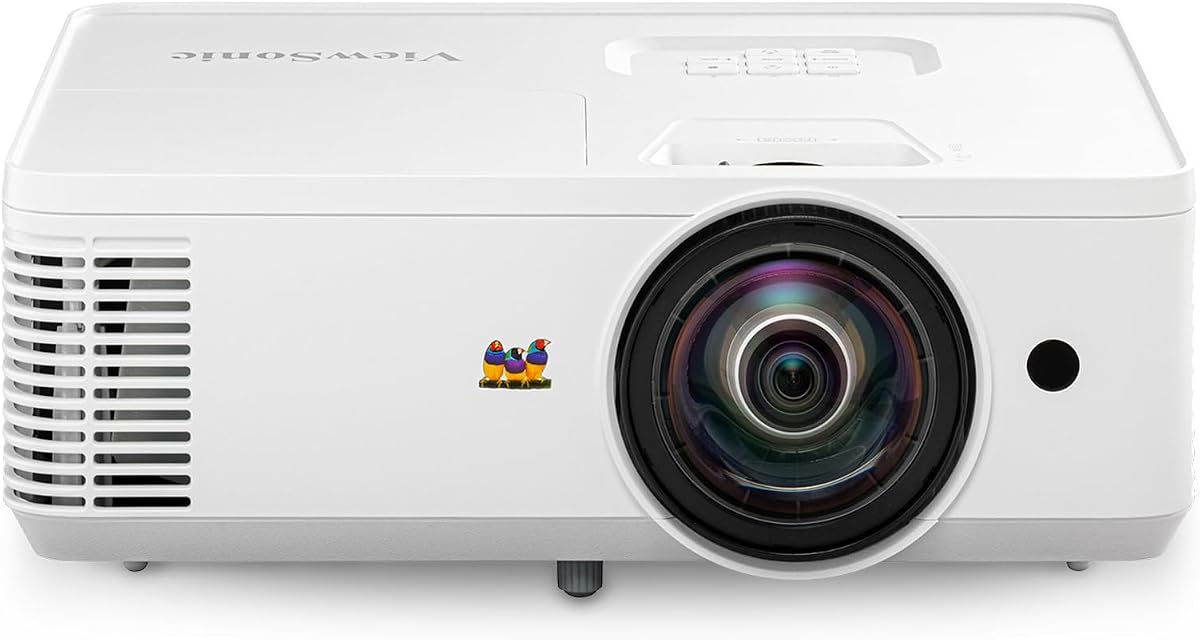
The ViewSonic PS502W is a short-throw projector designed for classrooms and small meeting rooms where display size matters more than physical footprint. Its 4.4 rating reflects a capable combination of 4000 ANSI lumens, a 0.5 throw ratio, automatic adjustment, and flexible installation.
We may earn a commission when you buy through this link, at no additional cost to you.
The projector can produce images up to 150 inches, including a 100-inch display from only 4.5 feet away. That makes it attractive for compact rooms where a conventional projector would cast distracting shadows or require the viewer to sit in an awkward position. SuperColor technology is intended to provide a wide, lifelike color gamut.
Vertical auto-keystone correction and digital zoom simplify setup, while instant power on and off suit fast-moving schedules. Table or ceiling mounting and compatibility with named ViewSonic mounts support permanent installations. The main drawback is that it is a digital projector rather than a document camera, and its native WXGA resolution is lower than many modern displays.
Choose the PS502W for a bright, large image in a small classroom or meeting room. It is particularly suitable when short-throw placement, ambient-light performance, and minimal shadowing are the top priorities. Pair it with a digital visualiser when teachers also need to present physical pages.
The 0.5 throw ratio allows a 100-inch image from 4.5 feet away and supports displays up to 150 inches. Teachers can place the unit close to the screen without creating major shadows.
The 4000 ANSI-lumen output is designed to remain visible under moderate ambient light. SuperColor technology and automatic keystone correction help produce a clean, correctly shaped image.
We may earn a commission when you buy through this link, at no additional cost to you.
Choosing a classroom document projector requires separating image-capture devices from display-only projectors, then matching resolution, lighting, connectivity, and physical-document support to the way you teach.
A document camera photographs worksheets, books, objects, and handwritten notes before sending that image to a computer, display, or conferencing application. A display projector, by contrast, projects digital slides, videos, and webpages and cannot capture physical paper on its own. Teachers who regularly work with textbooks, worksheets, art, or demonstrations should prioritize a document camera or overhead projector, while teachers showing mainly digital material may need only a display projector.
Resolution determines how much fine detail remains visible when a page or object is enlarged. The IPEVO V4K reaches 3264 × 2448 pixels, the INSWAN INS-2 records in 4K at 3840 × 2160, and several other document cameras provide 8MP or 1080p imagery. For small print, diagrams, artwork, and science specimens, higher resolution is helpful. Digital display projectors also need enough native resolution for the content being taught, although classroom viewing distance and screen size ultimately affect perceived clarity.
A camera that maintains 30fps will usually look smoother during a live demonstration than one optimized primarily for still pages. Motion matters when teaching experiments, performing practical procedures, or physically handling an object. The IPEVO V4K, VZ-X, THUSTAR A3, and INSWAN INS-2 all support 30fps output in their stated operating modes. For static worksheets, frame rate is less important than focus, lighting, and accurate framing.
Built-in lighting is especially important when a classroom lacks a window, or when papers are too dark to display clearly. The THUSTAR A3 provides three brightness levels, while the IPEVO VZ-X, INSWAN INS-2, and IPEVO V4K use built-in or integrated illumination to support clearer capture. A camera that can expose a white page and a dark object without excessive glare gives teachers more flexibility throughout the school day.
USB document cameras are dependable in computer-based classrooms and generally offer the highest direct image quality, but they remain tethered. The IPEVO VZ-X adds Wi-Fi and HDMI for greater placement flexibility, while traditional projectors typically use HDMI, VGA, or USB. Teachers should confirm that their operating system, conferencing application, and classroom display are supported. A model that works smoothly with the equipment already in the room is more valuable than one offering unsupported advanced features.
The viewing area determines whether a camera can frame a full worksheet, an A3 sheet, a two-page spread, or only a smaller note. The IPEVO VZ-X and INSWAN INS-2 support large-document views, while the THUSTAR A3 covers A3 paper. Optical zoom is also valuable because it magnifies without relying solely on digital cropping. The Lumens DC166 stands out with 6x optical zoom, making it worth considering for demonstrations involving very small objects.
A permanent ceiling-mounted projector suits a fixed teaching station, while a folding document camera is easier to carry between rooms. Wireless cameras can move around a classroom without dragging cables, although battery life and wireless range must be adequate. Portable document cameras also need enough desk space to unfold their arms, whereas short-throw display projectors can sit close to the screen and reduce shadowing in compact rooms.
Document-camera software can add annotation, zoom, recording, scanning, OCR, or whiteboard tools to a simple camera. The INSWAN INS-2 includes Documate for several of these functions, while the Lumens DC166 provides onboard JPEG storage and SD card recording. Teachers should evaluate whether they need live presentation alone or also want to save, annotate, and redistribute lesson content. Useful software is valuable only when it works with the classroom computer and chosen teaching application.
Begin by connecting the device to the classroom display or computer, then open the teaching or conferencing application you intend to use. For a USB document camera, verify that the computer recognizes it as a camera or visualizer. Position the camera above the center of the work area, point it downward, and use the stand joints or short-throw placement to create a square, upright image with minimal keystone distortion.
Adjust the built-in lighting before the lesson begins. Increase brightness for a dark page, lower it for glossy paper, and rotate or reposition the document to eliminate reflections. Use autofocus or the manual focus controls after changing the subject, and take a few seconds to frame the full page before beginning a live demonstration. On wireless models, confirm the active connection and test the signal from the normal teaching position.
For care, switch off the projector or camera before moving it and avoid yanking connected cables. Clean the lens with a soft, lint-free cloth, and keep the camera head away from dust, moisture, and direct heat. Tighten adjustable joints gently, keep ventilation openings clear, and store portable stands in their folded position. Periodically check software updates, camera focus, lighting output, and the condition of power adapters and connection cables.
A document camera captures a physical page, object, or demonstration and sends that image to a computer or display. A classroom projector displays digital slides, videos, and webpages but does not photograph physical materials. A teacher who regularly shows worksheets, textbooks, or objects usually needs a document camera, possibly paired with a projector.
Not always. Full HD or 8MP imaging can provide clear results for ordinary worksheets and demonstrations. Higher resolution becomes more valuable when displaying fine print, detailed artwork, circuit components, or small scientific objects. The viewing size, camera distance, display quality, and student sightlines also influence whether 4K produces a meaningful benefit.
Wireless models offer more freedom to move around a classroom and may connect to several device types. USB models are often simpler, more consistent, and able to provide the highest image resolution in the supported mode. Choose wireless operation when mobility is important, and favor USB when the classroom always uses a nearby computer and reliable cables are available.
Many document cameras behave as standard webcams and can be selected as the camera source in popular conferencing applications. Compatibility depends on the operating system and whether the device exposes the required video mode. Buyers should verify the product's supported platforms and test the complete teaching setup before class begins.
The appropriate brightness depends on room size, screen dimensions, window light, and content. Higher-lumen models are more suitable for rooms with moderate ambient light or larger audiences. Even a brighter projector benefits from controlled lighting, and dark text or detailed diagrams should always be tested on the actual screen.
A short-throw projector can display a large image from a short distance, which is useful in compact rooms. It reduces the need for long throw distances and can limit shadows when positioned correctly. The room layout, screen position, and ceiling-mounting plan should be checked before installation.
Look for a viewing area that fits the materials you actually teach. A standard worksheet may fit on a smaller camera, while A3 sheets, large maps, and two-page spreads need a larger stage. Also account for the height of the stand and the distance between the camera and the display when checking the available desk area.
Built-in microphones are convenient for demonstrations near the document camera and for basic video calls. They may not provide the clarity or reach of a dedicated teacher microphone in a large or noisy room. Schools should test audio across the teaching area and use separate audio equipment when consistent whole-room coverage is necessary.
The IPEVO V4K is the strongest all-around document camera for wired classroom teaching, combining 8MP imagery, smooth Full HD streaming, fast focusing, and flexible positioning. The IPEVO VZ-X is the premium choice for teachers who value wireless freedom, broad device compatibility, long battery life, and a large viewing area. The THUSTAR A3 stands out as the best budget selection because it brings useful lighting, autofocus, microphones, and A3 coverage to an accessible package.
The right decision depends on the teaching task. Use a document camera for physical pages and objects, a short-throw or LCD projector for digital presentations, and consider a dedicated overhead projector when large books or three-dimensional materials must be placed on a flat stage. Prioritize illumination, focus stability, supported platforms, capture area, and reliable connections before considering less visible features.
Ratings, specifications, availability, and prices can change, so check the current product listing and classroom equipment before ordering. Testing the camera or projector with the exact computer, display, application, and materials used in class will help prevent compatibility surprises and ensure a smoother lesson.