
StarTech 10/100 Ethernet Extender
4.8Editor score
Up to 800-meter reach
One or two cable pairs
Transparent network passthrough
This Ethernet Line Extender guide compares powerline adapters, copper extenders, long-range kits, and couplers for homes and offices.
An Ethernet line extender carries a wired network connection beyond the usual limits of copper cabling or across obstacles where new cable installation is impractical. The right model depends on the distance, available wiring, required speed, power infrastructure, and whether you need a simple connection or a complete multi-room network.
We compared ten products across powerline adapters, VDSL-style extenders, long-range copper systems, and passive RJ45 couplers. The review considers maximum range, link rate, port speed, installation requirements, wired and wireless coverage, compatibility, and the situations in which each technology is most useful.
Each pick reveals what it is best suited to, from connecting a gaming console to extending an office network across substantial distances. Ratings and product information reflect the supplied listings, while specifications may differ from real-world results. Prices change frequently, so check the current listing before buying.
4.8Editor score

4.2Editor score

4.7Editor score
The table below compares all ten products by connection method, reach, throughput class, and key installation considerations, helping separate in-home powerline solutions from professional long-distance extenders.



The TP-Link AV1000 Powerline Ethernet Adapter KIT is a practical all-around choice for homes that need a wired connection carried across walls, floors, or difficult building materials. Its supplied rating is 4.2 out of 5. The TL-PA7017 KIT uses HomePlug AV2 technology, provides a Gigabit Ethernet port, and is designed for users who cannot comfortably extend conventional Ethernet wiring.
We may earn a commission when you buy through this link, at no additional cost to you.
Its main strength is the combination of powerline convenience and wired performance. The two included adapters can establish a connection through existing electrical wiring without requiring new Ethernet cable or complex configuration. A maximum AV1000 powerline speed and reach of up to 750 feet make it suitable for connecting desktops, smart televisions, and game consoles in another part of a home. Included Ethernet cables simplify the physical connection at both ends.
There are important installation limitations. Both adapters must connect directly to wall outlets on the same electrical circuit, and power strips, surge protectors, and extension cords are not suitable. Large appliances may introduce interference, while homes with AFCI breakers can experience limited or blocked powerline operation. Actual results also depend on the quality of the wiring, adapter distance, electrical interference, and the speed of the internet service itself.
This kit is well suited to a multi-story home, basement, attic, or garage where a conventional wired run would be inconvenient. Choose it when you want a dedicated Gigabit connection without running new cable, but verify that the outlets share a circuit and that your electrical installation supports powerline networking. For most users seeking a straightforward extension method, it offers the strongest balance of useful throughput, size, and ease of setup.
The adapter is particularly effective when a smart television, desktop, or console sits beyond the router's Ethernet cable reach. Using the home's existing wiring removes the need to open walls or route a new cable through the building.
The compact adapters are easier to arrange around furniture and other wall-outlet equipment. Direct wall-outlet placement remains essential for the intended performance.
We may earn a commission when you buy through this link, at no additional cost to you.
The NETGEAR PLP2000 is a two-pack powerline solution aimed at homes with several high-bandwidth wired devices. Its supplied rating is 4.2 out of 5, and the kit combines an advertised link rate of up to 2000 Mbps with two RJ45 Ethernet ports on each adapter. That makes it a flexible option for linking routers, streaming equipment, computers, and game consoles.
We may earn a commission when you buy through this link, at no additional cost to you.
HomePlug AV2 technology, multiple data streams, and beamforming are central to the product's design. The listed capabilities are aimed at improving coverage through household electrical wiring, while the integrated noise-filtered outlet can help reduce interference. Plug-and-play setup means there is no need to install software or work through a complex configuration process. Additional adapters can be added when more network coverage is needed.
The headline 2000 Mbps figure describes the powerline link class rather than a guarantee for every device or room. It is not a Wi-Fi product, so it extends a network using electrical wiring and then presents standard Ethernet connections at each endpoint. Wiring quality, interference, distance, and the capabilities of connected equipment will influence actual throughput. The listing also states that the product is made for use in the United States only.
Choose the PLP2000 when multiple wired endpoints benefit from a fast powerline backbone and you want more than one Ethernet connection at each remote location. It is less appropriate for international installations or for homes whose outlets cannot support reliable powerline communication. Despite that regional limitation, it is a capable choice for extending a high-speed wired network without running new in-wall cable.
Two Ethernet ports on each adapter allow more than one wired device to use the extended link. This is useful at a desk, entertainment center, or home office where a router port alone would be insufficient.
The integrated power outlet lets the adapter share a wall receptacle with another plug. Its noise-filtering design is intended to help preserve signal quality within the electrical system.
We may earn a commission when you buy through this link, at no additional cost to you.
The Ethernet Extender Kit with up to 7000 feet of reach is designed for installations that greatly exceed the normal 328-foot limit of Ethernet cabling. It has a supplied rating of 4.4 out of 5. Rather than relying on household electrical wiring, it transfers a network signal over twisted-pair or telephone-style cabling between a local and remote unit.
We may earn a commission when you buy through this link, at no additional cost to you.
The kit can use CAT5, CAT6, CAT7, CAT8, or phone cable, with RJ45 and RJ11 connections supporting the physical arrangement. It comes as a matched pair with central and remote roles preset, so users can deploy it without installing a driver or application. The remote side can serve computers, cameras, VoIP phones, modems, and routers, making the system relevant to both homes and small offices.
Its greatest advantage is reach. A properly selected cable path can bridge locations that would require an entirely new Ethernet run if the standard distance limit were enforced. The trade-off is that the product uses VDSL-style transmission rather than preserving a conventional short copper Ethernet segment. Line quality, cable type, grounding, interference, and installation practices can influence stability and throughput.
This kit is most appropriate for rural buildings, detached structures, surveillance installations, and other situations where long cable runs already exist or can be installed. Users should confirm that the planned cable category and routing are suitable before purchase. When the objective is to connect a remote room without running hundreds of feet of modern Ethernet, it offers a more specialized solution than ordinary powerline adapters.
Existing Cat5, Cat6, telephone, alarm, or similar copper wiring can become the transmission path. That can make it easier to connect a detached office, camera, or other endpoint over infrastructure already present.
The included units arrive with their roles assigned, reducing setup work. A short local Ethernet lead and an appropriate cable path can then complete the point-to-point link.
We may earn a commission when you buy through this link, at no additional cost to you.
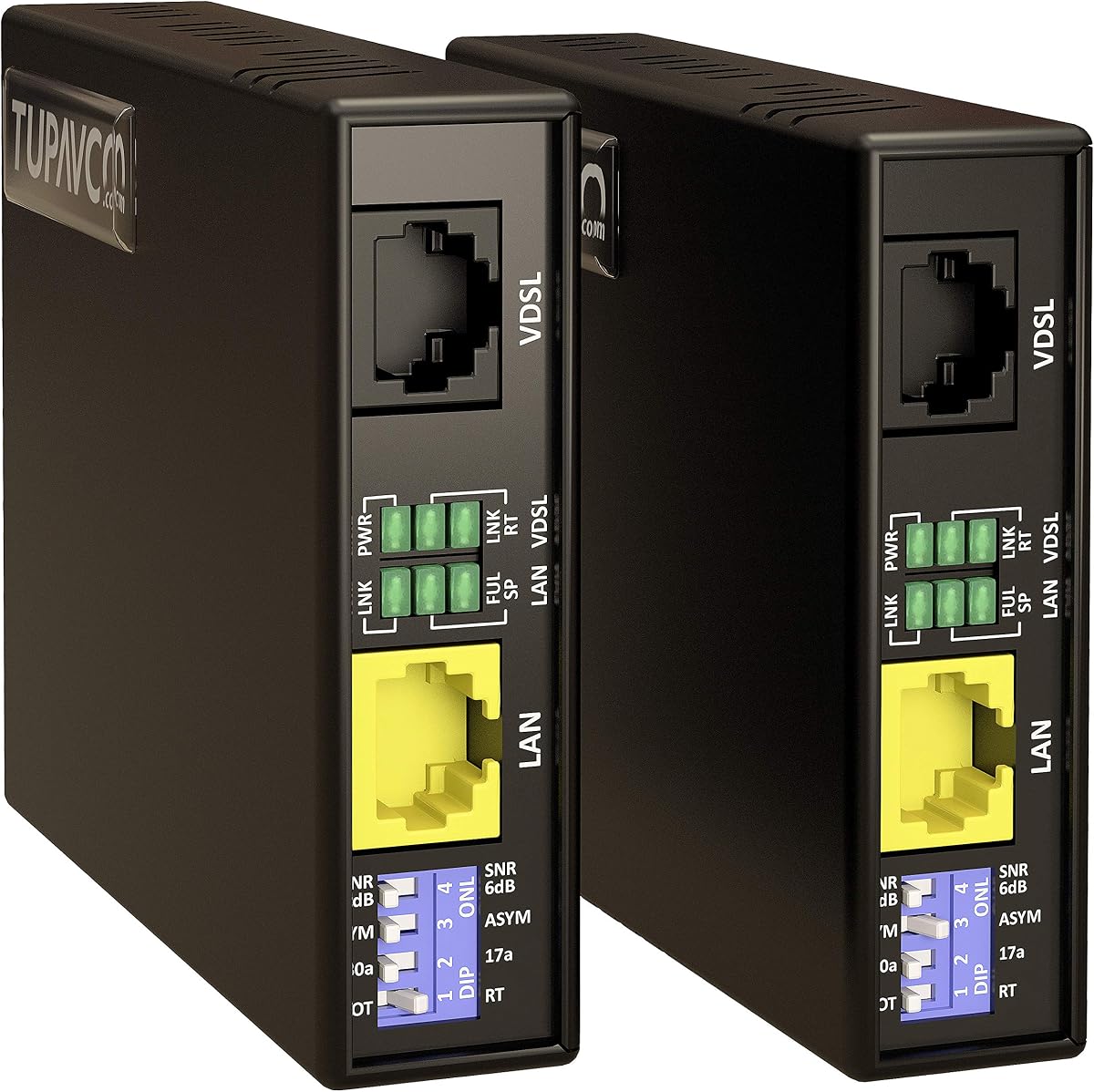
The StarTech 10/100 Ethernet Extender stands out for specialized long-distance networking, earning the highest supplied rating in this roundup at 4.8 out of 5. The unmanaged, single-port kit can extend a network as far as 800 meters, overcoming the usual 328-foot limit associated with Cat5, Cat5e, and Cat6 twisted-pair cable.
We may earn a commission when you buy through this link, at no additional cost to you.
Its flexibility comes from supporting either one or two cable pairs. According to the supplied details, a single-pair arrangement can reach up to 984 feet at 100 Mbps, while a two-pair arrangement can extend to 2,624 feet at 10 Mbps. The extender acts transparently at the network layer, passing Ethernet protocols while supporting IEEE 802.1q VLAN tags, Wake-on-LAN, jumbo frames, PXE, and related functions.
Administrative features make it more suitable for professional deployments than a basic consumer powerline kit. DIP switches provide configuration, and status LEDs report power, local or remote mode, network status, LAN speed, and line fault status. Power adapters for both the local and remote units are included. The central limitation is performance: the Ethernet side operates at 10 or 100 Mbps rather than gigabit speeds.
Buy this system for remote internet access, IP video surveillance, equipment management, wireless access points, automation, VoIP, sensors, or other situations where a robust long link matters more than maximum throughput. It is a strong fit for installers, campuses, and technically experienced users. Its combination of range, transparent operation, and diagnostics makes it the premium choice for infrastructure-heavy use.
The kit lets administrators trade link speed for distance by choosing one or two pairs. This makes it useful for both shorter 100 Mbps runs and more distant installations where reduced throughput remains acceptable.
Passing VLAN tags, Wake-on-LAN, PXE, and jumbo frames helps the extender fit into established networks. The local and remote units operate as a matched pair with included power adapters.
We may earn a commission when you buy through this link, at no additional cost to you.
The TP-Link AV600 Powerline Ethernet Adapter Kit is a straightforward way to add a wired network connection using the electrical wiring already in a home. Its supplied rating is 4.2 out of 5. The TL-PA4010 KIT provides up to 750 feet of AV600 reach and a 100 Mbps Ethernet port, making it better suited to basic networking than demanding data transfers.
We may earn a commission when you buy through this link, at no additional cost to you.
The kit includes two adapters and an Ethernet cable, allowing it to bridge a network source to a remote device without pulling new cable through the property. It works with TP-Link powerline adapters and supports desktops, smart televisions, and game consoles. Setup involves plugging in the pair and allowing the adapters to establish the link, with no detailed configuration required.
Electrical installation is the decisive factor. The adapters must connect directly to wall outlets on the same circuit, away from power strips, surge protectors, extension cords, and major appliances. AFCI breakers can limit or prevent powerline communication. Actual speed will also depend on wiring quality, distance, interference, and the user's internet connection, so the advertised class should not be treated as a guaranteed result.
This kit is a good choice for browsing, basic work, television connectivity, and other modest network demands in a home where powerline communication is supported. It is less suitable for transferring very large files or operating modern performance-sensitive networks. Its lower port speed is the principal disadvantage, but for a basic wired extension it remains simple and effective.
The pair creates a wired link through existing outlets, removing the need for a new cable route. It is especially practical when Wi-Fi does not perform well in the target room.
The adapter switches to a power-saving mode when it is not working as listed. This helps reduce unnecessary consumption without adding configuration steps.
We may earn a commission when you buy through this link, at no additional cost to you.
The TP-Link AV1000 Powerline Ethernet Adapter and AX1500 Wi-Fi 6 extender kit is built for homes that need both wired and wireless connectivity beyond the router. Its supplied rating is 4.1 out of 5. The TL-WPA7817 KIT combines an AV1000 powerline link with dual-band Wi-Fi 6, offering 1201 Mbps on the 5 GHz band and 300 Mbps on the 2.4 GHz band.
We may earn a commission when you buy through this link, at no additional cost to you.
Its powerline reach is listed at up to 980 feet, while the wireless portion can support up to 64 connected devices. A Gigabit Ethernet port serves devices that benefit from a stable wired connection, including game consoles and smart televisions. The kit also supports EasyMesh integration, letting it join compatible router or range-extender systems for more unified whole-home coverage.
Setup begins with pairing the two included adapters, while Wi-Fi Clone can copy the router's network name and password. Network management is available through a web interface, the tpPLC desktop application, and the tpPLC mobile application. As with other powerline systems, both units need direct wall-outlet connections on the same electrical circuit, and surge protectors should be avoided.
This is the most versatile choice for a home that has a mix of wireless clients and wired devices in a difficult-to-reach area. It can eliminate dead zones and reduce dependence on Ethernet cable without surrendering a high-speed wired port. Users who need only one wired endpoint can consider a simpler kit, while those with many wireless and high-bandwidth devices will get more value from the combined design.
The powerline backbone carries the connection, while the Wi-Fi 6 radios serve nearby wireless clients. This is useful in rooms where running Ethernet cable is undesirable but weak router coverage is a persistent problem.
EasyMesh compatibility supports broader whole-home network designs. Web and app-based management provide more control than a basic plug-and-play powerline pair.
We may earn a commission when you buy through this link, at no additional cost to you.
The TP-Link AV1000 Wi-Fi 5 extender kit offers a practical balance of powerline networking, wireless coverage, and a built-in outlet. It has a supplied rating of 4.0 out of 5. The TL-WPA7617 KIT uses HomePlug AV2 technology for up to 750 feet of reach and combines that backbone with AC1200 dual-band Wi-Fi.
We may earn a commission when you buy through this link, at no additional cost to you.
The wireless speeds are listed at 867 Mbps on 5 GHz and 300 Mbps on 2.4 GHz, allowing modern wireless devices to connect without requiring a cable at every location. At the same time, a Gigabit Ethernet port provides a secure wired option for desktops, smart televisions, and game consoles. Included Ethernet cables help complete the initial hookup.
Its most distinctive physical feature is the passthrough outlet, which allows another plug to use the same wall receptacle. The kit can also work with a compatible TP-Link OneMesh system, and a Wi-Fi Clone button copies the router's network name and password. The adapters must share an electrical circuit and connect directly to outlets, without surge protectors.
Choose this model for a home or small office that needs simultaneous wired and wireless extension and values the passthrough outlet. It is especially helpful near a kitchen counter, entertainment center, or desk where outlet space is limited. The main compromise is Wi-Fi 5 rather than Wi-Fi 6, but its strong powerline class and integrated convenience make it a credible all-around connectivity kit.
The integrated passthrough receptacle reduces the need to move other plugs or use a bulky power strip. It also keeps the powerline adapter positioned directly in the wall outlet.
Wi-Fi Clone transfers the router's network name and password for easier roaming. Adjustments made on one adapter can then be synchronized across the powerline network.
We may earn a commission when you buy through this link, at no additional cost to you.
The UGREEN Ethernet Coupler is the simplest and most affordable way to join two network cables. It has a supplied rating of 4.7 out of 5 and does not send a signal through household power outlets or regenerate it over long distances. Instead, two female RJ45 ports provide a direct connection between compatible Ethernet cables.
We may earn a commission when you buy through this link, at no additional cost to you.
The couplers support links up to 10 Gbps and are backward compatible with 1000 Mbps, 100 Mbps, and 10 Mbps according to the listing. They work with Cat5, Cat5e, Cat6, Cat6A, Cat7, and Cat8 cabling. Their arch-pin and Z-shape construction is intended to support stable connections, while the two-pack allows two extension points to be created.
PoE support makes the couplers relevant to PoE cameras and other powered network devices, reducing the need for a separate power arrangement when the connected cable already carries the necessary function. One important limitation is that the product is passive. It does not receive, regenerate, and retransmit the signal, so it cannot extend a run beyond the standard 328-foot cable limitation or compensate for degraded wiring.
This is the best budget option for joining two adequate Ethernet cables when the total route remains within the standard limit. It is ideal for temporary arrangements, furniture placement, or making an existing cable set reach a nearby wall jack. Choose an active extender instead when the installation needs to cross a much greater distance or reuse only one pair of wires.
The couplers can preserve high-speed wired links without introducing powered electronics or software. Actual throughput remains limited by the connected cable quality, equipment, and protocol.
Supporting PoE means the cable can continue carrying both network data and power where the installed devices and cabling support it. The coupler itself does not require separate electrical power.
We may earn a commission when you buy through this link, at no additional cost to you.
The Ethernet Range Extender Kit is built for installations where a conventional Ethernet cable cannot reach. Its supplied rating is 4.6 out of 5. It can carry a network across as much as 600 meters, or 2,000 feet, using only two copper conductors rather than requiring a full four-pair Ethernet run.
We may earn a commission when you buy through this link, at no additional cost to you.
The two conductors can come from a spare pair in Cat5e or Cat6, alarm cable, bell or intercom wiring, or the center conductor and shield of RG59 or RG6 coaxial cable. Supplied BNC-to-terminal adapters enable the coax option. Twisted-pair cable generally provides the strongest result, while wire gauge and insulation quality influence how far the link can operate and what rate it can maintain.
Unlike a passive coupler, the system actively receives, regenerates, and retransmits the signal. Both ends need mains power, and a 12-to-24 VDC adapter is included for each unit. Its RJ45 ports operate at 10/100BASE-T, with a maximum stated link rate of 92 to 100 Mbit/s on suitable cabling. The link behaves transparently at Layer 1, allowing VLAN tags, DHCP, camera streams, RTSP traffic, NVR discovery, and multiple VLANs to pass without alteration.
This kit is well suited to reusing existing building wiring, connecting remote equipment, or reaching an access point beyond standard Ethernet limits. It is less appropriate when maximum speed is essential, because throughput falls with distance and cable quality. The units are not IP-rated for exposed outdoor placement, so exterior installations should keep both devices inside a sealed enclosure.
Two conductors are enough to establish the point-to-point link. This can reduce the amount of new cable required when a full Ethernet run is impractical.
Each powered unit receives and rebuilds the signal, which is what allows the system to reach farther than a simple cable coupler. Performance still depends on the quality and length of the chosen wire.
We may earn a commission when you buy through this link, at no additional cost to you.
The VDSL Ethernet Extender Kit combines long-distance reach with a stated link rate of up to 300 Mbps. Its supplied rating is 4.6 out of 5. It increases the effective range of network cabling from the conventional 300-foot limitation to more than 5,000 feet, offering a middle ground between high-speed powerline systems and very low-rate long copper solutions.
We may earn a commission when you buy through this link, at no additional cost to you.
The kit can use existing telephone or network cable, including Cat5 and Cat6 wiring. That makes it appealing for connecting buildings, remote offices, cameras, or other network endpoints where pulling fresh Ethernet would be inconvenient. It requires no software installation and arrives ready to use, with standard RJ45 ports and status LEDs for monitoring.
A four-position DIP switch provides eight profile settings that can help match the units to different line conditions. The product supports G.INP, which is intended to improve broadband signal behavior in the presence of noise and interference. Despite the stated 300 Mbps maximum, actual performance will depend on the cable type, route, distance, electrical environment, and equipment connected at either end.
Choose this kit when the priority is a long connection that still offers substantially more throughput than a 10 or 100 Mbps extender. It is well suited to users who already have suitable copper infrastructure and can install the local and remote ends properly. For short home-network links, a powerline adapter may be simpler; for thousands of feet, this model provides a more balanced speed-and-distance proposition.
Eight DIP-controlled profiles provide different operating configurations. This is useful for adapting the link to varied copper paths and environmental conditions.
The stated 300 Mbps link rate leaves more performance potential than basic 10/100 Mbps long-range systems. Real-world results remain tied to the length and quality of the installed cable.
We may earn a commission when you buy through this link, at no additional cost to you.
The right Ethernet line extender depends first on the connection method you can use. Distance, throughput, wiring, power access, and network standards matter more than a broad range claim or the convenience of a particular outlet design.
Powerline extenders use electrical wiring as a network path and are often the simplest option in occupied homes because no new Ethernet cable is required. Their performance depends on whether outlets share a circuit, the age and condition of the wiring, electrical noise, AFCI breakers, and the distance between adapters. Cable-based extenders use twisted pair, telephone wire, alarm wiring, or coax and are generally better suited to long runs, outdoor paths, buildings, and installations where powerline conditions are unknown.
Choose powerline for easy in-home extension over compatible wiring. Choose a cable extender when you have a dependable copper route, need a very long link, or want more control over the transmission path.
Standard Ethernet cable has a commonly cited limit of 328 feet, or 100 meters. Products in this roundup range from passive couplers that merely join two cables to active systems advertised to cover 5,000, 7,000, or even 8,000 feet. Distance claims should be treated as maximum conditions rather than guaranteed operating distances because cable quality and the number of conductors can materially change the result.
Measure the full path rather than the straight-line distance between rooms. For a standard connection, a coupler is enough; for a long route, select an active extender whose specified reach exceeds the installation with some margin.
The port rate and advertised link rate answer different questions. A Gigabit Ethernet port can serve modern local connections, while a 100 Mbps port may become a bottleneck during large transfers or demanding activity. Long-distance systems frequently reduce speed as distance increases, so even a product with a high maximum rate may deliver much less over the full cable path.
Match the extender to the least demanding device on the network. Use at least 100 Mbps for ordinary browsing and streaming, gigabit-class connections for modern wired equipment, and a long-range rate appropriate for the remote application.
Inspect the cable path before choosing an extender. Powerline products need reliable electrical communication between outlets, while active cable extenders may support Cat5, Cat6, telephone, alarm, intercom, or coax wiring. Some systems can use only two conductors, which is convenient in existing structures but can reduce performance relative to properly twisted four-pair cable. Passive couplers require compatible Ethernet cables on both sides and cannot convert an unsuitable wire type into Ethernet.
Identify the exact cable category and connectors before purchasing. The easiest installation is usually the one that can reuse sound, correctly terminated wiring already present at both ends.
A wired-only powerline adapter is ideal when the remote endpoint has an Ethernet connection and the goal is a stable point-to-point link. Combined kits add Wi-Fi for phones, tablets, laptops, and other nearby devices. They also include more radio hardware and management features, making them larger and more complex than a dedicated wired adapter. Some combined systems can join compatible mesh ecosystems.
Select wired-only hardware for simplicity and predictable device connections. Choose a combined kit when the remote area needs several wireless clients as well as optional Ethernet.
Professional and enthusiast networks may depend on VLAN tags, Wake-on-LAN, PXE, jumbo frames, IP camera discovery, or other protocol features. Some long-range extenders pass these transparently, while others operate with a different layer and may not reproduce every feature. Powerline kits vary as well, with consumer-oriented controls and mesh integration in some models.
Review the complete protocol list rather than assuming an RJ45 connection guarantees identical behavior to a local Ethernet segment. Confirm compatibility with the specific services and devices in your network.
Environmental details can determine whether a product works as intended. Powerline adapters should connect directly to compatible wall outlets and generally avoid surge protectors, extension cords, and major appliances. Long-range equipment may require local power at both ends. Outdoor paths demand weather-resistant enclosures because many extender housings have no IP rating. Cable routing also needs attention around power lines and sources of electromagnetic interference.
Plan for power, environmental protection, and cable routing before installation. A product is only suitable if its physical requirements can be met safely and consistently.
Some powerline systems scale by adding compatible adapters, while other solutions are designed as fixed local and remote pairs. Multiport adapters can support several wired devices without an external switch, and mesh-compatible kits may integrate more easily with an existing wireless system. Long-range point-to-point kits generally have a fixed architecture, but their protocol support may be more appropriate for expanding specialized networks.
Consider how many endpoints the installation will serve over time. For a growing home network, adapters with multiple ports and mesh support provide more flexibility than a single fixed cable extension.
Begin by mapping the route between the network source and the remote endpoint. Confirm whether you will use household electrical wiring, an existing cable path, or a standard Ethernet cable, and verify that the selected extender supports that medium. For powerline systems, check that both outlets are on the same electrical circuit and avoid surge protectors, extension cords, and large appliances.
Install the local unit first, connect the source network device with the appropriate Ethernet cable, and then place the remote unit at the destination. Powerline kits generally pair automatically after both adapters are plugged in. Cable-based extenders require a continuous suitable cable between the local and remote units plus short patch cables at each end. Configure DIP switches, pairing buttons, Wi-Fi cloning, or management software only after the physical link is active.
Test the connection with the devices and services you care about before running cables permanently. Keep powerline adapters unobstructed, inspect connectors for dust or damage, and avoid moving powered extenders while they are operating. For outdoor or exposed routes, use weather-resistant enclosures and appropriate cable protection. Active long-range units should be checked periodically for stable power, link indicators, and any fault warnings shown by their status LEDs.
An Ethernet extender carries a network signal over a cable path, while a powerline adapter uses electrical wiring as its transmission medium. Cable-based systems are often better for very long runs or buildings, whereas powerline adapters can be easier to install in an existing home. Neither technology automatically guarantees a particular speed in every environment.
Yes, an active extender can carry a connection well beyond the usual 328-foot limit of a standard Ethernet segment. The maximum distance depends on the extender, cable category, number of wire pairs, installation quality, and acceptable throughput. Passive couplers cannot overcome that limit because they do not regenerate the signal.
The TP-Link models in this roundup specifically state that adapters should be plugged directly into wall outlets and do not work with power strips, surge protectors, or extension cords. This placement helps preserve reliable communication and reduces interference. Always follow the installation requirements supplied with the exact model being used.
No. A powerline rate describes the maximum capacity of the link between adapters, not the speed delivered by the internet service. Actual performance is limited by the slower network device, local Ethernet equipment, wiring quality, electrical interference, distance, and any internet plan limit.
Some active extenders can use telephone wire, a spare twisted-pair pair, alarm or intercom cable, and, with the proper adapters, coax. Compatibility depends on the specific product and the quality of the conductors. Ordinary passive RJ45 couplers work only with Ethernet cable and do not perform signal conversion.
It depends on the model. The NETGEAR PLP2000 includes two RJ45 ports, while several TP-Link combinations provide one Ethernet port and can be expanded with a separate Ethernet switch. Check the port count and the product's network-management guidance before connecting multiple clients.
Generally, no. The long-range products listed here use 10/100 Mbps or VDSL-class links whose performance declines with distance and cable quality. A passive coupler may support high category cable and 10 Gbps, but it does not extend the run beyond standard Ethernet length or regenerate the signal.
First confirm that both units have power and that the selected cable or outlets meet the manufacturer's requirements. Check physical connections, pairing status, and DIP-switch settings, then restart both ends. For powerline models, test different wall outlets and remove nearby surge protectors; for long-range systems, inspect the cable route and status indicators.
The TP-Link AV1000 Powerline Ethernet Adapter KIT is the most balanced general choice for a home that needs a compact, reliable wired extension over existing electrical wiring. The StarTech 800m system stands out for long-range infrastructure work, while the UGREEN 10Gbps coupler offers the simplest way to join two adequate Ethernet cables within the standard length limit.
Prioritize the connection method before comparing speed claims. Powerline is convenient but sensitive to the home's wiring and electrical circuit. Cable-based extenders suit longer, controlled routes, while passive couplers work only when the existing Ethernet cables already meet the task. Required throughput, protocol support, power availability, and environmental protection should then guide the final decision.
Ratings and specifications provide a useful starting point, but the installation environment determines real-world results. Check the current product listing, included accessories, compatibility notes, and any changes in availability before purchasing. Current prices change, and comparing the full feature set is more useful than focusing on a headline rate alone.