
BITFUNX NGC to HDMI Adapter
4.4Editor score
Digital video and audio
Multiple GameCube display modes
Line doubling and scanlines
Firmware update support
Protective console bracket
GameCube HDMI Adapters are compared for video quality, compatibility, audio, latency, setup ease and display support in this practical guide.
A GameCube HDMI adapter can give an original Nintendo console a cleaner connection to a modern television, monitor, or projector. The right device depends on whether your console has the original digital port, which signal path you want to preserve, and whether audio, aspect-ratio controls, latency, and firmware features matter to you.
We compared ten adapters using the supplied specifications, focusing on GameCube compatibility, resolution options, image processing, power requirements, audio support, included cables, remote controls, and ease of installation. The list includes dedicated DOL-001 adapters, multi-console converters, and S-Video-based solutions rather than treating every product as the same kind of device.
Each review explains what makes the adapter distinctive, where it is less convenient, and which player it best suits. Ratings reflect the published customer feedback supplied for each listing, while technical details come from the product information. Product prices and availability change, so check the current listing before purchasing.
The first three recommendations represent our strongest overall choices, while the remaining reviews cover alternatives for different budgets, console configurations, and display requirements. Readers with an original DOL-001 model should pay particularly close attention to digital-port support, while owners of later GameCube hardware should confirm that the chosen adapter uses the analog Multi-Out port.
4.4Editor score

4.6Editor score

4.4Editor score
This comparison separates dedicated digital adapters from analog converters and highlights the console support, output method, resolution claims, power needs, and distinguishing features of all ten products.

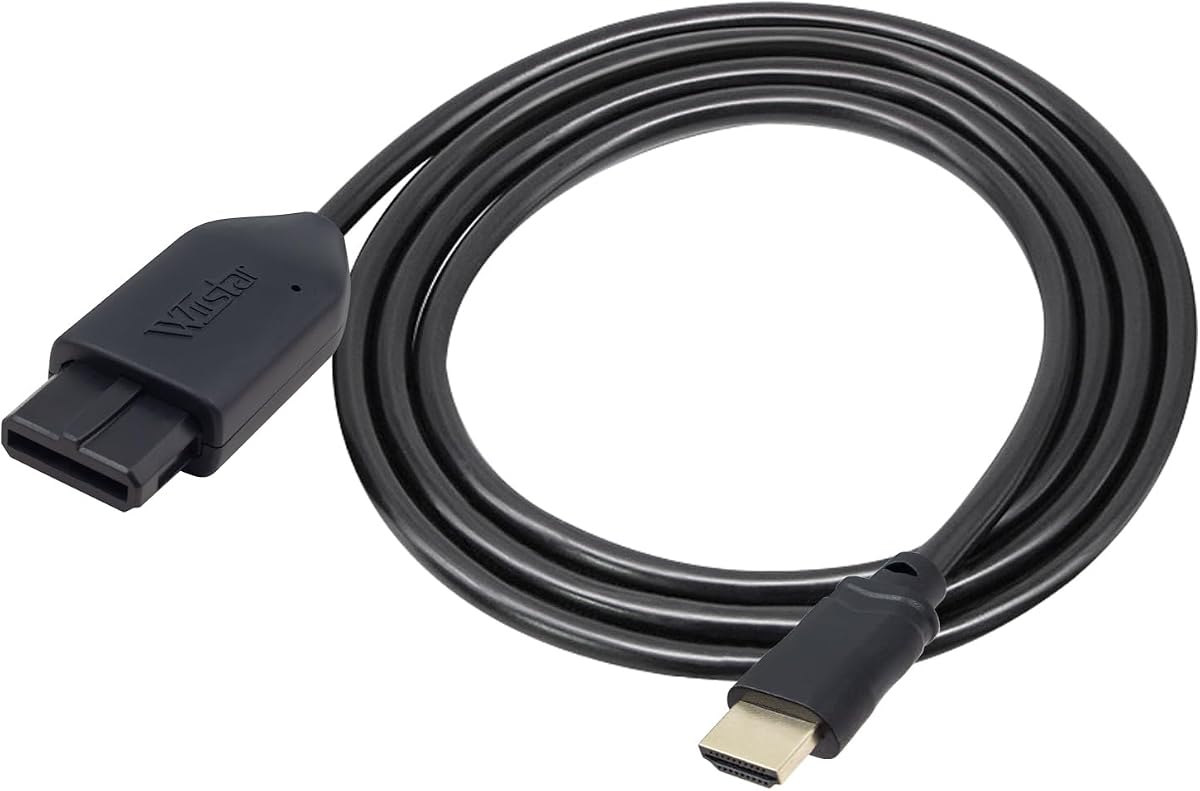


The Kaico GameCube HDMI Adapter with GCVideo is the strongest all-around recommendation in this guide for owners of an original DOL-001 GameCube. Its 4.6 rating reflects well-received customer feedback, while its dedicated digital connection, remote control, and selectable processing features set it apart from basic analog converters.
We may earn a commission when you buy through this link, at no additional cost to you.
This adapter connects directly to the Digital Port found on the back of the original console and sends video and audio to an HDMI display. It supports output up to 480p or 576p, depending on the mode and signal, and includes line doubling and scanline options. The programmed remote makes it easier to navigate those menu settings without repeatedly reconnecting the console.
A useful detail is the USB port for firmware updates, which gives the product a path for future maintenance. The included 3D-printed shelf is intended to reduce strain on the digital connector, a thoughtful addition because this dedicated plug occupies a specialized console port. No separate power supply is required, reducing cable clutter and making setup straightforward.
The principal limitation is console compatibility. It is designed for the DOL-001 rather than every GameCube model, and 480p-class output will not exploit a 4K television's full pixel count. Even so, for an original GameCube owner who values dependable digital video, clear menu control, and thoughtful cable management, it is the most complete dedicated option here.
The menu-based approach is particularly useful because it lets the player decide how the classic 4:3 image is treated. Line doubling can make the original 240p and 288p material easier to view on larger panels, while scanlines provide an alternative texture for players who want the image to evoke a CRT. These tools matter more than raw resolution on a modern display, where a clean upscale and accurate geometry can matter greatly.
The adapter also removes the need to hunt for an original or aftermarket analog cable. Once the GameCube, adapter, and television are connected, the system is ready for play. The remote-controlled GCVideo interface gives it a more polished feel than minimal converters that simply convert a signal and leave all image adjustment to the television.
Choose this model if you own the original GameCube, understand the 480p ceiling, and want more control over picture processing than a basic RCA or Multi-Out adapter can provide. It is also a strong choice for anyone who wants a dedicated solution rather than a cable marketed primarily for several different Nintendo consoles.
Using the DOL-001 Digital Port allows the adapter to preserve a digital signal rather than capturing an analog output. The included remote and GCVideo menu give direct access to line doubling, scanlines, and supported display modes.
The supplied shelf is designed to support the connector and reduce strain. Because no separate power adapter is required, the setup also avoids the extra cable and power dependency found with some universal converters.
We may earn a commission when you buy through this link, at no additional cost to you.
The Multi-Nintendo HDMI Adapter is a practical choice for a collection that includes the GameCube, Nintendo 64, and Super Nintendo. It carries a 4.2 customer rating and emphasizes a simple conversion path from legacy console output to a modern HDMI television.
We may earn a commission when you buy through this link, at no additional cost to you.
Its central advantage is breadth. Rather than requiring a dedicated digital adapter for the original GameCube, this product approaches retro video through an analog-to-HDMI conversion process. The listing claims support for 720p and 1080p conversion on an HD television, which can make the picture more convenient on a larger contemporary screen.
Setup is described as plug-and-play, and an HDMI cable is included. The one important caveat is that external power is required. Players should therefore plan to connect the converter's power lead to a suitable source rather than assuming the console will power it completely. This extra requirement makes the unit less tidy than models that operate without external power.
Another limitation is that the product's 1080p conversion does not create 1080p detail that was absent in the original GameCube signal. Upscaling can improve the size and convenience of the image, but it does not replace a native digital adapter when maximum signal quality and dedicated GameCube display controls are the priority.
This converter is best for a player who values one accessory across several older Nintendo systems and wants a straightforward route to an HDMI display. It may be especially helpful for someone setting up a shared retro corner without wanting to maintain separate display cables for each console. Confirm the appropriate console-side connection before buying.
Its 4.2 rating still places it comfortably within the competitive middle of the group. It does not lead the list in specialized features, but it offers a useful combination of multi-console support, included cable, and high-resolution conversion claims. The external-power requirement is the main point to evaluate.
Pick it over a dedicated DOL-001 adapter if you also own an N64 or SNES and want one product to serve all three. Pick the Kaico or BITFUNX digital alternatives instead if picture processing, digital audio, or the lowest possible dependence on analog quality matters most.
Support for the GameCube, Nintendo 64, and SNES makes this a versatile household accessory. The included HDMI cable also reduces the chance that buyers will need an additional cable before the first setup.
The advertised 720p and 1080p modes make the output convenient for modern televisions, but they remain conversions of an analog source. Native 4:3 geometry and a dedicated digital adapter may provide a different image presentation.
We may earn a commission when you buy through this link, at no additional cost to you.
The BITFUNX NGC to HDMI Adapter is the premium feature pick for original DOL-001 GameCube owners. It has a 4.4 rating and builds on the familiar strengths of a dedicated digital adapter by combining HDMI video, digital audio, multiple supported display modes, remote control, and firmware-update support.
We may earn a commission when you buy through this link, at no additional cost to you.
The adapter supports GameCube modes including 240p, 288p, 480i, 576i, 480p, and 576p. That range is valuable because it allows a player to choose a source mode suited to the display rather than accepting one fixed conversion. Line doubling and scanlines are available through the supplied programmed remote.
Unlike a composite-to-HDMI box, this unit takes the console's Digital Port and carries video and audio in digital HDMI format. The listing emphasizes zero transmission loss, signal precision, color, and resolution. In practical terms, the dedicated digital path should be the main reason to consider this model over a universal analog converter.
A USB port allows firmware updates, while the included black bracket protects the installed adapter and supports its durability. No extra power supply is called for in the NGC HDMI configuration. These details make the product feel purpose-built rather than like a generic converter fitted with a GameCube connector.
The listing also discusses a separate GC2SD Gen2 product path that supports more consoles, microSD storage, backup functions, widescreen patches, and homebrew such as Swiss. Those functions should not be confused with the basic NGC HDMI adapter. The important limitation is that the storage adapter cannot act as a standalone memory card, and GameCube homebrew users should use the latest Swiss version.
The drawback is narrow console compatibility for the main configuration. Owners of a GameCube that lacks the rear Digital Port should not assume the product will attach. Its range of menus and settings may also feel excessive for someone who only wants the simplest possible cable, though the remote makes those features accessible.
This is the recommendation for a DOL-001 owner who values digital audio, wants several selectable source modes, and intends to take advantage of scanline and line-doubling controls. It is also a natural choice for a player planning to keep an original GameCube setup and update the adapter's firmware when needed.
Supporting six GameCube display modes gives players meaningful control over the source signal. The remote makes it convenient to compare 240p, interlaced, and progressive-style options on a modern screen.
Digital video and audio travel through HDMI, reducing the need for separate analog audio leads. A dedicated USB port also provides a route for firmware updates and ongoing maintenance.
We may earn a commission when you buy through this link, at no additional cost to you.
The Tengchi RCA to HDMI Converter is the budget-sensitive choice, and it may also suit buyers who need to connect more than one classic game system. Its 4.4 rating reflects solid customer feedback, while the RCA female input offers a familiar route from the GameCube's analog output to an HDMI display.
We may earn a commission when you buy through this link, at no additional cost to you.
The converter accepts yellow, white, and red RCA connections and produces HDMI 1.3 output at a claimed 1080p. It supports several television standards, including PAL, NTSC 3.58, NTSC 4.43, SECAM, PAL/M, and PAL/N. This broad format support is useful for collectors who play consoles or discs from different regions.
Installation requires plugging the RCA and USB power cables into place and connecting the included HDMI cable to the television. The supplied power source must provide 5V and 1A. The product does not include the power supply itself, although it includes the converter, an HDMI cable, a USB cable, and a user manual.
The important trade-off is signal quality. The GameCube's yellow RCA composite lead carries less detail than the console's S-Video output and much less than a native digital connection. Any 1080p label describes the converter's output mode, not 1080p detail originating inside the GameCube. The result is functional and convenient, but not the most detailed way to play.
The device also cannot convert in the opposite direction, does not support 3D or 4K, and only handles analog composite input. Players who want richer color or sharper edges should use an S-Video converter such as the three-in-one or dedicated Multi-Out options listed here.
Even with those limitations, the Tengchi is a reasonable low-cost selection when the goal is simply getting a classic console onto a modern television without replacing the console or display. It also works with other equipment carrying standard composite AV, including several game systems, set-top boxes, VHS decks, VCRs, and DVD players.
Choose this adapter if your priority is a straightforward, broadly compatible AV conversion and a lower-cost purchase. For the best GameCube image, however, move up to a converter that captures S-Video or the original console's digital port.
The standard RCA input makes the converter useful beyond the GameCube. Players with several analog consoles can reuse it, provided each system exposes compatible composite video and audio.
Composite video contains less information than S-Video or a digital GameCube signal. The 1080p output is therefore best understood as convenient scaling rather than native high-resolution detail.
We may earn a commission when you buy through this link, at no additional cost to you.
The All-in-One N64 HDMI Link combines a console-specific cable with analog-to-HDMI conversion for the Nintendo 64, GameCube, SNES, and SFC. It has a 4.1 rating and targets buyers who want a direct, uncomplicated connection without a box and separate leads.
We may earn a commission when you buy through this link, at no additional cost to you.
The product description says it converts analog RGB signals from the supported consoles into digital HDMI. It also refers to an S-Video signal output and an upscaling process intended to produce a brighter, sharper image than a basic composite connection. The advertised HDMI output is 1080p60.
Its all-in-one design uses a built-in console-specific port and HDMI male plug. That arrangement minimizes cable clutter and makes the product visually tidy beside a television. The upgraded design also says it can operate without an additional power supply, removing one common complication with universal converters.
The console support is broad, but the physical design remains centered on N64-style proprietary connections. Buyers should verify that their particular GameCube and the included cable fit properly rather than relying only on the broad compatibility wording. A digital-port GameCube may require a different approach from a Multi-Out-based adapter.
The output restriction is worth noting: the listing states that the HDMI output supports 1080p60 and not 720p60. Players whose television or projector has unusual input support may need to test this mode or choose a more flexible converter. Troubleshooting notes also explain that a blue screen indicates a missing video input and that a lack of sound calls for checking the connection.
At a 4.1 rating, the product sits in the middle of the group, but its direct cable approach remains appealing. The conversion cannot create detail that was never present, yet using a stronger analog signal path can yield a cleaner result than composite-only alternatives when the console and cable support it.
This is a good match for a player who values a single integrated cable, uses multiple older Nintendo consoles, and does not want a power brick. If precise GameCube display modes, digital audio, or a remote-controlled menu are priorities, choose a dedicated DOL-001 adapter instead.
The integrated console connector and HDMI plug create a streamlined installation. Players can move the cable as one piece and avoid a separate converter box occupying space near the display.
Using an S-Video-related signal path can preserve more image information than composite video. The difference is especially relevant when comparing converters at similar prices and display sizes.
We may earn a commission when you buy through this link, at no additional cost to you.
The Three-in-One HDMI Link is a balanced converter for the GameCube, Nintendo 64, and SNES. It has a 4.4 rating, supports S-Video-based conversion, and offers a physical 4:3 and 16:9 switch, making it particularly useful for players who want straightforward image adjustment.
We may earn a commission when you buy through this link, at no additional cost to you.
The core function is conversion and upscaling of analog S-Video signals to HDMI for modern televisions, monitors, and projectors. Compared with a basic composite converter, the S-Video path is likely to deliver a cleaner image with more useful color and edge information. It is still an analog process, but a stronger one.
The detachable design allows players to position the console and display with more flexibility and permits a different or extended HDMI cable when needed. This is a notable practical benefit over permanently integrated cables. The product is also described as plug-and-play, with preattached console-side connections.
Aspect-ratio control is another important feature. A toggle lets the player move between 4:3 and 16:9 presentation, which can help manage the shape of a classic image on a widescreen display. The listing specifically highlights low, unnoticeable lag, an essential criterion for action games and competitive play.
The tradeoff is that this remains an analog converter. It cannot match a native digital GameCube adapter for signal integrity, and its upscaled output should not be interpreted as original 1080p GameCube graphics. There is also no dedicated remote for scanning detailed display modes.
Despite those constraints, the Three-in-One HDMI Link is one of the most balanced options because it combines three-console support, S-Video quality, aspect-ratio switching, detachable wiring, and low latency. It is a sensible choice for a retro gaming setup that includes several Nintendo systems.
Choose it for an easy shared-console solution, particularly if a physical aspect-ratio switch and replaceable cable arrangement are priorities. Choose the Kaico or BITFUNX dedicated products instead when the GameCube has a Digital Port and native digital video and audio are worth a more specialized solution.
The physical 4:3 and 16:9 switch makes it easy to compare image shapes without navigating a software menu. This is useful for owners of widescreen displays who prefer the original geometry or a more screen-filling presentation.
The detachable cable design can simplify cable routing and allows a different HDMI cable to be used when the console is far from the television. Low-lag output also keeps input delay to a minimum during fast games.
We may earn a commission when you buy through this link, at no additional cost to you.
The OLCLSS HDMI Adapter is a feature-packed analog converter for the N64, GameCube, SNES, and SFC. It lists 1080p upscaling, 4:3 and 16:9 switching, low input lag, and broad display compatibility, making it worth considering for a versatile retro setup.
We may earn a commission when you buy through this link, at no additional cost to you.
The product converts analog console signals to digital HDMI for HDTVs, monitors, and projectors. Its 1080p mode can make classic material more convenient to view on a large display, while the aspect-ratio setting helps players choose between the original shape and a widescreen presentation.
The revised power design is another point in its favor. According to the listing, the adapter can operate without extra power, while an external source can be connected if additional accessories need a stable supply. That approach is more flexible than converters that make external power mandatory.
The important reason to treat this product cautiously is that no customer rating was supplied for the listing. That makes direct comparison with well-reviewed models difficult. A strong feature list can be helpful, but actual installation experience, audio behavior, and image consistency are best judged through verified buyer feedback and clear compatibility information.
The converter also derives its picture from an analog source. A 1080p output does not turn the GameCube's native 240p or 480p material into true high-resolution content. It provides a convenient scaled presentation, and the low-lag claim is important for responsiveness, but a DOL-001 digital adapter remains preferable when maximum source fidelity is the priority.
Its compatibility with several Nintendo systems is useful for collectors and for homes where a single display serves multiple consoles. The simple plug-and-play positioning also means there are no drivers or complicated software steps to negotiate before playing.
Consider this adapter if its listed functions match your display and console collection and you are comfortable evaluating a listing without an established rating. For a more controlled purchase with detailed customer feedback, a dedicated digital adapter or the highly rated multi-console converter may be the safer choice.
The 1080p upscaler provides a modern output format for HDTVs, monitors, and projectors. It is especially useful when a classic console's native picture looks too small on a large screen.
Low input lag and broad Nintendo compatibility make the product appealing for action games and mixed-console setups. The optional external supply adds flexibility without making another power adapter a core requirement.
We may earn a commission when you buy through this link, at no additional cost to you.
The Kaico Multi-Nintendo HDMI Adapter is a straightforward analog-to-HDMI solution for the Nintendo 64, SNES, and GameCube. Its 4.2 rating indicates generally favorable customer feedback, and the absence of an external power requirement keeps the setup simple.
We may earn a commission when you buy through this link, at no additional cost to you.
The adapter uses the proprietary analog port found on the supported Nintendo consoles and supports both S-Video and composite signals. Support for S-Video is a meaningful advantage over composite-only converters because it can provide a cleaner image with better color and detail separation.
Its all-in-one approach is designed for easy use across three platforms. Players do not need software, drivers, or additional hardware beyond the console and display connection. The product also comes with Kaico's stated 12 months of support, repair, and replacement coverage, adding some reassurance for a technical accessory.
The main compromise is signal source. Unlike the dedicated Kaico GCVideo product, this converter does not use the DOL-001 Digital Port and therefore does not provide the same direct digital pathway. It also lacks the remote menu, scanline selection, line-doubling controls, and firmware update functionality of the more specialized model.
That makes the multi-Nintendo Kaico ideal for a player who wants a simple, tidy connection across several classic systems rather than a deeply configurable presentation. It is also a better fit for GameCube hardware that relies on analog output. A first-generation GameCube can use the proprietary port, but this adapter does not exploit its digital capabilities.
The absence of a power brick is particularly helpful near wall-mounted televisions or in compact retro gaming furniture. It also removes a common point of failure: many inexpensive converters need a separate USB supply and may produce unstable results when that supply is missing or inadequate.
Choose this adapter for easy multi-console use and a cleaner analog image than composite permits. If you own an original DOL-001 and want the most refined digital output, the dedicated Kaico GCVideo model is the better investment.
The adapter draws enough power from the console for normal use, so it does not need another power brick. This keeps setup and cable management straightforward.
Supporting S-Video as well as composite allows players to use a better analog path where the console provides it. The shared design works across the N64, SNES, and GameCube.
We may earn a commission when you buy through this link, at no additional cost to you.
The N64 GameCube SNES Adapter is a basic converter for players who want one uncomplicated HDMI solution across three Nintendo systems. It has a 4.1 rating, includes an HDMI cable, and does not require an external power supply, making setup particularly approachable.
We may earn a commission when you buy through this link, at no additional cost to you.
Its main features are straightforward: analog-to-HDMI conversion, 16:9 support for an HD television, and plug-and-play operation. The listing emphasizes a clear and smooth picture, although it does not make the same detailed signal or resolution claims as several dedicated or S-Video-focused competitors.
Because the HDMI cable is included, buyers can have a usable setup without separately purchasing one. The absence of an additional power adapter also reduces cable clutter. The converter draws what it needs from the supported console, which is useful for compact entertainment units and secondary gaming displays.
The trade-off is limited adjustability. There is no described remote control, scanline selector, line-doubling function, or firmware update process. The image is therefore shaped largely by the converter and the television. This is acceptable for casual play, but enthusiasts who like to compare modes or customize the look may find a more specialized adapter preferable.
The adapter's native signal path also remains analog. Even when using 16:9 conversion to fill a widescreen screen, it cannot recover the color depth, resolution, or separate audio information available from a DOL-001 digital connection. A dedicated digital adapter is the better choice for the cleanest source.
This product is most attractive to someone building a simple multi-console station. The N64, GameCube, and SNES can share the same display solution, reducing the need to move multiple cables. The listed customer service includes a return and refund period and a one-year replacement option, which can further improve the purchase experience.
Choose it for straightforward play, a supplied HDMI lead, and no power-brick setup. For finer image control, a stronger S-Video conversion path, or native digital GameCube output, move up to one of the feature-rich options in this guide.
The included HDMI cable removes one extra purchase from the setup. With no separate power supply required, the system can be connected and used with fewer accessories around the television.
The 16:9 conversion mode helps adapt a classic signal to a widescreen television. It provides more display flexibility, although it does not create detail absent from the analog source.
We may earn a commission when you buy through this link, at no additional cost to you.
The Nintendo Multi-Out HDMI Converter takes a deliberately straightforward approach: it connects to the GameCube's AV Multi-Out port, extracts the S-Video signal, and sends it to an HDMI display. Its 3.9 rating is the lowest published score in this group, so expectations should be measured accordingly.
We may earn a commission when you buy through this link, at no additional cost to you.
The key benefit is signal selection. The Multi-Out port carries both composite and S-Video, and this converter uses the S-Video path for a cleaner and more defined picture than standard RCA composite. The result is not a native digital image, but it is a better analog starting point than a composite-only converter.
The product does not upscale to HD resolutions. Instead, it outputs the original console resolution, which preserves the source's native presentation and can appeal to players who do not want aggressive scaling. The included 1.5-meter HDMI cable has nickel-plated connectors, and the converter's HDMI port is also described as nickel-plated for corrosion resistance.
The micro-USB port is reserved for optional backup power in unusual situations, such as unstable display output or no signal. Under normal conditions, no external power is needed because the console supplies sufficient power through the Multi-Out port. A micro-USB cable is not included, so buyers only need one if their installation develops a stability issue.
Compatibility covers the N64, GameCube, SFC, and SNES through their Multi-Out connections. HDMI televisions, monitors, and projectors are supported on the output side. This makes the converter a useful shared solution for players who want one connection method across several classic Nintendo systems.
The main drawback is the absence of output scaling and advanced controls. There is no described aspect-ratio switch, scanline menu, remote control, or firmware update process. Some viewers may also find the original-resolution image smaller on a modern panel than an upscaled presentation would be.
Choose this adapter when signal authenticity and S-Video quality matter more than convenient HD scaling. It is also a sensible choice for a shared Multi-Out setup. If a larger converted image and richer display controls are the priority, choose an upscaling converter or a dedicated DOL-001 digital adapter.
Extracting the S-Video portion of the Multi-Out signal provides a more defined image than using the standard composite RCA path. This is the converter's most meaningful technical distinction.
The adapter outputs the console's original resolution rather than upscaling. Players who prefer an unmodified source presentation may appreciate this approach, especially on a suitably sized display.
We may earn a commission when you buy through this link, at no additional cost to you.
The most important choice is whether the adapter connects to your GameCube's digital port or analog Multi-Out socket. Resolution, image processing, audio, power, and console compatibility should then be matched to the way you actually play and the display you own.
A GameCube's connector determines which adapters are usable. The original DOL-001 has a Digital Port on the rear panel and is the target of the Kaico and BITFUNX GCVideo adapters. Later GameCube models rely on the analog AV Multi-Out port, for which the multi-console analog converters and the Multi-Out S-Video product are more appropriate. Confirm the label or model number on the underside of the console before ordering, and do not assume that an adapter advertised for GameCube supports every hardware revision.
Choose a digital adapter for the DOL-001 when signal quality and dedicated controls matter. Choose a Multi-Out converter for later consoles or when one accessory must serve several Nintendo systems.
A digital adapter captures the GameCube's native digital output, which avoids the limitations of composite or S-Video and can support digital audio over HDMI. An analog converter captures one of the signals carried by the Multi-Out port. Among analog options, S-Video generally provides a better image than composite because it separates color information and reduces some interference artifacts. Neither an analog 1080p label nor an upscale creates new detail in the original game image.
Prioritize a digital path for an original console when possible. Use S-Video rather than composite if your budget requires an analog adapter.
Resolution claims describe the output signal, not necessarily the amount of native detail available. The Kaico GCVideo adapter supports up to 480p or 576p, while the BITFUNX unit lists modes through 576p. Several analog products advertise 1080p upscaling, and the Multi-Out S-Video converter retains the original console resolution. For a large modern television, scaling can make the image easier to view, but a dedicated digital source remains more faithful.
Choose the highest suitable source mode, not simply the largest number in a listing. Consider display size and viewing distance when deciding whether upscaling is helpful.
Line doubling, scanlines, aspect-ratio switching, and selectable native modes can have a greater effect on the GameCube experience than nominal resolution. Line doubling is useful for low-resolution modes, while scanlines create a more textured retro presentation. A 4:3 and 16:9 switch helps with widescreen displays, and dedicated digital adapters may provide more source modes. Remote-controlled menus make these options easier to change while gaming.
Choose the simplest converter if you will use the television's own picture controls. Choose menu-based controls if you value direct adjustment.
The dedicated Kaico and BITFUNX digital adapters are described as carrying video and audio in digital HDMI format. The supplied information for many universal analog converters emphasizes video and does not clearly establish equivalent GameCube audio support. If sound is important, check the current listing and manual for audio routing, cable requirements, and any synchronization delay. Avoid assuming that every box labeled HDMI adapter will carry the console's audio automatically.
Verify audio explicitly before buying, especially for a multi-console setup where the adapter may connect through the analog Multi-Out plug.
Some adapters need a USB power supply, while others draw enough power from the console. The Tengchi RCA converter and the first multi-Nintendo product require external power. The BITFUNX NGC configuration, Kaico multi-Nintendo adapter, N64 GameCube SNES adapter, and revised OLCLSS design do not require it under normal use. The latest Multi-Out product reserves micro-USB for optional backup power. Fewer accessories simplify setup, but stable external power can be worthwhile if a display is sensitive to signal fluctuations.
Count the cables and power connections before ordering. Choose the simplest arrangement that reliably meets your compatibility needs.
Low input lag is especially important in fighting games, shooters, platformers, and other fast-response genres. The three-in-one HDMI Link and OLCLSS adapter explicitly highlight low or unnoticeable lag. Other products do not provide a specific numerical latency measurement in the supplied information, so descriptions should not be treated as laboratory results. Display-side gaming modes can also reduce lag when the television offers them. Aspect-ratio controls are useful for avoiding stretched images or unwanted pillarboxing.
Prioritize adapters that state their latency characteristics and support the aspect ratio you prefer.
Published ratings can indicate how satisfied previous buyers were, but they should be considered alongside compatibility details and product features. The OLCLSS listing has no supplied rating, while the Nintendo Multi-Out converter has the lowest score in this group at 3.9. Kaico products include stated support, repair, and replacement coverage, and several other sellers offer replacement periods. Warranty terms can change, so confirm the current policy on the product page before purchasing.
Read recent reviews for installation, sound, and image feedback, then verify the current warranty and return terms.
Begin by identifying the correct console port. On an original DOL-001, use the rear Digital Port with a compatible digital adapter. On a Multi-Out model, connect the converter's console plug or cable to the AV Multi-Out socket. Power the GameCube and the television off, attach the adapter, and connect the HDMI cable to the correct television input before turning the system on.
Select the matching HDMI input, boot the GameCube, and allow the console and display to synchronize. If the picture is absent or blue, check that the television is on the correct input and that every cable is fully seated. For menu-based adapters, use the supplied remote to select the source mode, aspect ratio, line doubling, or scanline options. Test several modes rather than assuming one setting will suit every game and display.
Handle the GameCube's digital connector and any shelf or support bracket gently, and avoid lifting the console by the adapter. Keep the unit away from moisture, excessive heat, and heavy dust. If an analog adapter requires external power, use the specified USB supply and a stable source. Follow the seller's current instructions for firmware updates, and unplug the console before changing physical connections.
No. The original DOL-001 GameCube has a rear Digital Port and works with adapters specifically designed for that connection. Later GameCube models generally use the analog AV Multi-Out port, so they need a compatible Multi-Out adapter. Check the model number on the bottom of the console before buying, particularly when choosing between a dedicated digital product and a multi-console analog converter.
The number describes the signal presented to the modern display, not necessarily the native detail inside the original game. A digital adapter can output GameCube modes such as 480p or 576p, while some analog converters upscale a composite or S-Video signal to 1080p. The upscaled result may fill more of a modern television, but it cannot recreate information absent from the analog source.
Yes, generally. S-Video separates luminance and color information into separate signal channels, producing a cleaner and more defined image than the yellow composite connection. Several adapters in this guide use or support S-Video. A digital adapter can provide a stronger source still, but among analog options, S-Video is a meaningful quality improvement over composite.
It depends on the product. The dedicated Kaico and BITFUNX digital adapters are described as carrying audio in HDMI format. The supplied details for several analog adapters focus on video and do not make equally clear audio claims, so check the current listing and manual. Some designs may require a separate analog audio route or provide no audio at all.
Some do, and some do not. The Tengchi RCA to HDMI converter and the first multi-Nintendo HDMI Adapter require external power. The BITFUNX NGC adapter, Kaico multi-Nintendo adapter, N64 GameCube SNES adapter, and revised OLCLSS product are described as operating without an additional supply under normal conditions. Follow the instructions included with the specific adapter rather than assuming all models behave the same way.
It depends on your display and preferences. Scanlines can create a more textured retro appearance, while line doubling can make low-resolution GameCube modes look more comfortable on a large modern screen. Neither feature is automatically better for every television. Use the adapter's menu or remote to compare them, then choose the setting that preserves the intended image shape and makes movement easy to see.
A blue screen commonly means that the television is not receiving a usable video signal. Confirm that the correct HDMI input is selected, both ends of the HDMI cable are secure, and the GameCube is powered on. Also verify that the console-side adapter is fully attached and that any required USB power supply is connected. The relevant product instructions should provide troubleshooting specific to that design.
Several analog converters in this guide support combinations of the GameCube, N64, SNES, and SFC. Their connectors and signal quality vary, so read the supported console list carefully and confirm that the physical plug fits. A dedicated DOL-001 adapter usually provides better GameCube-specific features, while a multi-console design can be more convenient for a larger retro collection.
The Kaico GameCube HDMI Adapter with GCVideo is the strongest overall choice for an original DOL-001 console because it combines a dedicated digital connection, GCVideo controls, line doubling, scanlines, a remote, and firmware-update support. The BITFUNX NGC to HDMI Adapter is the premium alternative for players who want digital audio, numerous source modes, and a protective bracket, while the Tengchi RCA to HDMI Converter serves budget-sensitive buyers who need a simple analog connection.
Prioritize the source before the headline output number. A native digital adapter is preferable for the DOL-001, S-Video is a better analog choice than composite, and original-resolution output can be appropriate for players who prefer an unaltered presentation. Aspect-ratio controls, low latency, reliable audio, and a manageable power arrangement can matter more than a large upscaling claim.
Finally, check the current product page before ordering because prices, warranty details, package contents, and availability can change. Confirm that your exact GameCube model uses the required port, review the latest customer feedback, and make sure the television supports the selected output mode. Those checks will help ensure that the adapter you choose integrates cleanly into your gaming setup.