
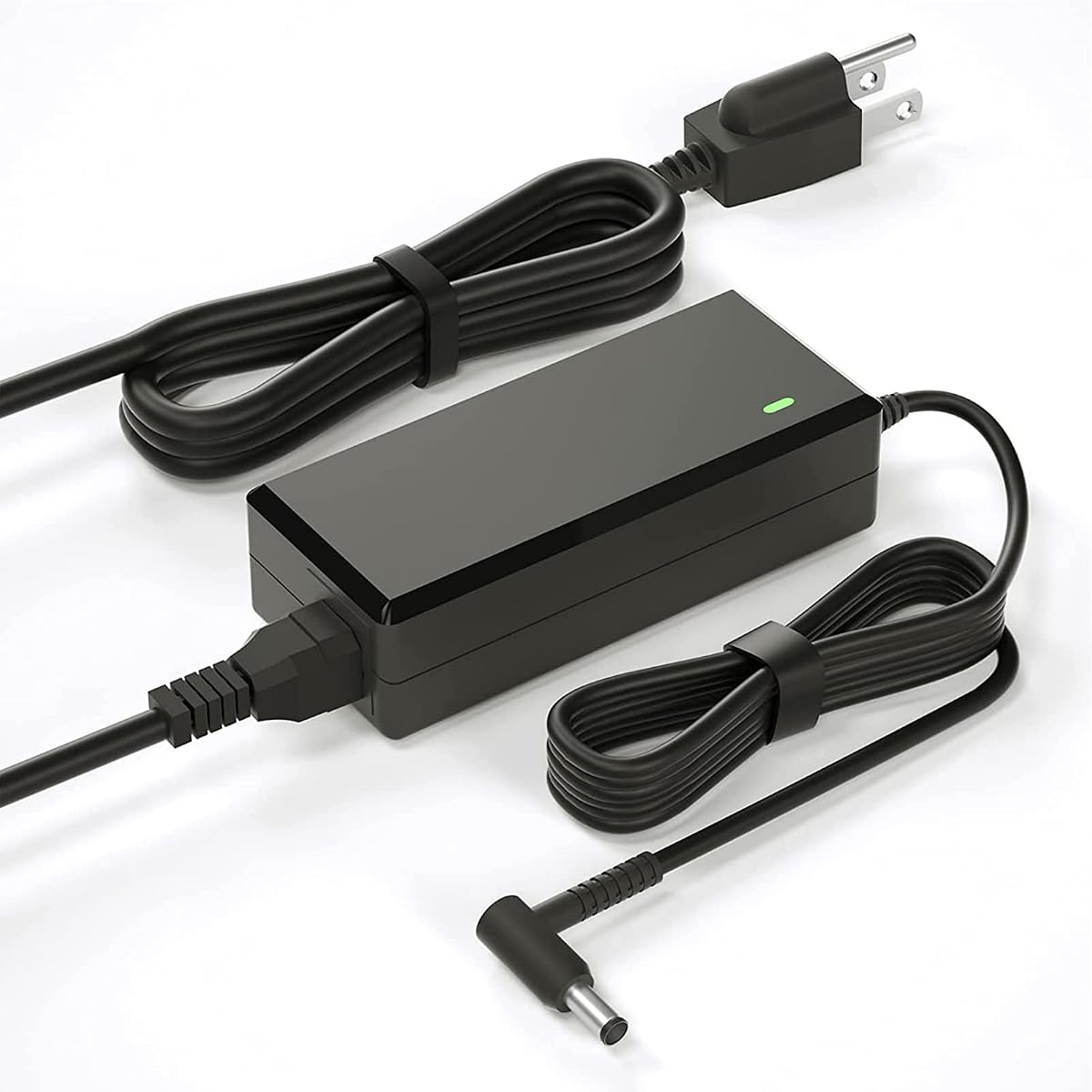
19.5V Blue-Tip HP Adapter
4.4Editor score
19.5V 3.33A output
4.5mm blue-tip connector
Total 8.8-foot cable reach
An HP monitor replacement power cord is rarely a one-size-fits-all purchase because monitor models use different voltages, connector tips, wattages, and power configurations. A replacement may need to provide only a grounded AC connection, or it may include an external power brick that converts wall power into the correct DC output for the display.
This guide compares ten replacement options based on the electrical specifications, connector dimensions, supported HP monitor families, included cables, safety claims, installation type, and reach provided in their product information. It covers 19V yellow-tip models, 19.5V blue-tip models, 12V display adapters, and standard AC cords for equipment using IEC C13 connections.
Each pick highlights the model family it is best suited for and explains the compromises involved. Ratings and specifications reflect the supplied product listings, while compatibility remains dependent on the exact label on your monitor. Prices and product availability can change, so readers should verify current details before purchasing.
4.4Editor score
4.4Editor score
4.7Editor score
As an Amazon Associate we earn from qualifying purchases.
The comparison below separates full power adapters from standard AC cords and organizes the options by output voltage, connector type, supported monitor families, and installation design.


This 19V replacement adapter is the strongest all-around option in the guide because it combines a 65W maximum output with an unusually extensive list of compatible HP monitor models. Its 4.4 rating reflects generally favorable customer feedback, while its stated 100-240V input and 19V 3.42A output make it suitable for many mainstream HP displays that use a conventional barrel connection.
We may earn a commission when you buy through this link, at no additional cost to you.
The compatibility list is the key advantage. It includes familiar Pavilion and HP monitor identifiers such as 22cwa, 24m, 23er, 23es, 27eb, 32f, VH240A, 24ea, and 27 25vx, along with several part numbers. The listed output is also broad enough for devices described as using 19V at 1.58A, 2.1A, 2.37A, or 3A, making it a practical choice for shoppers comparing several older 19V HP displays.
There is an important distinction between electrical compatibility and physical compatibility. The listing warns against 2011X, 2211X, 2311X, 2511X, 2711X, M22F, M24F, M24FW, M27F, and M27FD models. It also notes that some monitor power ports have no metal contact pins and may require the included blue adapter cable. Those caveats make the model and connector checks essential rather than optional.
This is a strong recommendation for someone who has already confirmed a 19V display and a compatible barrel tip. It is particularly useful as a general replacement for the many HP monitors sharing the conventional yellow-style connector. Shoppers should compare the label on the original adapter, measure the connector opening, and verify the monitor model before ordering.
The extensive supported-model list covers numerous 20-inch through 32-inch HP displays and numerous HP part numbers. That breadth is valuable when the monitor housing has faded but the original model information remains available on the rear label.
The stated 8.2-foot length provides useful placement flexibility, while over-voltage, over-load, over-current, and short-circuit protection are listed as product safeguards. As with any replacement power supply, the device should still be connected to a grounded wall outlet and monitored for unusual heat or damage.
We may earn a commission when you buy through this link, at no additional cost to you.
This three-prong AC cable is a simple solution for HP monitors that contain their own power conversion and accept a standard three-pin wall cord. It carries a 4.7 rating and offers a 5-foot length, 10A capacity at 125V, and heavy-duty 18 AWG conductors. It is not designed to replace a monitor-specific external adapter.
We may earn a commission when you buy through this link, at no additional cost to you.
Its fully molded construction is intended to reduce strain at the plug and device ends, addressing a common failure point in loose or repeatedly bent power cords. The cable can also serve compatible TVs, computers, printers, and other electronics with matching three-pin connections, although those broader uses do not make it suitable for every monitor.
The crucial limitation is that this is an AC power cable, not a 19V, 19.5V, or 12V converter. If the damaged part sits between the wall outlet and a monitor power brick, this may work. If the missing component is the brick or the cable running from the brick to the display, a model-specific adapter with the correct voltage and barrel connector is needed.
Choose this option for a straightforward cord replacement with matching connectors and a reasonable amount of desk reach. Before purchasing, inspect both the wall-side plug and the monitor-side receptacle. Users should also avoid using an AC-only cable as a substitute for an external DC power supply.
The molded body and 18 AWG construction make the cable a practical option for equipment that remains connected for long periods. Its 5-foot length suits desks where the wall outlet is close but may be short for wall-mounted or unusually large workstations.
This distinction prevents one of the most common replacement errors: buying a standard AC cable for a monitor that requires regulated DC output. Always verify the shape and purpose of the missing component before selecting this option.
We may earn a commission when you buy through this link, at no additional cost to you.
This adapter is a focused choice for users searching specifically for an HP VH240A replacement or compatible 19V monitor power supply. Its 4.6 rating is among the higher customer ratings among the dedicated adapters in this roundup. The package combines a 4.9-foot AC cord with a 3.9-foot DC lead attached to the 19V adapter.
We may earn a commission when you buy through this link, at no additional cost to you.
The adapter is stated to accept worldwide 100-240V input at 50/60Hz and to deliver 19V at up to 3.42A. It also lists compatibility with lower 19V outputs, including 2.1A, 2.37A, 2.53A, and 3A configurations. The listing identifies 1KL30AA#ABA, 1KL30AA#ABB, and 1KL30AT#ABU among the relevant identifiers.
Its main limitation is that it is more narrowly targeted than the broad 19V models in the guide. Although the listing discusses several devices associated with the SA142A-19U platform, those references do not replace checking the physical connector and voltage of the monitor. The safest approach is to use the original adapter label as the primary reference.
This is a good recommendation for a VH240A-series display or a compatible monitor using the same 19V supply. The product also states that units undergo finished-product testing and aging tests, along with over-voltage, over-load, over-current, and short-circuit protection claims.
A clearly specified 19V 3.42A maximum output and broad AC input make this easier to compare with an original HP adapter. Matching both voltage and amperage requirements reduces the risk of choosing a superficially similar but electrically unsuitable replacement.
The detachable 4.9-foot AC cord and 3.9-foot DC cord provide flexible placement around a desk. Buyers should inspect the barrel connector before installation because the listing's additional compatibility references do not guarantee that every monitor uses the same physical tip.
We may earn a commission when you buy through this link, at no additional cost to you.
This replacement adapter targets the popular HP M-series monitor group, including M22f, M24f, M27f, and several fw, fe, fwa, fq, fd, and ha variants. It has a 4.4 rating and supplies 19.5V at up to 3.33A through a 4.5mm smart blue round tip. That makes it a more targeted choice than a general 19V yellow-tip adapter.
We may earn a commission when you buy through this link, at no additional cost to you.
Its input specification of 100-240V at 50-60Hz supports use across different wall systems. The output is listed as 65W at 19.5V/3.33A, with stated compatibility for some 19.5V and 19V devices at lower amperages. A 1.5-meter adapter cord and 1.2-meter AC cable provide a total stated reach of 2.7 meters, or 8.8 feet.
The listing explicitly excludes many conventional 19V displays, including 22bw, 22cwa, 23-series models, 24ea, 24m, 25-series models, 27xi, 27xw, VH240A, and several X-Series and M-series identifiers. Those warnings are useful because 19.5V blue-tip and 19V yellow-tip replacements are not interchangeable merely because both may support lower-powered devices.
This is a strong pick for an owner who has confirmed one of the supported M-Series model names or has measured a compatible 4.5mm blue-tip port. The long reach and protection claims add practicality, but the connector color, diameter, voltage, and wattage should all be verified before ordering.
The 4.5mm by 3.0mm blue-tip specification is the defining feature. It differentiates this adapter from conventional 19V products with a 5.5mm yellow-style tip and helps prevent accidental purchases for the wrong HP display family.
An 8.8-foot combined length gives users room to position the power brick away from a wall or behind a desk. The two-part cable also allows the wall plug and monitor connector to be routed independently.
We may earn a commission when you buy through this link, at no additional cost to you.
This 19V adapter provides a conventional alternative for numerous HP Pavilion and related displays that use a 5.5mm connector. Its 4.4 rating, 65W maximum output, and long supported-model list make it relevant to a wide audience, particularly owners of 22-, 23-, 24-, 25-, and 27-inch models listed in the product description.
We may earn a commission when you buy through this link, at no additional cost to you.
The adapter accepts 100-240V input at 50-60Hz and produces 19V at up to 3.42A. Compatibility names include VH240A, 24f, 24ea, 24m, 24mh, 25f, 25es, 27f, 27xi, 27xw, and numerous numbered variants. The fixed connector avoids the sliding-fit problems associated with some universal multi-tip adapters.
Its most significant compromise is the explicit exclusion of M-Series and X-Series displays, including M22F, M24F, M27F, L7014, L7016, S230T, 2011X, and 2711X. Shoppers with those models should choose a product explicitly designed for their connector and output instead of relying on the broad monitor-size range.
This is a useful pick for someone who knows the display uses a standard 19V yellow-style tip and recognizes its model among the supported list. Confirm the connector diameter, voltage, and current on the original adapter before installation to obtain the best chance of a proper fit.
The dedicated 5.5mm connector provides a more predictable arrangement than loose interchangeable tips. It is best suited to the conventional 19V HP monitors named in the listing rather than modern blue-tip M-series equipment.
Dozens of model suffixes are included, which is helpful when the replacement is for an older Pavilion display. The model number should still be matched against the listing, and the original adapter should provide the most authoritative voltage and amperage guidance.
We may earn a commission when you buy through this link, at no additional cost to you.
This 19V replacement adapter combines a 65W maximum output with one of the guide's more detailed model-matching lists. Its 4.4 rating and specifications—100-240V input, 19V 3.42A output, and a 5.5mm connector—align it with conventional HP desktop displays that use a yellow-style DC plug.
We may earn a commission when you buy through this link, at no additional cost to you.
The supported list covers many 20-inch through 32-inch monitors, including 22cwa, 24m, 24ea, 24f, 27f, 27es, 27xi, 27xw, VH240A, and multiple model families. The listing says it also works with a 45W configuration, which can help owners whose original adapter has a lower current rating, provided the voltage and connector match.
The product details emphasize a built-in smart chip with over-temperature, over-current, over-voltage, and short-circuit protection. Its cable is described as containing copper conductors, using an external PVC coil, and surviving more than 10,000 bending tests. These are manufacturer claims, but they add useful context when comparing build characteristics.
This is a solid recommendation for users who can match their exact monitor model against the listing. The compatibility advice to use the search function on the model list is practical, but shoppers should also read the original power supply label because similar-looking HP monitors can use different voltage and connector systems.
The listing instructs buyers to use a find function to search for their model and check the supported list. This reduces the chance of overlooking a suffix or similarly named display before ordering.
Copper wiring, a PVC jacket, and stated bending-test durability are relevant to a cable that will be handled during setup, cleaning, and rearrangement. Inspect the cable for damage and avoid creating tight bends around the connector.
We may earn a commission when you buy through this link, at no additional cost to you.
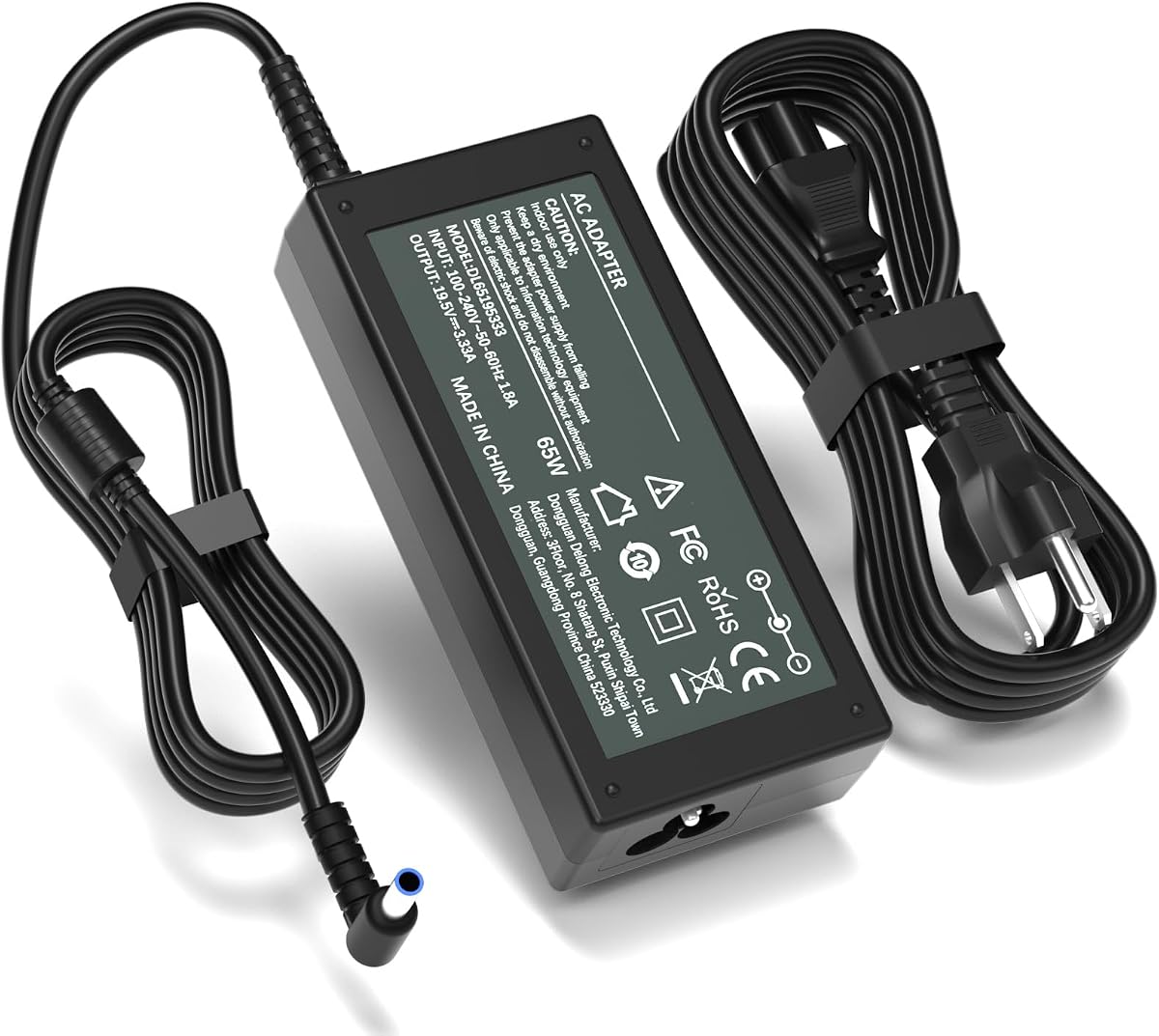
This 19.5V adapter stands out for modern HP displays that use a smart blue round tip. Its 4.7 rating is among the strongest in the group, and its stated 65W output and 100-240V input make the electrical profile easy to compare with an original power supply.
We may earn a commission when you buy through this link, at no additional cost to you.
The supported models include M22f, M24f, M27f, M24fw, M24fe, M24fwa, M27fw, M27fe, M27ha, M27fwa, M27fq, and M27fd. It also lists Series 5 7 and 524-series and 527-series monitor identifiers, providing coverage beyond the basic M-series suffixes.
The connector is explicitly described as a 4.5mm by 3.0mm smart blue round tip. This specificity is essential because a 19V or 19.5V label alone does not establish physical compatibility. The product is intended for the listed modern HP displays and should not be assumed to fit older Pavilion models with yellow-style connectors.
This is the top pick for users who have confirmed one of the supported M-series or Series 5 displays and need a clearly specified 19.5V replacement. It is also a strong option for buyers who want a higher-rated dedicated adapter rather than a generic AC cord.
The stated 4.5mm by 3.0mm blue-tip design allows direct comparison with the original charger. It is a safer selection method than choosing solely from a monitor's screen size, because several HP families share similar dimensions.
Support extends beyond a single M27f or M24f identifier to numerous fw, fe, fwa, fq, fd, and ha variants. Buyers should still use the complete monitor model number because shortened labels can refer to different regional configurations.
We may earn a commission when you buy through this link, at no additional cost to you.
This adapter is especially clear about physical and electrical fit. It uses a 5.5mm outer-diameter, 2.5mm inner-diameter hollow yellow tip, delivers up to 19V 3.42A, and has a 4.5 rating. That specificity makes it a strong option for owners of conventional 19V HP desktop monitors.
We may earn a commission when you buy through this link, at no additional cost to you.
A major practical feature is the North American Type B plug with a physical round grounding pin. The detachable 1.2-meter AC cord and 1.2-meter DC output lead create a stated 7.9-foot combined reach. The fixed single connector is designed to avoid the movement and loose connection associated with interchangeable universal adapters.
The listing is notably direct about exclusions. It does not fit M-Series models such as M27f, X-Series displays such as 2711x, 7.4mm ports, blue or black tips, laptops, tablets, or USB-C devices. It also warns that the connector lacks the smart-center pin protocol used by some portable devices.
This is a good recommendation for a desktop monitor with a 19V yellow-style input, particularly when grounding and a fixed connector are priorities. The stated FCC, CE, and RoHS markings and normal operating-temperature guidance add transparency, while the detachable wall cord makes replacement or transport easier.
Providing both outer and inner diameter makes it possible to compare the tip with the original adapter rather than relying only on color. The hollow center also confirms that this is not a smart-pin connector.
The physical grounding pin and permanently attached tip provide two clear installation benefits. They reduce reliance on interchangeable connectors and provide a more secure desktop-monitor power connection.
We may earn a commission when you buy through this link, at no additional cost to you.
This StarTech cord is the best choice in the guide for HP monitors that use an IEC 60320 C13 connection at the monitor or power-supply unit. It has a 4.8 rating, a 10-foot length, 18 AWG conductors, and a rated capacity of 125V at 10A. The NEMA 5-15P wall plug fits standard North American outlets.
We may earn a commission when you buy through this link, at no additional cost to you.
The product information identifies UL 62 and UL 817 listings, molded strain relief, 100% copper wire, and a VW-1 fire rating. These details make it more relevant for office, workstation, and home-office equipment than a lightweight general-purpose cable.
Its key limitation is the connector on the monitor end. An IEC C13 cord only works when the monitor or its external power supply has the matching female receptacle. It cannot replace a barrel-style DC lead or an adapter brick that converts AC power into 19V, 19.5V, or 12V.
This is a strong recommendation for commercial or office HP displays with C13 power inlets, particularly when a longer cable is needed to reach a grounded wall outlet. Verify the receptacle shape and confirm that the monitor's internal power supply accepts the standard AC input before buying.
UL listings, molded strain relief, copper wiring, and a stated fire rating support use in professional settings. The 10-foot length also makes the cable easier to route behind desks and along wall or furniture edges.
IEC C13 connections appear on many computers, monitors, scanners, and printers. That versatility makes this a convenient cable to keep around, provided it is not confused with a display-specific DC adapter.
We may earn a commission when you buy through this link, at no additional cost to you.
This 12V adapter earns the highest customer rating in the guide at 4.9 and serves a clearly different HP monitor category. It is intended for 2011X, 2211X, 2311X, 2011xi, 2311F, 2311CM, 1503, D5061-A, F1503, 1703, F1703, and L1800 displays.
We may earn a commission when you buy through this link, at no additional cost to you.
Its stated output is 12V at up to 5A, with listed compatibility for lower 12V outputs of 4A, 3A, 2A, and 1A. The input range is 100-240V at 50-60Hz, and the connector is described as a 5.5mm round tip. These details make it necessary to distinguish this product from 19V and 19.5V adapter choices.
The adapter and wall lead provide a stated total length of 8.8 feet. The listing describes overcurrent, short-circuit, and overheating safeguards, heat-resistant and flame-retardant materials, and a built-in chip. It also describes a lightweight, portable design suitable for office, school, and travel arrangements.
This is a strong recommendation for someone with one of the listed 12V HP displays whose original adapter uses a matching 5.5mm tip. It should not be selected merely because the monitor has an HP name; matching the voltage printed on the original power supply is the decisive requirement.
The adapter fills a category that generic 19V replacement cords cannot cover. It is particularly relevant to older HP LED LCD displays and selected X-Series model identifiers listed in the product information.
The 2.7-meter total cable length gives users more freedom to place a wall outlet away from the monitor. Its stated portability also suits users who need to set up quickly in different work locations.
We may earn a commission when you buy through this link, at no additional cost to you.
The correct replacement depends on whether your monitor needs an AC cord, a regulated external adapter, or a specific DC connector. Use the original power supply label and the monitor's full model number as the foundation for every comparison.
Voltage is the first specification to verify. Many of the adapters in this guide deliver 19V, while modern M-Series replacements commonly provide 19.5V and the X-Series option supplies 12V. A connector that appears to fit physically does not make a 19V adapter suitable for a 19.5V or 12V monitor. Read the output line on the original adapter, compare it with the replacement, and avoid using a lower-voltage supply simply because its barrel plug looks similar.
Current and wattage determine how much power the replacement can deliver. A 19V 3.42A supply provides up to 65W, while the 19.5V blue-tip options provide up to 3.33A and also 65W. A lower-current replacement may be acceptable when the monitor originally used a lower rating, as some listings indicate, but choosing an undersized supply can cause instability, shutdowns, or inadequate startup power.
Connector compatibility depends on outer diameter, inner diameter, shape, color, and whether the tip contains a center pin. The 19V products generally describe a 5.5mm hollow yellow-style tip, while the M-Series options use a 4.5mm smart blue round tip. The 12V product lists a 5.5mm round tip. Measure the opening and inspect the original plug rather than inferring the connector from the monitor model alone.
HP monitor names often include short display-size descriptions, but the full model number reveals the actual electrical platform. Listings in this guide cover VH240A, conventional Pavilion series, M-series displays, Series 5 models, and X-Series or 2011X-style displays. Search the complete label rather than only a phrase such as 27-inch monitor. Regional suffixes and closely related models may also have different power requirements.
A standard AC cord simply carries wall power to equipment with matching input hardware. It does not convert that power to a lower DC voltage. A monitor-specific adapter includes a power brick that changes AC input into the required DC output. Standard three-prong and IEC C13 cords are appropriate only when the missing component is the wall-side cable and the monitor already contains the required power supply.
The dedicated adapters in the guide provide combined reaches ranging from 7.9 to 8.8 feet, while the standard AC options offer 5 or 10 feet. Adequate reach prevents sharp bends at the plug and makes cable routing easier. Excessively long cables can occupy unnecessary desk space, while short ones may force the adapter brick to sit awkwardly near the outlet. Consider the distance from the wall, the monitor's power location, and the route behind the desk.
Over-current, over-voltage, short-circuit, and thermal protection are valuable features for any replacement adapter. Some listings also mention ETL, CE, FCC, RoHS, UL, VW-1, copper wiring, and molded strain relief. These claims help distinguish the products, but users should also inspect the physical unit for cracks, discoloration, damaged insulation, loose plugs, or unusually strong heat before connecting it.
Some packages provide a complete adapter with an attached DC lead and detachable AC cord. Others provide only the AC-side cable. Confirm whether the box includes a power brick, whether the wall cord is removable, and whether a blue adapter cable is included. The top-ranked product notes that certain monitor ports without internal metal pins may require its blue adapter cable, making package contents part of the compatibility decision.
Begin by shutting down the monitor and disconnecting its original power cable. Photograph the existing setup and record the adapter label, voltage, amperage, wattage, connector color, and connector dimensions. Compare those details with the replacement and confirm that the monitor's full model number appears in the compatibility information. If anything conflicts, stop and verify with another source.
Install the replacement without forcing the connector. Align the barrel plug with the monitor's DC input, insert it fully by hand, and connect the AC cord to a grounded wall outlet. For an IEC C13 or standard three-prong AC cord, connect the equipment first and the wall plug second. Never operate a monitor with a damaged connector, exposed conductor, loose plug, or mismatched adapter.
For ongoing care, route the cable so it is not pinched behind furniture or tightly looped at either end. Keep the power brick uncovered and ventilated, especially during extended use. Unplug the cord before cleaning the monitor, and inspect the connector, cable jacket, and wall plug periodically for cracks, discoloration, corrosion, or heat damage. Replace a compromised cord or adapter rather than continuing to use it.
Do not assume that a 19V replacement is interchangeable with a 19.5V monitor. Although some listings state compatibility with certain lower-current devices, the voltage and connector must both match the original adapter. Check the rear label and the output specification before using a 19V unit with a monitor designed for 19.5V.
A yellow-style replacement in this guide generally uses a 5.5mm hollow connector and supplies 19V, while a blue-tip replacement uses a 4.5mm smart connector and generally supplies 19.5V. The colors are a useful clue, but connector measurements and voltage labels are more reliable. Never force a tip that does not fit easily.
A monitor with a barrel-shaped DC input needs a regulated external adapter unless it already includes an internal power supply. A monitor with an IEC C13 or standard three-prong AC inlet may only need the appropriate AC cord. If the missing part is the box-shaped converter between the wall plug and the display, choose a compatible DC adapter.
No. The monitor adapters in this guide are designed for specific display power requirements and do not include the smart-pin protocol used by many laptops and tablets. Some listings expressly exclude portable devices. Always use the power supply specified for the device rather than assuming that a physically similar plug makes it compatible.
Look at the label on the rear of the monitor or on the original power brick and record the complete model number. Note the output voltage, amperage or wattage, and connector dimensions. Then search those details within the replacement listing's model list. The monitor's screen size is helpful but not sufficient for identifying the correct power system.
A longer cord can improve placement flexibility when the wall outlet is far from the desk, but excessive length creates unnecessary slack. The dedicated adapters here offer approximately 7.9 to 8.8 feet of combined reach, while standard AC options include 5- and 10-foot versions. Select a length that allows relaxed routing and easy connector access.
Power conversion creates heat, and a warm adapter brick can be normal during active use. One listing specifically describes an expected range of 40°C to 50°C and advises keeping the unit ventilated. Remove it from the outlet if it becomes excessively hot, smells unusual, shows discoloration, or behaves inconsistently.
No. HP displays of the same nominal size can use different power bricks, voltages, and connectors. Screen size may help narrow the search, but the full monitor model and original adapter label should determine the choice. Physical connector checks are especially important when crossing between conventional 19V, modern 19.5V, and 12V product families.
The best general-purpose replacement among these picks is the rank-one 19V 65W adapter because it combines a broad supported-model list with a long cable and standard 19V output. For a modern M-Series or Series 5 monitor, the 19.5V blue-tip options are more appropriate, while the 12V adapter serves the specific X-Series and LED LCD models listed in its product information.
Prioritize voltage, current, wattage, and connector dimensions over screen size or a vague HP-compatible label. The two standard AC cords are best when the monitor already contains its converter and only the wall-side cable is missing. Matching the complete model number and inspecting the original power brick will prevent the most common compatibility errors.
Ratings, product details, and availability can change, and current prices also fluctuate. Before making a final purchase, check the seller's latest specifications, customer feedback, included components, and warranty information. Use the compatibility documentation to confirm the replacement is electrically and physically suitable for your specific HP monitor.
