
WALI Adjustable Single Monitor Arm
4.3Editor score
Supports screens up to 34 inches
Extensive motion adjustment
C-clamp and grommet options
A monitor holder for desk can transform a crowded workstation by lifting screens, freeing usable space, and making it easier to place displays at a comfortable viewing height. The right model depends on monitor size, VESA pattern, weight, desk construction, and whether you need one screen, two screens, a laptop, or a tablet.
We compared ten monitor arms and risers based on the supplied compatibility limits, adjustment ranges, installation methods, cable-management features, and intended uses. The list includes single-arm and dual-arm mounts, a combined laptop tray, a tablet holder, and a riser with storage, allowing different desk setups to be compared directly.
Each review explains who the product suits, what makes its design useful, and where its limitations matter. Ratings reflect the supplied customer feedback, while practical recommendations depend on your equipment and desk. Product availability and pricing can change, so confirm the current specifications and cost before purchasing.
4.3Editor score

4.5Editor score

4.5Editor score
As an Amazon Associate we earn from qualifying purchases.
The comparison below covers the ten shortlisted monitor holders by screen capacity, supported equipment, mounting options, and workspace flexibility. It includes articulating arms, dual-screen systems, a laptop and monitor combination, a tablet arm, and a storage-oriented riser.
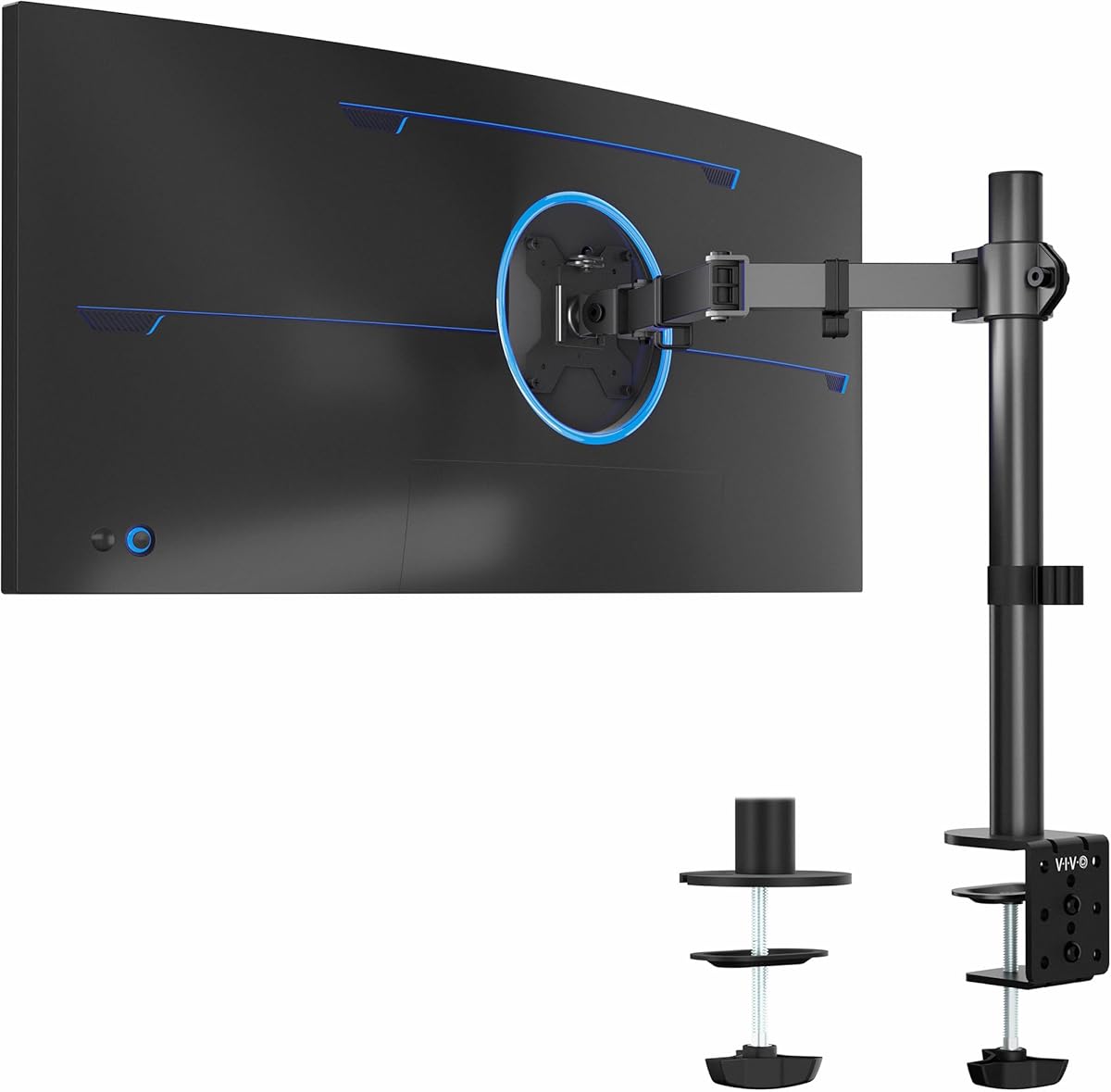


The WALI Adjustable Single Monitor Arm is a premium-style articulating mount for users who want considerable freedom in screen placement. Its supplied rating is 4.3 out of 5. It accommodates most flat or curved LCD and LED screens from 13 to 34 inches, with a maximum load of 26.4 pounds for flat displays and 19.8 pounds for curved displays.
We may earn a commission when you buy through this link, at no additional cost to you.
Its standout feature is the unusually generous range of movement. The arm can extend 19.3 inches, rise 17.3 inches above the desktop, swivel from plus 180 to minus 180 degrees, tilt from plus 70 to minus 45 degrees, and rotate 360 degrees. That range makes it useful for positioning a display close while working, moving it aside for shared desk space, or changing between landscape and portrait arrangements.
The mount also includes built-in cable-management guides and offers both C-clamp and grommet-base installation. The stated desk-thickness range is 0.39 to 2.76 inches for either method. WALI recommends a wooden desk, preferably without a crossbeam obstructing the underside, so desk structure deserves careful attention before installation.
This is the strongest option in the roundup for a large, heavy flat monitor or a user who values reach and fine positioning. It is less appropriate for desks where a clamp cannot grip, very heavy curved displays, or setups that fall outside the stated VESA and weight limits. For compatible equipment, its range and sturdy construction make it an excellent premium recommendation.
The broad extension, lift, swivel, tilt, and rotation ranges let you bring the screen closer, raise it toward eye level, or turn it away when the desk is shared. These adjustments can make a fixed display more responsive to different seating and working positions.
Built-in cable guides route wires along the arm rather than leaving them loose across the work surface. This helps preserve the space gained by lifting the monitor and keeps the rear of the desk visually organized.
We may earn a commission when you buy through this link, at no additional cost to you.
The HUANUO Adjustable Monitor Arm with Laptop Tray is a versatile two-position solution for hybrid workers. It carries a supplied rating of 4.5 out of 5 and combines a VESA monitor arm with a ventilated 14 by 12 inch laptop platform. Rather than forcing a laptop and external display to compete for separate stands, it places both on one articulated structure.
We may earn a commission when you buy through this link, at no additional cost to you.
The monitor section supports 13 to 32 inch displays weighing as much as 22 pounds, provided they use 75 by 75 millimeter or 100 by 100 millimeter VESA mounting patterns. It offers plus or minus 45 degrees of tilt, plus or minus 90 degrees of swivel, 360-degree rotation, and height adjustment up to 17 inches. The laptop arm can extend up to 16 inches, giving users room to pull the computer closer.
The ventilated tray includes a 0.8 inch bottom lip and is intended to help reduce heat buildup around the laptop. Installation uses either the included C-clamp, for desks 0.39 to 3.07 inches thick, or the grommet base, for desks 0.39 to 2.36 inches thick. The manufacturer recommends wooden desks and advises following the installation instructions or video.
This mount is ideal for someone who regularly moves between a laptop and a larger monitor, needs both visible at once, or wants a compact command center. It is less suitable if you need to support more than one laptop, use a desk material outside the recommendation, or want a tablet-specific holder. Within those boundaries, its versatility earns an Editor's Choice recommendation.
The combination of a monitor connection and laptop tray creates a compact two-display workstation from a single desk mount. The laptop can remain elevated and accessible while the larger screen handles detailed work or extended viewing.
Ventilation openings in the tray give the laptop's fan an outlet for cooling air. The raised lip also keeps the device supported while leaving space beneath the platform for airflow.
We may earn a commission when you buy through this link, at no additional cost to you.
The VIVO Single Ultrawide Monitor Arm is a practical choice for a large or unusually wide display, with a supplied rating of 4.5 out of 5. It supports standard monitors from 13 to 32 inches and ultrawide models up to 38 inches, as long as the screen weighs no more than 22 pounds and uses a compatible 75 by 75 or 100 by 100 millimeter VESA pattern.
We may earn a commission when you buy through this link, at no additional cost to you.
Adjustment is extensive for a single-arm model. The arm provides plus 90 to minus 90 degrees of tilt, 360-degree swivel, 360-degree rotation, and up to 16 inches of height movement along the center pole. Users can also switch the screen between portrait and landscape orientation, making it useful for documents, code, video, and other workflows that benefit from a taller display area.
The heavy-duty desk clamp secures to desks up to 3.25 inches thick using hand tightening, avoiding the need for a permanent hole. An optional grommet base is included for people who prefer that installation route. Detachable cable clips on the arms and center pole help route power and audiovisual cables, and the detachable VESA plate simplifies attaching the display.
The VIVO is especially appealing to ultrawide owners who otherwise might struggle to find a compatible arm. It also suits users who regularly rotate their display or need extensive height and angle control. It remains a single-screen mount, however, and the stated weight, VESA, and desk limits must be checked before purchase. Compatible users get a flexible, clean-looking solution.
Supporting ultrawides up to 38 inches distinguishes this model from many conventional single-screen mounts. The support limit is still governed by the stated 22-pound capacity, so heavier premium displays require careful verification.
Full rotation allows the monitor to move between landscape and portrait configurations. This adds flexibility for reading long documents, reviewing narrow content, or creating a more vertical workspace.
We may earn a commission when you buy through this link, at no additional cost to you.
The HUANUO FlowLift Pro Monitor Arm emphasizes controlled movement and repeatable positioning, earning a supplied rating of 4.5 out of 5. Its MechaSpring system is intended to maintain consistent support over time and resist the pressure loss associated with gas-based mechanisms. The arm is constructed with 90 percent professional-grade metal and is TÜV Rheinland certified.
We may earn a commission when you buy through this link, at no additional cost to you.
A particularly useful feature is the PrecisionView window, which provides visual feedback as tension is calibrated. Instead of relying entirely on feel, users can watch the indicator move to determine the appropriate setting for the monitor's weight. The LockSteady system is designed to reduce droop and support smooth one-finger movement, which is useful for users who adjust their display frequently.
The tool-free InstaMount VESA plate snaps into the mount, reducing the need to align and tighten individual screws while holding a screen. Compatibility covers 13 to 32 inch monitors weighing 4.4 to 15.4 pounds, with 75 by 75 or 100 by 100 millimeter VESA patterns. Both C-clamp and grommet bases are included, and the manufacturer recommends wooden desks 0.59 to 3.54 inches thick.
This mount is well suited to office users who make frequent screen adjustments, want visible tension calibration, or dislike aligning screws under a monitor. Its 15.4-pound maximum means it is not appropriate for heavier professional displays, and the desk recommendations are narrow. Within those limits, its refined adjustment system and quick-release design set it apart.
The PrecisionView indicator makes spring tension easier to set correctly. This is particularly helpful for first-time arm users or anyone who switches between displays with different weights.
The tool-free VESA plate reduces assembly friction by allowing the display to snap into place. Detachable monitors also make it easier to reorganize the workstation when equipment changes.
We may earn a commission when you buy through this link, at no additional cost to you.
The COOPER FlexArm Tablet Holder is a specialized option for users who want to elevate an iPad, Kindle, or portable monitor rather than a conventional desktop display. It has a supplied rating of 4.4 out of 5. The holder can function as a second screen, a hands-free video-call station, a recipe display, or a support for reading and creative work.
We may earn a commission when you buy through this link, at no additional cost to you.
Its extra-wide jaws open from 4.7 to 10 inches, accommodating devices from a small tablet through a 13-inch iPad Pro with a case. The silicone padding helps protect the device from scratches, while the listed 3.3-pound load limit covers the intended range of supported products. A built-in cable holder clips the charging or accessory lead into place for a tidier setup.
The arm uses two 11.8 inch aluminum-alloy segments and three joints that can be retightened. A 360-degree swivel base allows the device to rotate between portrait and landscape orientation. At the desk, a full-metal U-clamp grips surfaces up to 3.5 inches thick, although it is not intended for bed frames or round posts.
The COOPER is a good fit for a tablet-first workflow, hybrid meeting setup, or compact workstation where a conventional VESA arm would be excessive. It is not the right choice for a standard monitor, and its small load rating means heavier portable displays need careful checking. For supported devices, it offers attractive flexibility and useful cable control.
The elevated, repositionable tablet can become a companion display for notes, chat, reference material, or meeting content. The arm helps reclaim desk depth while keeping the device visible.
Silicone-padded jaws provide a softer contact surface than bare metal. They are designed to grip supported devices without adding scratch marks to the casing.
We may earn a commission when you buy through this link, at no additional cost to you.
The MOUNTUP Dual Monitor Stand is designed for users who regularly work with two displays and want each one positioned independently. Its supplied rating is 4.4 out of 5. It supports flat and curved screens from 17 to 32 inches, with each arm able to carry 4.4 to 17.6 pounds and compatible 75 by 75 or 100 by 100 millimeter VESA patterns.
We may earn a commission when you buy through this link, at no additional cost to you.
Both connections can be adjusted independently, providing 135 degrees of tilt, 180 degrees of swivel, and 360-degree rotation from portrait to landscape. This makes the stand useful for pairing a primary display with a narrower secondary screen, arranging two equal monitors side by side, or rotating one into a vertical document view. The pneumatic system is designed to provide smooth movement.
The arm extends 17.3 inches and offers 9.4 inches of height adjustment. Because pneumatic systems respond to monitor weight and pressure, the supplied guidance says to adjust each arm's tension according to the attached screen. Installation includes all necessary hardware, with a C-clamp for desktops 0.39 to 2.76 inches thick and a grommet base as an alternative.
This dual mount is a strong option for professionals who need two screens but do not require support for ultrawide models or loads above 17.6 pounds per arm. Users must also allow time to tune each pneumatic arm. In return, they gain independent positioning, meaningful desk-space savings, and cables that can remain routed along the arms.
Independent positioning allows one screen to face you directly while the other is angled, elevated, or rotated. This is particularly useful when one display is primary and the other is used for secondary information.
Holding two screens above the desk frees the area underneath for a keyboard, notebook, docking equipment, or decorative items. Integrated cable management also keeps the central workspace cleaner.
We may earn a commission when you buy through this link, at no additional cost to you.
The WALI Adjustable Laptop Desk Mount is a versatile lift for a notebook or a compatible monitor, with a supplied rating of 4.5 out of 5. It supports one laptop up to 17 inches and can also accommodate a monitor with 75 by 75 or 100 by 100 millimeter VESA holes. The listed load capacity is 22 pounds.
We may earn a commission when you buy through this link, at no additional cost to you.
Its high-grade arm extends, retracts, and provides 16 inches of height adjustment. Tilt of plus or minus 15 degrees, swivel of plus or minus 90 degrees, and 360-degree rotation make it possible to align the device with the user's seat. The detachable mounting plate allows the holder to alternate between laptop and monitor use when the device supports the appropriate attachment method.
The 14 by 11 inch tray includes ventilation holes intended to draw in cooling air from the laptop fan. A 0.6 inch bottom lip helps keep the computer in place. It is worth remembering that these features support proper airflow but do not make a laptop immune to heat; normal vents should remain unobstructed and intensive workloads may still require cooling measures.
Installation options include a C-clamp for desks 0.4 to 4 inches thick and a grommet mount for desks 0.4 to 2.2 inches thick. This is a good selection for a laptop-only user who wants the screen higher, more room beneath the device, or a cleaner desk. It also works as a conventional single monitor mount, although it is not designed to hold two laptops at once.
Raising the notebook can create a more comfortable viewing angle and reclaim the area below it. The articulating arm makes it easy to pull the device forward when needed and push it back afterward.
Vent holes in the tray help expose the laptop underside to circulating air. They work best when the computer's own exhaust vents remain clear and the surrounding area is not congested.
We may earn a commission when you buy through this link, at no additional cost to you.
The gianotter Dual Monitor Stand Riser is a storage-oriented alternative to a fully articulating monitor arm. It carries a supplied rating of 4.5 out of 5. Instead of attaching to the rear of a display with a VESA plate, it provides a raised shelf capable of supporting two monitors while adding organization below and alongside the screens.
We may earn a commission when you buy through this link, at no additional cost to you.
Monitor height can be adjusted to bring the displays closer to eye level, which may improve viewing comfort and posture. The space underneath can hold a mouse, keyboard, or other office supplies. A drawer provides concealed storage for smaller accessories, while two magnetic pen holders keep writing instruments within easy reach. This combination makes the riser particularly appealing to tidy, storage-conscious users.
Assembly is not required. Users can unbox the riser, position it on the desk, place their monitors on top, and begin organizing the workspace. The product is described as using high-strength metal materials and as a patented design. Unlike an arm, however, it does not provide the same degree of screen articulation, cable concealment, or ability to pull a display toward the user.
The gianotter is a good choice for a fixed two-monitor office, a study area, or any desk where raised storage matters more than constant repositioning. It should not be selected for a laptop because it is not a ventilated laptop platform, and buyers should confirm that the shelf dimensions and load arrangement suit their screens. For a simple, polished, storage-ready setup, it is an effective choice.
The shelf area beneath the screens becomes a practical home for the keyboard, mouse, papers, and small accessories. A front drawer adds a place to keep less frequently used items out of sight.
Raising two monitors can place them nearer eye level and create a more unified viewing arrangement. The design works especially well for users who keep their screens in a consistent position throughout the day.
We may earn a commission when you buy through this link, at no additional cost to you.
The Ergear Single Monitor Mount is a practical, uncomplicated option for a standard single-screen workstation. Its supplied rating is 4.5 out of 5. It supports monitors from 13 to 32 inches, handles up to 17.6 pounds, and fits the common 75 by 75 and 100 by 100 millimeter VESA mounting patterns.
We may earn a commission when you buy through this link, at no additional cost to you.
The arm provides 360-degree monitor rotation, plus or minus 45 degrees of tilt, and plus or minus 90 degrees of swivel. A 15.75 inch steel support pole creates several height options, while the central mounting structure allows a display to be positioned higher and at a more comfortable angle. These controls offer enough movement for most desks without reaching into the extreme ranges of a highly articulated premium model.
Installation is available through a C-clamp or grommet base. The C-clamp provides a drill-free route, and the manufacturer recommends a wooden table between 0.39 and 3.54 inches thick with a clear underside. Detachable cable clips along the center pole organize power and audiovisual wires, helping keep them out of sight and reducing clutter around the mounted screen.
This is an appealing choice for a home office, study desk, or shared workspace with one monitor and a straightforward mounting requirement. It lacks a laptop tray, second arm, and storage drawer, so buyers with more complex needs should look elsewhere. For a compatible single display, it combines useful articulation, tidy cable routing, and flexible installation in a focused design.
Rotation, swivel, and tilt provide enough movement to align a conventional screen with the user's position. The tall support pole also offers a useful range of height choices.
The C-clamp offers a practical way to secure the mount without making a permanent hole in the desktop. The included grommet base serves users whose desk is already prepared for that installation method.
We may earn a commission when you buy through this link, at no additional cost to you.
The MOUNTUP Dual Monitor Desk Mount provides two independently adjustable arms in one shared base, with a supplied rating of 4.4 out of 5. It supports flat or curved LCD and LED screens up to 32 inches, with each arm handling up to 17.6 pounds. Compatible VESA patterns are 75 by 75 and 100 by 100 millimeters.
We may earn a commission when you buy through this link, at no additional cost to you.
Each arm can rotate 360 degrees for portrait or landscape use, tilt from plus 90 to minus 90 degrees, and swivel 180 degrees. Independent height adjustment along the center pole makes it possible to arrange two different displays at different levels. This flexibility is valuable when one monitor serves as the main workspace while another is used for communication, reference information, or a narrow vertical application.
The mount includes interchangeable C-clamp and grommet bases and detachable VESA plates. The C-clamp and grommet options are stated to fit tables within the 0.39 to 1.97 inch thickness range or a suitable grommet-hole range, depending on the chosen hardware. Cable clips organize and protect the wires, while the single base reduces the number of separate supports occupying the desk.
This MOUNTUP is a solid option for users who want two standard-sized screens without the feature weight of more specialized dual displays. It is less suitable for screens larger than 32 inches or for unusually heavy equipment, and the narrower desk-thickness guidance should be checked. Compatible users gain independent positioning, a cleaner surface, and a versatile two-screen arrangement.
Independent arms let users place one screen horizontally and another vertically or at a different height. This mixed arrangement can make better use of a wide desk and support different content on each display.
One shared base supports both monitor arms, reducing the need for separate stands. Cable clips help control cords, while the detachable VESA plates simplify screen removal and rearrangement.
We may earn a commission when you buy through this link, at no additional cost to you.
Choosing a monitor holder for desk starts with your equipment and installation environment, not with the number of features listed on the package. Screen dimensions, weight, VESA layout, desk material, and the intended number of displays establish which designs can work safely and comfortably.
In short, match all three essentials: VESA holes, screen size, and weight.
Choose for the equipment you actually use, whether that is one display, two displays, a laptop, or a tablet.
Verify both the diagonal size and measured weight, paying extra attention to curved and ultrawide models.
Measure the desk and inspect its underside before ordering; do not assume every rectangular desktop is compatible.
Prioritize the movements you use most rather than choosing automatically based on the longest specification.
Choose a mount that actively routes the cables you use instead of merely providing a place to hang them.
Balance installation effort with the adjustments you expect to make after the first day.
Test the proposed layout with paper templates or measurements so the final mount supports the whole workspace.
Begin by identifying the mounting method that matches your desk. Inspect the underside, measure the thickness, and make sure the installation hardware can reach the mounting surface. For a clamp, position the protective pad against the desktop before tightening. For a grommet installation, confirm that the hole is the correct size and that the desktop has enough surrounding material before removing the original insert.
Attach the VESA plate or device support first, then connect it to the arm. Follow the included instructions, tighten the fasteners gradually, and avoid forcing a display into position. Once secured, set the tension for a spring or pneumatic mechanism according to the manufacturer's instructions. Test the movement with one hand, confirm that the screen holds its position, and adjust the height and viewing angle while seated.
For daily care, inspect the clamp, screws, and joints periodically for looseness, especially after moving the display. Keep the ventilation openings on laptop trays unobstructed and avoid placing excessive weight on tablet holders or storage shelves. Route cables without creating sharp bends, and clean the metal surfaces with a soft, dry cloth rather than harsh moisture or solvents.
A monitor arm attaches to a compatible display through its VESA mounting pattern and usually offers height, tilt, swivel, and rotation adjustments. A riser simply supports the display on a raised shelf, often adding storage below the screen. Arms are better for frequent repositioning, while risers work well for fixed desk arrangements.
Check the display's diagonal size, measured weight, and VESA hole pattern against the holder's stated limits. Compatibility requires all three conditions to be satisfied. If the monitor has no rear mounting holes, it may need a riser or a special adapter rather than a standard arm.
It can work if the screen meets the holder's VESA, size, and weight specifications. The WALI arm accepts curved screens but applies a lower weight limit to them than to flat screens. The VIVO arm supports ultrawide displays up to 38 inches, while most other models are limited to standard screens up to 32 inches.
A C-clamp is often more convenient because it does not require drilling and can move with the equipment. A grommet base may feel more integrated and can suit desks already prepared for that method. The better choice depends on desk thickness, edge shape, underside clearance, and whether you want a permanent hole.
Yes, if you choose a combined laptop and monitor arm such as the HUANUO model with a ventilated tray. This design lets the laptop and external display occupy one mounting system, which can save desk depth. Check the tray size, device weight, and VESA requirements before use.
Wooden desks are most consistently recommended because the clamp hardware can grip them predictably and the underside can usually be inspected for obstructions. Other desk types may work if their construction, thickness, and edge shape meet the manufacturer's requirements, but they should not be assumed compatible.
The listed limits vary considerably by product. Standard single-screen mounts in this roundup commonly support up to 17.6 or 22 pounds, while the WALI single arm supports 26.4 pounds for flat screens. The COOPER tablet holder has a much lower 3.3-pound limit, and dual mounts generally specify a maximum for each arm.
They can by lifting the display and reclaiming the surface beneath it, while also allowing the screen to sit nearer eye level. The ergonomic benefit depends on correct height and placement, so users should adjust the mount after sitting in their normal working position rather than leaving it at its default setting.
The strongest all-around choice depends on whether you value reach, versatility, or simplicity. The WALI single arm offers the broadest positioning range and a high flat-screen load limit, the HUANUO laptop and monitor arm excels for mixed-device workflows, and the Ergear mount provides a focused, economical single-screen solution. The VIVO arm stands out for ultrawide compatibility, while the FlowLift Pro offers visible tension calibration and quick VESA attachment.
Before purchasing, prioritize the non-negotiable specifications: correct VESA pattern, adequate weight capacity, suitable screen dimensions, and a desk that can accept the mounting method. Then consider extension, cable routing, laptop or tablet needs, and whether one or two displays will serve your workflow. Those checks will usually matter more than a long list of secondary features.
Finally, remember that product specifications, availability, and customer ratings can change over time, and prices fluctuate as well. Review the current listing and manufacturer instructions before ordering, especially if your monitor is close to a stated size or weight limit. Comparing your exact equipment against these ten options should make the final selection much more straightforward.