
Universal for Hisense TV Remote Replacement
4.4Editor score
Broad Hisense model compatibility
No programming required
Three streaming shortcut buttons
One-year warranty included
Our Hisense TV Replacement Remote guide compares 10 options for compatibility, voice control, shortcuts, response, setup, and coverage across Hisense smart TV
A replacement remote can restore convenient control over a Hisense television without requiring a repair visit or replacement of the entire set. The right choice depends primarily on the television platform, model number, remote design, and whether voice commands are important to the household.
The products in this guide were compared using their stated compatibility lists, supported functions, transmission claims, shortcut layouts, setup requirements, construction details, and customer ratings. Options cover traditional infrared remotes, Android and Google TV models, Roku televisions, voice-enabled replacements, and multipacks designed for shared viewing areas.
Each review highlights who the remote is most likely to suit, including important exclusions such as Fire TV, Roku streaming devices, or voice functions. Ratings and availability can change over time, so readers should confirm the television model and current listing details before ordering.
4.4Editor score

4.5Editor score

4.2Editor score
This side-by-side comparison organizes all ten remotes by television platform, voice support, shortcut controls, stated operating range, setup needs, and other relevant compatibility details. The information is designed to make model matching easier before purchase.


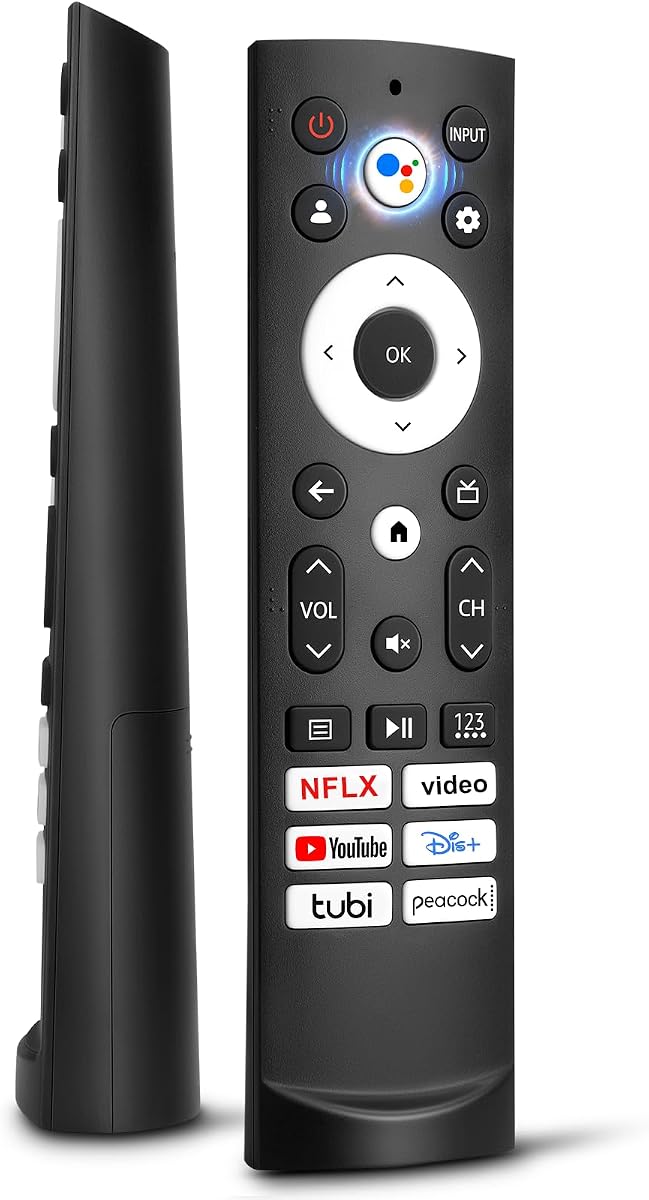
This universal infrared remote earns the Editor's Choice position because it combines a 4.5 rating with an extensive list of supported Hisense remote models. It is intended for 4K LED, HD, UHD, ULED, and Android-based Hisense smart televisions, making it a practical option for owners who want one replacement to cover several compatible models.
We may earn a commission when you buy through this link, at no additional cost to you.
Its strongest feature is the broad compatibility list, which includes EN2A27, EN2A127H, EN2A27HT, EN2AN27H, EN2AS27H, EN2B27, EN2C27, EN2D27, EN2G27, ERF2A60, and several additional remote models. It uses infrared technology and is advertised to operate from over 35 feet. Four quick-launch buttons provide direct access to favorite channels, while the ABS construction is designed for regular handling.
The important limitation is platform exclusion. This remote does not work with Hisense Fire TV or Roku television models, so a buyer must not treat the word universal as applying to every Hisense television. It also requires two batteries, which are not included. Even so, the extensive model coverage and simple out-of-box operation make it a sensible general-purpose choice for compatible non-Roku sets.
Choose this remote if your Hisense television uses one of the listed EN2 or ERF2-style infrared remotes and you want straightforward replacement without programming. Check the physical remote model and television model before ordering, particularly if the set is a Fire TV or Roku model. For those platforms, a more specialized remote in this guide will be the safer purchase.
Instead of limiting the remote to one television series, the listing identifies numerous EN2 and ERF2 model numbers. That breadth can be particularly helpful in households with more than one compatible Hisense television.
Four quick-launch buttons and no programming requirement make the remote approachable for users who want to restore basic control without navigating a complicated pairing process.
We may earn a commission when you buy through this link, at no additional cost to you.
This replacement has a 4.4 rating and focuses on Hisense televisions running the Google TV platform. Its supported series include A6, A65H, A6H, A7, U6, U6H, U7H, U8H, U7, U6K, and U8, as well as UX. That makes it a more focused choice than a general Hisense remote for owners who know their television uses Google TV.
We may earn a commission when you buy through this link, at no additional cost to you.
Six shortcut keys provide direct access to Netflix, Video, YouTube, Disney, tubi, and Peacock. The remote works out of the box after two AAA batteries are installed, so there is no setup routine to follow. Its stated transmitting distance is over 35 feet, and the ABS shell is described as resistant to falls and free of a strong odor.
Its design has been refined for everyday use. Buttons are described as comfortable and scratch resistant, while the narrow top and wide bottom let the remote stand upright on a tabletop. That is a small but meaningful convenience in a living room, where a misplaced remote may otherwise remain under furniture.
This is a strong fit for users seeking a straightforward Google TV remote with useful application shortcuts and no pairing process. However, it is not compatible with Google Chromecast-style remote controls, Google TV remote controls, or Google TV streaming hardware, depending on the wording of the listing. Verify the television series and remote style before ordering.
The dedicated application keys reduce the need to open menus before searching for common streaming services. This is especially useful for households that repeatedly switch among the listed platforms.
A narrow upper section and wider base allow the remote to stand on a surface, making it easier to locate after a viewing session. The described button texture and scratch-resistant shell also support regular use.
We may earn a commission when you buy through this link, at no additional cost to you.
This remote provides a budget-focused replacement for many Hisense LCD, LED, HDTV, and smart televisions. Its 4.4 rating reflects a generally favorable customer reception, while its support for the EN2A27 and a long list of television model numbers gives buyers more information to compare against their own set.
We may earn a commission when you buy through this link, at no additional cost to you.
Three application buttons for Netflix, YouTube, and Google Play provide fast access to frequently used services. The remote operates through infrared and needs no programming; installing two AAA batteries is enough to begin using it. A full one-year warranty adds reassurance and is unusual among the simpler options in this category.
Compatibility is the key issue. The product is not intended for Hisense Roku televisions, Blu-ray players, DVD players, home theater systems, sound bars, AV receivers, or subwoofers. Its listed television models include several H5, H6, H7, H8, H9, CU, and EN2-series sets, with additional models said to be available in the product detail listing.
This is the most sensible option for a compatible older or mid-range Hisense television when the main goal is replacing a lost or damaged remote without paying for a platform-specific voice accessory. Confirm that the original remote resembles the product image and that its model is included in the compatibility list. Avoid it for Roku televisions or as a universal entertainment-system controller.
The remote focuses on reliable infrared control and common streaming shortcuts rather than voice functions or advanced pairing. That keeps the feature set aligned with owners who only need to navigate their television.
A one-year warranty gives buyers recourse if the remote develops a problem during normal use. Product support is available through the order listing for questions and troubleshooting.
We may earn a commission when you buy through this link, at no additional cost to you.
This Hisense Roku TV infrared remote has the highest customer rating in the group at 4.7. That makes it worth close consideration for owners of a compatible Hisense Roku television, especially when their goal is a simple replacement rather than a voice-enabled universal accessory.
We may earn a commission when you buy through this link, at no additional cost to you.
The listing specifically identifies support for the Hisense H4030F1 and R6ER8F series, along with compatibility with other Hisense Roku televisions. It is designed without voice control, which can simplify the layout for users who rely mainly on directional navigation, playback controls, and the Roku interface.
The main concern is partial button compatibility. The product information warns that a few buttons may not be compatible with the television. Depending on the set and remote variant, this could mean that an occasional less-used control behaves differently or is unavailable.
This remote is best for viewers whose television is explicitly a Hisense Roku model and whose original remote lacks voice functionality. Check the model number on the television and compare it with the supported series before buying. If every button must closely mirror a voice-equipped original remote, a voice-specific Google TV replacement may be a better match.
The remote targets the Hisense Roku television platform directly, reducing the uncertainty involved with broad universal replacements. It is intended to provide familiar navigation and playback control.
The 4.7 rating is the strongest in this comparison, although it applies within a narrower product category. Buyers should still verify their exact television series because a few buttons may behave differently.
We may earn a commission when you buy through this link, at no additional cost to you.
This voice-enabled remote targets modern Hisense Google TV models, including ULED, QLED, TriChroma Mini-LED, and Laser series. Its 4.2 rating is lower than several conventional alternatives, but the feature set is more specialized, especially for owners who want microphone control across a wide selection of newer television series.
We may earn a commission when you buy through this link, at no additional cost to you.
A dedicated microphone button supports voice commands for searching, checking information, and navigating menus. The remote also has six shortcut keys and a stated operating range of up to 50 feet. Its activation time is advertised at 0.2 seconds, while the ABS construction is designed to withstand daily use.
Compatibility is extensive but complicated to parse. The listing names the ERF3M90H remote model and a long collection of A4K, A6H, A65K, A65H, A7H, U6H, U6K, U7, U7H, U7K, U8H, U8K, U75K, UX, L5H, L9, and other models. Voice functionality still depends on the television's built-in assistant support, regardless of the remote's microphone.
This is the premium choice for a compatible newer Hisense Google television where voice navigation and a long operating range are priorities. Before buying, locate the television model number and verify it against the extensive list. The low rating is worth considering, but the stated 4.2 score is still accompanied by a one-year warranty and a broad feature set.
The dedicated microphone gives users a direct way to request searches and control supported menus without repeated directional-button navigation. It works only when the television itself provides the necessary voice assistant.
A stated range of up to 50 feet is useful for larger living spaces and viewing areas. The claimed 0.2-second activation time also suggests that the remote is intended to feel responsive during normal use.
We may earn a commission when you buy through this link, at no additional cost to you.
This two-pack is designed for Roku televisions from Hisense and several other television brands. Its 4.3 rating reflects a balanced feature set, while the inclusion of two remotes makes it particularly useful for shared rooms, multiple matching televisions, or keeping a spare close at hand.
We may earn a commission when you buy through this link, at no additional cost to you.
The stated television compatibility includes Hisense, TCL, Sharp, Onn, Philips, Westinghouse, Element, Insignia, JVC, RCA, and Sanyo Roku TVs. Shortcut buttons for Netflix, Disney, Hulu, and VUDU provide direct service access. The listed response time is 0.3 seconds, and the buttons are stated to have been tested for more than 120,000 clicks.
This remote is only for televisions running the Roku platform. It does not support standalone devices such as the Roku Express, Express+, Streaming Stick, Stick+, Premiere, Premiere+, Ultra, and Roku Box models. It also cannot be assumed to work with non-Roku Hisense televisions, even if they are otherwise compatible with other remotes in this guide.
The pair is ideal for households that own multiple compatible Roku televisions or want a backup for a frequently used set. Its broad brand support is useful for mixed-brand homes, but the platform restriction remains important. Verify that your television displays the Roku interface rather than Google TV, Android TV, Fire TV, or VIDAA before ordering.
Keeping one remote in each of two viewing areas can prevent arguments over missing controls. It also provides a ready spare if one remote is damaged or misplaced.
Compatibility extends beyond Hisense to several other common Roku television brands. This makes the multipack relevant for mixed-brand households, provided every television uses the Roku platform.
We may earn a commission when you buy through this link, at no additional cost to you.
This universal infrared remote stands out for covering several Hisense smart television environments, including Android TV, Google TV, Laser TV, ULED Google TV, Mini-LED ULED Google TV, and VIDAA models. Its 4.4 rating places it among the stronger conventional options in this comparison.
We may earn a commission when you buy through this link, at no additional cost to you.
The compatibility information covers the ERF3A90, ERF3J80H, and ERF3M90H remote model families. Named television series include U7G, U8, U9G, A45H, A4H, A6G, U68G, U6G, PX1, L5, L9, A6, A65H, A6H, A7, U6, U6H, U7H, U8H, U7, U6K, UX, and more.
Six shortcut buttons cover Netflix, Video, YouTube, Disney+, tubi, and Peacock. Installation of two AAA batteries is enough to start using the remote, with no programming required. Its stated transmission distance is approximately 19 to 26 feet, which is shorter than the ranges claimed by several other options but should be sufficient for many living rooms.
Choose this remote when the original remote belongs to one of the three listed model families and its design closely resembles this replacement. It does not advertise a microphone, so voice searching should not be expected. Confirm both the television series and original remote model number before purchase to avoid an incompatible replacement.
Support for Android, Google, Laser, ULED, Mini-LED, and VIDAA families provides more flexibility for owners of multiple Hisense television generations. Exact series matching remains essential.
Six streaming shortcuts offer one-press access to popular services, while the no-programming setup reduces replacement friction. Only two batteries are required to begin operation.
We may earn a commission when you buy through this link, at no additional cost to you.
This multipack combines two remotes for compatible Hisense Google smart televisions, with support extended across UHD, ULED, QLED, and 4K series. Its 4.4 rating indicates a solid reception, and the pack format is appealing for homes with more than one television or for keeping a replacement available in another room.
We may earn a commission when you buy through this link, at no additional cost to you.
The supported list includes U7, A65H, A4K, A6H, A7H, U6, U6H, U7H, U8H, L5H, U6K, U7K, U8K, U75K, UX, U76, A76K, L9, and A65K series. Six shortcut keys launch Netflix, prime video, YouTube, Disney, tubi, and Peacock. The remote operates through infrared with a stated transmission distance of up to 40 feet.
Its physical design combines ABS plastic with upgraded silicone buttons. The manufacturer describes the buttons as soft and sensitive, while the plastic provides durability and a non-slip grip. Two alkaline AAA batteries are required for each remote, although batteries are not included.
This pack is well suited to owners of two compatible Hisense Google televisions who want consistent controls in separate spaces. It may also appeal to anyone who prefers keeping a spare. Confirm the television series against the list before ordering, as the pack is not presented as a universal solution for every Hisense platform.
The two included remotes can be placed in separate viewing areas or kept as a ready replacement. This reduces inconvenience when one set is damaged or frequently misplaced.
Soft silicone buttons are designed for sensitive operation, while the stated 40-foot range gives the remote useful coverage in larger rooms. Six shortcut keys support faster service access.
We may earn a commission when you buy through this link, at no additional cost to you.
This non-voice replacement offers a 4.4 rating and a detailed set of supported Hisense television and remote models. It is aimed at owners of compatible Android or Google television sets that use the ERF3A90 or ERF3J80H remote families, without the added complexity of a microphone.
We may earn a commission when you buy through this link, at no additional cost to you.
The television list covers numerous A4H, A45FH, A6G, A6GV, A68G, and U6G models. The compatible remote-model section also includes specific U7G, U8G, U9DG, PX1, L5G, and L9G television examples. This level of detail can help buyers locate their model in the product information.
Six shortcut buttons provide access to Netflix, Video, YouTube, Disney+, tubi, and Peacock. The remote works without programming after two AAA batteries are installed. A further convenience is the seller's offer to help identify the correct remote when a buyer cannot determine the matching model.
This replacement is best for a compatible television whose original remote has no voice capability. It is expressly not compatible with Hisense Fire, Roku, or Google TV models, and the listing does not advertise voice support. If the original remote includes a microphone or your set is part of the Google TV ecosystem, select one of the voice-focused alternatives instead.
The remote identifies supported television series and the underlying ERF3A90 and ERF3J80H remote families. Buyers can compare these details with the model label on their original remote.
The seller invites buyers to contact them when the correct remote cannot be identified. That assistance can be useful, although the television and original remote model numbers should still be checked before ordering.
We may earn a commission when you buy through this link, at no additional cost to you.
This voice replacement is designed for Hisense Google televisions, including 4K Mini-LED, ULED, QLED, Laser, and TriChroma Laser sets. It carries a 4.3 rating and offers a more modern feature set than a basic infrared controller, including voice recognition and dedicated streaming keys.
We may earn a commission when you buy through this link, at no additional cost to you.
Compatible series include A6H, A65H, A65K, U8K, U6H, U7H, U7K, A4K, U6K, U7, U75K, U8H, L5H, L9, A76K, A7H, U6, U76, and UX. Five one-touch shortcuts provide access to Netflix, Video, YouTube, Disney+, and tubi, reducing the number of steps needed to begin viewing.
Unlike many basic replacements, this remote uses a pairing process. After inserting two AAA batteries and turning on the television, the user presses and holds the Back and Home buttons for five seconds. An indicator light blinks during pairing, and the television displays a pairing-successful message when the process is complete.
This is a good choice for owners of a compatible Google television who value voice search and want a replacement resembling a modern original remote. The ABS construction is stated to withstand 100,000 button clicks, and the shell is designed for durability. Buyers should be comfortable with the pairing steps and confirm their television series before purchase.
The built-in intelligent voice assistant can search, play music, check schedules, and handle other supported voice commands. The television must provide the necessary voice-assistant functionality for these features to work.
Holding Back and Home for five seconds initiates pairing, with an indicator and on-screen confirmation providing clear status cues. This is more involved than a basic infrared remote but appropriate for newer Google TV sets.
We may earn a commission when you buy through this link, at no additional cost to you.
Choosing a Hisense replacement remote begins with identifying the television platform and the original remote model. Once those details are known, shoppers can compare voice support, shortcut buttons, setup requirements, range, construction, and warranty coverage.
Match the platform first, then move on to the exact model and remote number. This prevents an otherwise attractive replacement from failing basic functions.
If the original number cannot be found, the television model and visible button layout can still narrow the options. Do not rely on appearance alone when a model number is available.
Choose voice control only when the television supports it and the household will use it. Otherwise, a simpler non-voice replacement may be easier to operate.
Favor no-setup operation for simpler households, but follow pairing instructions carefully when a connected remote requires them. A clear pairing message can confirm successful setup.
Treat range as a useful comparison point rather than a guaranteed distance. Aim the remote directly toward the television's infrared sensor when a command does not register.
Choose shortcuts based on services used most often. More buttons are useful only when they correspond to services the household actually opens.
A multipack is sensible when several rooms need the same type of remote. For one compatible television, a single remote is usually sufficient.
Prioritize a correct fit first, then consider durability, button feel, and warranty. A well-built remote is only useful if it supports the intended television.
Before installing batteries, compare the replacement with the original controller and confirm the television model appears in the supported list. Install two fresh AAA batteries in the correct polarity for conventional remotes, then turn on the television and test the power, navigation, volume, and playback controls. The batteries are not included with any of the listed products.
For remotes that operate immediately, point the infrared window toward the television's infrared sensor rather than relying on an arbitrary distance. For a pairing remote, insert the batteries, turn on the set, hold Back and Home for five seconds, and wait for the indicator and on-screen confirmation. A blocked sensor, weak batteries, or incorrect model pairing can all interfere with operation.
Treat the remote as a precision electronic accessory rather than a heavy tool. Avoid dropping it onto hard surfaces, moisture, and excessive heat, and clean the exterior with a soft dry cloth. Remove batteries if the remote will remain unused for an extended period, and replace weak cells promptly to reduce leakage or inconsistent infrared performance.
Start by finding the model number on the back of the original remote, then locate that number or its series in the product's compatibility list. Also verify the television platform, such as Roku, Google TV, Android TV, Fire TV, or VIDAA. Appearance can help confirm the match, but exact model numbers are more reliable than button layout alone.
No. The word universal generally refers to compatibility with multiple models within the stated category, not every Hisense television. Several options specifically exclude Fire TV or Roku models, while voice remotes may support only newer Google TV series. Always review the exclusions before ordering.
Most conventional infrared replacements work after batteries are inserted, with no programming or pairing required. The dedicated Google TV voice remote uses a pairing process: hold Back and Home for five seconds until the indicator blinks and the television reports a successful connection. Follow the specific instructions supplied with the chosen product.
Batteries are not included in the supplied product information for any of the remotes in this guide. Most require two AAA batteries, so having a fresh pair available will prevent delays. Use the polarity markings inside the battery compartment to install them correctly.
Generally, no. Roku television remotes are designed for Roku navigation and the buttons or functions of a Roku television remote may not correspond to a Google TV interface. Choose a replacement that explicitly lists the correct Google, Android, VIDAA, Fire, or Roku platform for the television in question.
No. Several models are non-voice infrared replacements and even include a microphone button without advertising a voice feature. Dedicated voice models include the ERF3M90H-based Google TV remote and the pairing-based Google TV voice replacement. Voice functionality also depends on the television's built-in voice-assistant support.
Install fresh batteries, confirm that they follow the marked polarity, and point the remote directly at the television's infrared sensor. Check that the television model and original remote model are included in the compatibility list. For a voice remote, repeat the specified pairing procedure and confirm that the television has voice-assistant support.
It can be, because one remote can serve as a backup while the other remains in active use. Two remotes are especially practical for multiple matching televisions or separate rooms. Compatibility still needs to be confirmed for each set, and the pack does not add support for platforms or models excluded by the manufacturer.
The strongest all-purpose choice in this guide is the Universal for All Hisense TV because it combines broad EN2 and ERF2 model coverage, no programming, four shortcut buttons, and a 4.5 rating. The budget-oriented EN2A27 replacement offers extensive model support and a warranty, while the ERF3M90H voice remote suits owners of newer premium Google TV models who want microphone control and a wider stated range.
The most important buying priority is exact platform and model compatibility. Decide first whether the television runs Roku, Google TV, Android TV, Fire TV, or VIDAA, and then match the original remote number. After that, consider whether a voice function, additional streaming shortcuts, a two-pack, or a simpler no-setup infrared design will provide meaningful everyday value.
Ratings, inventory, and prices can change, so review the current listing and its compatibility information before making a purchase. Check the television label, compare it with the remote model list, and confirm what accessories or pairing steps are required. A replacement that precisely matches the intended television will provide a much more satisfying result than a broader listing whose exclusions are overlooked.